
Best YouTube Thumbnail Makers in 2025: Complete Guide to Boosting Your Click-Through Rate
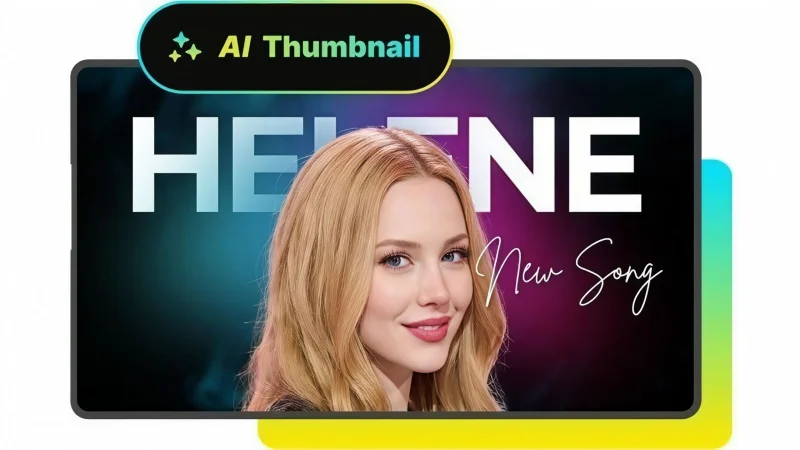
Over 500 hours of content are uploaded to YouTube every minute; your thumbnail is the single most important factor determining whether viewers click on your video or scroll past it. Recent data shows that 90% of the best-performing videos on YouTube have custom thumbnails, and videos with high-quality thumbnails can receive up to 30% more views.
But with so many tools available, which ones actually deliver results? This comprehensive guide will walk you through the best YouTube thumbnail makers in 2025, from free online tools to advanced AI generators, backed by real data and creator insights.
How to Make a YouTube Thumbnail in 5 Minutes (Quick, Easy & Free Step-by-Step Guide)
Creating an effective thumbnail doesn’t need to take hours. Follow this streamlined process to produce professional-looking thumbnails in minutes:
Step 1: Choose Your Tool
Start with a free online YouTube thumbnail maker like Canva or Adobe Express. These platforms offer thousands of templates specifically designed for YouTube’s requirements.
Step 2: Set the Correct Dimensions
YouTube’s recommended thumbnail size is 1280 x 720 pixels (with a minimum width of 640 pixels). This 16:9 aspect ratio ensures your thumbnail displays perfectly across all devices.
Step 3: Select a Template or Background
Choose a high-contrast template or upload your own background image. Remember that color combinations like yellow/black and blue/white have shown the highest engagement rates in recent thumbnail studies due to their standout contrast.
Step 4: Add Compelling Text
Keep your text to 3-5 words maximum. Use bold, easy-to-read fonts like Bebas Neue, Montserrat, Oswald, or Impact. Avoid overused fonts like Times New Roman, Arial, Calibri, and Comic Sans MS that look generic and don’t stand out.
Step 5: Incorporate an Expressive Image
Add a high-quality image featuring an expressive face if possible. Studies show that including a human face in thumbnails can increase Click-Through Rate (CTR) by up to 38%. The expression should match your video’s emotional tone.
Step 6: Add Subtle Branding
Include a small logo or consistent border element that represents your brand without overwhelming the thumbnail.
Step 7: Export and Upload
Download your thumbnail as a JPG or PNG under 2MB and upload it to YouTube when you publish your video.
Best Free YouTube Thumbnail Maker Apps of 2025
The market for free design tools has exploded, with several excellent options for creators on a budget. Here’s our detailed analysis of the top performers:
Canva: The All-Rounder Champion
Canva remains the most popular choice for YouTube thumbnails in 2025, and for good reason. Their free tier offers access to thousands of templates across 50+ content types, including a vast collection specifically for YouTube thumbnails.
Key Features:
- AI Designer (Beta) for text-to-design generation
- Brand Wizard for integrating your fonts, colors, and logo
- Millions of free photos and icons
- 3D graphics and animated elements
- Content planning and scheduling tools
Canva’s research reveals that thumbnails with text overlays have a 20% higher CTR compared to those without text. Their Pro plan starts at 119.88/year), but the free version is sufficient for most creators’ needs.
Adobe Express: The Professional’s Choice
Adobe Express leverages the power of Adobe’s ecosystem with AI-powered features that rival paid tools. While their template library isn’t as extensive as Canva’s, the integration with Adobe’s stock photo library and advanced editing capabilities make it a strong contender.
Strengths:
- AI-powered background remover
- Custom font uploads
- Advanced photo editing tools
- Seamless integration with other Adobe products
VistaCreate: The Canva Alternative
VistaCreate offers a similar interface to Canva with thousands of free templates and animation features. It’s particularly strong for creators who want to incorporate animated elements into their thumbnails without additional software.
Comparison Table: Top 6 Free Thumbnail Makers
| Tool | Template Quality | Ease of Use | Unique Feature | Best For |
| Canva | Excellent | Very Easy | AI Designer | All creators |
| Adobe Express | Very Good | Easy | Adobe Integration | Professionals |
| WayinVideo | Excellent | Very Easy | Video-to-Thumbnail | AI-powered thumbnails from video content |
| Fotor | Good | Easy | AI Editing | Quick edits |
| Snappa | Good | Very Easy | Pre-sized Templates | Social media focus |
| VistaCreate | Very Good | Easy | Animations | Dynamic content |
The Rise of AI: Best AI Thumbnail Generator for YouTube in 2025
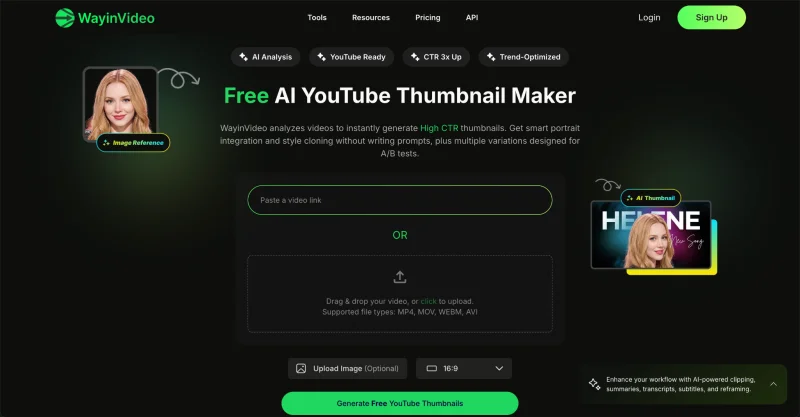
The AI-powered content creation market has grown to $2.15 billion in 2024, with a projected CAGR of 19.4% through 2033. AI thumbnail generators are at the forefront of this revolution, offering creators unprecedented speed and optimization capabilities. The following are our tested best Youtube thumbnail makers in 2025.
WayinVideo: The Video-First AI Generator
WayinVideo takes a unique video-first approach, analyzing your video content to generate multiple high-CTR thumbnails automatically. Unlike other tools, it understands key scenes, emotions, and context to create thumbnails designed for maximum engagement.
Key Features:
- AI analyzes video content deeply for key moments and faces
- Smart portrait integration with automatic background removal
- Style cloning from reference thumbnails
- Multiple variations for A/B testing
- Promptless workflow – just upload and generate
WayinVideo is free to use with no credit card required and generates thumbnails in YouTube’s recommended 1280 x 720 px format.
Pikzels AI: The Engagement Specialist
Pikzels AI has emerged as a leader in AI thumbnail generation, focusing specifically on creating engaging thumbnails that boost viewer retention. Their AI analyzes your video content to generate thumbnails that are not just visually appealing but contextually relevant.
Performance Metrics:
- Videos with engaging thumbnails show a 25% lower bounce rate
- 15% increase in average watch time
- Significant reduction in creation time
While specific pricing isn’t publicly listed, their pay-per-credit model makes it accessible for occasional users while offering bulk options for high-volume creators.
Canva’s AI Capabilities
Canva has integrated AI features that compete with specialized tools:
- Auto-generation of thumbnails based on video content analysis
- Smart resize for different platforms
- AI-powered text suggestions for optimal font styles, colors, and sizes
- Background removal tool
Canva’s internal data shows that AI-generated thumbnails can increase click-through rates by up to 20% compared to manually created alternatives.
VidIQ’s AI Prediction Models
VidIQ takes a different approach with their AI prediction models that analyze thumbnail performance before you publish. Their tool focuses on channel optimization rather than creation, helping you select the thumbnail most likely to perform well based on historical data.
Pricing:
- Free version available with limited features
- Pro Plan starts at 250/year)
- Often available with discount codes through affiliate partnerships
When to Use AI vs. Manual Creation
AI generators excel at:
- Quickly creating multiple options for A/B testing
- Analyzing performance data to suggest improvements
- Generating ideas when you’re experiencing creative block
Manual creation remains superior for:
- Maintaining precise brand control
- Creating unique, artistic concepts
- Thumbnails requiring specific emotional nuances
How to Make a Killer Thumbnail for the 2025 Algorithm
YouTube’s algorithm has evolved to prioritize viewer retention and engagement signals. Your thumbnail is your first opportunity to signal value to both viewers and the algorithm.
The Psychology of Color & Contrast
Recent studies have identified specific color combinations that consistently outperform others:
- Yellow/Black: Creates urgency and stands out in YouTube’s red interface
- Blue/White: Conveys trust and professionalism
- Red/White: Generates excitement and draws immediate attention
The key is creating high contrast that makes your thumbnail visible even when shrunk to mobile size. Remember that 60% of YouTube viewers access the platform via mobile devices.
The Power of Human Faces
Including a human face in your thumbnail can increase CTR by up to 38%, but the expression matters:
- Surprise/Excitement: Works well for reveal content and product reviews
- Concern/Worry: Effective for problem-solving and tutorial content
- Joy/Happiness: Ideal for entertainment and lifestyle content
The face should occupy at least 30-50% of the thumbnail space to be recognizable on mobile devices.
Text That Clicks: Power Fonts vs. Overused Fonts
Your thumbnail text must be instantly readable. Based on 2023-2025 design research:
Power Fonts for High Performance:
- Bebas Neue: Bold and modern, excellent for tech and gaming content
- Montserrat: Clean and professional, perfect for educational content
- Oswald: Strong and condensed, ideal for limited text space
- Impact: The classic choice for maximum readability
Fonts to Avoid:
- Times New Roman: Too traditional and thin
- Arial: Generic and lacks personality
- Calibri: Designed for documents, not thumbnails
- Comic Sans MS: Appears unprofessional to most audiences
Creating Intrigue Through Composition
The best thumbnails tell a micro-story that complements your title. Consider these techniques:
- The Gaze: Have faces look toward your title text to guide viewer attention
- Color Blocking: Use contrasting colors to separate elements
- The Reveal: Show only part of an image to create curiosity
- Emotional Mirroring: Match the thumbnail emotion to your title’s promise
I Analyzed 56 Thumbnails for New Creators – Here’s What I Learned
After examining thumbnails from channels under 10,000 subscribers, several patterns emerged that distinguish successful creators from those struggling to grow.
Mistake 1: Clutter and Information Overload
New creators often try to include too much information in their thumbnails. The most successful thumbnails focus on a single clear message. Remember that viewers make split-second decisions – if they can’t process your thumbnail instantly, they’ll move on.
Solution: Limit your thumbnail to three elements maximum: one primary image, one short text phrase, and one branding element.
Mistake 2: Low-Quality or Generic Imagery
Using blurry screenshots or generic stock photos immediately signals amateur content. Your thumbnail quality sets expectations for your video production value.
Solution: Invest in a decent camera or use high-quality stock images. If using video frames, export at the highest resolution possible from your editing software.
Mistake 3: Illegible Text on Mobile Devices
What looks readable on a desktop often becomes unreadable on mobile. With over 60% of YouTube traffic coming from mobile devices, this is a critical error.
Solution: Test your thumbnails on mobile size before publishing. Canva’s mobile preview feature is excellent for this. Ensure text remains readable when the thumbnail is just 2 inches wide.
Mistake 4: Thumbnail-Title Mismatch
When your thumbnail promises something different from your title, viewers feel deceived and quickly click away, harming your watch time metrics.
Solution: Ensure your thumbnail visually represents exactly what your title promises. The synergy between title and thumbnail is crucial for audience retention.
Mistake 5: Inconsistent or “Forced” Branding
While consistency is important, forcing the same elements onto every thumbnail regardless of content can make your channel look generic and uncreative.
Solution: Develop a flexible branding system with consistent elements (color palette, font choices) that can be adapted to each video’s unique content.
2025 Guide: Your Top YouTube Thumbnail Questions Answered
What are the exact dimensions and file size for a YouTube thumbnail in 2025?
YouTube’s technical requirements remain consistent in 2025:
- Recommended size: 1280×720 pixels (16:9 aspect ratio)
- Minimum width: 640 pixels
- Maximum file size: 2MB
- Accepted formats: JPG, GIF, BMP, and PNG
While YouTube accepts various formats, JPG typically offers the best balance of quality and file size. Ensure your image remains sharp at the minimum size by avoiding excessive compression. For optimal quality across devices, design at 1280×720 pixels and export at 90% quality or higher.
How much should a professional thumbnail design cost?
Professional thumbnail design pricing varies significantly based on experience level and complexity:
Freelance Marketplaces:
●Fiverr: $5-75+ per thumbnail
- Beginner: $5-15
- Experienced: $25-75
- Agency quality: $100+
●Upwork: $10-100+ per thumbnail
- Beginner: $10-20
- Experienced: $30-75
- Agency: $75+
Monthly Retainers:
- Fiverr: $50-500+ per month
- Upwork: $100-1000+ per month
- Specialized services: $200-1500+ per month
For established channels, investing in professional thumbnails can provide significant ROI. A digital marketing agency reported that optimizing thumbnails and A/B testing led to an average CTR increase of 95% across their video series.
Does changing an old thumbnail affect my video’s rank?
Yes, changing a thumbnail can impact your video’s performance, but not necessarily negatively. YouTube treats thumbnail changes as a content update that can trigger re-evaluation of your video’s placement.
Positive Impacts:
- Improved CTR can lead to better rankings
- Fresh thumbnails can revive stagnant videos
- A/B testing allows continuous optimization
Potential Risks:
- Temporary ranking fluctuation during re-evaluation
- Drastic changes may confuse returning viewers
- Poorly performing new thumbnails can hurt existing momentum
Best Practice: Use YouTube’s built-in analytics to track performance changes after thumbnail updates. If CTR decreases within 48 hours, consider reverting to the previous version or trying another design.
Apps YouTubers Actually Use for Editing Videos and Thumbnails (2025 Reddit Insights)
Analysis of Reddit communities like r/youtubers, r/NewTubers, and r/VideoEditing reveals what successful creators actually use, versus what’s marketed to beginners.
For Thumbnails: The Professional Workflow
While online tools dominate beginner discussions, serious creators consistently recommend these professional options:
Photoshop:
Remains the industry standard for creators who prioritize complete control. Most frequently mentioned features include:
- Content-Aware Fill for removing unwanted elements
- Advanced layer effects for professional text styling
- Precise color grading tools
Photopea:
Emerges as the top free alternative for those who want Photoshop functionality without the cost. This browser-based tool supports PSD files and offers most of Photoshop’s core features.
GIMP:
The open-source option for creators comfortable with a steeper learning curve in exchange for powerful free tools.
The Pro Workflow: From Video to Thumbnail
So the most common professional workflow involves exporting high-resolution still frames directly from video editing software:
1.In Your Video Editor (DaVinci Resolve, Premiere Pro, CapCut):
- Identify the perfect frame with the right expression or action
- Export at maximum resolution (preferably 4K even if your video is 1080p)
- Use a high-quality codec like PNG or uncompressed TIFF
2.In Your Design Software:
- Import the high-resolution frame
- Color grade specifically for thumbnail visibility
- Add text and branding elements
- Export at YouTube’s recommended size
This workflow ensures perfect visual consistency between your video content and thumbnail, which signals authenticity to viewers.
The Creator’s Dilemma: Should I Put My Face or Logo on Every Single Thumbnail?
This question generates passionate debate in creator communities. The truth is, there’s no one-size-fits-all answer, but data-driven insights can help you decide.
The Case for Face Consistency
Channels like MKBHD and MrBeast have built massive followings with consistent face-based thumbnails. The psychology behind this approach:
- Human Connection: Faces create immediate emotional connection
- Recognition: Viewers quickly identify your content in crowded feeds
- Trust Building: Consistent presence builds parasocial relationships
This approach works best for personality-driven content where the creator is the primary brand element.
The Case for Logo Consistency
Educational and niche channels like Linus Tech Tips often prioritize logos over faces. Benefits include:
- Scalability: Doesn’t limit content to specific personalities
- Professionalism: Conveys authority and expertise
- Evergreen Content: Thumbnails remain relevant even with present changes
This approach excels for channels focused on information rather than personality.
The Hybrid Strategy: The Best of Both Worlds
Data from top-performing channels suggests a hybrid approach yields the best results:
- Core Branding: Consistent logo placement or border style
- Content-Specific Imagery: Faces or products relevant to each video
- Flexible Templates: Adaptable designs that maintain brand recognition
When to Break Your Rules:
Sometimes, breaking your established pattern can boost performance for specific content types. Viral-style content often benefits from thumbnail styles that differ from your norm, as the surprise element can drive additional curiosity clicks.
The key is developing a recognizable brand identity while allowing flexibility for content that warrants special treatment.
Conclusion
Creating effective YouTube thumbnails in 2025 requires balancing art and science. The tools available today—from free online editors to sophisticated AI generators—make professional-quality thumbnails accessible to creators at every level. The data is clear: custom thumbnails can increase views by up to 30%, with AI-generated options potentially boosting CTR by an additional 20%.
Success ultimately comes from understanding your audience, testing different approaches, and maintaining consistency while allowing for strategic variations. Whether you choose Canva’s user-friendly interface, Photoshop’s professional power, or Pikzels AI’s data-driven optimization, the key is continuous improvement based on performance metrics.
Remember that your thumbnail is your first handshake with potential viewers. Make it count, test relentlessly, and always prioritize clarity over complexity. The right thumbnail doesn’t just represent your video—it determines who actually watches it.
Ti potrebbe interessare:
Segui guruhitech su:
- Google News: bit.ly/gurugooglenews
- Telegram: t.me/guruhitech
- X (Twitter): x.com/guruhitech1
- Bluesky: bsky.app/profile/guruhitech.bsky.social
- GETTR: gettr.com/user/guruhitech
- Rumble: rumble.com/user/guruhitech
- VKontakte: vk.com/guruhitech
- MeWe: mewe.com/i/guruhitech
- Skype: live:.cid.d4cf3836b772da8a
- WhatsApp: bit.ly/whatsappguruhitech
Esprimi il tuo parere!
Ti è stato utile questo articolo? Lascia un commento nell’apposita sezione che trovi più in basso e se ti va, iscriviti alla newsletter.
Per qualsiasi domanda, informazione o assistenza nel mondo della tecnologia, puoi inviare una email all’indirizzo [email protected].
Scopri di più da GuruHiTech
Abbonati per ricevere gli ultimi articoli inviati alla tua e-mail.