
How to Integrate Seedream 4.5 API on Kie.ai: A Beginner’s Guide for Developers

As businesses increasingly rely on high-quality visuals for marketing, e-commerce, and creative projects, the need for efficient image generation solutions has grown significantly. However, producing consistent and professional-grade images at scale remains a challenge for many developers. ByteDance Seedream 4.5 API is an AI image generator API that can streamline this process, allowing businesses to generate and edit images quickly while maintaining high visual standards.
For developers looking to integrate this advanced technology, Kie.ai provides an ideal platform. Kie.ai offers seamless access to Seedream 4.5 API, complete with comprehensive Seedream 4.5 API documentation and a flexible Seedream 4.5 API pricing model. This makes it easy for developers to integrate Seedream 4.5 API into their applications, unlocking the potential for efficient and scalable image generation across a variety of use cases.
Explore the Key Features of Seedream 4.5 API
Realistic Proportions, Object Placement, and Scene Layout
Seedream 4.5 API excels in generating realistic proportions and precise object placement within scenes. This feature allows businesses and developers to create images that maintain a high level of realism, ensuring that objects and scenes are laid out in a way that aligns with natural spatial aesthetics. Whether you’re working on interior design visuals or product displays, Seedream 4.5 API can simulate environments with exceptional accuracy, making it ideal for projects requiring visually consistent compositions.
Knowledge-Based Visuals with Accurate Scientific and Technical Reasoning
Seedream 4.5 API takes image generation a step further by incorporating scientific and technical reasoning into the process. This feature allows users to generate visuals that are not only aesthetically appealing but also grounded in real-world knowledge. By leveraging its advanced algorithms, Seedream 4.5 API creates images that accurately represent complex scientific and technical concepts.
4K Resolution for Stunning Detail
With Seedream 4.5 API, users can generate images at a maximum resolution of 4K, ensuring that every visual detail is captured with exceptional clarity. This high resolution is particularly beneficial for professional-grade content, where image quality is critical, such as in marketing materials, product advertisements, and high-resolution visuals. The ability to generate stunning 4K images quickly, without compromising quality.
Consistency Across Multiple Images
One of the standout features of Seedream 4.5 API is its ability to maintain consistent subjects, clear details, and coherent scenes across multiple images. Whether you’re creating a series of product shots, marketing visuals, or visual content for social media, Seedream 4.5 API ensures that all images stay consistent, with the same subject and style maintained throughout. This consistency is crucial for branding and marketing efforts where uniformity across images is key.
Why Choose Kie.ai for Seedream 4.5 API Integration
Affordable Seedream 4.5 API Pricing for Cost-Effective Image Generation
Kie.ai offers highly affordable API pricing, making Seedream 4.5 API accessible to businesses of all sizes. At just $0.032 per image, our pricing is 19% lower than the official rate of $0.04 per image, allowing you to generate high-quality visuals without exceeding your budget. This cost-effective solution ensures that businesses can scale their image generation efforts while keeping operational costs in check.
Comprehensive Seedream 4.5 API Documentation and Reliable Technical Support
With Seedream 4.5 API on Kie.ai, you gain access to detailed Seedream 4.5 API documentation, ensuring smooth integration and efficient use of the platform. Our comprehensive guides cover every aspect of the API, from setup to advanced usage, empowering developers to implement the API with ease. In addition, Kie.ai offers reliable technical support, assisting you whenever you encounter challenges, ensuring a seamless experience throughout your integration.
Stable Performance and High Concurrency Support
Kie.ai is designed to handle high-volume requests without compromising performance. Whether you’re generating thousands of images at once or need a solution that can scale with your business, Seedream 4.5 API delivers stable performance and high concurrency support. This ensures that your image generation tasks are processed efficiently, even under heavy demand, so your business can continue to run smoothly without interruptions.
How to Integrate Seedream 4.5 API on Kie.ai
Step 1: Create Your Kie.ai Account and Obtain the API Key
To begin integrating Seedream 4.5 API with Kie.ai, start by creating an account on the Kie.ai platform. Once registered, you’ll receive an API key, which is necessary for authenticating your requests. This Seedream 4.5 API key will enable you to access Seedream 4.5 API and make secure, authorized API calls. Be sure to store this Seedream 4.5 API key securely, as it is required for every API interaction.
Step 2: Create a Task to Generate Images
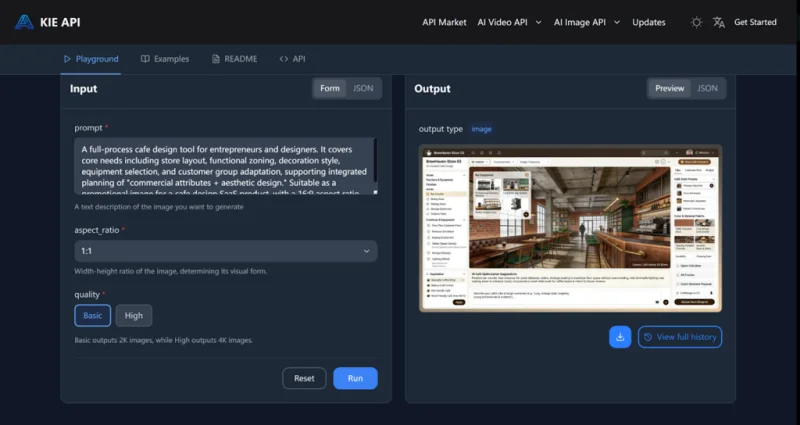
Once you have your Seedream 4.5 API key, the next step is to create a new task with Seedream 4.5 API. This involves specifying the model and providing the required input, such as an image description and preferred settings like aspect ratio and image quality. You can choose additional options as needed. After creating the task, the system will generate a task ID for tracking the task’s progress.
Step 3: Monitor the Task Status and Retrieve the Results
After submitting your task, you can monitor its status through the Seedream 4.5 API. By checking the task status, you can see if the task is waiting, processing, or has been completed. Once the task is finished, you’ll receive the result, which will include the generated image URL. This allows you to access and use the image for your project or application.
Key Considerations When Integrating Seedream 4.5 API on Kie.ai
Ensure Proper API Authentication
Before starting any integration with Seedream 4.5 API, make sure to securely store and manage your API key. The API key is essential for authenticating all your requests. Without proper authentication, your integration may not function correctly. Always keep the API key private and avoid exposing it in public repositories or client-side code.
Understand Input Parameter Requirements
When integrating Seedream 4.5 API, it’s crucial to understand the input parameters required for task creation. Ensure that you provide valid inputs for fields such as prompt, aspect ratio, and image quality. The API will only generate the desired outputs if these parameters are correctly configured, so always double-check the input values to avoid errors or unexpected results.
Handle Task Completion and Error Handling
As part of the integration, it’s important to monitor the task status carefully. Seedream 4.5 API provides different states like waiting, generating, and completed. Be prepared to handle errors and failed requests, such as those caused by invalid parameters or server issues. Implement appropriate error handling mechanisms, such as retrying tasks or notifying users about task failures, to ensure a smooth workflow.
Consider Task Time and API Rate Limits
While integrating Seedream 4.5 API, keep in mind the time it takes to generate images, especially when processing large batches. Depending on the complexity of the task, image generation might take some time. Additionally, be aware of any rate limits imposed by Kie.ai to ensure that you don’t exceed the allowed number of requests in a given time period. Properly manage the flow of tasks to avoid delays or service interruptions.
Seamless Integration with Seedream 4.5 API on Kie.ai for Efficient Image
Integrating Seedream 4.5 API on Kie.ai offers businesses and developers a robust solution for generating high-quality images at scale. From the initial setup to task management and error handling, the process is streamlined, making it easy to integrate Seedream 4.5 API into your workflow. With its features, such as 4K resolution, realistic scene generation, and consistent image quality, Seedream 4.5 API ensures businesses can produce visually stunning content efficiently. By choosing Kie.ai, developers benefit from comprehensive Seedream 4.5 API documentation, reliable technical support, and an affordable Seedream 4.5 API pricing model, making it the ideal platform for integrating advanced image generation into various applications.
Ti potrebbe interessare:
Segui guruhitech su:
- Google News: bit.ly/gurugooglenews
- Telegram: t.me/guruhitech
- X (Twitter): x.com/guruhitech1
- Bluesky: bsky.app/profile/guruhitech.bsky.social
- GETTR: gettr.com/user/guruhitech
- Rumble: rumble.com/user/guruhitech
- VKontakte: vk.com/guruhitech
- MeWe: mewe.com/i/guruhitech
- Skype: live:.cid.d4cf3836b772da8a
- WhatsApp: bit.ly/whatsappguruhitech
Esprimi il tuo parere!
Ti è stato utile questo articolo? Lascia un commento nell’apposita sezione che trovi più in basso e se ti va, iscriviti alla newsletter.
Per qualsiasi domanda, informazione o assistenza nel mondo della tecnologia, puoi inviare una email all’indirizzo [email protected].
Scopri di più da GuruHiTech
Abbonati per ricevere gli ultimi articoli inviati alla tua e-mail.