

Keyboard Switches: A Complete Guide to Understanding, Choosing, and Customizing Mechanical Switches for Better Typing and Gaming Performance
Introduction
Mechanical keyboards have moved from niche enthusiast tools to mainstream productivity and gaming equipment. At the heart of every mechanical keyboard are Keyboard Switches—the components that determine how a key feels, sounds, and performs. Unlike membrane keyboards, which rely on a single rubber dome layer, mechanical keyboards use individual switches beneath each keycap, creating a more consistent, responsive, and customizable typing experience.
For many users in the U.S., the choice of keyboard is no longer just about aesthetics; it is about comfort, speed, accuracy, and long-term reliability. Writers, programmers, gamers, and office workers often report that the right switch can reduce typing fatigue, improve reaction time in competitive gaming, and even make daily computer use more enjoyable.
This guide will walk you through what keyboard switches are, how they work, the main types available, how to choose the right ones for your needs, and how to maintain and customize them. Whether you are a first-time buyer or an experienced enthusiast, this article will help you make an informed decision.
What Are Keyboard Switches and Why Do They Matter?
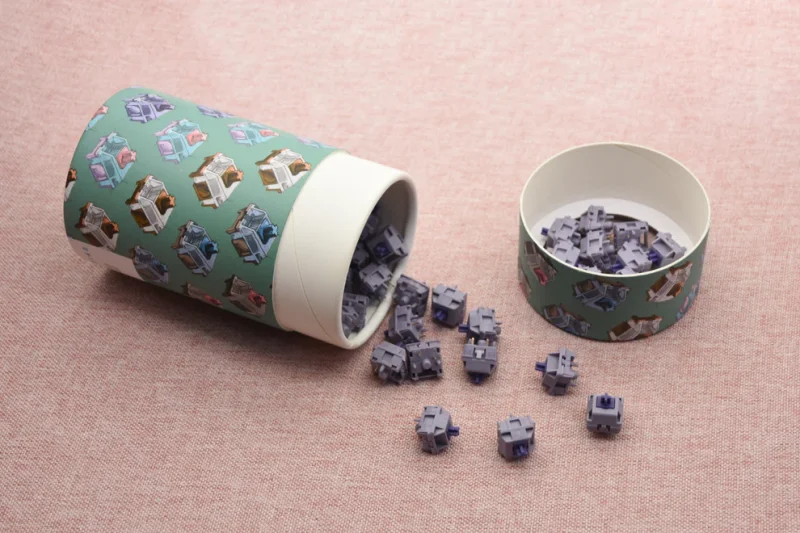
Keyboard switches are the mechanical components beneath each keycap that register your keystrokes. In a mechanical keyboard, every key has its own switch, which typically consists of a housing, a spring, and a stem that moves up and down when pressed. When the stem travels far enough, it completes an electrical circuit that sends a signal to your computer.
Why do they matter? Because switches directly shape your typing feel, sound profile, speed, and comfort. For example, a heavy switch may feel stable but can cause fatigue during long typing sessions, while a lighter switch may enable faster keystrokes but feel too sensitive for some users.
Research from human–computer interaction studies suggests that key feel influences both typing speed and accuracy. According to studies summarized by the Human-Computer Interaction (HCI) community and organizations such as ACM, tactile feedback can improve error detection for many typists, especially beginners.
In real-world use, office workers often prefer quieter tactile switches to avoid disturbing colleagues, while gamers tend to favor smooth linear switches for rapid double-tapping in fast-paced titles like FPS or MOBA games. In short, keyboard switches are not just hardware—they shape your entire digital interaction experience.
How Do Keyboard Switches Work Inside a Mechanical Keyboard?
Inside a mechanical keyboard, each key sits on top of a switch mounted to a printed circuit board (PCB). When you press a key, the switch stem moves downward against a spring. At a specific travel point—called the actuation point—the switch completes an electrical contact and sends a signal to the keyboard controller.
Most modern switches use a metal leaf or contact mechanism that closes the circuit. After you release the key, the spring pushes the stem back up to its resting position. The distance the key travels is known as key travel, typically around 4.0 mm for standard mechanical switches, with actuation usually occurring around 1.8–2.0 mm.
There are also newer designs such as optical switches, which use a light beam instead of metal contacts. When the stem interrupts the light path, the keystroke is registered. Brands like Keychron and Razer have popularized this technology, claiming faster response times and reduced debounce issues.
From a durability standpoint, reputable manufacturers such as Cherry and Kailh often rate their switches for 50–100 million keystrokes, which is significantly higher than most membrane keyboards. This means that a well-built mechanical keyboard can last many years even with heavy daily use.
What Are the Main Types of Keyboard Switches?
| Switch Type | Feel | Sound | Best For | Common Users |
| Linear | Smooth, no bump | Quiet to moderate | Gaming, rapid typing | FPS gamers, programmers |
| Tactile | Noticeable bump | Moderate | Typing, coding, writing | Office workers, students |
| Clicky | Strong bump + click | Loud | Tactile feedback lovers | Enthusiasts, writers |
Linear switches move smoothly from top to bottom without any tactile bump. Many competitive gamers prefer them because they allow fast repeated keystrokes in games like Valorant or Call of Duty.
Tactile switches provide a noticeable bump at the actuation point, helping typists feel exactly when a key registers. This can reduce typing errors and improve rhythm for long writing sessions.
Clicky switches add both a tactile bump and an audible “click.” While satisfying for some users, they can be disruptive in shared workspaces.
For users looking to explore a wide range of options, browsing high-quality collections of Keyboard Switches can be a good starting point to compare real products rather than just theory.
How to Choose the Right Keyboard Switches for Your Needs?
- 1. For Gaming: If you play fast-paced games, linear switches such as Gateron Red or Cherry MX Red are often recommended because of their smooth travel and lighter actuation force.
- 2. For Typing and Writing: Writers and coders frequently prefer tactile switches like Cherry MX Brown or Kailh Box Brown because the bump provides feedback without excessive noise.
- 3. For Office Use: In shared spaces, quieter switches—such as silent linear or dampened tactile options—are usually more considerate. Switch dampeners or o-rings can also reduce noise.
- 4. For Custom Keyboard Builders: Enthusiasts may experiment with spring swaps, switch films, or lubing to fine-tune feel and sound. Many builders start with a base switch and customize from there.
Before purchasing, consider trying a switch tester if possible. You can also read user reviews on platforms like Reddit’s r/MechanicalKeyboards or YouTube reviews to see how switches perform in real-world setups.
How to Maintain and Customize Your Keyboard Switches?
Mechanical switches require minimal maintenance, but small care steps can extend their lifespan and improve performance.
Basic maintenance:
- Keep your keyboard clean by removing keycaps and using compressed air.
- Avoid eating or drinking near your keyboard.
- If keys feel scratchy, dust buildup may be the cause.
Lubing switches: Many enthusiasts lubricate switches with specialized grease to reduce friction and noise.
Switch films: Thin plastic films can be inserted between switch halves to reduce wobble and rattle.
Spring swaps: Some users replace the stock spring with a heavier or lighter one to adjust actuation force.
For users interested in high-quality components and variety, curated collections of Keyboard Switches provide a practical way to explore different options before committing to a full build.
Conclusion
Keyboard switches are the core of the mechanical keyboard experience. They influence comfort, speed, sound, and overall satisfaction with your typing or gaming setup. Understanding how switches work, the differences between linear, tactile, and clicky types, and how to maintain or customize them empowers you to make smarter purchasing decisions.
Whether you are upgrading your office keyboard, building a custom rig, or seeking a competitive edge in gaming, investing time in selecting the right switches can pay off in daily usability and long-term enjoyment.
FAQs
What is the difference between mechanical and membrane keyboard switches?
Mechanical switches use individual physical switches under each key, offering better durability, tactile feedback, and customization. Membrane keyboards use a single rubber dome layer, which is quieter and cheaper but generally less precise.
Are linear switches better for gaming than tactile switches?
They are often preferred by many gamers because of their smooth travel and faster repeat potential, but some players still prefer tactile switches depending on play style and comfort.
How often should keyboard switches be maintained or replaced?
For most users, basic cleaning every 6–12 months is sufficient. Replacement is usually only needed if a key becomes inconsistent or unresponsive.
Scopri di più da GuruHiTech
Abbonati per ricevere gli ultimi articoli inviati alla tua e-mail.