

Dreamina AI 2026 Review: Is It Worth It for Video Creation?
AI video generation has changed quickly in 2026. Instead of learning complicated editing software, creators can now describe an idea, upload an image, or provide a reference and let AI generate a video. One of the platforms attracting attention is dreamina ai free, an all-in-one creative platform associated with the CapCut ecosystem.
Dreamina is designed around more than just video generation. It combines AI video, image creation, editing, and avatar tools in one place. Its current video lineup includes Dreamina Seedance 2.5, Seedance 2.0, Seedance 2.0 Mini, Sora 2, and Veo 3.1, while its image tools include models such as Seedream and Nano Banana.
Part 1. What Is Dreamina AI?
Dreamina is ByteDance’s all-in-one AI video generator platform for generating images and videos from text prompts, reference images, and audio. It has the capcut ai dreamina ecosystem, shares login credentials with CapCut, and is designed so you can generate a clip in Dreamina, then move it straight into CapCut’s timeline for editing.
Features
- Type a prompt or upload a still image and Dreamina animates it, aiming for smooth motion and consistent style across frames.
- Seedance 2.0 / 2.5 video engine. The current generation model supports cinematic camera moves, multi-scene continuity, and native audio generation synced to on-screen action.
- Powered by the Seedream line of models, with inpainting, outpainting, upscaling, and remix tools for refining generated images before turning them into video.
- The tool can compose background music that matches a clip’s pacing and mood, or you can pick a track by genre and instrumentation.
- Assets generated in Dreamina carry over into CapCut’s desktop and mobile editors for further cutting, captioning, and publishing.
Pros
- Strong image quality and prompt comprehension
- Native audio-video generation
- Daily free credits for meaningful testing before paying
- Tight CapCut pipeline if you already edit/publish there
- Frequent model upgrades
Cons
- No direct control over clip duration in most workflows
- Avatar and some video features are region-restricted
- Credit costs add up fast, especially for avatars/longer clips
Part 2. Is Dreamina AI Free? Is There a Dreamina AI App?
The dreamina ai video generator is free to start, with daily free credits for image, video, and avatar generation that refresh every 24 hours — enough to test the tool without paying. Beyond that, paid Premium plans add more credits, faster processing, and higher-end models, though pricing shifts periodically. Hence, it’s worth checking the live in-app pricing page rather than older info.
There’s also an official Dreamina app on Google Play with the same core tools: text-to-image, image-to-video, canvas editing, and a community feed synced to your Dreamina/CapCut account.
How to Use Dreamina AI
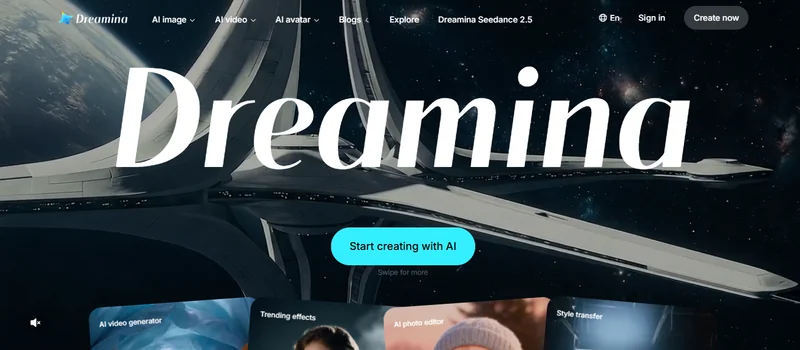
Step 1: Visit Dreamina AI and Start Creating
First, visit the Dreamina AI website and log in to your account. After logging in, find the Create Video option and click on it. A prompt box will appear where you can enter your video idea and instructions.
Step 2: Enter Your Prompt and Generate the Video
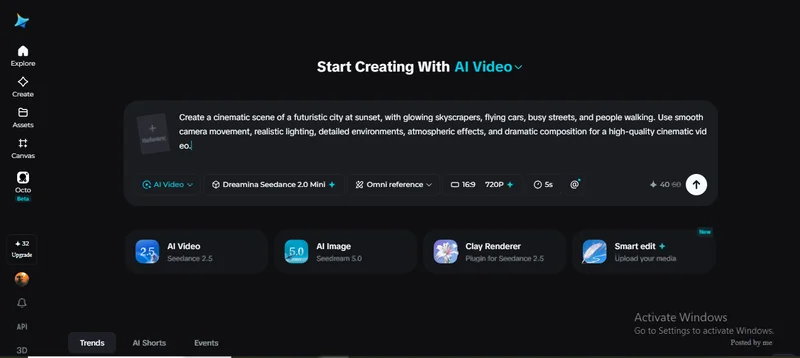
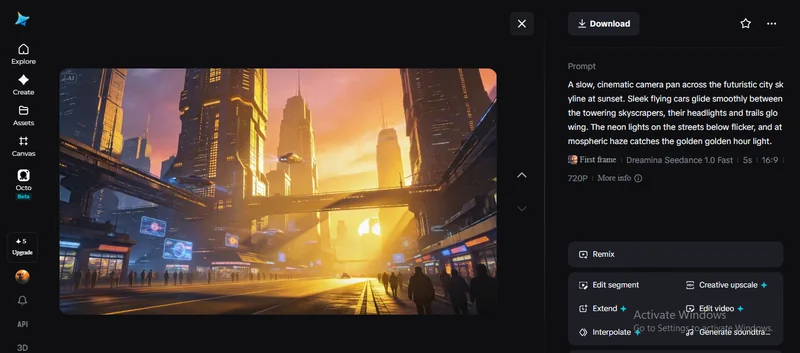
Enter your required prompt in the prompt box and click Next. The dreamina ai image to video will process your instructions and generate the video. Wait for a short while until your AI-generated video is ready to preview.
Step 3: Preview and Edit Your Video
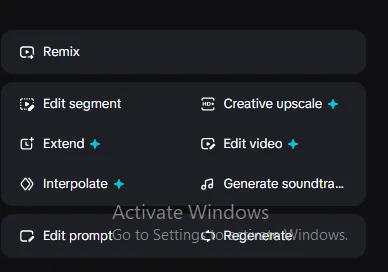
Once your video has been generated, preview it carefully to check the visuals, movement, audio, and overall quality. If you are not satisfied, make the required edits or generate the video again with an improved prompt. Compare the generated result with your original idea and make adjustments until the video looks natural and matches your expectations.
Step 4: Download and Share to CapCut
When you are completely satisfied with the final video, download it to your device. You can also use the Share to CapCut option to continue editing, add effects, music, transitions, captions, or other elements before publishing your final content. This makes it easy to polish your video further and prepare it for social media, presentations, or other creative projects.
Part 3. Why Do Users Face Dreamina AI Status Issue?
Dreamina’s status problems come up often enough in user forums and review sites that they’re worth addressing directly rather than glossing over. A few recurring causes explain most of them:
- Dreamina’s global infrastructure sees heavy load spikes during peak creator hours, which slows generation times or causes queued jobs to fail outright.
- ByteDance pushes frequent model and system updates, and these rollouts sometimes leave accounts stuck showing System Upgrade in Progress messages that block video, image, and canvas tools temporarily.
- A number of user reviews describe being charged for a subscription while the account still shows no subscription active, or credits being deducted for generations that failed or were never requested.
- Some features, including avatar generation, are geofenced, and prompts that brush up against content filters copyrighted characters, public figures, graphic content — fail with generic error messages rather than clear explanations.
- Seedance 2.0/2.5 errors are sometimes tied to a broader industry dispute over AI models trained on copyrighted footage, which has led to occasional feature suspensions independent of ordinary server load.
Part 4. Is Magiclight AI Better Than Dreamina AI?
The dreamina ai and MagicLight AI solve fairly different problems, even though both fall under AI video generators. Dreamina is built around short, high-fidelity clips — think product shots, social cutdowns, and stylized animation — generated from prompts or images, with tight integration into CapCut for editing.
While MagicLight AI is built around long-form, narrative video: turning a script or story idea into a continuous, multi-scene video up to 50 minutes long, with consistent characters and voice throughout. Whether one is better really depends on which of those two jobs you’re trying to do.
Full Comparison Guide
| Feature | Dreamina AI | MagicLight AI |
| Text-to-video | Yes | Yes |
| Image-to-video | Yes | Yes |
| AI image generation | Yes | Yes |
| Multiple AI models | Strong | Strong |
| Cinematic short clips | Excellent | Excellent |
| AI audio generation | Yes, model-dependent | Yes |
| AI avatars | Yes | Yes |
| Scene-by-scene storytelling | Yes | Strong focus |
| Best for short social videos | Excellent | Excellent |
| Best for long YouTube stories | Less specialized | Better suited |
Conclusion
Dreamina AI is a strong fit for short-form work, especially within the CapCut pipeline with a free tier that makes it easy to test. MagicLight AI, by contrast, suits continuous, character-driven storytelling that needs to hold together over many minutes rather than seconds. The real question isn’t which is better overall but which output you need and which is best for your data..
FAQs on Dreamina AI
1. What Core Video Creation Features Does Dreamina Ai 2026 Offer?
Text-to-video and image-to-video generation powered by Seedance 2.5, first-and-last-frame control, MultiFrame/Omni Reference for visual consistency across scenes, AI avatar creation, auto-generated soundtracks, and direct export into CapCut for editing.
2. Does Dreamina Ai Support Lip Sync?
Yes. Its avatar feature includes dreamina ai lip sync across multiple languages, though availability can vary by region and account.
3. Can Dreamina Ai 2026 Be Used For Commercial Content Creation And Monetization?
Yes, on paid Premium Service tiers, which typically include broader usage rights alongside additional credits and faster generation. Always confirm the current licensing terms on Dreamina’s official pricing page, since terms can change.
4. Can Dreamina Ai Generate Images From Text?
Yes. Its text-to-image and image-to-image tools run on the Seedream model family and include inpainting, outpainting, upscaling, and remix tools for refining outputs.
5. What Are The Best Dreamina Ai Alternatives?
MagicLight AI is a strong pick for long-form, script-driven storytelling with consistent characters over many minutes. Other alternatives worth exploring depending on your needs include general-purpose AI video tools built around models like Kling, Hailuo, and Sora-based platforms.
Ti potrebbe interessare:
Segui guruhitech su:
- Google News: bit.ly/gurugooglenews
- Telegram: t.me/guruhitech
- Facebook: facebook.com/guruhitechfb
- X (Twitter): x.com/guruhitech1
- Bluesky: bsky.app/profile/guruhitech.bsky.social
- Rumble: rumble.com/user/guruhitech
- VKontakte: vk.com/guruhitech
- MeWe: mewe.com/i/guruhitech
- Skype: live:.cid.d4cf3836b772da8a
- WhatsApp: bit.ly/whatsappguruhitech
Esprimi il tuo parere!
Ti è stato utile questo articolo? Lascia un commento nell’apposita sezione che trovi più in basso e se ti va, iscriviti alla newsletter.
Per qualsiasi domanda, informazione o assistenza nel mondo della tecnologia, puoi inviare una email all’indirizzo [email protected].
Che ne pensi?
Scopri di più da GuruHiTech
Abbonati per ricevere gli ultimi articoli inviati alla tua e-mail.