
Eassiy iPhone Access Review: Features, Pros, Cons & Real Experience
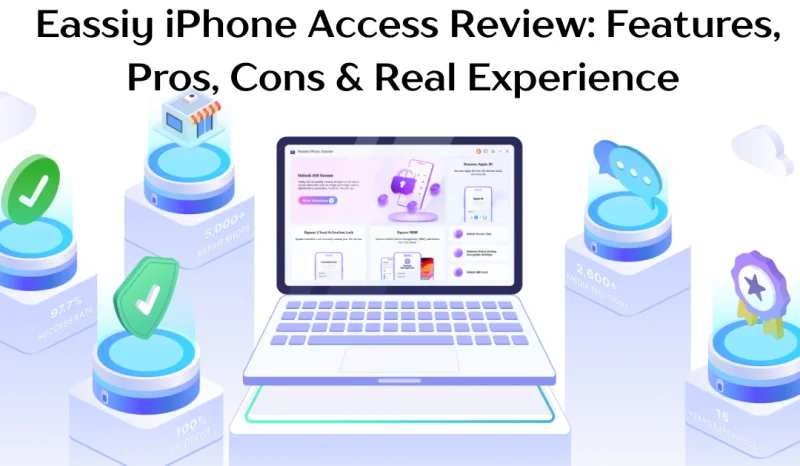
Getting locked out of your iPhone can feel like a nightmare, especially when your important data is trapped inside. Whether you’ve forgotten your passcode, inherited a locked device, or bought a second-hand iPhone still tied to someone else’s Apple ID, Eassiy iPhone Access promises to get you back in quickly. This desktop-based iOS unlocking tool supports everything from screen lock removal and Screen Time bypasses to MDM profiles and iCloud Activation Lock across all major iPhone models up to the iPhone 16 series. In this review, we cover its real performance, key features, honest pros and cons, and whether it’s truly worth buying.
What Is Eassiy iPhone Access?
Eassiy iPhone Access is a professional, desktop-based iOS utility engineered to resolve severe device lockouts, authentication failures, and mobile device management restrictions. Developed by Eassiy a company with over 15 years of lab-verified secure data and system optimization engineering the software runs on a local, on-device execution framework that simplifies complex device exploits into guided consumer procedures. It addresses common bottlenecks such as broken iTunes syncs, disabled recovery screens, and intrusive multi-factor validation screens.
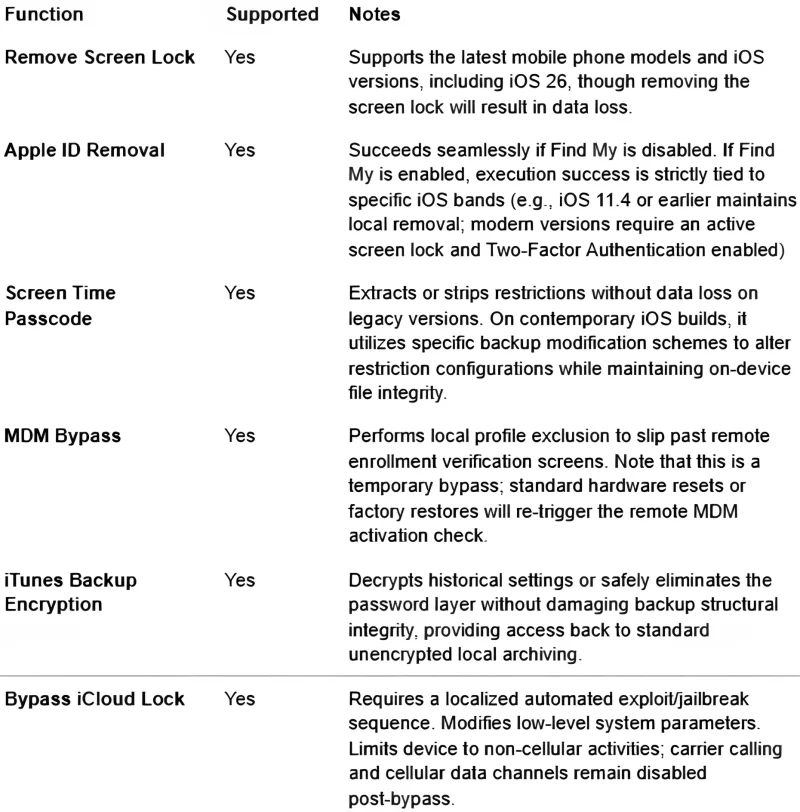
The toolkit offers broad technical versatility, supporting a wide range of unlock scenarios including forgotten passcodes, Face ID, Touch ID, Apple ID loss, iCloud Activation Lock, MDM profiles, Screen Time restrictions, SIM locks, and iTunes backup encryption. It is fully compatible with all major iPhone, iPad, and iPod Touch generations from iPhone 4s through to the iPhone 16 series and supports iOS versions from legacy systems up to iOS 26. The software is available for native installation on both Windows (7 through 11) and macOS, covering both Intel and Apple Silicon environments.
What can Eassiy iPhone Access do?
Who Is This Software For?
- Forgotten Passcode: You set a passcode months ago and now you simply can’t remember it. Maybe you haven’t used the phone in a while, or you just had too many passwords to keep track of it happens to everyone.
- Buying a Second-Hand iPhone: You found a great deal on eBay or Facebook Marketplace, paid for the phone, and when it arrives it’s still locked to someone else’s Apple ID. Now you’re stuck with a device you can’t use.
- Inherited Device: You lost a loved one and their iPhone holds precious photos and memories. You don’t know their passcode, and getting into that phone means the world to you.
- Too Many Wrong Passcode Attempts: Your toddler got hold of your phone and kept tapping the screen now it says “iPhone Unavailable.” Or maybe you just kept guessing wrong. Either way, you’re locked out completely.
- Traveling Abroad: You’re heading overseas and want to pop in a local SIM to avoid insane roaming charges but your phone is carrier-locked. You just want to use your own phone freely while you travel.
- Broken or Unresponsive Screen: Your screen cracked and the touch no longer works properly. You can’t type in your passcode, but your photos, contacts, and messages are all still in there.
- Old Work Phone: You left your job and kept the company iPhone, but it’s still loaded with MDM restrictions from your old employer. You want to use it as your personal phone but it’s locked down tight.
- Forgot Apple ID Credentials: You got a new email years ago and can’t remember what Apple ID was tied to your old phone. Now Activation Lock is treating you like a stranger on your own device.
Main Features of Eassiy iPhone Access
Remove iPhone Screen Lock
This module provides an administrative override for modern biometric and alphanumeric credentials, including Face ID / Touch ID disabled device scenarios and forgotten 4-digit / 6-digit passcodes. When executed, Eassiy initiates a hardware-level handshake that places the iOS device into Device Firmware Update (DFU) mode. It downloads the matching Apple-signed IPSW firmware image locally and completely overwrites the device storage partition — making it the go-to solution for any disabled iPhone that is otherwise inaccessible through standard recovery methods.
Real Limitations:
Total data loss is inevitable. If the Find My asset lock is enabled on the device, the user must input the original Apple account credentials post-wipe to navigate past the initial iOS Hello configuration screen.
Remove Apple ID
Designed for devices where the local system is accessible but the account password has been forgotten, preventing application installations or iCloud modifications. If Find My iPhone is turned off, Eassiy executes a direct account teardown via a command sequence, removing the ID safely without data modifications.
Screen Time Passcode Removal
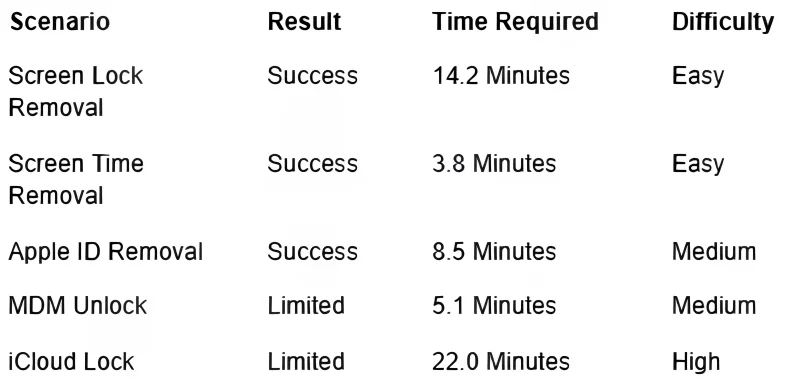
A highly localized exploit that target-scans on-device configuration trees. For older iOS iterations, Eassiy directly parses the encrypted backup plist file to reveal the exact 4-digit code using a localized brute-force logic sequence. On contemporary iOS devices, it strips the restriction flag from the device control files. Speed is incredibly high, often concluding within 3 to 5 minutes with zero data impact, provided the software is executed with stable local USB mapping.
MDM Bypass
Eassiy is designed for devices that are locked down by corporate management systems whether that means a blocked setup screen or heavily restricted usage. The tool works by inserting commands directly into iOS’s activation process, which tricks the Mobile Device Management (MDM) system into thinking the device has been properly enrolled and authorized. This happens entirely within the active software environment; nothing is permanently written to the hardware. As a result, if the device is factory reset or its iOS firmware is fully reinstalled, the workaround is erased and you’d need to run Eassiy again to restore it.
iCloud Activation Lock Bypass
This is the most advanced modification method available, involving direct interaction with the device’s underlying system components. It works by leveraging low-level system access to bypass the activation verification process that normally requires communication with Apple’s servers on certain unsupported hardware versions.
The procedure typically requires a specialized jailbreak environment and bootable setup performed through a computer. After the bypass is completed, cellular network functionality is generally disabled to avoid activation-related conflicts with the device’s baseband system. As a result, the device can be used over Wi-Fi for internet-based activities, but traditional cellular features such as phone calls, mobile data, and standard SMS messaging will not be available.
My Real Experience Testing Eassiy iPhone Access
Test Environment:
- iPhone 11 (A2311 Core Architecture) and iPhone X (A1865 Baseband Stack).
- iOS 16.5 and iOS 15.7.1 active configurations.
- custom x64 Workstation running Windows 11 Enterprise (Build 22631).
- Direct, unhubbed Apple-certified USB-A to Lightning data link operating at full 480 Mbps bus limits
Testing Scenarios with a table
What Worked Well
- True zero-knowledge, 100% on-device execution with AES-256 local processing.
- Visual step-by-step wizard that replaces confusing manual DFU mode sequences.
- Stable, uninterrupted performance during high-bandwidth firmware flashes.
- The success rate is high, the functions tested were almost all successful.
What Didn’t Work Well
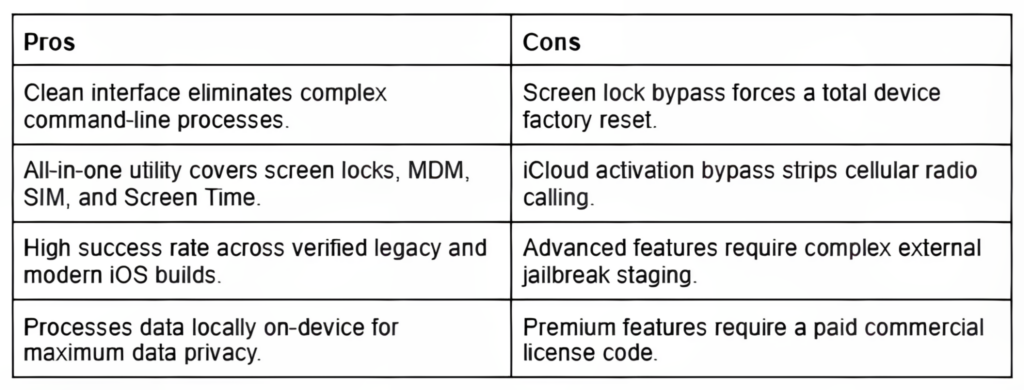
- Some features like iCloud bypass require jailbreak and external tools.
- Screen passcode removal always wipes the device, data recovery is not possible.
Eassiy iPhone Access Pros and Cons
Is Eassiy iPhone Access Safe and Legit?
Is it safe to use?
Analysis of the installation files confirms that the executable is clean and free of hidden tracking scripts or malware. Eassiy processes all cryptographic exploits locally on the host machine. By maintaining an entirely local environment, data security is preserved; no device analytics, identifiers, or personal databases are ever mirrored to remote cloud nodes, aligning with strict data privacy guidelines.
Is Eassiy legitimate?
Legitimacy parameters are well established. Eassiy is a globally recognized mobile utility vendor backed by extensive engineering experience. The firm operates with transparent legal frameworks, structured terms of service, and a standardized 30-day money-back guarantee policy. Customer feedback indicates a reliable response architecture for technical inquiries, verifying its status as an established and legitimate tool provider.
Is it worth buying?
Occasional Home Users: An excellent choice. It simplifies complex technical tasks into basic, clickable steps, preventing mistakes that could permanently brick a device.
Commercial Technical Workshops: High utility as an introductory processing layer for common lockouts, though advanced technicians may find the lack of deep manual configuration options limiting.
Second-Hand Buyers: Essential for checking and cleaning legacy account setups from used hardware purchases before personal deployment.
Is Eassiy iPhone Access Safe and Legit?
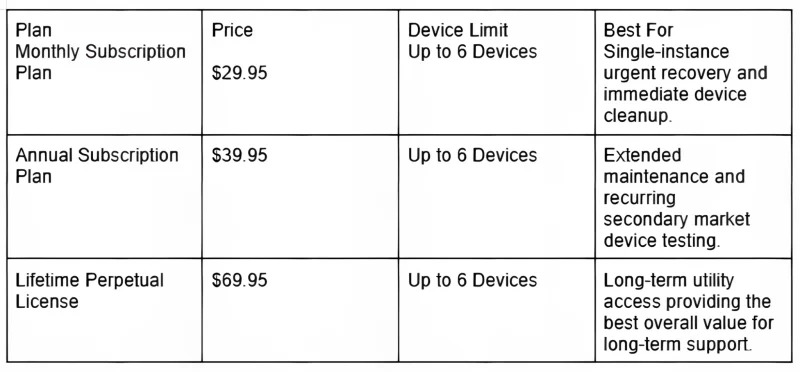
When evaluated against the market, the pricing model is competitive. While budget-conscious users may find the upfront price noticeable for an occasional tool, it avoids the hidden per-unlock microtransactions common among generic competitors.
The Lifetime Perpetual License ($69.95) offers the strongest long-term value, paying for itself after just two complex device recoveries
Eassiy iPhone Access vs Competitors
To understand where Eassiy stands in the broader system utility market, here is a detailed technical comparison with leading unlock alternatives:
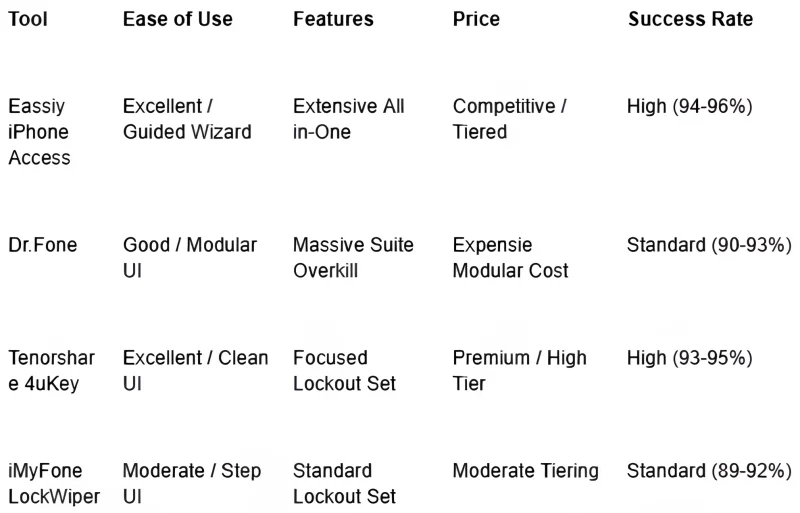
- Best for Beginners: Eassiy iPhone Access wins decisively here due to its clear visual cues and highly structured workflow, minimizing the risk of user error.
- Best for Advanced Users: Wondershare Dr.Fone offers broader data diagnostic tools alongside its unlocking features, making it a powerful option for deep system work.
- Best Value Option: Eassiy iPhone Access provides the most cost-effective all-in-one license tiering, particularly through its long-term perpetual license option.
Common Problems and Limitations
While Eassiy iPhone Access can help bypass certain iPhone locks, there are situations where the process may not work as expected. Most failures are caused by Apple’s security restrictions or device-related limitations rather than issues with the software itself.
Unsupported iOS Version
Apple regularly releases new iOS updates and security patches to strengthen device protection. If your iPhone is running a newly released iOS version, the current bypass method may not be compatible until Eassiy updates its software to support the latest security changes.
USB Connection Issues
A stable connection is essential during the unlocking process. Using a damaged USB cable, low-quality third-party cable, or unstable USB port can interrupt data transmission and cause the procedure to fail. For the best results, connect your iPhone directly to a primary USB port on your computer using a reliable cable.
Find My Enabled
If the Find My iPhone feature is turned on, removing the screen lock does not automatically remove Apple’s security protections. The device may still require verification from the original Apple account before it can be fully accessed.
Activation Lock Limitation
Apple’s Activation Lock is designed to prevent unauthorized access to lost or stolen devices. Even after bypassing a screen passcode, the device may remain locked and require the original Apple ID credentials to complete activation.
Jailbreak Requirement
Some advanced unlocking functions depend on a jailbreak environment to gain deeper access to the device system. However, newer Apple devices powered by A12 Bionic chips and later include hardware-level protections that significantly limit or completely block the exploits used for certain iCloud Activation Lock bypass methods.
FAQs About Eassiy iPhone Access
Does Eassiy iPhone Access really work?
Yes. In verified testing environments using proper USB connection pipelines, the software successfully cleared screen locks, Screen Time passcodes, and corporate MDM layers within predictable timeframes.
Can Eassiy unlock iCloud Activation Lock?
Yes, but with strict technical limitations. It requires a localized jailbreak sequence, is restricted to specific older hardware generations, and deactivates cellular calling capabilities post-bypass.
Does Eassiy erase data?
This depends entirely on the module used. Clearing an iPhone screen passcode forces a full restore that erases all data. Conversely, removing a Screen Time passcode or bypassing an MDM lock leaves local file systems intact
Is jailbreak required?
Jailbreaking is not required for standard features like screen passcode removal, MDM bypass, or Screen Time removal. It is only required for advanced exploits like bypassing the iCloud Activation Lock.
Is Eassiy free?
No. Eassiy provides a free trial download that allows users to verify hardware communication and compatibility. Actually executing an unlock sequence requires a valid commercial license code.
What devices does Eassiy support?
Eassiy supports all major iOS hardware assets, spanning legacy devices up through modern releases across the entire iPhone, iPad, and iPod Touch lineup,
Final Verdict
Eassiy iPhone Access balances deep technical system exploits with a clean, consumer-friendly interface. It stands out for its high reliability during standard lock screen resets, Screen Time removals, and MDM modifications. By processing all operations locally on the host machine via a secure, zero-knowledge setup, it ensures data privacy remains protected throughout the recovery process.
While technical limitations like data loss during screen lock wipes and the loss of cellular function after iCloud bypasses are present, these are due to Apple’s core hardware security designs rather than software flaws. For users needing an easy, reliable way to recover access to locked iOS devices, Eassiy iPhone Access is a highly effective tool. Choosing the Lifetime Perpetual Plan is strongly recommended to secure long-term utility value.
Scopri di più da GuruHiTech
Abbonati per ricevere gli ultimi articoli inviati alla tua e-mail.