
A Seven Day, Zero Dollar Plan for Reworking Your Home Layout With Free Tools
The Idea: Plan the Whole Thing Before Spending a Cent
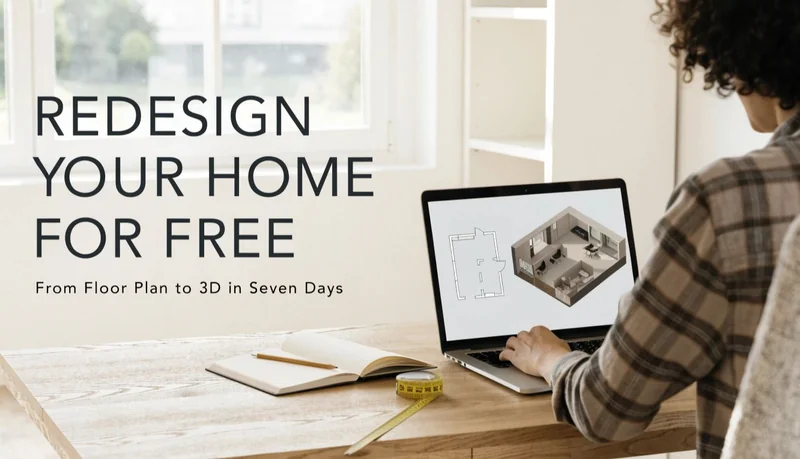
Most home projects start with a vague wish. The kitchen feels cramped, the spare room does nothing useful, or the living area needs a new arrangement, the expensive part usually comes later, when you hire people and buy materials, the planning stage, though, no longer needs to cost anything. A 3D floor plan free tool and a free floor plan editor can take you from a vague wish to a clear, shareable picture in about a week of spare evenings.
Here is a day by day plan. You can compress it into a weekend or stretch it out, but the order matters.
Day One: Find and Prepare the Plan You Already Have
Your starting point is a floor plan of the space as it exists today. Check the usual places: a folder of closing documents, an old blueprint, a listing image from when you bought the property, or a plan the builder provided. If nothing turns up, a clean hand drawn sketch of your layout will do.
Whatever you find, prepare it properly:
- Scan it or photograph it in bright, even light with the camera directly above the page
- Save it in a common image format such as JPG or PNG
- Crop away anything that is not part of the plan itself, like margins or title blocks
A clear image makes every later step easier. Spending thirty minutes here saves hours of confusion afterward.
Day Two: Decide What Is Actually Bothering You
Before touching any tool, write down the problems in plain language. Be specific. “The kitchen is bad” is not useful. “There is no room for a second person to cook, and the fridge door blocks the walkway” is something you can act on.
Then list two or three changes you want to test. For example:
- Open up the wall between the kitchen and dining room
- Add an island or a small breakfast bar
- Turn the spare bedroom into a home office
Limiting yourself to a short list keeps the project manageable. You can always return for another round.
Day Three: Make Your First Edits With a Free Floor Plan Editor
Now upload your plan to a free floor plan editor. The core idea is simple: instead of rebuilding the layout, you change only what needs changing. Upload the image, use the brush to mark the area you want to alter, and describe the result you are after.
Take the kitchen example. Brush over the kitchen and the wall beside it, then write something like “remove the wall between the kitchen and dining room to create an open space, keep the rest of the plan unchanged.” Review what comes back. If it is close but not right, adjust the selection or reword the prompt and try again.
These editors typically support four kinds of change: removing items, replacing items, adding new elements, and redesigning a selected room. Some work on architectural renderings and section drawings as well. Many are free to use, and some need no sign up, so you can experiment without handing over an email address.
Day Four: Compare Variations Instead of Settling on the First Result
The first edit is rarely the best one. Use today to generate alternatives. Try the open kitchen with an island and without. Try the spare room as an office and as a guest bedroom. Because the rest of the plan stays intact, comparing versions is quick and the differences are easy to see.
Keep a simple note of each version and what it tested. After a few rounds you will probably find that one option clearly beats the others. Sometimes you will discover that an idea you loved does not fit the space at all, which is exactly the kind of discovery you want before spending money.
Day Five: Turn the Chosen Plan Into a 3D View
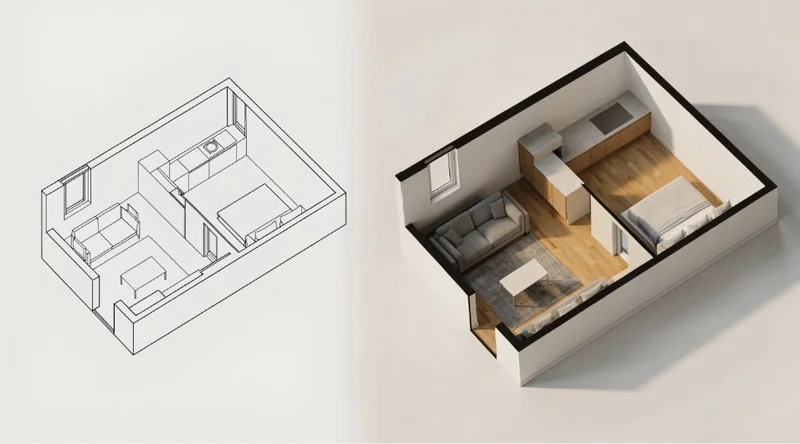
With a favorite layout in hand, move to a 3D floor plan free tool. Upload the edited plan and make a few presentation choices:
- Furnished or unfurnished: furnished helps people judge scale and function, while unfurnished shows the structure clearly
- Viewing angle: top down, isometric, aerial, or eye level, depending on what you want to communicate
- Background: plain and neutral keeps attention on the layout
The tool then generates a 3D version while treating your uploaded plan as the structural reference. Try two angles for the same plan. An isometric view usually explains how rooms connect, while an eye level view shows how the space might feel to stand in.
This is the moment many people say the plan finally “clicks.” Flat lines become rooms you can imagine using.
Day Six: Share It and Collect Honest Feedback
A clear visual is a conversation tool. Show the 3D view to the people who live in the home or will use the space. Ask specific questions:
- Does the flow from the kitchen to the dining area feel natural?
- Is there enough room around the island?
- Would you actually use the office in that spot?
If you plan to talk with a contractor, designer, or agent, bring both the edited flat plan and the 3D view. People respond to pictures faster than to descriptions, and a clear visual often shortens the first meeting considerably. Note any feedback, then loop back to the editor if a change is needed. Because the tools are free, another round costs only time.
Day Seven: Check What the Tools Cannot Tell You
The last day is about reality. These tools are excellent for visualization, comparing options, and communicating ideas. They are not construction documents. They cannot confirm whether a wall is load bearing, whether pipes or wiring run through the area you want to change, or whether the design meets local building codes.
Make a short list of questions for a qualified professional:
- Is the wall I want to remove structural?
- What would moving the sink or stove involve?
- Do any permits apply to these changes?
- Are my dimensions accurate enough to plan around?
Bringing a clear plan and informed questions makes professional time more productive. That is the real payoff of a week of free planning: you arrive prepared instead of starting from nothing.
What a Week of Free Planning Gives You
By the end, you have an edited plan that reflects what you actually want, a 3D view that makes it easy to understand, a set of compared alternatives, and a list of practical questions to take to an expert. None of that required software purchases or design training.
A Few Habits That Make the Plan Work Better
- Keep prompts specific and make one or two changes at a time
- Select only the area you want edited, so the rest of the plan stays safe
- Start every project from the clearest image you can find
- Treat every result as a draft you can improve
- Remember that visualization is not verification
The Takeaway
A free floor plan editor handles the changing, and a 3D floor plan free tool handles the seeing. Together they turn the planning stage of a home project into something you can finish in a week without spending anything. Use them to decide what you want, test whether it works, and communicate it clearly, then bring in professionals for the parts only they can confirm. Done in that order, you spend your money on building the right thing instead of discovering mid-project that you planned the wrong one.
Ti potrebbe interessare:
Segui guruhitech su:
- Google News: bit.ly/gurugooglenews
- Telegram: t.me/guruhitech
- Facebook: facebook.com/guruhitechfb
- Instagram: instagram.com/guruhitech_official/
- X (Twitter): x.com/guruhitech1
- Bluesky: bsky.app/profile/guruhitech.bsky.social
- Rumble: rumble.com/user/guruhitech
- VKontakte: vk.com/guruhitech
- MeWe: mewe.com/i/guruhitech
- Skype: live:.cid.d4cf3836b772da8a
- WhatsApp: bit.ly/whatsappguruhitech
Esprimi il tuo parere!
Ti è stato utile questo articolo? Lascia un commento nell’apposita sezione che trovi più in basso e se ti va, iscriviti alla newsletter.
Per qualsiasi domanda, informazione o assistenza nel mondo della tecnologia, puoi inviare una email all’indirizzo [email protected].
Scopri di più da GuruHiTech
Abbonati per ricevere gli ultimi articoli inviati alla tua e-mail.