

How to Bring Your Photos to Life: The Ultimate Guide to AI Photo Animation
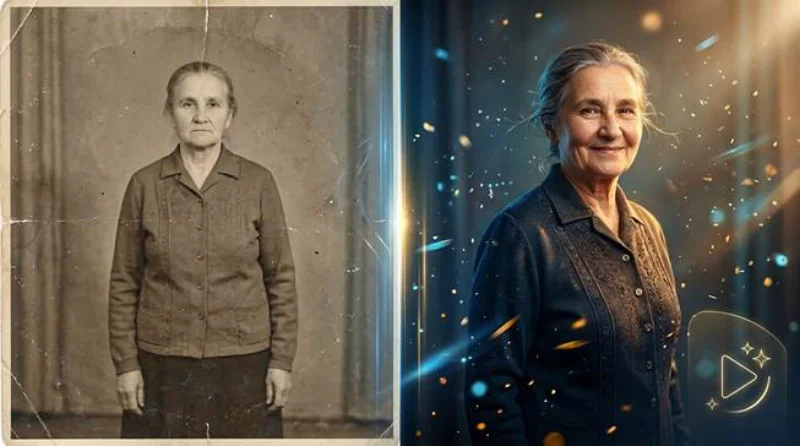
AI photo animation has moved from novelty effect to practical storytelling tool. Instead of leaving meaningful portraits frozen in time, people can now create moving visuals that feel warmer, more immersive, and more emotionally immediate. This is especially important for family archives, memorial photos, pet portraits, and creator content, where the goal is not just visual enhancement but stronger emotional connection.
For that reason, more users are looking for mobile workflows that combine ease of use with believable results. A strong photo animation experience should preserve likeness, respect the original mood, and create motion that feels natural rather than synthetic. For readers exploring tools that can animate old photos, Wondershare Relumi is relevant because its product messaging focuses on bringing photos back to life through natural movement, 4K-quality animation, and mobile-friendly creation.
Part 1. What AI Photo Animation Really Does
At its core, AI photo animation analyzes a still image and predicts what kind of motion can be added without breaking realism. The system studies facial landmarks, body posture, subject boundaries, and visual context before generating micro-movements that make the image feel alive. The best tools keep those movements subtle enough to preserve the original character of the photo while still creating a clear sense of motion.
This is why the category matters so much in 2026. People no longer want awkward novelty filters. They want natural movement, better detail, and output that is useful in the real world. A good animation workflow can transform a static portrait into a memorial keepsake, a shareable social clip, or a more engaging profile visual without requiring desktop software or complex manual editing.
Part 2. Why People Want to Animate Old Photos and Personal Memories
The most powerful use case is emotional memory. Old family photos often carry more meaning than technical quality. They may be faded, scanned, black and white, or slightly damaged, yet they hold irreplaceable moments. When AI animation is applied carefully, those still images gain a new layer of presence. A smile, head turn, or soft expression can make the memory feel closer and more vivid.
There is also a strong content creation reason. Audiences respond more strongly to dynamic visuals than static uploads, especially on mobile-first platforms. For creators, marketers, and everyday users, AI animation creates a bridge between photography and short-form video. That bridge matters because it allows one image to work harder across social sharing, personal storytelling, and digital publishing.
Part 3. How Wondershare Relumi Fits the AI Photo Animation Workflow
Wodershare Relumi positions the feature around a clear emotional promise: some memories feel too alive to stay frozen in a photo. That framing is effective because it describes exactly why people use AI animation in the first place. Instead of treating motion as a gimmick, the product presents animation as a way to bring old family photos to life, create animated avatars, and produce shareable moving memories from single images.
The broader app messaging reinforces that value. Photo Animation is described as adding natural movement to portraits, generating 4K AI animations, and using realistic facial micro-expressions. Old Photo Restoration and AI Colorization strengthen the workflow by helping users improve vintage images before animation. In practice, that means the app fits both sides of the process: preparing older images and then turning them into moving visuals that feel more lifelike.
Key Reasons This Workflow Stands Out
First, the concept is easy for general users to understand: upload a still image, choose the creative mode, preview the result, and save a shareable output. Second, the use cases are broad enough to cover old wedding photos, pet portraits, creator visuals, and memorial storytelling. Third, the experience is designed for mobile use, which is important because many users now manage their photo libraries and editing habits primarily on their phones.
Another advantage is that animation does not have to exist in isolation. A practical mobile workflow often combines enhancement, restoration, and animation inside the same app ecosystem. That makes the product more useful in everyday scenarios, because users can improve the image first and then decide how they want to bring it to life.
Part 4. How to Animate a Photo with AI on Mobile
The official animate photo page presents a simple three-step workflow that makes AI animation approachable for general users. Instead of relying on advanced editing skills, the process focuses on uploading a still image, selecting the animation mode, and reviewing the final output. That structure makes it easy to explain how mobile AI turns a static photo into a moving memory.
Step 1. Add Your Photo into Relumi
The official animate photo page starts with uploading the image you want to animate. This can be an old family portrait, a pet photo, or a personal snapshot. The step matters because a clear source image gives the AI enough facial and visual information to build natural movement instead of artificial-looking motion.

Step 2. Choose AI Photo Animation Mode
After the upload, users choose the AI Photo Animation mode and style. At this stage the system analyzes the face, subject posture, lighting, and emotional tone of the image so the generated movement feels fluid and believable. This is the key step that turns a still image into a moving visual story.

Step 3. Preview, Save, and Share the Animated Result
The final step is reviewing the animation and exporting the result. This preview stage is important because users can confirm that the motion still respects the original image and emotional mood. Once satisfied, they can save the output as a high-resolution animated clip for personal keepsakes, family sharing, or social media use.

Part 5. Best Use Cases for AI Photo Animation in 2026
AI photo animation works best when the image already carries emotional or communicative value. Old family portraits are an obvious fit because motion can add closeness without changing the original identity of the subject. Pet photos also perform well because gentle movement instantly highlights personality. For creators, animated profile images and transformed portrait content create stronger visual hooks than static images alone.
There is also an important memorial use case. When handled respectfully, animation can help families revisit meaningful photos of loved ones in a way that feels gentle and personal. In those situations, realism matters more than drama. The strongest tools are the ones that preserve expression, mood, and likeness while adding only the amount of motion the image can support naturally.
Quick Comparison: When AI Photo Animation Delivers the Most Value
| Photo Type | Main Goal | Why Animation Helps |
| Old family portrait | Revive memory | Adds emotional presence to historical photos |
| Pet image | Show personality | Turns a still image into a lively shareable moment |
| Profile or creator portrait | Increase engagement | Creates a stronger visual hook than a static upload |
| Memorial photo | Preserve remembrance | Supports subtle, respectful motion that feels personal |
Conclusion
The value of AI photo animation is not simply that it makes a picture move. It changes how people connect with still images by adding motion, presence, and stronger emotional storytelling. For users who want to bring a portrait, archive image, or family memory back to life, the best results come from tools that combine realism, simplicity, and mobile accessibility. That is why Wondershare Relumi fits naturally into this discussion: it supports a practical pathway from still image to moving memory without making the workflow feel complicated.
Ti potrebbe interessare:
Segui guruhitech su:
- Google News: bit.ly/gurugooglenews
- Telegram: t.me/guruhitech
- Facebook: facebook.com/guruhitechfb
- Instagram: instagram.com/guruhitech_official/
- X (Twitter): x.com/guruhitech1
- Bluesky: bsky.app/profile/guruhitech.bsky.social
- Rumble: rumble.com/user/guruhitech
- VKontakte: vk.com/guruhitech
- MeWe: mewe.com/i/guruhitech
- Skype: live:.cid.d4cf3836b772da8a
- WhatsApp: bit.ly/whatsappguruhitech
Esprimi il tuo parere!
Ti è stato utile questo articolo? Lascia un commento nell’apposita sezione che trovi più in basso e se ti va, iscriviti alla newsletter.
Per qualsiasi domanda, informazione o assistenza nel mondo della tecnologia, puoi inviare una email all’indirizzo [email protected].
Scopri di più da GuruHiTech
Abbonati per ricevere gli ultimi articoli inviati alla tua e-mail.