

How to Turn Technical Diagrams into AI Explainer Videos Without Losing Accuracy
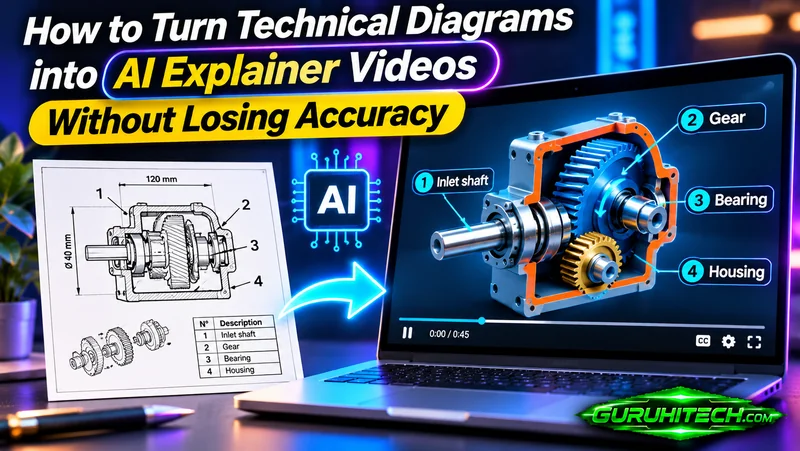
Technical diagrams are designed to make complicated information easier to understand. A network architecture chart can explain how different systems communicate, a scientific illustration can show the structure of a cell, and an engineering diagram can reveal how individual components fit together.
But static diagrams have one limitation: they show relationships without necessarily showing how those relationships develop over time.
AI video generation is creating new possibilities for turning these visual explanations into short, engaging videos. Image-to-video technology can add movement to existing illustrations, diagrams, and educational graphics without requiring creators to build every animation frame by frame.
For example, platforms such as Image2Video.art offer an online Image to Video AI workflow where users can upload a reference image, select an available generation model, and describe the movement they want to create. This makes it possible to experiment with animated explanations using existing visual material rather than starting an entire video project from scratch.
However, technical content introduces a challenge that ordinary creative videos do not always face: accuracy. A moving diagram is only useful if it communicates the same information as the original.
Why Technical Diagrams Need a Different Animation Approach
Animating a landscape photograph or a portrait is primarily a visual task. Animating a technical diagram is also an information-design task.
A small visual change can alter the meaning of an explanation.
Consider a network architecture diagram. If an AI model moves a server icon, changes the direction of an arrow, or introduces an additional connection, the resulting video may communicate an incorrect system architecture.
There are three common challenges.
1. Text and Labels Can Become Distorted
Generative video models do not always preserve small text, numbers, symbols, and labels across multiple frames.
This is particularly problematic for educational content. A diagram containing component names, mathematical formulas, or measurement values cannot simply tolerate approximate text.
2. Relationships Between Components Must Remain Consistent
Technical diagrams often depend on precise spatial relationships.
For example, an electrical circuit diagram uses specific connections to explain how current flows. Moving a component or changing a connecting line can make the illustration misleading.
3. Motion Should Explain Something
Adding movement does not automatically improve an explanation.
A diagram that contains several unrelated animated elements may become harder to understand than its original static version.
The objective should be to introduce movement that helps viewers follow a process, identify an important component, or understand a relationship.
A Practical Workflow for Creating AI Explainer Videos
A reliable workflow combines generative AI with conventional editing tools. Instead of asking an AI model to handle every element, assign different responsibilities to each stage.
Step 1: Identify What Needs to Move
Start by examining the original diagram and identifying its most important information.
Separate the visual elements into three groups:
- Primary elements: The main objects, systems, or components being explained.
- Supporting elements: Background illustrations, decorative shapes, and visual context.
- Information elements: Text labels, numbers, arrows, formulas, and annotations.
The primary and supporting elements may benefit from AI-generated movement. Information elements generally require more precise control.
For example, a diagram explaining a computer’s cooling system could use subtle airflow animation around the main components, while keeping component names and directional labels unchanged.
Step 2: Prepare an Animation-Friendly Image
Not every static diagram is suitable for direct AI animation.
Before uploading an image, consider simplifying its composition.
Remove unnecessary decorative elements, improve contrast, and make the main subject easy to distinguish from the background.
For diagrams containing important text, one useful approach is to prepare a separate visual version without the labels and small annotations.
Keep the original diagram as a reference. You can restore the exact text, arrows, and other information elements during the editing stage.
This creates a cleaner starting point for generative video models.
Step 3: Describe Motion Rather Than Rewriting the Scene
When using image-to-video AI, the uploaded image already provides the visual context.
The prompt should therefore concentrate on movement.
For example, imagine an illustration of a computer network.
A suitable prompt might be:
“Keep the camera stationary. Add a subtle blue glow traveling along the existing network connections, highlighting the communication path between the central server and connected devices. Preserve the original composition and do not introduce new objects.”
For a scientific illustration, another example could be:
“Create a gentle camera push-in toward the central structure. Add subtle environmental movement while maintaining the original shapes, proportions, and overall visual style.”
The key is to give the model one clear movement objective rather than asking it to animate everything simultaneously.
Step 4: Generate and Compare Different Results
Different video generation models may interpret the same reference image and motion prompt differently.
Some may produce more natural camera movements, while others may be better suited to atmospheric effects or complex illustrations.
A practical approach is to test a small number of generations before committing to a final version.
Compare the results using several criteria:
- Does the animation preserve the original subject?
- Is the movement relevant to the explanation?
- Have any important shapes or components changed?
- Does the camera movement make the diagram easier to understand?
- Are there unexpected objects or visual distortions?
If the result introduces unwanted changes, simplify the prompt and reduce the amount of requested movement.
Step 5: Restore Accurate Labels and Information
This is one of the most important stages.
AI-generated video should not be treated as a guaranteed method for preserving technical text.
After generating the visual sequence, use a conventional video editor to add the original labels, arrows, measurements, captions, and other essential information.
For example, a video explaining a cloud computing architecture could use AI-generated movement in the background, while the exact names of cloud services and connections are added separately.
This hybrid approach offers a useful balance: AI provides visual movement, while traditional editing maintains informational accuracy.
Step 6: Add Narration and Organize the Sequence
Once the visual elements are ready, arrange them into a logical explanation.
A simple educational video might follow this structure:
- Introduce the complete diagram.
- Highlight the first important component.
- Show how information moves to the next component.
- Explain the relationship between the different elements.
- Return to the complete diagram for a final overview.
Add narration or subtitles to explain what viewers are seeing.
A sequence of short, focused clips is often more effective than one long animation containing too many simultaneous movements.
Where AI-Annotated Visuals Can Be Useful
The combination of image-to-video generation and conventional editing has applications across several technical fields.
Software Architecture and IT Education
Software developers and educators regularly use architecture diagrams to explain databases, APIs, distributed systems, and cloud infrastructure.
Short animations can help illustrate how requests move between services, how data travels through a pipeline, or how different system components interact.
The actual architecture should remain defined by the original diagram rather than invented by the video model.
Science and Engineering Education
Scientific illustrations can be used to introduce concepts that are difficult to visualize through text alone.
Examples include molecular structures, mechanical assemblies, astronomical illustrations, and simplified representations of physical processes.
AI-generated movement can add visual context, although scientific claims and important structural details should be checked against authoritative references.
Technology Journalism
Technology publications often need visual material to explain new products, emerging technologies, and complex developments.
When actual footage is unavailable, an animated illustration can provide a useful visual introduction.
However, publishers should distinguish conceptual illustrations from authentic product footage or documentary evidence.
An AI-generated representation should never be presented as a recording of a real event or an actual device in operation.
Online Courses and Tutorials
Course creators can reuse existing presentation slides, diagrams, and illustrations to produce additional video material.
Instead of redesigning every visual asset, they can selectively animate important sections and combine them with narration.
This is particularly useful when a course contains many related concepts that benefit from consistent visual presentation.
How to Choose an Image-to-Video Workflow
The best approach depends on the type of material being animated.
For simple illustrations, a straightforward image-to-video workflow may be sufficient.
For detailed technical diagrams, a hybrid workflow with separate editing and compositing is generally more appropriate.
When evaluating an AI video platform, consider several factors:
Reference image support: The ability to upload an existing image is essential when you need to retain a particular visual composition.
Model selection: Different generation models can produce different movement styles and levels of visual consistency. Having multiple options can make experimentation easier.
Output quality: Resolution and aspect ratio should match the intended destination, whether that is a presentation, educational website, or social media video.
Generation costs: Test simple animations before using expensive high-quality settings for every generation.
Privacy and licensing: Check how uploaded images are handled and whether the selected model and subscription permit the intended commercial use.
The most important consideration is not the number of available models. It is whether the resulting video can communicate the intended information accurately.
Common Mistakes to Avoid
Even with a good source image and carefully written prompts, some mistakes can reduce the quality of AI-generated explainers.
Animating too many elements simultaneously. Excessive motion makes it difficult for viewers to identify the main subject. Focus on one important action at a time.
Asking AI to reproduce precise text. Small labels, numbers, and formulas should be added through conventional editing tools rather than relying on generated frames.
Using unnecessary camera movements. A stationary camera is often preferable for technical diagrams because it helps viewers maintain their understanding of the layout.
Treating generated movement as scientific evidence. An animation can illustrate a concept, but it does not prove that a physical or technical process behaves exactly as depicted.
Ignoring the original information hierarchy. So the most important components should remain visually prominent throughout the explanation.
The Future of AI-Generated Educational Content
The development of generative video is changing how creators approach visual explanations.
Previously, transforming a static technical illustration into a polished animation often required dedicated motion graphics software and considerable manual work.
AI image-to-video generation introduces another option: using an existing visual as a reference and generating movement through natural-language instructions.
The technology still has limitations, particularly when dealing with precise text, complex geometry, and information that must remain unchanged. However, combining AI-generated visuals with conventional editing can make the process more accessible.
For educators, technology publishers, and content creators, the opportunity is not simply to animate more diagrams. It is to make difficult concepts easier to follow without sacrificing accuracy.
The most effective explainer videos will likely continue to combine human editorial judgment, carefully designed visual information, and AI-assisted production.
Frequently Asked Questions
What is image-to-video AI?
Image-to-video AI is a generative technology that uses an existing image as a visual reference and creates a moving video from it. Users can describe the desired subject movement, camera direction, and environmental effects through text prompts.
Can AI turn a technical diagram into a video?
Yes. AI video generation can add motion to technical illustrations, diagrams, and other static visual materials. However, detailed labels, arrows, and technical relationships may change during generation, so important information should be reviewed and restored during editing.
How can I animate a diagram without changing its text?
A practical approach is to separate the visual illustration from its text and annotations before generation. Animate the illustration using AI, then add the original text and labels back using a conventional editing application.
Is image-to-video AI suitable for educational videos?
Yes. It can help educators animate scientific illustrations, historical images, technical diagrams, and other visual materials. It is especially useful for creating short visual explanations, provided that the generated content is checked for accuracy.
What is the difference between image-to-video and traditional motion graphics?
Image-to-video AI generates movement from an uploaded image using a generative model. Traditional motion graphics rely on manually controlled animation, keyframes, and compositing. Traditional tools generally provide more precise control, while AI generation can make visual experimentation faster.
Can AI-generated explainer videos be used commercially?
Commercial use depends on the licensing terms of the selected AI model, the platform’s terms, and the rights associated with the original images. Always check these conditions before publishing videos in commercial projects.
Will AI replace traditional animation software?
Not completely. AI generation is useful for creating visual movement and exploring creative possibilities, but traditional animation and editing software remain important when projects require precise timing, accurate diagrams, consistent typography, and complete control over individual elements.
Ti potrebbe interessare:
Segui guruhitech su:
- Google News: bit.ly/gurugooglenews
- Telegram: t.me/guruhitech
- Facebook: facebook.com/guruhitechfb
- X (Twitter): x.com/guruhitech1
- Bluesky: bsky.app/profile/guruhitech.bsky.social
- Rumble: rumble.com/user/guruhitech
- VKontakte: vk.com/guruhitech
- MeWe: mewe.com/i/guruhitech
- Skype: live:.cid.d4cf3836b772da8a
- WhatsApp: bit.ly/whatsappguruhitech
Esprimi il tuo parere!
Ti è stato utile questo articolo? Lascia un commento nell’apposita sezione che trovi più in basso e se ti va, iscriviti alla newsletter.
Per qualsiasi domanda, informazione o assistenza nel mondo della tecnologia, puoi inviare una email all’indirizzo [email protected].
Che ne pensi?
Scopri di più da GuruHiTech
Abbonati per ricevere gli ultimi articoli inviati alla tua e-mail.