
Convert Apple Music to MP3: The Ultimate Guide to Free Your Music Library
Apple Music offers a vast catalog of over 100 million songs, but it comes with a catch: digital rights management (DRM) protection. This restriction means your carefully curated playlists remain tethered to the Apple ecosystem and an active subscription. If you’ve ever wanted to play your Apple Music collection on a non-Apple device, use a track for a creative project, or simply ensure you never lose access to your favorite songs, converting Apple Music to MP3 is the solution. This guide provides a step-by-step walkthrough, specifically using ViWizard Apple Music Converter, to achieve this easily and efficiently.
Why Convert Apple Music to MP3?
Apple Music tracks are encoded in a protected M4P format. This encryption prevents them from being played on MP3 players, Android phones, car stereos, or other non-Apple devices. Furthermore, your access to these songs is contingent on your subscription being active; if you cancel, your entire library becomes unplayable.
Converting your Apple Music songs to MP3, a universally compatible format, offers several key benefits:
- Universal Playback: MP3 files work on virtually every device, from smart speakers to game consoles.
- True Ownership: The converted files are yours to keep permanently, regardless of your subscription status.
- Creative Flexibility: Easily use your music for personal projects like video background music, DJ mixes, or alarm sounds.
- Reliable Backup: Create a secure, offline archive of your entire library to protect against service outages or sync errors.
However, because of Apple’s DRM policies, standard music players cannot convert these protected files. This is where a specialized tool like ViWizard Apple Music Converter becomes essential.
The Problem with Standard Conversion Methods
You might wonder if you can simply use Apple’s own tools to convert your files. While the Apple Music app and iTunes do have a built-in conversion feature, it is strictly limited to files you have purchased or imported yourself. It cannot be used to convert DRM-protected streaming songs from the Apple Music catalog. This is why a dedicated converter is necessary.
ViWizard Apple Music Converter: Your Complete Solution
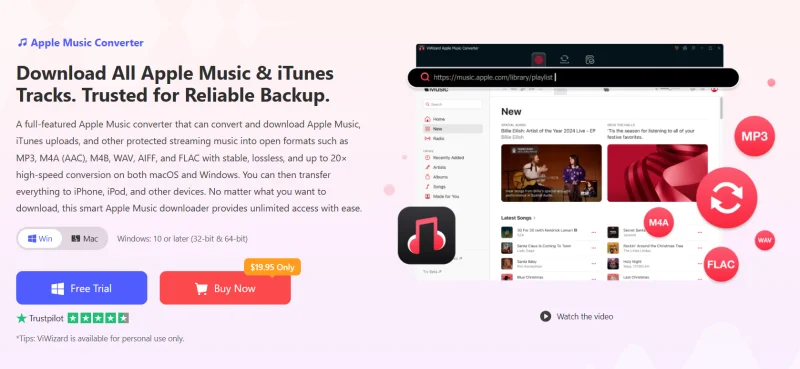
ViWizard Apple Music Converteris a one of the best downloader of Apple Music designed to strip DRM from Apple Music tracks and convert them into common, unrestricted formats. It works directly with your Apple Music library and a built-in Apple Music Web Player, providing full access to your catalog.
Key Features of ViWizard:
- Universal Format Support: Seamlessly converts Apple Music to MP3, as well as M4A, WAV, FLAC, AIFF, and more.
- Lossless Quality: Preserves the original audio quality, supporting MP3 output at up to 320 Kbps.
- High-Speed Conversion: Utilizes advanced multi-thread technology for up to 30x faster batch processing.
- ID3 Tag Preservation: Automatically retains critical metadata like song title, artist, album, and genre for an organized library.
- Customizable Output: Offers adjustable settings for bit rate, sample rate, and channel to suit your specific needs.
- Lifetime Upgrades: Comes with free lifetime updates, ensuring long-term compatibility.
Step-by-Step Guide: How to Convert Apple Music to MP3 Using ViWizard
Converting your music library is a simple process. Follow these four straightforward steps to get started:
Step 1: Log in to Your Apple Music Account
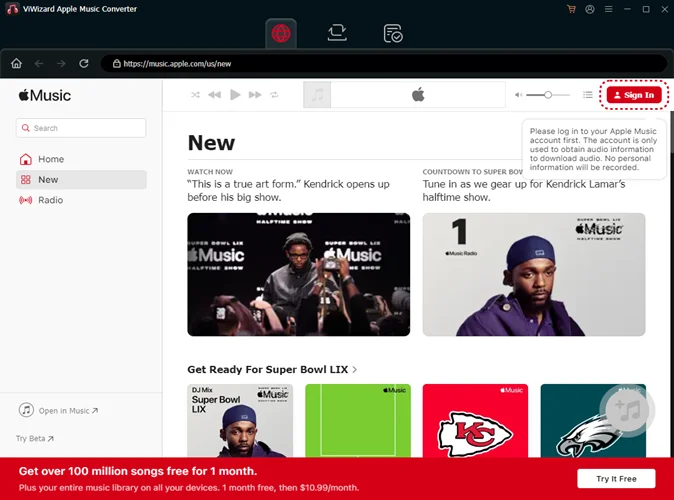
Open ViWizard Apple Music Converter and sign in with your Apple ID on the built-in web player. This will sync your library, allowing you to access all your songs, albums, and playlists.
Step 2: Customize Your Output Settings
Click the menu icon (☰) in the top-right corner and select “Preferences.” In the “Conversion” tab, choose “MP3” from the “Output Format” menu. You can also adjust advanced parameters like bit rate (up to 320 kbps) and sample rate. Then, specify your desired output folder in the “Output” tab.
Step 3: Select Your Music for Conversion
Browse your library within the ViWizard interface or use the built-in Apple Music Web Player to find the songs, albums, or playlists you wish to convert. Drag and drop them into the program’s conversion queue.
Step 4: Download and Convert
Click the large “Convert” button. ViWizard will begin processing the files, converting them into high-quality, DRM-free MP3 files and saving them to the folder you selected.
Beyond MP3: Complete Library Management
ViWizard is more than just a converter. It doubles as a powerful library manager, offering features to automatically sort your music by Artist, Album, or Playlist. It also includes a local media player, allowing you to browse and play both your original Apple Music tracks and your newly converted files in one place.
Conclusion: Take Full Control of Your Music
Converting your Apple Music collection to MP3 is the definitive way to break free from subscription locks and device restrictions. Using ViWizard Apple Music Converter offers a fast, reliable, and high-quality solution to create a permanent, portable music library that you can truly own. Back up your entire collection and enjoy your favorite tracks on any device, anytime, anywhere.
Ti potrebbe interessare:
Segui guruhitech su:
- Google News: bit.ly/gurugooglenews
- Telegram: t.me/guruhitech
- Facebook: facebook.com/guruhitechfb
- Instagram: instagram.com/guruhitech_official/
- X (Twitter): x.com/guruhitech1
- Bluesky: bsky.app/profile/guruhitech.bsky.social
- Rumble: rumble.com/user/guruhitech
- VKontakte: vk.com/guruhitech
- MeWe: mewe.com/i/guruhitech
- Skype: live:.cid.d4cf3836b772da8a
- WhatsApp: bit.ly/whatsappguruhitech
Esprimi il tuo parere!
Che ne pensi di questa notizia? Lascia un commento nell’apposita sezione che trovi più in basso e se ti va, iscriviti alla newsletter.
Per qualsiasi domanda, informazione o assistenza nel mondo della tecnologia, puoi inviare una email all’indirizzo [email protected].
Scopri di più da GuruHiTech
Abbonati per ricevere gli ultimi articoli inviati alla tua e-mail.