
The Top AI Photo Editor for Brand Refresh in 2026

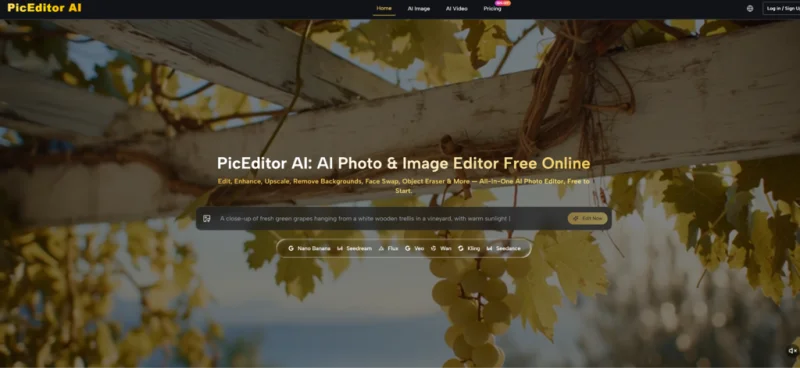
Visual work often slows down long before creativity runs out. The bigger problem is usually that a usable image still needs too many small fixes before it can actually go live. A strong AI Photo Editor matters in that moment because it turns image refinement into a faster decision cycle. Instead of treating editing as a long chain of technical operations, it lets users start with an image, define the change, and move toward a publishable result with less friction.
That shift feels especially relevant in 2026 because visual assets are expected to do more than ever. One image may need to appear on a landing page, in a paid ad, inside a product card, and in a short video variation for social distribution. The old approach of handling each version through separate tools can still work, but it often costs more time than the task deserves. What makes this platform interesting is that it tries to reduce those breaks in the workflow and keep image improvement, transformation, and motion experiments inside one system.
In practical terms, that makes the tool easier to understand as a production shortcut rather than a novelty product. The point is not simply to generate something impressive. The point is to take an image that is already useful, then make it clearer, cleaner, more flexible, or more adaptable without rebuilding everything from the ground up.
Why Editing Speed Now Shapes Content Quality
It is easy to assume that speed and quality are opposites, but in many real workflows that is not quite true. Slow production often leads to fewer experiments, fewer variations, and less willingness to improve a visual once the first acceptable draft appears. Faster editing can actually raise quality if it gives people enough room to compare several directions before choosing one.
That is one reason platforms like this are becoming more relevant. Modern content work rewards revision speed. A team may need to brighten a product image, remove a distracting element, test a cleaner visual style, and then create a motion-ready version from the same base asset. Those are different actions, yet they are tied to the same goal: getting more value from one source image.
The Job Is Often Refinement, Not Reinvention
Many users are not looking for a tool that invents everything from scratch. They already have the subject, the framing, the lighting, or the brand context. What they need is controlled change. That can mean enhancement, upscaling, background removal, object erasing, face swap, or style adjustment. The real advantage is that the source image continues to carry the core visual idea while the platform helps it evolve.
Natural Language Changes The Editing Experience
This is where the workflow becomes more intuitive. Instead of relying entirely on manual tool manipulation, the system allows the user to describe what should happen. That does not remove judgment. It simply moves more of the effort into direction. In many cases, that is a better fit for marketers, creators, founders, and small teams who know what they want visually but do not want to spend unnecessary time inside a traditional editing interface.
How The Platform Organizes Creative Work
One of the platform’s more useful ideas is that it does not reduce every task to a single engine. It presents itself as a broader workspace that combines image editing and video generation while exposing different underlying models for different needs.
For image work, the site highlights models such as GPT-4o, Nano Banana, Nano Banana 2, Flux Kontext Pro, Flux Kontext Max, Seedream 4.0, Seedream 5.0 Lite, Qwen Image Edit, and Grok Imagine Image. On the video side, it lists Veo 3, Veo 3.1 Basic, Veo 3.1 Premium, Kling 2.5, Kling 2.1 Pro, Kling 2.1 Master, Seedance 1.0 Lite, Seedance 1.0 Pro, Seedance 1.5 Pro, Wan 2.5, Runway Gen 4, and Grok Imagine Video.
That matters because editing needs are rarely uniform. Some jobs need speed, some need realism, some need stronger contextual control, some need motion. A platform becomes more useful when it acknowledges that difference instead of pretending one model solves every creative problem equally well.
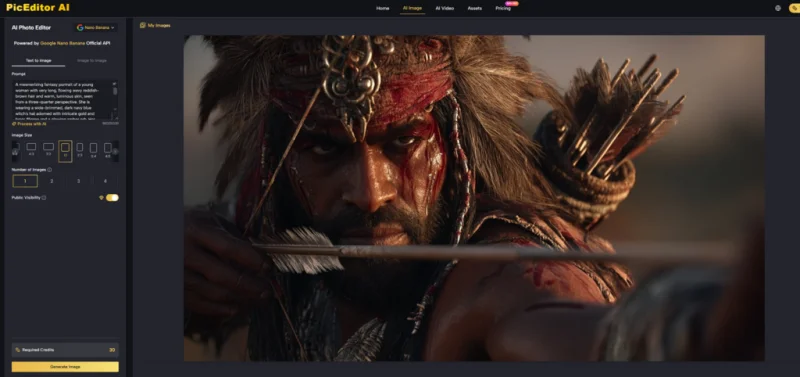
Nano Banana Supports Consistent Image Identity
Nano Banana is presented as a model suited to realism, style transfer, and character consistency. The site also notes support for up to four reference images. That is especially meaningful when the user wants the output to preserve identity rather than drifting into a loosely related reinterpretation. For portraits, character-based assets, and recurring brand visuals, that kind of consistency can matter more than pure novelty.
Flux Supports More Targeted Adjustments
Flux appears more aligned with precision. The descriptions point toward context-aware editing, text replacement inside images, and object-level changes. In practice, that makes it easier to imagine Flux being useful in tasks where the user wants a specific correction inside an already solid composition rather than a broad visual rewrite.
Seedream Helps When Iteration Speed Matters
Seedream is positioned more around quick generation and fast visual iteration. That sounds like a small detail, but speed often shapes whether a team tests one idea or five. In my view, that can be one of the quiet strengths of a platform like this. Faster output does not guarantee better taste, but it creates more opportunities for better choices.
Model Choice Becomes A Creative Decision
This is an important shift. Users are no longer only editing pictures. They are deciding what kind of result matters most for the task in front of them. Realism, control, speed, and motion each suggest a different route. The platform’s structure makes that choice easier to surface.
What The Official Workflow Looks Like
The site keeps the basic process very simple, which is one of the reasons the platform feels approachable.
Step One Upload The Original Image
The workflow starts with an uploaded image. That is important because the system is clearly designed not only for pure generation but also for transformation. It assumes the image already contains useful visual decisions and that the next step is improvement or extension.
Step Two Choose A Tool Or Model
After upload, the user selects the kind of edit or the model that best fits the task. This can include straightforward correction tools such as enhancement or object removal, but it can also mean selecting a model for broader stylistic or generative output. That makes the platform feel less like a narrow editor and more like a routing system across different creative methods.
Step Three Describe The Intended Change
The next step is giving the platform a written instruction. According to the site, the system analyzes the image and applies the requested edit. This is the stage where clarity matters most. In tools like this, vague direction usually creates vague output, while precise direction tends to produce more reliable results.
Step Four Review The Result And Iterate
Once the image is processed, the user reviews the output and decides whether another pass is needed. That last step deserves emphasis because it reflects the real nature of AI-assisted editing.
A Better Result May Need Another Pass
The first generation may already be useful, but not always final. A small adjustment in phrasing or a different model choice can lead to a stronger result. That is not a weakness unique to this product. It is part of how generative editing works. In many cases, a second attempt still takes far less effort than manual reconstruction.
How The Tool Compares To Older Workflows
The product becomes easier to understand when viewed against common editing needs.
| Editing Need | Older Workflow | Platform Approach | Practical Effect |
| Improve low-quality images | Manual cleanup and sharpening | AI enhancement and upscale tools | Faster polish |
| Remove distractions | Clone, mask, and retouch by hand | Object eraser workflow | Less repetitive editing |
| Change visual direction | Rebuild or repaint major areas | Prompt-based style transformation | Easier experimentation |
| Preserve subject consistency | Manual recreation across versions | Reference-image support | More stable identity |
| Extend still images into motion | Separate animation tools | Integrated image-to-video path | Better asset reuse |
This comparison helps explain why an AI Image Editor is increasingly valuable in production settings. It reduces the amount of switching between tools and makes it easier to treat one source image as the base for several kinds of output.
Why Image-To-Video Adds Real Value
One of the more interesting parts of the platform is that it does not stop at static editing. It also includes video-capable models. That changes the role of the source image. A still no longer has to remain the final format. It can become the opening frame of a moving asset.
Still Assets Become More Reusable
For content teams, this is useful because a polished image can support more than one publishing context. Instead of treating video as a completely separate process, the platform allows existing imagery to feed motion generation. That can help with social clips, ad variations, and lightweight storytelling formats.
Motion Extends Approved Creative Work
There is a practical advantage here. Teams often already have approved visuals but do not want to rebuild the creative direction just to test movement. Turning a still asset into motion creates more output from the same approved material.
Where Users Should Stay Grounded
The platform clearly lowers the barrier to editing, but it does not remove the need for judgment. Output quality still depends on the source image, the selected model, and the clarity of the prompt. Some tasks will look strong immediately. Others may need a few attempts before they feel right.
There is also a usage ladder in the product structure. The site presents the service as free to start, while paid tiers add broader access, better limits, no watermark, private generation, commercial license support, and priority processing. That feels consistent with a tool meant to serve both casual experiments and more serious workflow needs.
Why This Feels Timely In 2026
What makes the platform feel relevant is not just that it can edit images quickly. It is that it matches how visual work now happens. Teams need faster refinement, more format flexibility, and simpler ways to extend the useful life of existing assets.
That is why this kind of editor feels especially well suited to 2026. It treats image work as an iterative system rather than a one-time correction task. Start with a visual, choose the right direction, describe the change, and keep refining until the result fits the channel, the message, and the moment. That is a more realistic definition of modern editing than technical complexity alone.
Ti potrebbe interessare:
Segui guruhitech su:
- Google News: bit.ly/gurugooglenews
- Telegram: t.me/guruhitech
- Facebook: facebook.com/guruhitechfb
- Instagram: instagram.com/guruhitech_official/
- X (Twitter): x.com/guruhitech1
- Bluesky: bsky.app/profile/guruhitech.bsky.social
- Rumble: rumble.com/user/guruhitech
- VKontakte: vk.com/guruhitech
- MeWe: mewe.com/i/guruhitech
- Skype: live:.cid.d4cf3836b772da8a
- WhatsApp: bit.ly/whatsappguruhitech
Esprimi il tuo parere!
Ti è stato utile questo articolo? Lascia un commento nell’apposita sezione che trovi più in basso e se ti va, iscriviti alla newsletter.
Per qualsiasi domanda, informazione o assistenza nel mondo della tecnologia, puoi inviare una email all’indirizzo [email protected].
Scopri di più da GuruHiTech
Abbonati per ricevere gli ultimi articoli inviati alla tua e-mail.