

Two AI Photo Generators Walk Into a Workflow: Photogenerator.ai vs Runway
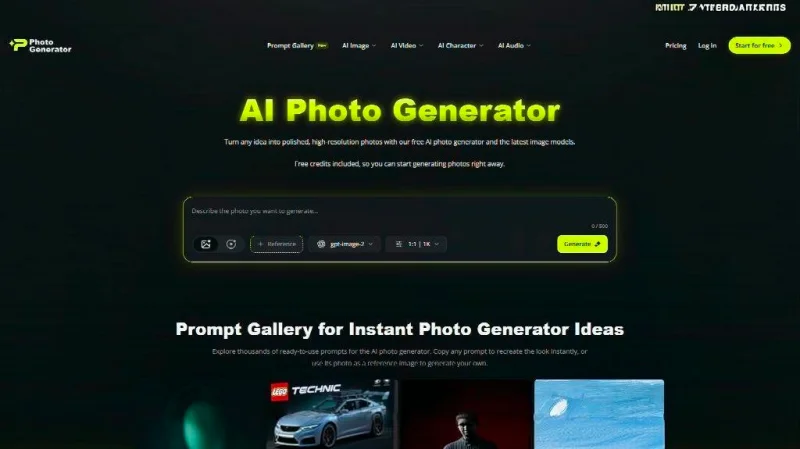
I needed stills that did not look like every other AI still. Product shots. Character concepts. Mood boards that could later become video. So I ran the same briefs through two tools that keep showing up in creator chats: Photogenerator.ai and Runway’s AI image generator.
This is not a ranking. It is a side-by-side from actual sessions. What each one does well. Where they frustrate. Who might actually keep using them after the free credits run out.
Why These Two Matter Right Now
McKinsey’s work on generative AI puts a big slice of potential value in marketing and creative content production. Teams that generate visuals faster can test more ideas before the campaign locks. That pressure is real for solo creators and small studios alike.
An AI Photo Generator is no longer a novelty button. It is part of the daily pipeline. The question is which one fits the kind of work you ship.
Photogenerator.ai: The Multi-Model Browser Workhorse
I opened Photogenerator.ai first because the promise was simple. Type a prompt or upload a photo. Pick from several current models. Download.
What I Actually Tested
I fed it product photography briefs and portrait-to-fantasy character jobs. The model switcher is the main feature. GPT Image 2, Nano Banana 2, Midjourney, and Seedream 5.0 sit side by side. One pass looks too soft. Switch the engine. Run again. No new tab. No new login.
Prompt-based editing worked better than I expected on simple changes. Upload a real photo. Ask for a different background or lighting. Nano Banana 2 kept facial structure reasonably intact in most tries. The 4K upscaler cleaned older low-res references without turning everything into plastic.
Free credits let me burn through a full afternoon of tests. That matters. You learn the tool’s taste only by rejecting a lot of outputs.
Where It Felt Strong
Speed and low friction. Everything lives in the browser. No install. The multi-model approach reduces the “this engine hates my subject” problem. For straightforward product stills and character concepts, results landed in the usable zone more often than not.
Where It Frictioned
Complex multi-subject scenes needed more retries. Text inside images stayed inconsistent. Once free credits are gone, volume work moves to paid plans. The tool stays focused on image generation and light editing. It does not pretend to be a full video suite.
Runway’s AI Image Generator: Built for Iteration and Handoff
Runway treats images as the first frame of something larger. That mindset shows up in the interface.
What I Actually Tested
Same product and character briefs. Text-to-image and image-to-image both available. Generate a set of variations. Pick one. Then edit without starting over. Relight the subject. Swap the backdrop. Change style while keeping the parts you already like. That surgical control is the part that felt different.
Character consistency tools let me lock a face and costume across several frames. Useful when the stills need to feel like the same person in different lighting. Photoreal, illustrated, and stylized outputs come from the same prompt box. The range is wide.
Because Runway also does video, the images sit inside a larger creative space. You can push a still into motion later without exporting and re-uploading elsewhere.
Where It Felt Strong
Production-minded editing. You spend less time regenerating whole frames when only one element is wrong. Character lock helps campaign-style work. Professional teams already use the platform for real deliverables. That shows in the feature set.
Where It Frictioned
Credit math becomes part of the mental load. Free credits are limited. Heavier use means watching the meter. The interface carries more options than a pure image tool, so the learning curve is steeper if you only want stills. Some pure image generators still feel faster for one-off product shots.
Head-to-Head Observations From the Same Briefs
Both tools accept text and reference images, both produce commercial-usable outputs under their terms, both give free starting access.
Photogenerator.ai wins on model variety inside a simple image-focused flow. Switching engines mid-brief is fast. The AI Photo Generator experience here feels closer to a dedicated stills machine.
Runway wins on precise local edits and the path from still to motion. If your next step is often video, staying inside one platform removes export friction. Character consistency across multiple images is more intentional.
Neither is magic. Vague prompts produce generic results in both. Clear lighting, camera, and material language improves both. I still rejected more outputs than I kept. That is normal.
Who Might Prefer Which
Solo creators and small e-commerce teams that need product photos and occasional character art will find Photogenerator.ai lower friction. The multi-model switch and browser-only setup keep the day moving.
Teams already thinking in sequences, storyboards, or social video will lean toward Runway. The image tools exist to feed the larger pipeline. Agencies that need consistent characters across a campaign will notice the difference.
Budget-sensitive users should test both free tiers hard before paying. Credit burn rates differ. Your actual monthly volume decides the cost more than the sticker price.
A Quick Note on the Bigger Picture
Gartner and McKinsey both track rapid generative AI adoption inside marketing and content functions. The tools that survive are the ones that cut real hours, not the ones with the flashiest demos. An AI Photo Generator that forces constant re-prompting or constant exporting ends up abandoned.
Photogenerator.ai and Runway both pass the “I would open this again tomorrow” test for different reasons. One prioritizes model choice and simplicity. The other prioritizes control and continuity into video.
Practical Takeaways After the Tests
Run the same three prompts on both. One product, one portrait, one fantasy character. Look at the rejects as carefully as the keepers. Notice how many times you have to leave the tool to finish the job.
If your work stops at the still, the simpler multi-model path often wins. If the still is only the first frame, the integrated platform starts to pull ahead.
Neither tool removes the need for taste. Both remove a large chunk of the blank-canvas labor. That is the actual upgrade.
I still keep both bookmarked. Different jobs call different tools. The only real mistake is treating any single AI Photo Generator as the final answer for every visual problem.
Ti potrebbe interessare:
Segui guruhitech su:
- Google News: bit.ly/gurugooglenews
- Telegram: t.me/guruhitech
- Facebook: facebook.com/guruhitechfb
- Instagram: instagram.com/guruhitech_official/
- X (Twitter): x.com/guruhitech1
- Bluesky: bsky.app/profile/guruhitech.bsky.social
- Rumble: rumble.com/user/guruhitech
- VKontakte: vk.com/guruhitech
- MeWe: mewe.com/i/guruhitech
- Skype: live:.cid.d4cf3836b772da8a
- WhatsApp: bit.ly/whatsappguruhitech
Esprimi il tuo parere!
Ti è stato utile questo articolo? Lascia un commento nell’apposita sezione che trovi più in basso e se ti va, iscriviti alla newsletter.
Per qualsiasi domanda, informazione o assistenza nel mondo della tecnologia, puoi inviare una email all’indirizzo [email protected].
Scopri di più da GuruHiTech
Abbonati per ricevere gli ultimi articoli inviati alla tua e-mail.