
Why Hotel Wi-Fi Fails: Seven Infrastructure Mistakes That Cost Guest Trust
A practical guide to designing coverage, capacity, backhaul and security for properties where every room behaves like a small, connected office.
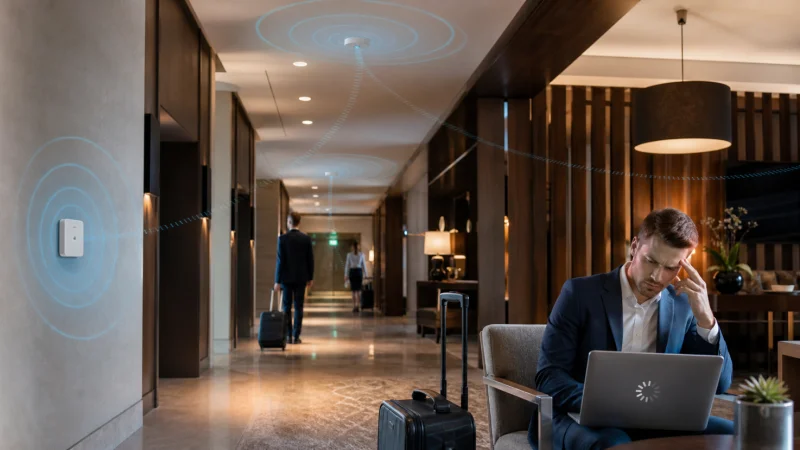
At 9:17 p.m., the guest in room 814 does not care that the fiber circuit in the basement benchmarks at a gigabit. Her video call has frozen for the third time, the television is buffering, and the signal bars vanish when she moves from the desk to the bed. To her, the hotel has one network – and it is broken.
That gap between a fast internet connection and a poor in-room experience explains most hotel Wi-Fi failures. A property can buy more bandwidth and still disappoint guests if radio coverage, client density, cabling, traffic policy and operations were never designed as one system. The commercial stakes are not abstract: a 2019 Hotel Internet Services survey reported that 85% of guest respondents said Wi-Fi quality would affect whether they rebooked a hotel or brand, while 77% called the absence of free Wi-Fi a deal breaker.
Below are seven infrastructure mistakes I would look for before approving another bandwidth upgrade.
1. Treating ISP Speed as the Guest Experience
The speed delivered to the building is only the first link. Between the gateway and room 814 sit switches, Ethernet runs, access points, walls, doors, mirrors, neighboring radios and dozens of competing devices. If one of those links is undersized or badly configured, a larger internet circuit merely feeds the bottleneck faster.
Hotel Castle Salam in Sudan offers a useful real-world example. According to Grandstream’s published case study, the property’s previous infrastructure supported only 200 Mbps and guests and staff frequently could not connect. Its renovation deployed 70 indoor Wi-Fi 6 access points plus four outdoor long-range units, with room, common-area and outdoor coverage treated separately. The lesson is not that every hotel needs 74 APs. It is that WAN capacity and radio design must be measured independently.
My recommendation: record four numbers during peak occupancy – internet utilization, wired uplink utilization, channel airtime and per-client throughput. If the WAN is quiet while airtime is saturated, buying more broadband will not solve the problem.
2. Designing for Coverage Instead of Capacity
A pre-opening heat map may prove that a phone can see an SSID in every room. It does not prove that the network can carry hundreds of concurrent video calls, streaming sessions, cloud backups, locks, televisions and staff devices. Coverage answers, “Can a client hear the AP?” Capacity asks, “Can it perform when everyone else is talking?” Hotels need both.
The Cliffs Hotel and Spa case published by Cisco Meraki is a sharp illustration. Thick concrete walls and metal studding absorbed radio signals, while a mixed, consumer-grade deployment produced guest complaints and equipment failures. After the redesign, MR30H access points served an average of more than 540 daily guests consuming 10 TB per month. Those figures are a reminder to model real traffic, not just floor area.
You should design for peak concurrent devices by zone: guest floors, lobby, breakfast room, pool and conference space. A ballroom at 70% occupancy can be a harder wireless problem than ten quiet corridors.
3. Mounting Access Points Where Installation Is Easy
Corridor-only placement is attractive because cable pathways are accessible and rooms remain visually clean. Unfortunately, the signal may have to cross a fire door, bathroom tile, plumbing, mirrors and furniture before it reaches the guest’s laptop. The result is often a strong hallway and a weak bedside.
A proper site survey should include closed doors and furnished rooms, not an empty floor plan. Test both 5 GHz and 6 GHz where applicable; higher-frequency bands deliver capacity but lose more energy through obstacles. For many properties, a mix of ceiling units in open spaces and in-wall units close to room occupants produces a more predictable result than a single AP type everywhere.
When evaluating a wireless access point, look past the headline radio rate. Check mounting format, PoE options, uplink speed, multiple-SSID support, roaming behavior, environmental rating and realistic concurrent-client limits. COMFAST, for example, offers in-wall, ceiling and outdoor AP formats; that range matters because a hotel is several RF environments under one roof.
4. Ignoring the Wired Backhaul and PoE Budget
An access point advertised at multi-gigabit wireless speeds can still be constrained by a 100 Mbps switch port, a damaged cable pair, an oversubscribed uplink or a switch that cannot supply enough Power over Ethernet. These faults are especially deceptive because the Wi-Fi signal can look excellent while applications remain slow or unstable.
I suggest documenting the full path for every AP: cable category and test result, switch port speed, PoE class, uplink capacity and redundancy domain. If a Wi-Fi 6 or Wi-Fi 7 AP has a 2.5 GbE port, connecting it to legacy Fast Ethernet wastes the investment. Likewise, count the switch’s total PoE wattage under worst-case load, not only the number of ports.
5. Letting Every Device Compete on One Flat Network
Guest phones, front-desk terminals, payment systems, cameras, locks, televisions and building controls should not share one undifferentiated broadcast and security domain. A flat network increases risk, makes troubleshooting noisy and allows a few heavy users to damage service for everyone else.
Hotel Castle Salam’s redesign used three SSIDs and separate staff and guest networks. The exact segmentation will vary, but the principle is sound: map SSIDs to VLANs and policies for guests, staff and operational or IoT systems; enable client isolation where appropriate; and apply fair-use limits by user or application class. Keep the SSID count restrained, because every additional beacon consumes airtime.
6. Assuming Clients Will Roam Gracefully
Guests move from room to elevator lobby to restaurant while phones make their own roaming decisions. Without coordinated power levels, channel plans and roaming assistance, a device may cling to a distant AP even when a better one is nearby. The user sees “full Wi-Fi” but suffers retries, latency and dropped calls.
Do not solve this by turning every radio to maximum power; that enlarges contention domains and can make sticky-client behavior worse. I recommend validating roaming with ordinary guest devices, including older phones, while running a live voice or video call. Controller or cloud management should expose association history, retries, signal strength and channel utilization so the support team can diagnose a complaint without walking the property first.
7. Treating Commissioning as the Finish Line
Hotel networks change every day. Firmware ages, neighboring interference appears, cables fail, occupancy patterns shift and guests arrive with new device generations. A network that passed acceptance testing can degrade quietly until online reviews become the monitoring system.
Set operational thresholds for AP availability, authentication failures, DHCP latency, channel utilization, retry rates and WAN saturation. Review peak-hour data, not only monthly averages. Run periodic room-level spot checks and preserve a baseline survey so changes are visible. The mystery-shopping approach used by Coyle Hospitality – three standardized upload and download tests at prescribed times and locations – is simple, repeatable and more actionable than asking whether Wi-Fi “felt fast.”
A Better Upgrade Sequence
If I were planning a hotel refresh, I would start with occupancy, device and application assumptions; survey the actual building; design capacity and coverage by zone; verify cabling, switching and PoE; segment traffic; then validate roaming and peak-load behavior. Hardware selection comes after those decisions, not before them.
COMFAST positions its commercial portfolio around ceiling, in-wall and outdoor access points, PoE deployment, multiple SSIDs and centralized management. Those are relevant building blocks, but no brand can compensate for a missing survey or an undersized backhaul. The best procurement question is not “Which AP is fastest?” It is “Which architecture will still meet our service target on a sold-out night?”
| Before purchase | Before opening | After opening |
| Peak devices by zone | Closed-door RF validation | Peak-hour telemetry |
| Cabling and PoE audit | Roaming call test | Room-level spot checks |
| VLAN and policy plan | Load and failover test | Firmware and capacity reviews |
The bottom line: guests experience the weakest link, not the fastest specification. Fix the architecture, measure the real load and operate Wi-Fi as a service. That is how a hotel turns connectivity from a recurring complaint into invisible infrastructure – exactly where good Wi-Fi belongs.
Scopri di più da GuruHiTech
Abbonati per ricevere gli ultimi articoli inviati alla tua e-mail.