

Brick, Wood, or Stucco: Exploring Finishes with RoomDesign AI House Exterior Design

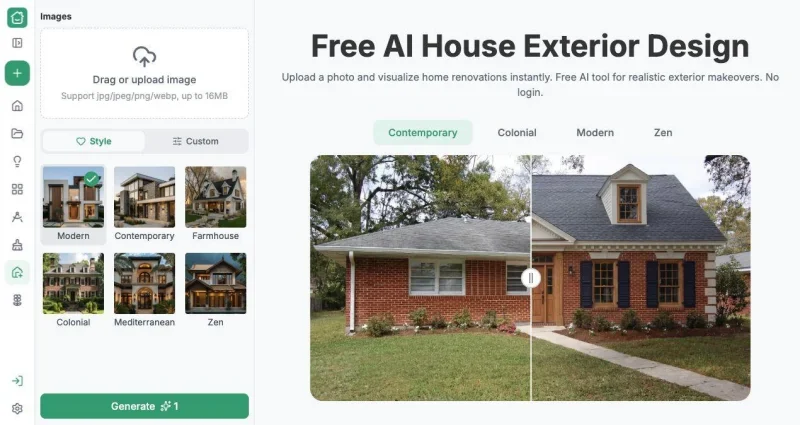
Brick, wood, and stucco can each look convincing on a sample board, yet choosing between them for a whole facade is harder. Homeowners considering new finishes need to see the relationship between texture, coverage, and the shape of their own house. AI House Exterior Design provides a visual starting point. RoomDesign offers free online AI House Exterior Design for exploring material directions from a house photograph, helping you decide which ideas deserve a conversation with a supplier or installer before you request detailed specifications.
Ask What the Material Needs to Change
Start with the reason the current exterior feels wrong. Perhaps a broad wall looks flat, the entrance lacks emphasis, or several existing finishes seem unrelated. A material change should respond to that problem. Otherwise, you may choose an attractive texture that adds visual noise without improving the composition.
Upload a clear photo into RoomDesign and describe the part of the facade you want to explore. For an entrance emphasis, request a wood-toned accent around the entry while keeping the broader palette restrained. For a more uniform appearance, describe a consistent finish across the main wall surfaces. These are concept requests that make the next preview easier to evaluate.
Compare Coverage as Well as Texture
A small wood accent and an entirely wood-clad elevation are different proposals, even when the material name is the same. Use the Custom description to explain where you want the finish to appear. Then review whether the generated image communicates the intended amount of contrast.
Try another direction using the same source photo, such as a light stucco appearance with a darker entrance or brick paired with a quieter trim treatment. The feature helps you compare the overall visual character of those choices on a recognizable house. It does not require you to know a product range before you can begin narrowing the look you want.
Read the Preview as a Material Brief
When a concept appeals to you, describe the qualities behind that preference. Is it the warm tone, the horizontal rhythm, the rougher surface, or the contrast with the windows? Recording those observations is more useful than saving an image with no explanation. A supplier can respond to a defined visual intention.
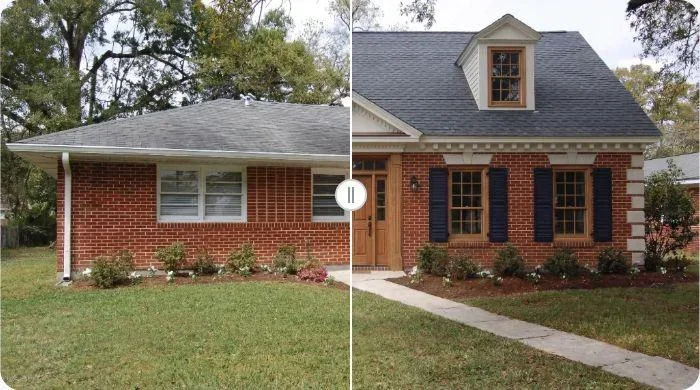
Inspect the building features as well. If the generated option changes openings or adds depth that the existing wall does not have, separate that change from the finish itself. Refine the prompt or retain only the material relationship as inspiration. The example image in the interface demonstrates visual exploration; your own result still needs to be assessed against the actual facade.
Move from an Image to a Suitable Product
Download the preferred version and discuss it with the relevant professional. Ask which real materials can achieve the direction and how they would meet the existing windows, corners, and roof edges. Product choice also depends on the underlying wall, installation method, maintenance, and local conditions.
The AI image is not a material schedule, quantity takeoff, or construction detail. That distinction makes the workflow more useful: explore appearance first, then investigate practical suitability for the small set of options you actually like. Instead of asking a supplier to explain every finish available, you can show the visual effect you are trying to achieve and ask focused questions about delivering it.
Conclusion
Define the visual problem, compare both material type and coverage, and take your preferred concept to a supplier for physical samples and installation advice. Keep the original facade photo available during that discussion.
RoomDesign helps you explore exterior finishes before making a material decision. Upload the house, compare a few deliberate directions, and use the output to make your next supplier conversation more specific.
Try RoomDesign: https://roomdesign.io/house-exterior-design
Ti potrebbe interessare:
Segui guruhitech su:
- Google News: bit.ly/gurugooglenews
- Telegram: t.me/guruhitech
- Facebook: facebook.com/guruhitechfb
- Instagram: instagram.com/guruhitech_official/
- X (Twitter): x.com/guruhitech1
- Bluesky: bsky.app/profile/guruhitech.bsky.social
- Rumble: rumble.com/user/guruhitech
- VKontakte: vk.com/guruhitech
- MeWe: mewe.com/i/guruhitech
- Skype: live:.cid.d4cf3836b772da8a
- WhatsApp: bit.ly/whatsappguruhitech
Esprimi il tuo parere!
Ti è piaciuta questa notizia? Lascia un commento nell’apposita sezione che trovi più in basso e se ti va, iscriviti alla newsletter.
Per qualsiasi domanda, informazione o assistenza nel mondo della tecnologia, puoi inviare una email all’indirizzo [email protected].
Scopri di più da GuruHiTech
Abbonati per ricevere gli ultimi articoli inviati alla tua e-mail.