

How to Fit Podcast Music Around Your Opening Line
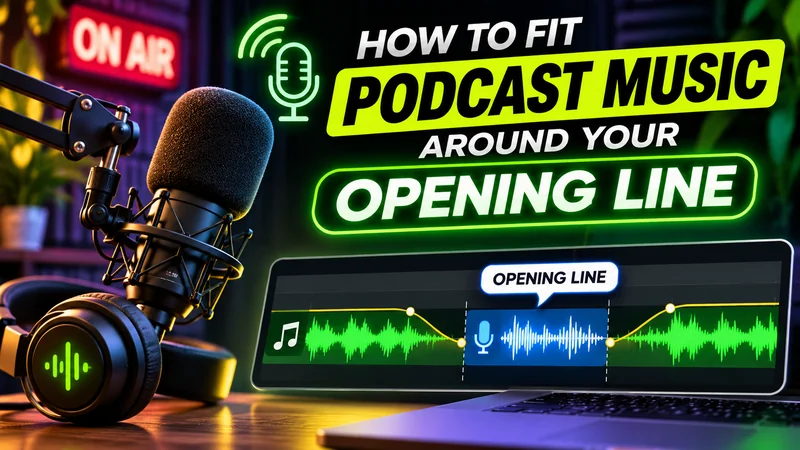
Dropping a full song onto an editing timeline often fights the spoken voice. A podcast intro does not need an entire musical arrangement. Its job is simply to welcome the listener, introduce the show, and step aside so the episode can begin. Building the music cue around your recorded voice keeps your words clear and gets you straight to the topic.
Record the first sentence before choosing the music
Choosing music before knowing your opening words makes it hard to fit sound and speech together. A track that sounds pleasant on its own can easily overpower your voice or force an unnatural speaking pace.
Start by recording your opening sentence to establish your topic and natural pace. For example, a tech podcast might open with: “Today we’re sorting out which laptop upgrades are actually worth doing.”
There is no universal intro duration for every podcast; the timing depends on your spoken line. Once you record that sentence, you can shape the music around your voice instead of trimming your speech to fit a song.
Give the cue one clear job
Before looking for audio, decide what purpose the music serves so you avoid tracks with competing layers.
You have two practical choices:
- A brief musical greeting that plays for a moment and hands over to clean speech.
- A quiet background bed that starts just ahead of your voice and continues at low volume under the sentence.
Music is optional if neither choice helps. If you use music, look for simple arrangements with a steady rhythm, avoiding heavy drum breaks or busy lead melodies that distract from your words.
Pick a source track, then find the useful passage
When you need starting material, you can use a suitable existing track with proper rights, record a simple sound yourself, or try an AI music generator.
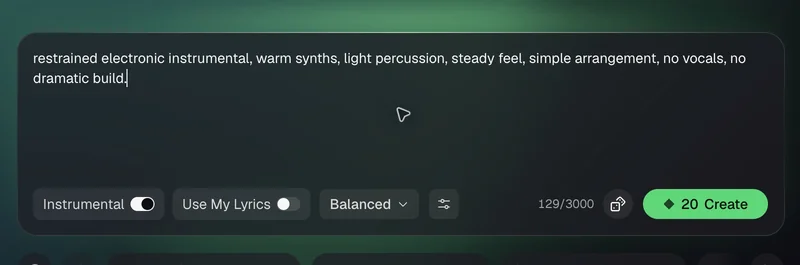
Whichever source you use, pick music for how it will sit under speech, not for how it sounds on its own. If you generate a track, turn vocals off to get an instrumental (instruments only, no singing), and describe the feel you need, for example: “restrained electronic instrumental, warm synths, light percussion, steady feel, simple arrangement, no vocals, no dramatic build.”
A full track is far too long for an intro cue. Rather than trying to use an entire piece, listen through it and select a short, steady passage to work with.
Build the handoff in your audio editor
With your spoken sentence and chosen music clip ready, you can assemble the cue in an audio editor like Audacity.
The goal is to shape the music so your voice stays clear and takes focus right away. If the music plays at full volume while you speak, it will compete with your words. Instead, you want the music to establish the show’s mood for a brief moment, drop down so the listener can easily understand your sentence, and then fade out completely as your voice finishes.
To build this handoff on separate tracks:
- Import your spoken opener and music file onto separate tracks.
- Trim the music track to your chosen excerpt, removing sections before and after.
- Position the music relative to your voice. For a greeting, start the voice as the phrase resolves. For a bed, place the voice shortly after the music starts so listeners hear the tone briefly first.
- Lower the music just before your voice comes in, so the opening plays at full level and the music sits well under your speech. In Audacity, you can draw this dip with the Envelope Tool, or place the voice track below the music track, select the music track, and apply Effect > Volume and Compression > Auto Duck to lower it automatically wherever you speak.
- Create a fade out across the tail of the music. A fade gradually lowers volume until it reaches silence. In Audacity, select the end of the music clip and apply the Fade Out effect under Effect > Fading > Fade Out.
Adjust the fade points while listening to your sentence until the music drops away smoothly.
Know when to change the clip—and when to change the track
Fixing an intro is usually a matter of adjusting placement, but sometimes you need to swap the audio. Use this checklist to decide what to change:
- If the music stops abruptly: Lengthen your fade or start it earlier so the sound tapers off naturally.
- If a musical accent falls directly over a word: Slide the music clip forward or backward so the accent lands in a pause between words.
- If a high lead sound or unwanted vocal clashes with your voice: Pick a different section of the source track, or switch to a track with a simpler arrangement.
- If the cue delays the useful opening: Shorten the music passage, move your voice earlier, or remove the music altogether.
Do not evaluate the transition only inside your editing timeline. Export the opening and check it on everyday devices, such as phone speakers, laptop speakers, or earbuds, to see whether the words remain easy to follow under typical listening conditions.
Save a repeatable opening
Once your intro sounds balanced, organize your project files so you can reuse the cue across future episodes without rebuilding it from scratch.
Store your source music, raw voice recording, editable project file, and approved export together in a dedicated show folder. Keep a clear record of source permissions and usage terms. Always review the source’s terms for your planned release, as some free tracks require attribution in your episode notes.
When preparing your next episode, import the approved cue into your new project and align it with your new opening line. When the listener can hear the introduction clearly and the music reaches a natural handoff, your intro is ready to publish.
Ti potrebbe interessare:
Segui guruhitech su:
- Google News: bit.ly/gurugooglenews
- Telegram: t.me/guruhitech
- Facebook: facebook.com/guruhitechfb
- Instagram: instagram.com/guruhitech_official/
- X (Twitter): x.com/guruhitech1
- Bluesky: bsky.app/profile/guruhitech.bsky.social
- Rumble: rumble.com/user/guruhitech
- VKontakte: vk.com/guruhitech
- MeWe: mewe.com/i/guruhitech
- Skype: live:.cid.d4cf3836b772da8a
- WhatsApp: bit.ly/whatsappguruhitech
Esprimi il tuo parere!
Ti è stato utile questo articolo? Lascia un commento nell’apposita sezione che trovi più in basso e se ti va, iscriviti alla newsletter.
Per qualsiasi domanda, informazione o assistenza nel mondo della tecnologia, puoi inviare una email all’indirizzo [email protected].
Scopri di più da GuruHiTech
Abbonati per ricevere gli ultimi articoli inviati alla tua e-mail.