

Best Free AI Voice Generator: How to Create Natural Voiceovers in Seconds
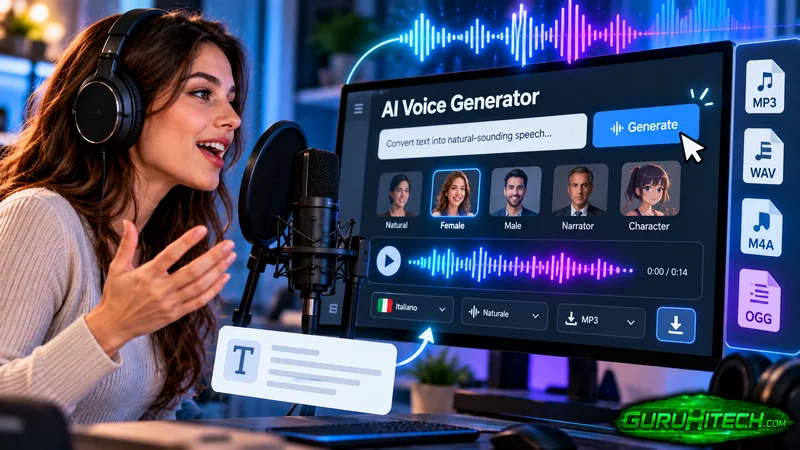
Recording a voiceover used to mean a quiet room, a microphone, and plenty of retakes. Now you can type a script, pick a voice, and get an audio file in under a minute. That is why more creators, teachers, and small business owners are trying text to speech tools for videos, tutorials, and presentations. But not every tool sounds good, and the free ones come with limits. This guide shows you how a natural voice is made, what to look for before you choose, and how to create a clean voiceover. You will also learn rules for responsible use, so your AI voice content stays honest and safe to publish.
Key Takeaways
- A good AI voice generator turns written text into spoken audio in seconds, with no recording gear.
- The script matters as much as the tool. Short, clear sentences sound the most human.
- Check language options, audio controls, export formats, and usage terms before you commit.
- Always listen to the full audio before publishing, and fix any wrong pronunciations.
- If your video could be mistaken for real footage, check platform rules on disclosing AI content.
What an AI Voice Generator Does
An AI voice generator is software that reads your text out loud. You paste in a script, choose a voice, and the tool creates a spoken audio file. This is often called text to speech, or TTS.
Older robot voices sounded flat and choppy. Modern tools use machine learning models trained on large amounts of recorded speech. They learn how people stress words, pause between phrases, and change pitch at the end of a question. The result is a voice that sounds much closer to a person reading a script.
How AI Voices Are Made
You do not need to know the math, but a simple view helps you get better results.
- Text analysis. The tool reads your text and works out how each word should be said, including numbers, dates, and short forms.
- Speech planning. It decides where to pause, which words to stress, and what rhythm fits the sentence.
- Sound creation. A voice model turns that plan into audio you can play and download.
Because the tool is guessing how to read your words, unusual names, short forms, and unclear punctuation can trip it up. That is why preparing your script is part of the job.
Where People Use AI Voiceovers
| Use | Why it works |
| Explainer and how-to videos | Clear, steady narration without recording sessions |
| Social media clips | Fast turnaround for short, frequent posts |
| Online lessons and training | Easy to update a line without re-recording the whole lesson |
| Presentations and slideshows | Adds narration for people who cannot attend live |
| Audio versions of articles | Lets readers listen while they commute or work |
| Product demos | Consistent voice across many videos |
Notice what these have in common. They are informative, repeatable, and often need quick edits. That is where text to speech saves the most time.
What to Look for in a Free AI Voice Generator
Free does not have to mean poor. But free tools often have limits, so check these points first.
| Feature | Why it matters |
| Voice quality | Play a sample with your own script, not only the demo text |
| Languages and accents | Needed if your audience is global or local |
| Audio controls | Speed, pitch, and volume let you match the mood of your video |
| Export options | You need an audio file that works in your editor |
| Free limits | Check character limits, voice lists, and what needs a paid plan |
| Usage terms | Read what you may do with the audio, especially for business use |
| Account and privacy | Know what the tool asks for and how it treats your text |
A tool does not need to win in every row. It needs to fit your project.
How to Create a Voiceover in Seconds
Most browser tools follow the same simple path. One example is an ai voice generator free option from CapCut. According to CapCut’s own page, it runs online in your browser, lets you choose among voices, accents, and languages, and offers controls for speed, pitch, and volume. The company also notes that some premium voices may need a paid plan, so check what is included before you plan a big project.
Here is the process.
- Write or paste your script. Keep paragraphs short. Read them out loud first.
- Pick a voice. Choose one that fits your audience. A calm, warm voice suits tutorials. A brighter voice suits ads and social clips.
- Choose language and accent. Match them to your viewers.
- Adjust the settings. Try a slightly slower speed for teaching, and normal speed for social clips.
- Generate a short test. Listen to one paragraph before you create the full audio.
- Create and download the full audio. Save it with a clear file name.
- Add it to your video or slides. Match the timing with your visuals and captions.
The whole process can take just a few minutes, but the checking step is where quality comes from.
Write Scripts That Sound Natural
A great voice cannot rescue a stiff script. These habits make AI speech sound more human.
- Write for the ear. Use words you would say out loud, not formal words you would only write.
- Keep sentences short. Aim for one idea per sentence.
- Use punctuation as a guide. Commas create short pauses. Full stops create longer ones.
- Spell out tricky items. Write numbers, dates, and short forms the way you want them spoken.
- Fix names with spelling tricks. If a brand name is read wrong, try a phonetic spelling in the script.
- Add breathing room. Split long lists into smaller groups.
Read your script aloud once. If you run out of breath, the AI voice will sound rushed too.
Understanding Speed, Pitch, and Volume
Small changes in these settings can change the whole mood.
| Setting | What it changes | Simple starting tip |
| Speed | How fast the voice speaks | Slow slightly for lessons, keep normal for social clips |
| Pitch | How high or low the voice sounds | Make tiny changes only, since big shifts sound odd |
| Volume | How loud the voice is | Match the level of your background music |
Change one setting at a time and listen again. Large changes tend to make the voice sound fake.
Quality Checks Before You Publish
Take five minutes for this checklist.
- Listen to the full audio with headphones.
- Check names, numbers, and technical words.
- Make sure the audio sits at a comfortable level against music.
- Watch the video once with the voiceover and captions together.
- Ask someone else to listen and tell you if anything sounds odd.
A few small fixes can lift a good clip to a great one.
Responsible Use: Be Honest and Respectful
AI voices are helpful, but they come with responsibilities.
Disclosure. Platforms are paying attention to synthetic media. YouTube, for example, asks creators to disclose realistic altered or synthetic content that viewers could mistake for a real person, place, or event. It lists synthetically generating a person’s voice to narrate a video as one example. It also says that production help such as script writing or automatic captions does not need disclosure. Rules change, so read the current policy of each platform you publish on.
Consent. Never copy a real person’s voice without clear permission. Using someone’s voice or likeness without consent can cause real harm and may break platform rules or laws.
Honesty. If a voice is meant to sound like a real expert or news presenter, tell your audience it is AI. Trust is easier to keep than to win back.
Usage terms. Read the tool’s terms before using audio in paid or commercial projects.
What to Expect from Free and Paid Plans
Free plans on any AI voice generator are great for testing and light use. Paid plans often add more voices, higher limits, or extra features. Instead of guessing, do this: run your real script through the free version, check the quality, and see whether the limits fit your project. Upgrade only if you hit a real wall.
Example: A Small Business Tutorial
This example is invented to show the process, not a record of a real business.
Sara runs a small online shop and wants a two-minute video showing customers how to track their orders. She does not have a quiet space to record.
- She writes a 250-word script in short, simple sentences.
- She reads it aloud and changes three phrases that feel stiff.
- She generates a short test with a calm voice and slows the speed a little.
- The tool misreads her shop name, so she adjusts the spelling in the script and tests again.
- She creates the full audio, adds it to the video, and lines it up with on-screen captions.
- She listens to the final video once with headphones and fixes one pause that felt too long.
The result is a clear tutorial finished in an afternoon. The tool did the speaking, but her script and checks made the difference.
Common Mistakes to Avoid
- Pasting a long, unedited script. Edit for spoken language first.
- Skipping the test clip. One paragraph test saves a lot of rework.
- Choosing a voice that does not fit the topic. Match the tone to the audience.
- Pushing pitch and speed too far. Small changes sound better.
- Ignoring terms and platform rules. Check them before you publish.
Final Thoughts
A free AI voice generator can turn a written script into a clean voiceover in minutes. The best results come from a simple routine: write for the ear, test a short sample, adjust gently, and listen to the finished audio before you publish. Choose a tool by checking voice quality, controls, export options, and terms rather than by promises alone. Use AI voices honestly, get permission before copying anyone’s voice, and follow platform rules. Do that, and you will save time without losing the trust of your audience.
Frequently Asked Questions
What is the best free AI voice generator?
The best one depends on your project. Test each tool with your real script and compare voice quality, language options, audio controls, export formats, and free limits.
Can I use AI voiceovers for YouTube videos?
Yes, many creators do. Check YouTube’s current policy on altered or synthetic content, since realistic content that could be mistaken for real may need a disclosure label.
How do I make an AI voice sound more natural?
Write short sentences, use punctuation to guide pauses, spell out tricky words, and make small speed adjustments. Always listen to a test clip before creating the full audio.
Are free AI voice generators safe to use?
Most are fine for everyday scripts, but read the privacy and usage terms. Avoid pasting confidential or private information into any online tool you do not trust.
Can I use AI-generated audio commercially?
It depends on the tool’s terms. Read them carefully before using audio in paid projects, ads, or products, and confirm what your plan allows.
Ti potrebbe interessare:
Segui guruhitech su:
- Google News: bit.ly/gurugooglenews
- Telegram: t.me/guruhitech
- Facebook: facebook.com/guruhitechfb
- X (Twitter): x.com/guruhitech1
- Bluesky: bsky.app/profile/guruhitech.bsky.social
- Rumble: rumble.com/user/guruhitech
- VKontakte: vk.com/guruhitech
- MeWe: mewe.com/i/guruhitech
- Skype: live:.cid.d4cf3836b772da8a
- WhatsApp: bit.ly/whatsappguruhitech
Esprimi il tuo parere!
Ti è stato utile questo articolo? Lascia un commento nell’apposita sezione che trovi più in basso e se ti va, iscriviti alla newsletter.
Per qualsiasi domanda, informazione o assistenza nel mondo della tecnologia, puoi inviare una email all’indirizzo [email protected].
Scopri di più da GuruHiTech
Abbonati per ricevere gli ultimi articoli inviati alla tua e-mail.