

Dokie AI Review: The Best AI Presentation Maker in 2026
Creating slides takes time. An AI PPT maker can now turn ideas into full decks in minutes.
In this Dokie AI review, we look at why it may be one of the best AI PPT makers in 2026.
What Is Dokie AI?
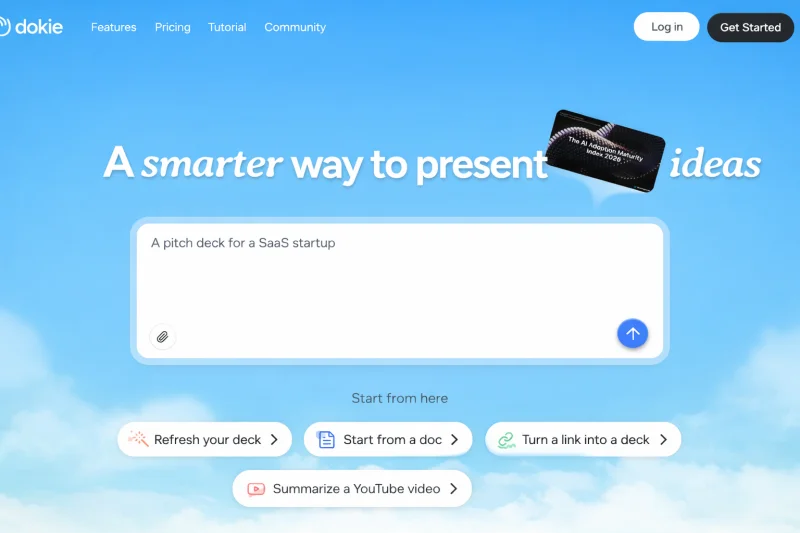
Dokie AI is an AI presentation maker for business works built to help users create clean and useful slide decks fast. It is made for business teams, marketers, students, and anyone who builds slides often.
Instead of starting from a blank page, you enter a topic, paste notes, or upload content. Dokie AI then creates a full slide outline with titles, bullet points, and simple design. It works like a smart AI slides generator that understands structure, not just words.
Many AI tools can write text. Fewer tools can turn that text into a strong slide story. Dokie AI focuses on both.
How Dokie AI Works
Using Dokie AI is simple:
- Enter your topic or paste content.
- Choose the style or tone you want.
- Let the AI PPT maker build your slides.
- Edit and export your deck.
The system first creates a clear outline. Then it turns that outline into slides. This step is important. Good slides need strong structure. Without structure, slides feel messy.
Dokie AI helps with:
- Slide titles
- Bullet points
- Key ideas
- Basic charts
- Clean layout
The goal is not just to save time. The goal is to make slides easier to present.
Why Dokie AI Stands Out in 2026
There are many AI slides generator tools today. Some focus on design. Some focus on fast drafts. Dokie AI focuses on structure and real use.
1. Built for Real PPT Use
Some AI presentation maker tools create web-style pages. They look modern but may not work well in normal business meetings.
Dokie AI creates slides that feel like real PowerPoint decks. This makes it easier for office use.
2. Strong Slide Logic
A good slide deck tells a story. Dokie AI builds slides in a clear order:
- Problem
- Idea
- Plan
- Result
This flow is useful for marketing, sales, and reports.
3. Time Saving
Many users spend hours building slide outlines. Dokie AI cuts this time down to minutes. You still edit and improve, but the hard part is done.
4. Easy Editing
After the AI slides generator creates the deck, you can change:
- Tone
- Length
- Slide count
- Bullet style
This makes the tool flexible.
Key Features of Dokie AI
Let’s break down the main features of this AI PPT maker.
Smart Outline Builder
The outline builder is the heart of Dokie AI. It turns your topic into a clear plan. This is helpful for:
- Marketing plans
- Business reports
- Product launches
- School projects
Instead of random slides, you get a full structure.
Content Expansion
If your notes are short, Dokie AI can expand them into full slide text. If your notes are long, it can shorten them. This makes it a strong AI presentation maker for both rough ideas and detailed drafts.
Clean Slide Design
The design is simple and clean. It does not overload slides with too many effects. This helps your message stay clear.
Export Options
Most users need to share slides. Dokie AI supports export to common formats. This makes it easy to present in meetings.
Who Should Use Dokie AI?
Dokie AI is not only for one type of user. It works for many groups.
Marketing Teams
Marketers build slides often:
- Campaign reports
- Client updates
- Strategy decks
This AI slides generator saves time on first drafts.
Sales Teams
Sales teams need strong pitch decks. Dokie AI helps build clear problem-solution slides fast.
Students and Teachers
Students can use it for class projects. Teachers can use it for lesson slides.
Founders and Startups
Startups often build pitch decks. Dokie AI helps create structured slides quickly.
Real Use Case Example
Imagine you need a marketing report.
Without AI:
- 1 hour for outline
- 1 hour for slide building
- 30 minutes for edits
With Dokie AI:
- 10 minutes for AI draft
- 30–40 minutes for edits
You save time and energy. This is why many users call it one of the best AI PPT makers in 2026.
Dokie AI vs Other AI PPT Makers
Let’s compare Dokie AI with other tools in simple terms.
Dokie AI vs Design-Focused Tools
Some AI presentation maker tools focus on templates and colors. They make slides look pretty. But they may not help much with content.
Dokie AI focuses more on structure and logic. It helps you think through your story.
Dokie AI vs Fast Draft Tools
Some AI slides generator tools create slides very fast but with simple content.
Dokie AI balances speed and quality. The slides often need fewer big changes.
Pros and Cons
Pros
- Strong slide structure
- Easy to use
- Saves time
- Good for business and school
- Clear and clean design
Cons
- Design themes are simple
- May need edits for very deep topics
- Not focused on heavy animation
No tool is perfect. But for structure and speed, Dokie AI performs well.
SEO Benefits for Professionals
If you create content about AI tools, using an AI PPT maker like Dokie AI can also help with:
- Faster content planning
- Clear visual reports
- Better team communication
Many content creators now use AI presentation maker tools to present data and ideas.
Is Dokie AI Worth It in 2026?
In 2026, AI tools are everywhere. The question is not “Should I use AI?” The question is “Which AI tool fits my work?”
If you:
- Create slides often
- Care about structure
- Need PPT-friendly decks
- Want to save time
Then Dokie AI is worth trying.
It may not have the most fancy design effects. But it does what most users need: build strong, clear slides fast.
Tips to Get the Best Results with Dokie AI
To use this AI slides generator well:
- Start with a clear topic.
- Give simple but clear instructions.
- Edit the outline before final slides.
- Adjust tone for your audience.
AI is a helper, not a full replacement. The best results come from mixing AI speed with your own ideas.
The Future of AI PPT Makers
AI PPT maker tools will keep improving. In the future, we may see:
- Smarter data charts
- Better brand control
- Voice-to-slide tools
- Real-time team AI support
Dokie AI is already moving in this direction by focusing on structure and usability.
Final Thoughts on Dokie AI
Dokie AI is a strong AI presentation maker in 2026. It saves time, builds clear structure, and creates slides ready for real use. For many users, it stands out among the best AI PPT makers today.
FAQs
1. What makes Dokie AI different from other AI PPT makers?
Dokie AI focuses on slide structure and real PPT use. Many tools focus on design, but Dokie AI builds clear, logical decks.
2. Can I edit slides after using Dokie AI?
Yes. You can edit text, layout, and tone after the AI slides generator creates your draft.
3. Is Dokie AI good for business presentations?
Yes. It works well for reports, pitch decks, and marketing slides.
4. Is Dokie AI beginner friendly?
Yes. The tool is simple to use. You enter a topic, and the AI presentation maker builds your slides step by step.
AI is changing how we build slides. If you want a smart, simple, and structured AI PPT maker, Dokie AI is one of the best choices in 2026.
Scopri di più da GuruHiTech
Abbonati per ricevere gli ultimi articoli inviati alla tua e-mail.