
Ecommerce Product Videos: Scale Without SKU Drift
ecommerce product videos become difficult at the exact moment they become valuable: when a merchant needs them for many products, channels, languages, or campaigns. One handcrafted hero video can be reviewed frame by frame. A catalog of fifty variants creates a different problem. The wrong image can pair with the wrong model, a price can travel to another SKU, or one approved claim can be rewritten across dozens of exports.
TapVid is an Explainer Video Engine built to organize supplied assets and approved copy into structured videos. For ecommerce sellers and professional content teams, the useful question is not whether one video can look good. It is whether the production system can preserve the real product, exact wording, and correct SKU relationship as volume increases.
This guide presents a catalog-safe workflow. It treats every product video as a controlled combination of a product record, approved asset set, message, and channel specification.
Match the Video Type to the Buyer Question
Not every product needs the same video. Choose the format by the uncertainty a shopper needs to resolve.
| Buyer question | Useful video type | Required evidence |
|---|---|---|
| What does it look like from every side? | Inspection or detail video | Real product footage or images |
| How does it work? | Demonstration | Real steps and outcome |
| Will it fit my situation? | Use-case explainer | Approved scenarios and dimensions |
| What is different between models? | Comparison | Exact model data and matched visuals |
| How do I set it up? | How-to | Approved instructions and safety notes |
| Why should I care now? | Launch or ad cut | Approved product claim and CTA |
A merchant may need more than one format, but each video should answer one main question. A thirty-second product-page clip should not become a catalog, tutorial, testimonial, and brand film at once.
Give Ecommerce Product Videos a SKU Truth Record
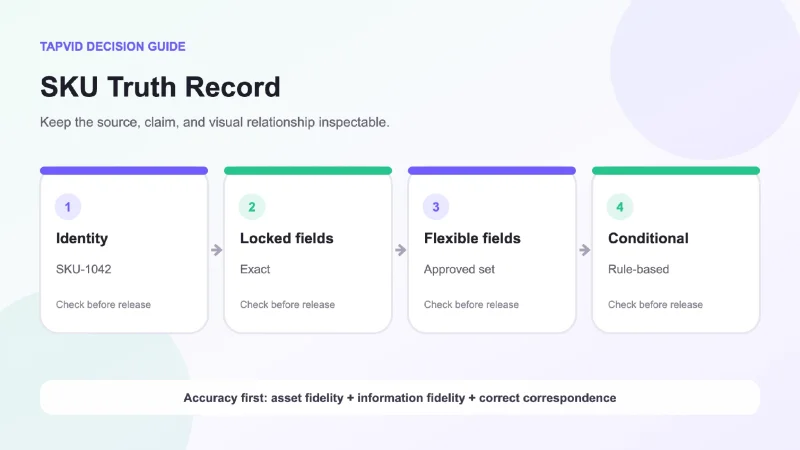
The SKU truth record is the smallest reliable unit in catalog video production. It keeps product facts and assets together.
Include:
- SKU and exact product name.
- Variant attributes such as size, color, capacity, or region.
- Approved hero image and supporting images.
- Packaging and logo files.
- Approved feature and benefit copy.
- Model numbers, dimensions, prices, and disclaimers.
- Claims that are prohibited or unsupported.
- Channel restrictions.
- Owner and review date.
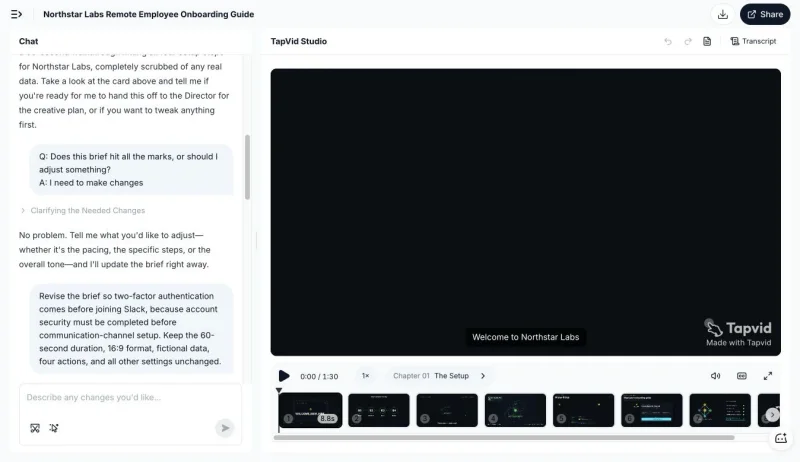
Do not store a product image in one folder and the model data in another without a stable key. Filenames such as blue-final-new.jpg are not enough. The SKU should connect every asset and claim. A documented TapVid test used a fictional Northstar Labs brief and recorded a local request to reorder two defined onboarding actions while preserving the remaining constraints. The screenshot below proves that visible revision context only. It does not prove catalog throughput, accuracy rates, or a customer result.
Separate Locked Fields From Flexible Fields
Not every part of the video needs the same control.
Locked fields must remain exact. These include SKU, product name, model, price, dimensions, capacity, ingredients, warranty wording, legal copy, and regulated claims.
Flexible fields can change inside approved boundaries. These may include the opening hook, transition style, background treatment, music, or CTA phrasing.
Conditional fields appear only when a rule applies. A regional disclaimer, color-specific feature, seasonal offer, or channel note belongs here.
Create a field policy before production. If a locked field is missing, the video should stop rather than guess. If a flexible field is missing, the system may choose from an approved set. This distinction lets the creative layer move without putting product truth at risk.
Design a Catalog Video Template as a Data Contract
A template is not only a visual layout. It is a contract between data and scenes.
Define each scene by purpose and fields:
- Product identity: hero image, exact product name, variant.
- Buyer problem: one approved need or situation.
- Product proof: real asset showing the relevant feature.
- Detail: dimension, material, model, or usage condition.
- Offer or next step: approved CTA and current destination.
For each scene, specify what happens when a field is missing. The safe options are to omit the scene, use an approved neutral alternative, or block the export. Inventing a substitute is not safe.
Templates should also define image behavior. A landscape product photo may not survive a vertical crop. A close-up may hide the package variant. Set rules for fit, crop, padding, and minimum resolution, then flag assets that cannot meet them.
Prevent Product-to-Copy Mismatch
The most dangerous batch error is not a typo. It is correct copy attached to the wrong product.
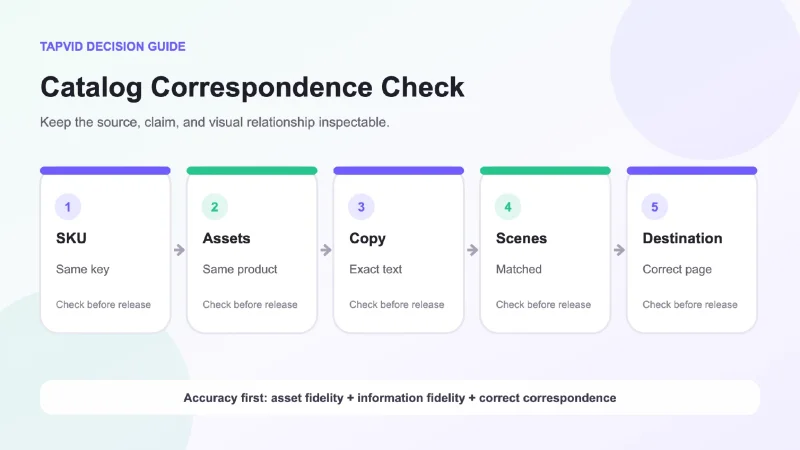
Use one stable SKU key across the product record, asset directory, script, scene manifest, export name, and QA report. Do not join records by product title alone because titles change and variants can share similar names.
Create a correspondence test for every export:
- The product shown matches the SKU in the filename.
- The product name matches the SKU record.
- Model and variant details match the shown asset.
- Price and offer belong to the same product and region.
- The narration describes the visible product.
- The CTA points to the correct destination.
This check should run before a human judges style. A visually weak frame can be improved. A beautiful video for the wrong product can create refunds, complaints, or ad-policy problems.
Build the Master Before the Variants
Approve one master video for a representative SKU. Choose a product that exercises the template, including a long name, several locked fields, multiple images, and at least one conditional statement.
Use the master to test:
- Text length and wrapping.
- Product image fit.
- Caption readability.
- Voice pronunciation.
- Scene timing.
- Disclaimer placement.
- CTA behavior.
- Horizontal and vertical crops.
Do not begin a fifty-SKU batch because one simple product looked good. The representative SKU should expose the edges of the system.
Once the master passes, generate a small pilot across several different products. Review the pilot for repeated error patterns. A correction to the template is cheaper before the full batch.
Review the Batch in Layers
Human review still matters, but it should focus on the right risks.
Layer 1: Record completeness
Check required fields, asset availability, permissions, and destinations before rendering.
Layer 2: Deterministic checks
Check SKU consistency, exact locked copy, image dimensions, export naming, and channel format.
Layer 3: Visual exception review
Review flagged crops, overflow, contrast, pacing, pronunciation, and unusual products. A representative sample can reveal template problems, but critical product correspondence should be checked for every export.
Layer 4: Merchant approval
The product owner confirms that the exported set matches the current catalog and campaign scope.
This layered model avoids two bad extremes: manually rechecking every harmless design decision or trusting a batch because the generation process finished without an error.
Handle Prices and Offers Carefully
Prices, discounts, availability, and shipping statements change faster than product identity. Decide whether they belong in the video at all.
A stable product video can direct viewers to a current product page for price. A campaign video may need a price or offer, but then the source should include region, currency, validity window, and owner. The export should carry an expiration trigger.
Do not reuse a priced video for another market without a new approval. Do not assume that an offer attached to one variant applies to the whole product family.
Create Channel Variants Without Losing Product Truth
A product page, marketplace listing, paid ad, email, and social post need different edits. Keep the SKU truth record stable while changing the channel layer.
Channel rules may control:
- Aspect ratio.
- Maximum duration.
- Safe areas.
- Caption style.
- CTA.
- Offer eligibility.
- Audio assumptions.
- Required disclaimer.
The product layer should not change unless the product source changes. A vertical social cut may remove a detail scene, but it should not paraphrase a locked specification to save space.
For agencies or growth service firms, this separation supports scale. The client approves the product record and core scenes. The production team can create channel variants inside known rules and return only exceptions for review.
Measure the Production System
Track measures that reveal whether scale is safe:
- Percentage of records complete before render.
- First-pass approval rate.
- Number of correspondence errors.
- Number of locked-copy errors.
- Number of crop or overflow exceptions.
- Time from product update to corrected export.
- Number of variants affected by one source change.
Avoid treating raw video count as success. A larger batch with more SKU mismatch is worse, not better. The useful outcome is approved coverage of the catalog with a controlled correction process.
A Catalog-Safe Release Checklist
Before release, confirm:
- Every export has one stable SKU key.
- The product shown matches the product named.
- Locked copy matches the approved record.
- Conditional wording appears only where its rule applies.
- Assets are current and cleared for the intended channel.
- Prices and offers have region and validity controls.
- The CTA points to the correct product destination.
- The representative master and pilot passed.
- Exceptions were reviewed.
- The merchant approved the exact batch.
No catalog process can promise zero mistakes forever. Product data changes and assets are replaced. A controlled system makes drift visible, stops missing critical fields, and narrows corrections to the affected SKU and scenes.
Frequently Asked Questions
What kind of ecommerce product video should I make first?
Start with the buyer question blocking purchase. For a new mechanism, use a demonstration, for a visual product, use inspection or detail footage, for several similar models, use an exact comparison.
How can a small store make videos for many products?
Create a SKU truth record, approve one representative master, pilot several varied products, and generate channel variants from controlled fields. Scale the system only after the pilot exposes template problems.
Should prices appear in product videos?
Only when the campaign needs them and the record includes currency, region, validity, and an owner. Stable product videos often age better when price remains on the current product page.
Can the same video be used on a product page and social media?
The same approved core can be adapted, but channel constraints differ. Use a variant layer for duration, ratio, captions, CTA, and disclaimers while keeping the SKU truth unchanged.
What is the most important quality check in a batch?
Correct correspondence. The visual product, spoken description, on-screen copy, offer, and destination must all belong to the same SKU.
Scale Starts With Identity
The foundation of ecommerce product video is not a template. It is product identity. Connect every asset and claim to one SKU, lock the fields that cannot change, and allow creative variation only inside approved boundaries. That is how a merchant moves from one attractive video to a catalog production system that remains useful as volume grows.
Ti potrebbe interessare:
Segui guruhitech su:
- Google News: bit.ly/gurugooglenews
- Telegram: t.me/guruhitech
- Facebook: facebook.com/guruhitechfb
- Instagram: instagram.com/guruhitech_official/
- X (Twitter): x.com/guruhitech1
- Bluesky: bsky.app/profile/guruhitech.bsky.social
- Rumble: rumble.com/user/guruhitech
- VKontakte: vk.com/guruhitech
- MeWe: mewe.com/i/guruhitech
- Skype: live:.cid.d4cf3836b772da8a
- WhatsApp: bit.ly/whatsappguruhitech
Esprimi il tuo parere!
Ti è stato utile questo articolo? Lascia un commento nell’apposita sezione che trovi più in basso e se ti va, iscriviti alla newsletter.
Per qualsiasi domanda, informazione o assistenza nel mondo della tecnologia, puoi inviare una email all’indirizzo [email protected].
Scopri di più da GuruHiTech
Abbonati per ricevere gli ultimi articoli inviati alla tua e-mail.