

How Banana AI Image Fits Mistakes And Pitfalls
The shift from manual digital creation to generative AI has happened so fast that many content teams are still operating on old mental models. We often treat AI like a faster version of a stock photo site or a more efficient search engine. But when professional workflows are built around the idea of “instant” assets, the focus usually drifts toward speed at the expense of control. This is where most production pipelines break.
In the rush to integrate generative tools, teams frequently fall into a cycle of “prompt-and-pray.” They generate hundreds of variations, hoping one will stick, rather than using the tool’s underlying architecture to steer the output toward a specific brand requirement. For those using Banana AI Image, understanding where this friction occurs—and how to mitigate it—is the difference between a scalable workflow and a chaotic folder full of unusable JPEGs.
The High-Velocity Fallacy in Content Teams
Speed is the most deceptive metric in the AI space. It is easy to measure how many seconds it takes to generate a 16:9 visual, but it is much harder to measure the “cost of rework” when that visual fails to meet the creative brief. Many teams prioritize high-output models like Z-Image Turbo because they provide immediate gratification. While these models are excellent for rapid ideation or mood boarding, relying on them for final deliverables without understanding their specific limitations often leads to a “flatness” in the creative output.
The mistake here isn’t the speed itself; it’s the lack of a secondary review or refinement step. In a rush, creators often bypass the settings that actually provide the control they need. For example, ignoring the “Seed” parameter is a common pitfall. If you find a style or a specific character composition that works, losing that seed number because you’re rushing to the next prompt makes it nearly impossible to maintain visual consistency across a series of images.
Choosing the Wrong Engine for the Task
One of the primary strengths of Banana AI is the variety of models available, from Seedream 4.0 to Banana Pro. However, a common mistake is treating these models as interchangeable. Content teams often default to whatever is “New” or “Popular” without testing which engine handles their specific subject matter best.
Seedream 4.0, for instance, offers a level of artistic nuance that a “Turbo” model might sacrifice for the sake of generation speed. If a team is working on a high-concept marketing campaign where lighting and texture are paramount, using a speed-optimized model will likely result in assets that feel “uncanny” or lack the necessary depth. Conversely, using a heavy, detail-oriented model for simple social media thumbnails might be a waste of processing credits and time.
There is also a persistent uncertainty regarding how different models handle specific brand-unique color palettes. While AI has become remarkably good at following text prompts for “teal and orange” or “minimalist white,” it still struggles with precise HEX code adherence. Expecting a model to perfectly replicate a specific brand color without post-production color grading is a common expectation that needs to be reset. AI is a starting point for color, not a final destination.
The Neglect of Aspect Ratio and Resolution Logic
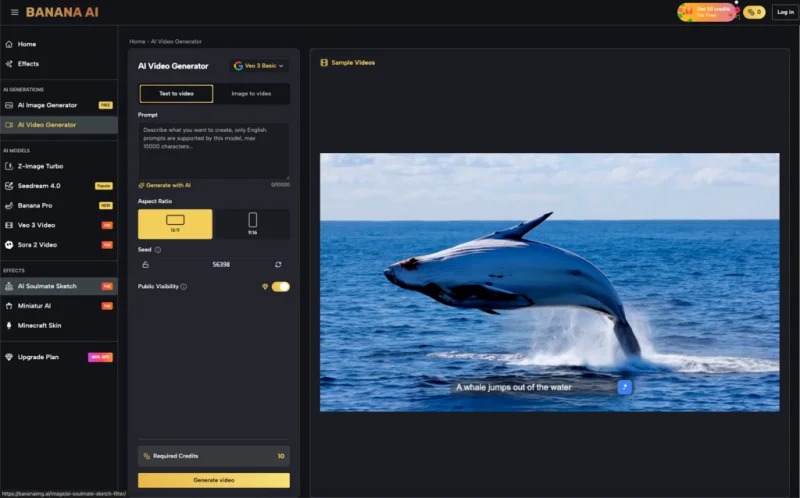
In a production environment, resolution isn’t just about pixels; it’s about the “compositional logic” of the AI. A major pitfall occurs when teams generate assets in a standard 1:1 square format because it’s the default, intending to crop them to 16:9 or 9:16 later.
Generative models don’t just “fill” a frame; they compose elements based on the aspect ratio. If you prompt for a “cinematic landscape” in a square frame and then try to crop it into a wide view, you lose the horizons and the peripheral details that the AI would have naturally generated if the 16:9 setting had been selected from the start. Banana AI Image allows for these specific ratio selections, yet creators in a hurry often overlook this, leading to awkward compositions that require significant manual cleanup in Photoshop.
Prompt Drift and the “More is More” Mistake
There is a tendency to believe that longer, more complex prompts lead to better images. In reality, “prompt drift” is a significant issue. When a team feeds a 500-word paragraph into an AI image generator, the model often experiences a weighting conflict. It might prioritize the first three adjectives and completely ignore the lighting instructions at the end of the text.
The mistake here is lack of iterative refinement. Instead of starting with a simple core concept and layering in complexity through the “Image to Image” or “Prompt Refinement” tools in Banana AI, teams try to achieve the final result in a single shot. This rarely works for professional-grade assets. The most successful workflows we see are those that treat the prompt like a conversation—starting broad, identifying what worked, and then using specific modifiers to tighten the frame.
The Limitation of Spatial Relationships
It is important to acknowledge a current limitation in the technology: spatial reasoning. Even with advanced models, AI still struggles with complex interactions between multiple objects or characters. For example, if a prompt requires a person “holding a specific tool while looking over their left shoulder at a second person,” the AI may hallucinate extra limbs or merge the objects.
Teams that set up workflows for speed often assume the AI can handle these complex arrangements autonomously. When it fails, they blame the tool. A more mature approach involves acknowledging this limitation and planning for it. This might mean generating the character and the background separately and compositing them, or using a “Sketch to Image” workflow to give the AI a spatial blueprint to follow. Without this level of control, speed becomes a liability, as you spend more time fixing “impossible” hands or distorted perspectives than you would have spent drawing it from scratch.
Managing Credits and Production Scarcity
Even in “unlimited” or high-credit environments, there is a psychological mistake teams make regarding resource management. When generations feel “free” or low-cost, the quality of the prompting tends to drop. There is a lack of intentionality.
In a professional setting, every generation should have a purpose. Banana AI provides a streamlined interface that encourages rapid creation, but the “Pro” creator knows that the real power lies in the “Advanced Settings.” The mistake of ignoring these—such as the “Negative Prompt” field—is what leads to the repetitive, generic “AI look” that many brands are trying to avoid. Negative prompts are arguably as important as positive ones for maintaining control, allowing you to specifically exclude “deformed features,” “blurry backgrounds,” or “text” that the AI might otherwise hallucinate into the scene.
The Illusion of Human-Free Production
The final and perhaps most damaging mistake is the belief that a high-speed AI workflow removes the need for a creative director or a lead designer. AI is an incredibly powerful brush, but it is still just a brush. It lacks the ability to judge whether an image truly aligns with a brand’s “vibe” or emotional resonance.
We see teams automate their entire social media asset pipeline, only to realize three weeks later that their feed looks disconnected and robotic. This is where the “expectation-reset” is most needed. AI can speed up the execution by 90%, but the remaining 10%—the curation, the refinement, and the final “vibe check”—is where the value is actually created. If you remove the human from the loop to save time, you end up with a high-volume output of mediocrity.
Building a Balanced Workflow
To avoid these pitfalls, teams should view Banana AI not just as a generator, but as a modular creative suite. This means:
- Standardizing Aspect Ratios: Don’t let the AI guess. Define the output format before the first prompt is ever written.
- Leveraging Image-to-Image: Instead of relying solely on text, provide the AI with a reference image for composition and color. This provides more control than a 100-word prompt ever could.
- Iterating in Stages: Use a fast model like Banana AI Image for initial brainstorming, then switch to a higher-fidelity model like Seedream 4.0 for the final render.
- Embracing “Seed” Consistency: Document the seed numbers for successful generations to ensure that future assets can maintain the same stylistic DNA.
The transition from manual creation to AI-assisted production is not about finding a “magic button” that does the work for you. It’s about using tools like Banana AI to remove the grunt work so that creators can spend more time on the high-level decisions that actually matter. Speed is a byproduct of a well-organized workflow, but it should never be the primary goal. When control is sacrificed for velocity, the “efficiency” gained is usually lost in the correction phase. Focus on the settings, understand the model limitations, and treat the AI as a collaborator that needs a clear, firm hand to produce its best work.
Ti potrebbe interessare:
Segui guruhitech su:
- Google News: bit.ly/gurugooglenews
- Telegram: t.me/guruhitech
- Facebook: facebook.com/guruhitechfb
- Instagram: instagram.com/guruhitech_official/
- X (Twitter): x.com/guruhitech1
- Bluesky: bsky.app/profile/guruhitech.bsky.social
- Rumble: rumble.com/user/guruhitech
- VKontakte: vk.com/guruhitech
- MeWe: mewe.com/i/guruhitech
- Skype: live:.cid.d4cf3836b772da8a
- WhatsApp: bit.ly/whatsappguruhitech
Esprimi il tuo parere!
Che ne pensi di questa notizia? Lascia un commento nell’apposita sezione che trovi più in basso e se ti va, iscriviti alla newsletter.
Per qualsiasi domanda, informazione o assistenza nel mondo della tecnologia, puoi inviare una email all’indirizzo [email protected].
Scopri di più da GuruHiTech
Abbonati per ricevere gli ultimi articoli inviati alla tua e-mail.