

How to Use a Free Online Image to Video AI Generator to Create Viral Content Easily
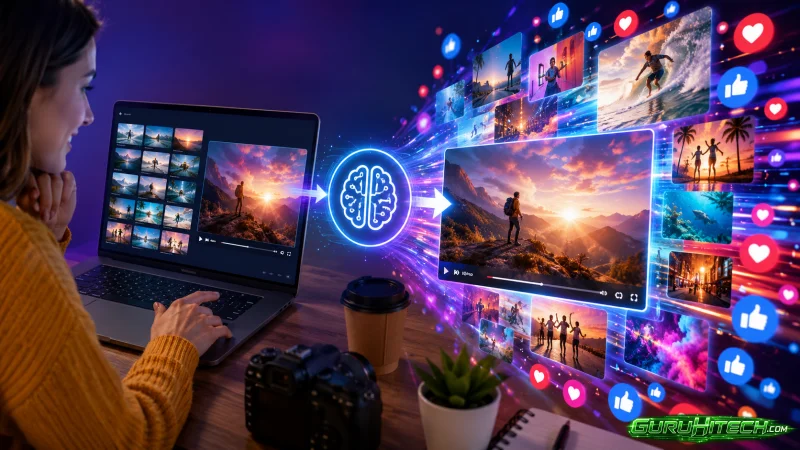
Creating videos that attract thousands or even millions of views used to require expensive cameras, advanced editing software, and years of experience. Today, that barrier has largely disappeared. Thanks to the latest AI technology, anyone can transform a single image into an engaging video with just a few clicks. A modern Image to Video AI Generator makes video creation accessible to beginners, while an advanced AI Video Generator automates animations, motion effects, and cinematic transitions that once demanded professional editing skills.
The growing popularity of short-form content on platforms such as TikTok, Instagram Reels, YouTube Shorts, and Facebook has also changed what audiences expect. People want quick, visually appealing videos that immediately capture their attention. AI tools help creators meet that demand by turning ordinary photos into dynamic content that is ready to share in minutes.
If your goal is to create videos that people enjoy watching and sharing, understanding how to use an AI-powered video generator effectively is just as important as choosing the right tool.
Start With an Image That Already Captures Attention
Every successful AI-generated video begins with a strong image. Artificial intelligence can create movement, but it cannot completely transform a weak or poorly composed photograph into engaging content.
Choose an image that has a clear subject and enough visual detail to support animation. A travel photo with mountains in the background, a beautifully designed living room, a close-up product image, or even a portrait with expressive lighting can all serve as excellent starting points.
High-resolution images generally produce smoother animations because the AI has more detail to work with. Sharp focus, balanced lighting, and a clean composition often make the final video look far more professional.
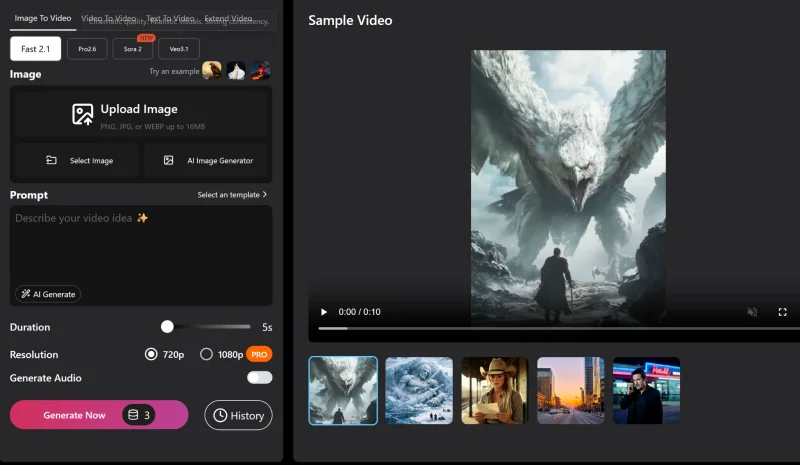
Before uploading an image into an Image to Video AI Generator, ask yourself a simple question: “Would this image grab someone’s attention if it appeared in a social media feed?” If the answer is yes, it has the potential to become an engaging video.
Let Motion Support the Story
One common mistake beginners make is adding unnecessary movement simply because the software allows it. Viral videos are rarely successful because they contain dramatic effects alone. Instead, every animation should help tell a story.
Imagine a photograph of a quiet beach at sunset. Gentle waves, moving clouds, and a slow camera zoom create a peaceful atmosphere. On the other hand, fast camera rotations and exaggerated visual effects would distract from the original image rather than enhance it.
The same principle applies to portraits, product photography, architectural designs, and illustrations. Natural movement usually creates a more immersive experience than excessive animation. An AI Video Generator works best when motion feels intentional instead of random.
Write Prompts That Give the AI Clear Direction
Most modern AI video tools rely on prompts to understand what users want. Rather than using vague instructions, describe the scene as though you were explaining it to a filmmaker. For example, instead of requesting a simple animation, explain how the environment should behave. You might describe soft sunlight entering through a window, leaves moving gently in the breeze, or a slow cinematic camera movement toward the subject.
Specific prompts give the AI more context, helping it generate smoother and more realistic results. Small adjustments to your wording can often produce significantly different videos, so don’t hesitate to experiment until you find the style that matches your vision. The more descriptive your instructions, the more effectively the AI can interpret your creative ideas.
Understand What Makes Content Shareable
Many creators focus only on visual quality, but viral content depends on more than impressive graphics. People share videos because they evoke curiosity, emotion, inspiration, or surprise. Think about the reaction you want viewers to have. A product launch should generate excitement, while a travel video might inspire people to visit a destination. Interior design transformations often satisfy viewers because they reveal dramatic before-and-after changes.
When planning a video, consider the emotional response first. Once that goal is clear, use the Image to Video AI Generator to create animations that reinforce the message rather than distract from it. Strong storytelling often outperforms complicated editing.
Keep the Viewing Experience Simple
Short-form platforms reward videos that communicate their message quickly. This does not mean every video must be only a few seconds long, but it does mean every second should contribute to the overall experience.
Avoid trying to include too many visual effects or multiple ideas within one clip. A focused video built around a single image often feels cleaner and more memorable than one overloaded with transitions and animations. AI makes it easy to experiment, but simplicity usually produces stronger results.
Professional creators often rely on subtle movement because it keeps the audience focused on the subject rather than the technology behind it.
Experiment Instead of Settling for the First Result
One of the greatest advantages of using an AI Video Generator is the ability to generate multiple versions quickly. Rather than accepting the first output, try changing your prompt, adjusting the camera movement, or selecting a different animation style. Sometimes a minor adjustment creates a much stronger result.
For example, replacing a fast zoom with a slow cinematic pan can completely change the mood of a scene. Likewise, changing lighting from bright daylight to warm evening tones can make a promotional video feel more emotional and inviting. Professional creators rarely publish the first version they generate. They compare several variations before choosing the strongest one.
Adapt Videos for Different Platforms
Every social media platform has its own audience and viewing habits. A vertical video that performs well on TikTok may require slight adjustments before being shared on YouTube Shorts or Instagram Reels. Fortunately, many AI tools allow users to export videos in different aspect ratios, making it easier to reuse the same project across multiple platforms.
Instead of creating separate videos from scratch, creators can simply adjust the framing while keeping the core animation unchanged. This saves time while helping maintain a consistent visual identity across channels. An efficient workflow is one of the biggest reasons AI-powered video creation has become so popular among digital marketers and content creators.
Combine AI With Your Own Creativity
Artificial intelligence is an excellent production assistant, but creativity still comes from the person using it. AI can generate movement, improve visual quality, and automate technical tasks, but it cannot fully understand your brand, your audience, or your storytelling goals.
The most engaging videos usually combine AI-generated visuals with human creativity. Adding thoughtful captions, selecting suitable music, choosing the right pacing, and understanding audience preferences all contribute to better results. Rather than viewing AI as a replacement for creative skills, consider it a tool that allows you to bring your ideas to life more efficiently.
Why AI Video Creation Is Becoming the New Standard
The popularity of AI-generated videos continues to grow because they solve one of the biggest challenges facing creators today: producing more content without sacrificing quality.
Instead of spending hours learning complex editing software, beginners can now create visually impressive videos in a fraction of the time. Businesses can launch campaigns faster, educators can make lessons more engaging, and online sellers can showcase products without arranging expensive video shoots.
As AI models continue to improve, users can expect even smoother animations, higher-quality video outputs, and greater creative control. These advancements will make video production even more accessible for individuals and businesses of every size.
Conclusion
Creating engaging content no longer depends on professional editing experience or expensive production equipment. With the help of an Image to Video AI Generator, anyone can transform a high-quality image into a compelling video that captures attention on today’s most popular social platforms. An advanced AI Video Generator handles the technical side of animation, allowing creators to focus on storytelling, creativity, and audience engagement.
The key to producing videos with strong viral potential lies in choosing meaningful images, writing thoughtful prompts, keeping animations natural, and refining multiple versions before publishing.
Scopri di più da GuruHiTech
Abbonati per ricevere gli ultimi articoli inviati alla tua e-mail.