

Avoiding SPF Flattening Problems While Reducing DNS Lookups
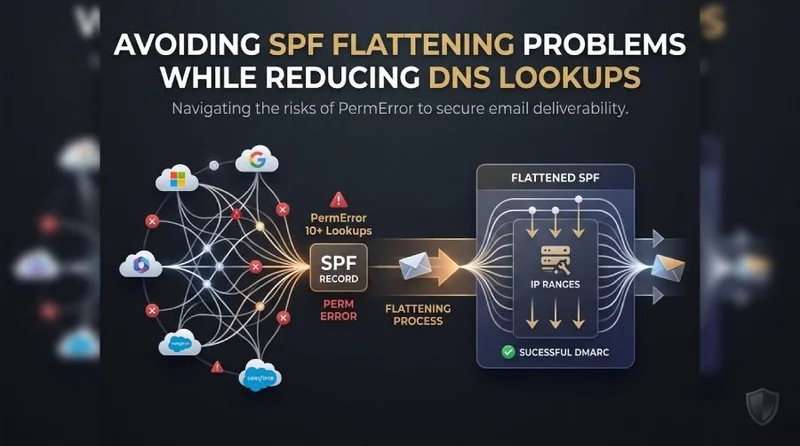
SPF DNS lookup limits can become a major challenge when businesses rely on multiple third-party email services. Complex chains may push an SPF record beyond the 10-DNS-lookup limit, resulting in PermError and authentication failures. SPF flattening can help reduce these lookups, but improper flattening may create outdated IPs, oversized records, and maintenance issues. Understanding these risks and using the right flattening strategy can help maintain reliable email authentication and deliverability.
Why SPF DNS Lookup Limits Matter
Email authentication protocols like Sender Policy Framework (SPF) play a crucial role in preventing email spoofing and enhancing deliverability. A well-formed SPF record is essential for passing authentication checks, supporting DMARC policies, and ensuring that only authorized senders can transmit emails on behalf of your domain. However, SPF is subject to a strict DNS lookup limit, defined by RFC 7208, which impacts how you can structure your records.
Every time an SPF record uses an include mechanism, A mechanism, MX mechanism, or redirect mechanism, it may trigger additional DNS lookups as part of the authentication process. Due to the SPF DNS lookup limit of 10 queries, exceeding this threshold results in SPF failures and potentially a PermError. Reaching this limit is common when organizations employ many third-party email vendors—like Google Workspace, Microsoft 365, SendGrid, Mailchimp, or Salesforce—or when extensive IP ranges are authorized for email transmission.
Exceeding the SPF lookup limit directly threatens email deliverability, causing spikes in SPF fail rates and entries in DMARC reports. Thus, the ability to efficiently reduce DNS lookups while respecting authentication standards is imperative for large cloud services, enterprise domain portfolios, and businesses dependent on third-party email senders.
What SPF Flattening Is and When It Helps
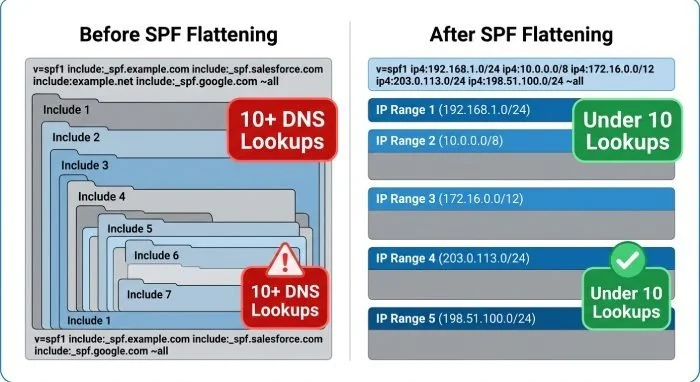
SPF flattening is a strategic method to stay within the 10 DNS lookup limit imposed by RFC 7208. Rather than relying on multiple include mechanisms, SPF flattening consolidates the resolved IP addresses directly into the SPF record, transforming nested includes into a streamlined list of IPs.
This process yields a flattened SPF record, which replaces potentially problematic include chains with explicit IP addresses or IP ranges. Flattening either happens manually (manual flattening), dynamically (dynamic SPF flattening), or via managed hosted SPF solutions. By reducing the use of includes, the final static SPF record makes DNS lookups predictable, lessening the risk of PermError and authentication issues.
When should SPF flattening be used?
- When leveraging multiple third-party vendors whose SPF records contain several nested includes, such as Mandrill, Zendesk, Amazon SES, or Sendinblue.
- When DMARC aggregate reports show SPF failures attributed to DNS lookup excess.
- For organizations with complex SPF configurations, especially across vast domain portfolios or with frequent vendor IP changes.
While SPF flattening is indispensable for controlling DNS lookups and avoiding lookups cascade, it must be applied with caution to prevent record bloat and maintain ease of ongoing management.
Common SPF Flattening Problems to Avoid
1. Record Bloat and DNS Size Limits
Flattened SPF records can grow excessively large since all authorized IP addresses referenced in includes are written directly into the DNS TXT record. DNS registrars often have limits on TXT record size (typically 255 characters per string and up to 512 bytes for query responses). Exceeding these constraints may cause critical portions of your SPF configuration to be ignored during record validation, introducing authentication failures.
2. Stale IP Addresses Due to Static Flattening
If static SPF flattening is performed without automated updates, your record may reference outdated IP ranges. Many cloud services and third-party senders—like Outlook.com, PowerDMARC, Mailchimp, or Zoho—periodically update their sending IPs without notice. Outdated IPs can lead to legitimate mail being rejected or even SPF pass/fail rates dropping, affecting email deliverability and authentication checks.
Manual flattening increases the risk of human error during record updates, challenging proper record maintenance and raising the likelihood of missed vendor IP changes.
3. Loss of Centralized Management and Auditing
A static flattened SPF record obscures the original sources of authorized senders. If you use DMARC reporting or perform SPF audits, tracking which external service an individual IP refers to becomes difficult. This complicates SPF workspace visibility, aggregate reporting, and centralized management—particularly critical for enterprise environments and cloud services.
4. Nested Include Chains Still Undetected
In some situations, flattening may not address nested include issues fully. For example, an upstream SPF record from a third-party vendor may contain deeply nested includes that exceed the lookup limit even before flattening is applied.
5. Insufficient Monitoring and Automated SPF Management
A one-time flattening action doesn’t account for ongoing SPF record changes. Without tools like an automated SPF flattener or PowerDMARC flattening tool, organizations risk silently falling out of compliance with authentication standards as their DNS records become outdated or oversized.
Safer Strategies for Reducing SPF DNS Lookups
Automated and Hosted SPF Solutions
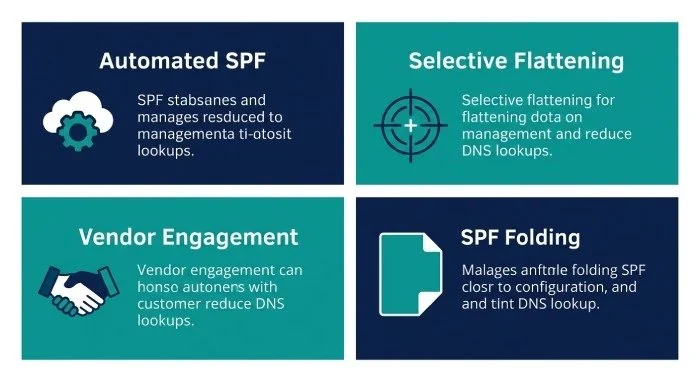
To mitigate the pitfalls of static SPF flattening, organizations should favor hosted SPF services or advanced dynamic SPF flattening tools. Hosted SPF platforms like PowerSPF automatically retrieve, monitor, and update the IP addresses in your SPF record, accounting for vendor IP changes and reducing manual intervention. This dynamic approach minimizes human error, maintains up-to-date authentication, and streamlines centralized management across large domain portfolios.
Selective Flattening and Include Mechanism Optimization
Analyze your SPF configuration using an SPF checker or auditing tool to identify which mechanisms and nested includes drive DNS lookup bloat. Replace only the most problematic nested includes with flattened IP ranges, retaining indirect includes for vendors with stable SPF records and low IP churn. Balance static and dynamic approaches as the situation dictates.
Vendor Engagement and Authentication Standards Review
Work with major email vendors—such as SendGrid, Salesforce, or Mailchimp—to understand their SPF and DKIM authentication practices, frequency of IP range changes, and best-practices documentation for SPF configuration. Proactively monitor vendor announcements regarding SPF record changes and incorporate this feedback into your record maintenance processes.
Leverage SPF Macros, MX, and A Mechanisms Wisely
Structure SPF records to use MX and A mechanisms only where authoritative and predictable. For large or complex environments, evaluate whether SPF Macros or the redirect mechanism can centralize control without introducing excess lookups. Avoid unnecessary inclusion of broad IP ranges unless required for legitimate business communications.
SPF Folding and Record Validation Techniques
When flattened SPF syntax approaches DNS size limits, employ SPF folding techniques to break long records into multiple strings. Always validate your flattened SPF record using an SPF checker and confirm with DMARC reporting to ensure high SPF pass/fail rates and compliance with RFC 7208.
Ongoing SPF Monitoring and Maintenance Best Practices
Continuous SPF Failures Monitoring
Deploy automated SPF failures monitoring to catch PermError events, excessive DNS lookups, and other authentication issues as they arise. Integrate DMARC reports with your SPF workspace to view aggregate reports and pinpoint domains or vendors causing failures.
Periodic SPF Audit and Record Maintenance
Schedule regular SPF audits, especially after onboarding new third-party email senders or updating cloud services. Use auditing utilities to check for nested includes, IP range drift, and the effectiveness of the flattened SPF record over time.
Automated Updates and SPF Flattener Tools
Invest in automated SPF management solutions such as the PowerDMARC flattening tool or a reputable SPF flattener. These tools offer automated updates, ensure that your flattened SPF stays current, and help you adapt to rapid vendor IP changes without violating authentication standards or DNS size limits.
Centralized Management for Large Domain Portfolios
For organizations with multiple domains, employ centralized management platforms such as AutoSPF to streamline SPF configuration, consistent record maintenance, and reduce DNS lookups across your domain portfolio. Leverage hosted SPF and cloud-based SPF flattening solutions to minimize fragmentation, foster standardized authentication checks, and prevent human error.
By applying these best practices—regular auditing, dynamic updates, record validation, automation, and careful flattening—organizations can reduce SPF DNS lookups, sustain compliance with authentication standards, and maximize email deliverability across all cloud services and email vendors.
Ti potrebbe interessare:
Segui guruhitech su:
- Google News: bit.ly/gurugooglenews
- Telegram: t.me/guruhitech
- Facebook: facebook.com/guruhitechfb
- Instagram: instagram.com/guruhitech_official/
- X (Twitter): x.com/guruhitech1
- Bluesky: bsky.app/profile/guruhitech.bsky.social
- Rumble: rumble.com/user/guruhitech
- VKontakte: vk.com/guruhitech
- MeWe: mewe.com/i/guruhitech
- Skype: live:.cid.d4cf3836b772da8a
- WhatsApp: bit.ly/whatsappguruhitech
Esprimi il tuo parere!
Ti è stato utile questo articolo? Lascia un commento nell’apposita sezione che trovi più in basso e se ti va, iscriviti alla newsletter.
Per qualsiasi domanda, informazione o assistenza nel mondo della tecnologia, puoi inviare una email all’indirizzo [email protected].
Scopri di più da GuruHiTech
Abbonati per ricevere gli ultimi articoli inviati alla tua e-mail.