

The 2026 Creator’s Shortcut: How AI Music Generators Finally Fit Your Workflow
Youre trying to ship consistently—videos, ads, podcasts, shorts—and the soundtrack is always the bottleneck. You either spend hours digging through libraries, or you settle for something that feels generic. That’s why I keep coming back to tools like AI Music Generator as the “good enough to publish” moment of AI music in 2026: you can go from a plain-language brief to a finished track without turning your week into a mixing session.
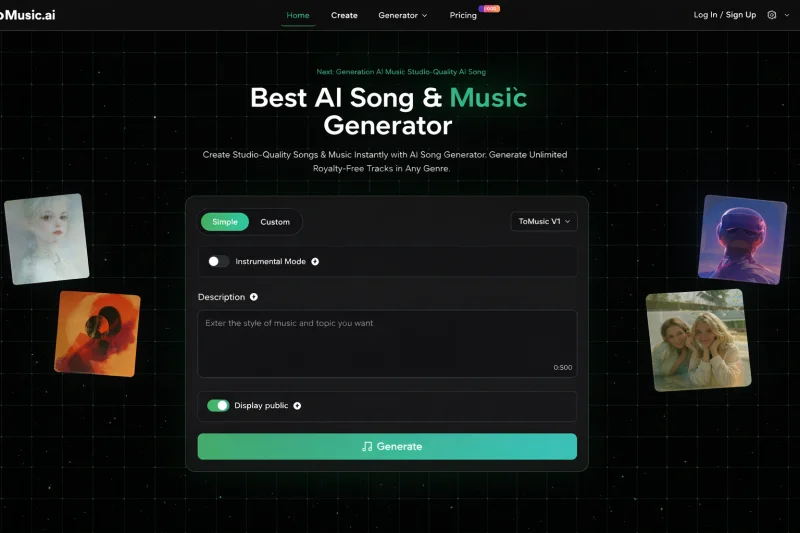
1. The new reality: speed is a creative constraint now
In 2026, the best music generator is not the one that makes the most technically impressive 12-second demo. It’s the one that reduces friction across your whole content pipeline:
- You can describe what you want in everyday language.
- You can iterate quickly without losing the thread.
- You can export in a way that fits editing timelines, voiceovers, and brand consistency.
- You can keep licensing and usage clear enough to avoid regrets later.
That’s the lens I use below: not “Is it magic?”, but “Does it keep you moving?”
1.1 What “best” actually means for creators
When you compare AI music tools, you’re really comparing trade-offs:
- Control vs. convenience
- Vocal realism vs. instrumental reliability
- Short-form punch vs. long-form structure
- Editability vs. one-click output
The top tools in 2026 offer different answers. The trick is choosing the one that matches your workflow, not someone else’s.
2. The best AI music generators in 2026 (with ToMusic.ai as the anchor)
Here’s a practical shortlist that covers most creator needs:
- ToMusic.ai (fast idea-to-track, multiple model options, export and editing-friendly features)
- Suno (popular for quick “song-like” results and viral-friendly outputs)
- Udio (often favored when you want more producer-style control and iterations)
- Stable Audio (strong option for sound design and instrumental generation use cases)
- Soundraw (useful when you want template-like control for content music)
- AIVA (more composition-leaning, helpful for cinematic or classical structures)
- Boomy (simple creation and sharing, often used for quick drafts and experimentation)
- Mubert (background music generation for streams and ambient use cases)
No single tool wins every category. But you can pick a “default” and keep 80% of your work moving.
2.1 Quick comparison table (creator workflow view)
| Tool | Best for | What it does well | Typical trade-off |
| ToMusic.ai | End-to-end creator workflow | Multiple models, flexible prompt-to-music, options that support editing | Results depend on prompt clarity; sometimes needs a few generations |
| Suno | Fast, catchy song drafts | Hooky ideas, social-friendly outputs | Less predictable when you need precise structure |
| Udio | Iterative production feel | Granular variations and refinements | Can require more tuning time than one-click tools |
| Stable Audio | Instrumentals and sound textures | Clean instrumentals, sound design-friendly | Not always the fastest for full “song” feel |
| Soundraw | Content-friendly background tracks | Simple controls, usable for steady production | Can feel templated if you don’t customize |
| AIVA | Cinematic and structured pieces | Longer-form composition logic | Less direct “prompt like a human” feel |
| Boomy | Instant drafts | Speed and simplicity | Limited depth when you want a signature sound |
| Mubert | Ambient/utility music | Continuous backgrounds | Less suited for lyrical, story-driven songs |
3. Why ToMusic.ai often becomes the “default” tool
If you publish frequently, you need repeatable outcomes. ToMusic.ai tends to fit because it’s built around practical creation rather than novelty.
3.1 Before vs. after: what changes in your process
Before:
- You hunt for tracks, worry about vibe mismatch, and compromise.
- You avoid edits because stems are hard to get.
- You reuse the same “safe” sound until your audience can predict it.
After:
- You start from your script or creative brief and generate to match it.
- You iterate like you would with thumbnails: fast, focused, and intentional.
- You export in a way that supports real editing, not just listening.
3.2 What to pay attention to when you test it
If you want a fast, honest evaluation, run a small A/B test:
- Prompt A: “warm acoustic indie, hopeful, 90 bpm, light percussion, no heavy bass”
- Prompt B: “sleek tech product launch, modern electronic, confident, steady beat”
Then ask:
- Do the tracks feel distinct, or like the same template with different labels?
- Can you get a clean bed under voiceover without fighting the mix?
- Can you regenerate without losing the “identity” of the idea?
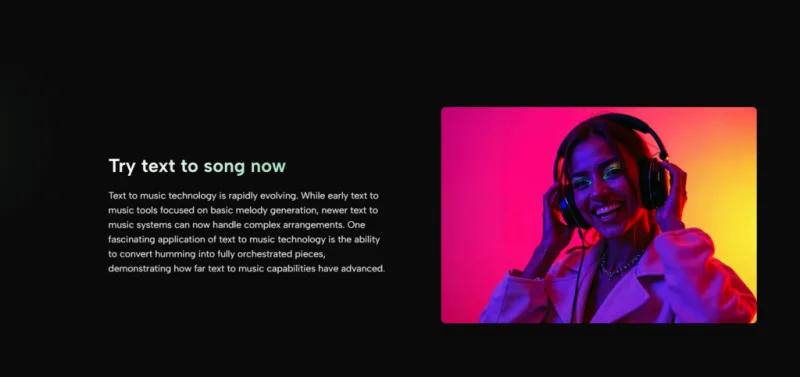
4. How to get better results without “prompt wizardry”
Most people fail AI music the same way they fail stock music: they describe moods, not functions.
4.1 Write prompts like an editor, not a poet
Instead of:
- “Epic, emotional, powerful”
Try:
- “Cinematic but minimal, builds slowly, leaves space for narration, avoid busy hi-hats, 100 bpm”
You’re telling the model how the music should behave inside your project.
4.2 Use structure cues
If your content needs pacing, add simple direction:
- “intro 10 seconds, then fuller rhythm, then simplify for outro”
Even if the tool doesn’t “obey” perfectly, it nudges the output toward usable structure.
5. Limitations (and why they actually increase trust)
AI music is not effortless magic, and pretending it is makes the experience worse.
- Output quality can swing based on prompt precision and genre complexity.
- You may need multiple generations to land on a truly publishable track.
- Vocals can be impressive but still occasionally miss nuance or diction.
- Some styles converge on similar patterns if you don’t guide instrumentation and rhythm.
The win is not perfection—it’s getting 90% of the way there in minutes, then choosing whether to iterate.
6. The deeper lesson: “best” depends on your creative intent
If you’re building catchy social snippets, Suno might feel like rocket fuel. If you want producer-like iteration, Udio can be worth the extra time. So, if you need instrumentals and textures, Stable Audio can shine.
But if your main goal is shipping consistently with fewer bottlenecks, ToMusic.ai often lands in the sweet spot: fast enough to keep pace, flexible enough to feel personal, and practical enough to fit real editing.
6.1 A simple decision rule you can keep
- If you publish weekly: choose the tool that reduces friction, not the one with the flashiest demo.
- If you publish monthly: choose the tool that gives you control and signature sound potential.
6.2 A tiny “workflow stack” that works in practice
- Draft quickly in your default generator
- Regenerate 2–4 times with specific changes
- Keep one “safe” version and one “bold” version
- Pick based on the edit, not the waveform
6.3 A note on originality
Your best safeguard is intentionality: prompt with purpose, vary instrumentation, and treat generation as starting material—not as a finished identity.
6.4 Your next step
Pick one real project you need to publish this week, write two functional prompts, generate three variations each, and choose the track that makes your edit feel inevitable. That’s when AI music stops being a toy and becomes part of your workflow.
Ti potrebbe interessare:
Segui guruhitech su:
- Google News: bit.ly/gurugooglenews
- Telegram: t.me/guruhitech
- Facebook: facebook.com/guruhitechfb
- Instagram: instagram.com/guruhitech_official/
- X (Twitter): x.com/guruhitech1
- Bluesky: bsky.app/profile/guruhitech.bsky.social
- Rumble: rumble.com/user/guruhitech
- VKontakte: vk.com/guruhitech
- MeWe: mewe.com/i/guruhitech
- Skype: live:.cid.d4cf3836b772da8a
- WhatsApp: bit.ly/whatsappguruhitech
Esprimi il tuo parere!
Ti è stato utile questo articolo? Lascia un commento nell’apposita sezione che trovi più in basso e se ti va, iscriviti alla newsletter.
Per qualsiasi domanda, informazione o assistenza nel mondo della tecnologia, puoi inviare una email all’indirizzo [email protected].
Scopri di più da GuruHiTech
Abbonati per ricevere gli ultimi articoli inviati alla tua e-mail.