

Why AI 3D Projects Often Fail Before the Model Is Generated
When an AI-generated 3D model looks wrong, users often blame the tool.
The proportions are strange. The back of the object appears invented. Important design features disappear, while minor decorations become overly prominent. The model may look impressive at first glance but have little connection to the original idea.
In many cases, however, the problem begins before generation.
The creator has provided the wrong kind of information for the decision the model needs to make. A detailed written prompt is used when the project already depends on an approved visual design. A single photograph is expected to explain surfaces and structures that it never shows. Style words are added without defining the object’s actual shape.
A better AI 3D workflow begins by diagnosing the information gap.
The Input Is Not Just an Instruction
Every 3D asset contains several layers of information:
- What the object is
- What purpose it serves
- How its parts are arranged
- What proportions define it
- Which visual features must remain recognizable
- What materials it appears to use
- What exists on surfaces hidden from the camera
Text and images communicate these layers differently.
Text is effective at explaining intention. It can describe purpose, atmosphere, category, style, and unusual combinations of features.
An image is effective at showing relationships. It immediately communicates silhouette, color placement, proportion, surface patterns, and the position of visible components.
Problems appear when creators expect one form of input to communicate information that it does not contain.
Misconception One: A Longer Prompt Always Produces a Better Model
A long prompt can still be unclear.
Descriptions often become crowded with words such as detailed, cinematic, realistic, futuristic, premium, beautiful, or dramatic. These terms may influence the overall style, but they do not explain the physical construction of the object.
Compare these two descriptions:
A highly detailed, cinematic and futuristic robot with an amazing design.
A compact repair robot with a low rectangular body, two short mechanical arms, one large camera eye, a wide stable base, and simple removable tool compartments.
The second description is more useful because it identifies the object’s structure.
For text-led generation, creators should prioritise:
- Object category
- Main body shape
- Relative proportions
- Important components
- Intended style
- Material direction
- Required complexity
Descriptive language should support the structure rather than replace it.
Misconception Two: One Image Contains the Entire Object
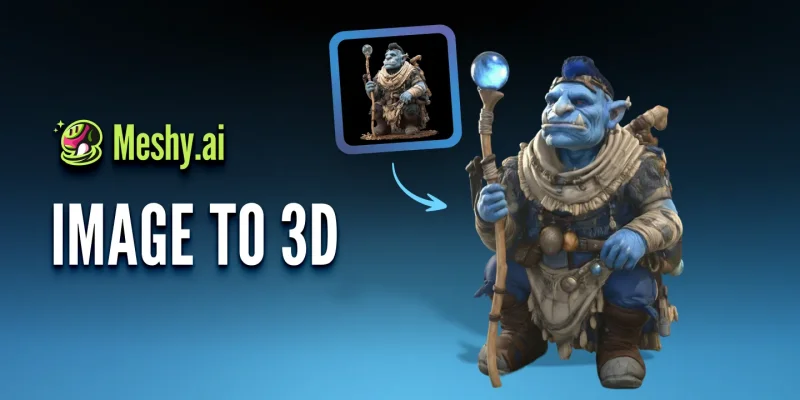
A reference image may look complete to a human viewer because people naturally imagine the missing information.
A front-facing photograph of a chair suggests that it has a back, depth, joints, and an underside. Yet these surfaces may not actually be visible.
An image to 3D process must interpret the visible information and estimate everything else.
This creates a common pattern:
- The front view resembles the reference.
- The side appears less accurate.
- The back contains invented details.
- Thin parts become merged or enlarged.
- Painted shadows are interpreted as surface structure.
- Decorative elements are placed at the wrong depth.
This does not necessarily mean the reference image is unusable. It means the creator should understand what the image can and cannot prove.
Where accuracy matters, additional front, side, rear, or three-quarter references can reduce uncertainty. When those views do not exist, the hidden areas should be treated as design proposals rather than faithful reconstructions.
Misconception Three: Visual Similarity Means Technical Readiness
A model may look convincing in a preview and still be unsuitable for its intended use.
A game asset may be too dense, a character may have geometry that cannot deform properly, a product model may use inaccurate proportions, a printable object may contain open surfaces or parts that are too thin.
The first generated result should answer a creative question: Is this direction worth developing?
It should not automatically answer a production question: Is this asset ready to publish, animate, manufacture, or import into a final project?
The difference matters because AI generation is often strongest at creating a visual starting point. Technical suitability depends on what happens next.
Misconception Four: Text and Images Are Competing Methods
Creators frequently ask whether text or images are better for AI 3D generation.
The more useful question is: Which design decisions have already been made?
When few visual decisions exist, text gives the system room to explore. When the design has already been approved, an image helps preserve established choices.
These inputs can also appear at different moments in one project.
A creator might:
- Begin with text to explore several original objects.
- Select one direction.
- Produce or refine a concept image.
- Use that image to generate a more visually consistent model.
- Edit the result for its final use.
The project has not changed tools because one method failed. It has changed inputs because the creative question changed.
Read the Symptoms Before Regenerating
When a generated model is disappointing, the result often reveals which information was missing.
Symptom: The Model Feels Generic
The description probably identifies a broad category but lacks defining structural features.
Instead of requesting “a fantasy chest,” describe the proportions, opening mechanism, material, silhouette, and one memorable feature.
Symptom: The Model Does Not Resemble the Concept Art
The reference may be too complex, heavily cropped, or visually obstructed. The subject may also occupy too little of the image.
Prepare a cleaner version with one main object and a simpler background.
Symptom: The Front Looks Correct but the Back Does Not
The input does not provide enough information about hidden areas.
Add more reference views or decide manually what the rear should contain.
Symptom: Important Details Disappear
The details may be too small, low contrast, or structurally unclear.
Enlarge them in the reference, mention them explicitly, or recreate them as separate parts later.
Symptom: The Model Has the Right Style but the Wrong Shape
The prompt focuses too heavily on mood and aesthetics.
Remove unnecessary style terms and describe the main geometry more directly.
Symptom: Every Generation Looks Too Different
The project may still lack a stable visual reference.
Create a concept image or approved sketch before continuing to generate more 3D variations.
A Better Way to Begin a Text-Led Project
Text is most useful when the creator is still defining what the object could become.
Start with a short design statement: Create a stylised portable energy device for a survival game.
Then add structural information: It should have a low circular base, a folding handle, one large illuminated panel and two protected connection ports.
Finally, define the visual treatment: Use simple low-poly geometry, worn orange metal and dark rubber components.
This sequence moves from purpose to shape and then to style.
It also makes revision easier. If the model feels too heavy, the creator can change the proportions without rewriting the entire idea. If the silhouette works but the surface treatment does not, the material language can be adjusted separately.
A platform such as Meshy AI can use written descriptions or visual references to produce an initial textured 3D model. The usefulness of that result still depends on whether the input communicates the decisions that matter most.
A Better Way to Begin an Image-Led Project
Image-based projects require preparation rather than simply uploading the most attractive artwork.
The most useful reference normally has:
- One dominant subject
- A visible outer silhouette
- Limited overlap
- A simple or removable background
- Clear boundaries between materials
- Moderate perspective
- Enough resolution to understand major features
A clean design reference may work better than a dramatic finished illustration.
Effects such as smoke, motion lines, reflections, depth-of-field blur, complex shadows and surrounding scenery can make an image more expressive while making the central object harder to interpret.
Creators should preserve the final artwork but prepare a simplified generation reference when necessary.
Three Input Strategies for Different Projects
An Original Science-Fiction Prop
The project has a function and theme but no fixed appearance.
Start with text. Explore several shapes before deciding which visual direction deserves further development.
A Character with Approved Concept Art
The costume, colors and silhouette have already been established.
Start with the image. Focus the review on whether the generated model preserves the character’s identity from new angles.
A Product Concept Still Under Discussion
The team knows the intended features but has not approved the final form.
Begin with text-based exploration. Once a direction is selected, prepare a controlled reference image and use it to improve visual consistency.
The correct strategy depends on whether the project is inventing a design, translating a design or refining a design.
Do Not Ask the Input to Solve the Entire Project
A prompt cannot replace technical specifications, a reference image cannot confirm exact dimensions.
A visually appealing result cannot prove that an object is safe to manufacture, efficient in a game engine, ready for animation or legally cleared for commercial use.
Later stages may still require:
- Geometry cleanup
- Retopology
- Scale correction
- Material editing
- UV adjustment
- Rigging
- Performance testing
- Print preparation
- Engineering validation
- Licensing review
The input should create a stronger first model. It should not be expected to eliminate the rest of the production process.
Frequently Asked Questions
Should creators use text when they already have concept art?
Text may still help explain the intended use or clarify hidden features, but the concept art should normally remain the primary visual reference when resemblance matters.
Can several reference images be combined?
Multiple views can provide useful information about proportions and hidden surfaces. They should remain visually consistent and represent the same object or design version.
Why does an AI model ignore some prompt details?
The prompt may contain too many competing instructions, or the requested details may be too small relative to the overall object. Prioritising a few defining features often produces a clearer result.
Is a generated model ready once it resembles the reference?
Not necessarily. Visual resemblance is only one requirement. Geometry, materials, scale, file structure and suitability for the final workflow must also be checked.
Better Models Begin with Better Questions
The first question in an AI 3D project should not be “Which button should I press?”
It should be: What information does the model still need?
If the project needs invention, begin with a clear structural description, if it needs visual continuity, begin with a prepared reference image. If it needs both, allow the input method to change as the design becomes more defined.
The quality of the model often improves before generation begins—when the creator chooses the right information to provide.
Scopri di più da GuruHiTech
Abbonati per ricevere gli ultimi articoli inviati alla tua e-mail.