
Why AI Video Generators Are Finally Worth Testing for Solo Marketers
The AI video space has moved fast in the last twelve months. What was once a landscape of experimental research demos and disjointed single-model tools has quietly turned into something more practical. Solo founders, small marketing teams, and independent content creators now face a different kind of problem: not a shortage of AI video generators, but a surplus of them. The real question is no longer “can AI generate video,” but rather “can I use it without wasting half my day on workarounds.”
That is the exact question I brought to Omni Video. The platform presents itself as a browser-based content creation tool built specifically for marketers and small to medium businesses who need to produce promotional videos and images without advanced editing skills or software installation. The pitch is simple enough: describe what you want, optionally upload a reference image, click a button, and pick the best result from a set of generated options. No GPU setup, no timeline scrubbing, no post-production audio stitching. The platform is entirely web-based and accessible from any device with an internet connection. That promise alone makes it worth a closer look, especially for anyone who has wrestled with heavier video tools and walked away frustrated.
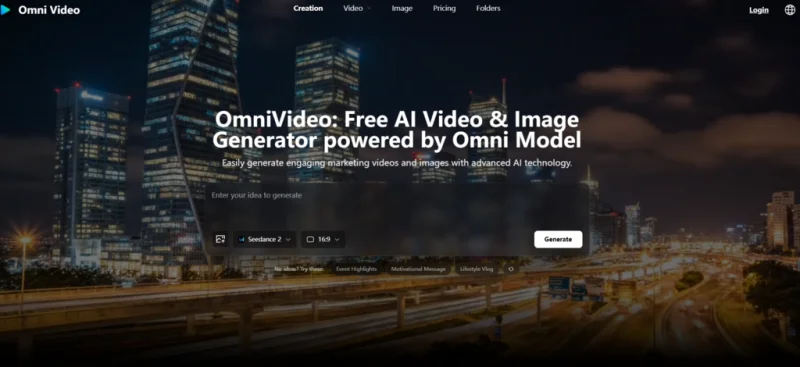
I spent focused time working through the platform to understand what it actually delivers. What follows is a practical walkthrough grounded in what the tool offers, what it asks of the user, and where it fits into a real content workflow. I kept my evaluation anchored to the official page, tested each step as it is presented, and noted where the experience delivered and where it required patience.
What Omni Video Actually Generates and Who It Is Built For
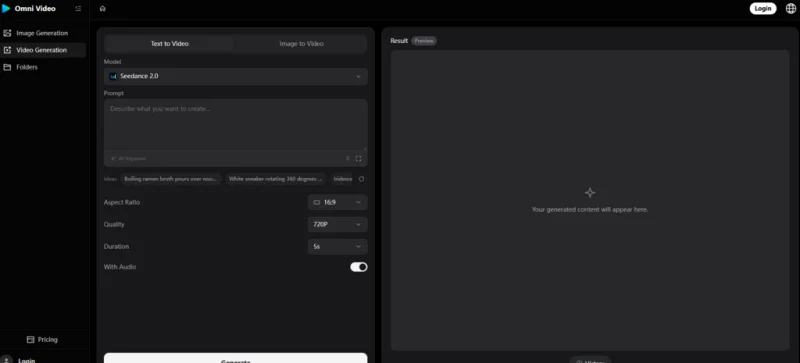
The platform supports two generation modes: text-to-video and image-to-video, using leading AI models including Seedance, Sora, Veo, and Nano Banana. In practical terms, that means you can either type a descriptive prompt from scratch or upload a reference image to guide the visual style and subject matter. The AI then produces a set of generated options, and you choose the result that best fits your needs.
So the output is positioned firmly in the marketing and social media space. The official page lists promotional videos, marketing images, social media content, and advertising materials as the intended content types. This is not a cinematic filmmaking tool, nor does it pretend to be one. It is designed for video creators, marketers, and small business owners who need to produce content quickly and without specialized skills.
From a positioning standpoint, Omni Video sits in a useful middle ground. It does not require technical setup, yet it provides access to multiple generative models rather than locking users into a single engine. All generated content is available for commercial use, including marketing campaigns and advertisements. The platform offers a free tier with basic features alongside premium plans for higher usage limits and advanced tools. For a solo operator producing product clips, seasonal promotional loops, or social media visual assets, this combination of accessibility and commercial freedom removes a meaningful barrier to entry.
A Three-Step Workflow That Removes Most Friction
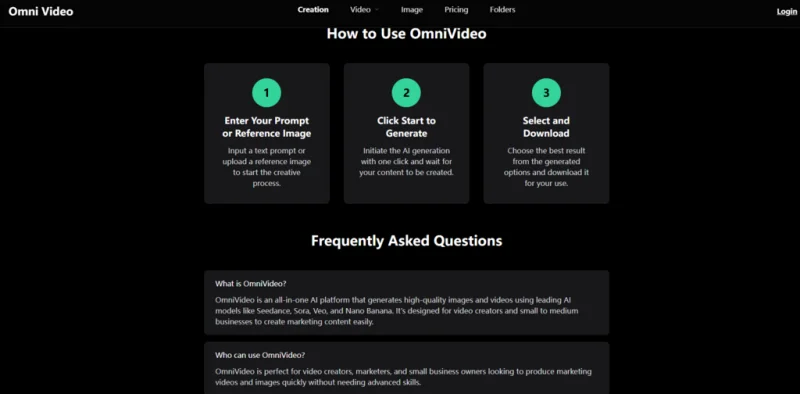
The entire generation process on Omni Video follows three clearly labeled steps. The simplicity is deliberate and worth examining step by step, because the difference between a three-click tool and a ten-click tool matters enormously when you are producing content at volume.
Enter Your Prompt or Reference Image to Start the Creative Process
The first step asks the user to input a text prompt or upload a reference image. This dual-path entry point is practical. There are days when I have a specific visual in my head and can write it out in natural language. There are other days when I already have an approved product photo and simply want to bring it to life with motion. The platform accommodates both workflows without forcing the user into one paradigm.
Text Prompts Reward Specificity Without Requiring Technical Jargon
In my testing, prompts that described a clear subject, a setting, and a desired mood produced noticeably more usable results than vague one-liners. The input field does not demand camera terminology or technical parameter settings, but it does reward descriptive writing. A prompt like “a skincare product on a marble bathroom counter, soft morning light, clean and minimalist” tends to yield more coherent output than simply typing “skincare video.” This aligns with how most modern AI generation tools behave, and the learning curve here is minimal.
Reference Image Upload Gives You Control Over Visual Direction
Uploading a reference image proved to be the more predictable path when I had a specific product or visual asset I wanted to anchor the generation around. The image acts as a guide for style and subject consistency. In my testing, this mode was particularly useful for maintaining brand continuity: if you have existing product photography with a defined color palette and composition style, the generated video variations tend to stay closer to that visual identity than pure text-to-video generation would allow.
Click Start to Generate and Wait for Content Creation
The second step is a single click: initiate the AI generation and wait for the content to be created. There is no multi-step configuration panel, no model selection dropdown to overthink, and no parameter sliders to calibrate. From a user experience perspective, this is both the platform’s greatest strength and a potential limitation depending on the user’s expectations.
One-Click Generation Reduces Decision Fatigue
The absence of configuration options means there is nothing to second-guess before hitting generate. For marketers who need to produce a high volume of content quickly, this design choice makes sense. Every extra setting is an extra decision point, and decision points add up fast when you are running multiple generations in a single sitting. In my testing, the streamlined flow genuinely reduced the time between having an idea and seeing a result.
The Trade-Off Is Less Granular Control Over Technical Output
So the flip side of this simplicity is that users who want to specify resolution, duration, or aspect ratio before generation will need to look elsewhere or accept the default outputs. The official page does not expose these controls as part of the core flow. For some use cases, this is perfectly fine. For others, it may feel restrictive. In my testing, I found that the default outputs were serviceable for social media drafts and quick promotional assets, but anyone requiring precise output specifications should test whether the platform’s defaults align with their distribution channels.
Select the Best Result and Download for Immediate Use
The final step is straightforward: review the generated options and download the one that best meets your needs. The platform produces multiple variations from a single prompt or reference image, which means you are not betting everything on a single roll of the dice.
Multiple Output Options Let You Compare and Choose
Having several generated results to choose from changes the dynamic of the creative process. Instead of tweaking prompts endlessly to chase a perfect output, you can run a generation, scan the variations, and pick the strongest one. This batch-and-select approach aligns well with how marketing teams typically work: generate a range of creative options, then apply human judgment to choose what goes live.
Download and Go, With No Post-Processing Required
The platform emphasizes that generated content is ready for immediate use. There is no export configuration step, no format conversion requirement, and no suggestion that further editing is necessary. For users who need to move fast, this end-to-end simplicity is valuable. In my testing, the downloaded files integrated directly into social media scheduling tools and presentation decks without any intermediate processing.
Three Real-World Scenarios Where Omni Video Fits
Rather than list features in the abstract, I tested the platform against three specific content creation tasks that reflect how a solo marketer or small business owner might actually use it.
Testing Scenario One: Creating a Short Social Media Promo From a Text Prompt
I wanted to see how the platform handled a standard social media use case: generating a promotional clip for a hypothetical product launch from a text description alone. The difficulty with this scenario is that the AI has no visual anchor, so it must build the entire scene from the prompt.
In my testing, the generated outputs showed reasonable scene composition and an understanding of the described subject. The visual quality was consistent with what you would expect from a marketing-focused AI tool: clean, serviceable, and stylistically coherent rather than photorealistic in the cinematic sense. The strongest results came from prompts that described both the product and its context, while prompts that focused only on abstract concepts or emotional tones produced more generic results.
So the main advantage here is speed. Going from a blank page to multiple video drafts took only a few minutes, which is dramatically faster than any manual production workflow. The main limitation is predictability: the AI may interpret certain descriptive terms differently than intended, and complex scenes sometimes required a second or third generation to land on a usable result. This is not unique to Omni Video, but it is worth noting for anyone who needs highly specific output on the first attempt.
This workflow suits marketers who need to generate a high volume of social media content quickly and are comfortable curating the best outputs from a larger batch of generations. It is less suited to projects where every frame must match a precise creative brief without iteration.
Testing Scenario Two: Animating a Product Photo With Image-to-Video Generation
For this test, I uploaded a clean product shot to see how well the platform could add motion and environmental context to a static image. The difficulty here is maintaining subject consistency while introducing believable movement. Many AI video tools struggle with this balance, either keeping the subject frozen while the background moves unnaturally or distorting the product entirely.
In my testing, Omni Video handled subject preservation reasonably well. The uploaded reference image served as a reliable visual anchor, and the generated video variations added subtle camera movement and lighting shifts without warping the core product beyond recognition. So the motion was conservative, which in a marketing context is often preferable to aggressive cinematic flourishes that can distract from the product itself.
The advantage of this mode is brand consistency. If you already have approved product photography, the image-to-video workflow ensures that your video assets stay visually connected to your existing brand imagery. The limitation, based on my testing, is that the range of motion is relatively contained. Users expecting dramatic camera fly-throughs or complex environmental interactions may find the output more restrained than they would like. The result may vary depending on the complexity of the reference image and the nature of the requested motion.
This workflow suits e-commerce operators and product marketers who need to convert existing catalog imagery into short-form video assets without reshooting. It is less suited to users who want to generate entirely novel scenes with complex physics or multi-subject interactions.
Testing Scenario Three: Producing a Batch of Seasonal Campaign Variants
Seasonal marketing campaigns often require multiple visual variants, each tailored to a different platform, audience segment, or promotional message. I tested whether Omni Video could function as a rapid variant-generation engine by running several related prompts with different seasonal themes.
The platform’s straightforward prompt-and-generate flow proved efficient for this task. I was able to iterate through different seasonal styles by adjusting the descriptive language while keeping the core subject consistent. The batch of results provided enough variety to populate a multi-platform campaign without requiring separate production sessions for each variant.
The advantage here is creative throughput. Instead of spending hours in a traditional editing tool to produce seasonal refreshes, the entire batch process took minutes. The limitation is that subtle brand-specific details, such as exact color codes or logo placement, are not controllable through the standard generation flow. Users with strict brand guidelines should expect to do some manual selection and possibly light post-processing to ensure alignment.
This workflow suits marketing teams running frequent promotional cycles who need a high volume of on-brand visual variants. It is less suited to brands that require pixel-perfect consistency across every asset without any human review step.
How Omni Video Compares to Alternative Approaches for Marketing Content
The table below provides a concise comparison across several dimensions that matter in daily content production. I have kept the comparison focused on practical workflow factors rather than technical specifications, since those are what determine whether a tool actually gets used.
| Dimension | Omni Video | Traditional Video Editing | Single-Model AI Generators |
| Learning curve | Low; three-step browser-based workflow with no software installation required | High; requires proficiency with timeline editing, keyframes, and rendering | Moderate; may require model-specific prompt engineering and parameter tuning |
| Production speed | Minutes per batch of variants | Hours to days for comparable output volume | Minutes, but limited to one model’s strengths and weaknesses |
| Creative variety | Multiple AI models under one roof, including Seedance, Sora, Veo, and Nano Banana | Unlimited but entirely dependent on human effort and skill | Constrained to whatever a single model handles well |
| Brand consistency | Moderate; reference image upload helps anchor visual direction | Full control over every frame | Varies significantly by model and prompt quality |
| Commercial licensing | All generated content available for commercial use | No licensing restrictions on original work | Depends on the specific tool’s terms; not all offer clear commercial rights |
| Accessibility | Web-based, any device with internet access, no GPU required | Requires capable hardware and installed software | Often web-based, but may require sign-up, credits, or regional access |
Real Limitations Worth Knowing Before You Start
No tool is perfect, and Omni Video is no exception. I want to highlight several limitations I observed during testing, not as criticism but as practical context for setting realistic expectations.
The quality of the output is tightly coupled to the quality of the input prompt. Vague or ambiguous prompts tend to produce generic or incoherent results. This is a characteristic shared across most AI generation tools, but it is worth emphasizing because the platform’s streamlined interface may give the impression that any prompt will yield professional output. In my experience, thoughtful prompt writing remains essential.
Complex scenes with multiple interacting subjects, detailed backgrounds, or specific spatial relationships may require multiple generation attempts before producing a usable result. The AI does not always interpret compositional instructions the way a human would, and there is no guarantee of consistency across generations. This means users who need highly specific output on the first attempt should budget extra time for iteration and curation.
The platform does not expose fine-grained controls such as resolution selection, duration settings, or model choice in its core three-step workflow. For users who value speed and simplicity over configurability, this is an advantage. For users who want to dial in technical parameters precisely, it represents a constraint. From a practical user perspective, the trade-off is clear and intentional.
The output style tends toward marketing-friendly aesthetics rather than cinematic realism or artistic experimentation. This is consistent with the platform’s stated purpose, but anyone expecting film-quality photorealism or avant-garde visual styles should calibrate their expectations accordingly. The results may vary depending on the prompt, the reference image, and the underlying model’s behavior on any given generation.
Where Omni Video Fits Best in a Content Production Stack
After spending time with the platform and working through multiple generation scenarios, I see Omni Video as a practical front-end tool for rapid content creation rather than a replacement for a full production pipeline. It excels at the early stage of the creative process, where speed and volume matter more than pixel-level precision.
For solo marketers and small business owners, the platform fills a genuine gap. It removes the technical barriers that typically stand between an idea and a usable video asset, and it does so without requiring software installation, hardware upgrades, or specialized training. The commercial-use terms add meaningful value for anyone publishing content in a business context.
Omni Video works best as a daily driver for social media content, promotional clips, and seasonal campaign refreshes. It is less suited for projects that demand frame-accurate control, complex multi-scene narratives, or integration with existing post-production pipelines. Used within its intended scope, it can meaningfully reduce the time and cost associated with producing marketing video content. Used outside that scope, it will feel limiting.
The broader takeaway from this testing is that AI video generation has reached a point where the tools are genuinely usable for practical marketing work. This gap between “interesting demo” and “daily production tool” is closing, and platforms like Omni Video are part of that shift. The key for any potential user is to match the tool to the task, understand the trade-offs, and approach the workflow with realistic expectations about what AI can and cannot do reliably.
Scopri di più da GuruHiTech
Abbonati per ricevere gli ultimi articoli inviati alla tua e-mail.