

Why Your “100W” Charger Isn’t Charging Your Laptop at 100W
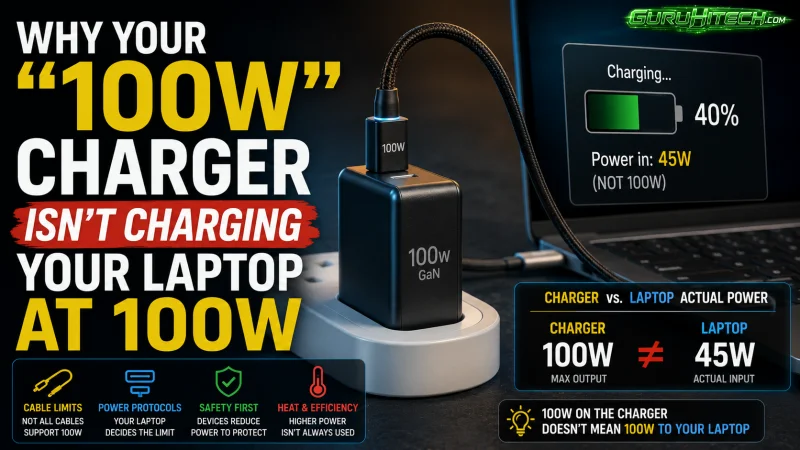
I own a small graveyard of chargers. It is a shoebox in a hall closet, and until this spring it held eleven of them: two laptop bricks, four phone cubes, a car adapter for a car I sold in 2021, and a 100W GaN charger I bought last winter because the listing said 100W and my laptop asked for 96W. That looked like arithmetic to me.
Two weeks later I was in a hotel room with the laptop, a phone and a set of earbuds all plugged into that charger, watching the laptop battery climb about as fast as the minute hand. Nothing was broken. I had bought a number rather than a product, and the number on the front of the box turned out to be the least useful thing printed on it.
Here is what I wish somebody had explained to me before I started buying.
Gallium nitride is a size story, not a speed story
GaN, or gallium nitride, replaces the silicon in a charger’s switching transistors. It has a wider bandgap, which is a technical way of saying it tolerates higher voltages and switches far faster without cooking itself. Faster switching lets engineers shrink the transformers and capacitors that normally dictate the size of a power supply. That is the whole magic trick: a 65W charger the size of a matchbox instead of a deck of cards.
Efficiency improves too, though less dramatically than the marketing suggests. A compliant silicon charger already runs somewhere around 88 to 91 percent efficient. A well-built GaN design lands closer to 93 to 95 percent. In a 65W charger that gap amounts to only a few watts of waste heat, but a few watts is the difference between warm and uncomfortable when the thing is wedged behind a nightstand.
What gallium nitride does not do is make your phone charge faster. Speed is decided by a negotiation, and that is where most people, me included, go wrong.
Wattage is negotiated, not delivered
When you plug a USB-C device into a USB Power Delivery charger, the two of them hold a short conversation. The charger advertises the voltage and current combinations it can supply. The device picks one it is willing to accept. Whichever side is more conservative wins.
Your phone will draw roughly 25W no matter what. Plug it into a 20W charger, a 65W charger or a 240W monster and you get the same result, because the phone is the limiting factor. Meanwhile a laptop that wants 20V at 4.5A only reaches that speed if the charger can offer exactly that profile, and plenty of “100W” multi-port chargers cannot, because the 100W is a total budget shared across the ports rather than a promise to any single one of them.
That was my hotel-room problem. The moment the phone and the earbuds joined the party, the charger throttled its top port to a lower profile. The spec sheet had said so all along. It said so in a table, in six-point type, on the third image of the listing.
The cable is half the charger
This one is worth repeating because it is cheap to fix. Any USB-C cable can carry 60W, which is 20V at 3A. Above that, the cable needs an e-marker chip, a tiny identifier that tells the charger it is rated for 5A. Without it the connection quietly caps at 60W. No error, no warning, just a laptop that charges slowly and an owner who blames the charger.
If you have spent real money on a high-wattage charger and you are still using the cable that came with a phone in 2020, that is very likely where your watts went.
The spec worth paying extra for
If you read only one line on a spec sheet, make it PPS: Programmable Power Supply. Standard USB-PD offers a handful of fixed voltage steps. PPS lets the device request voltage in 20mV increments and current in 50mA increments, tuning the supply to what the battery actually wants at that moment.
The practical effect is less heat inside the phone, because less conversion work is happening on the device side. Heat is what ages lithium cells, so a PPS-capable charger does more for your battery’s long-term health than any “battery safe” sticker on a box. It is also required for the higher-speed charging modes on recent Samsung Galaxy phones. It costs manufacturers very little to include, and budget chargers still skip it constantly.
If you want the deeper technical version of all this, there is a genuinely plain-language breakdown of how GaN chargers handle negotiation, port sharing and thermal behavior that is worth ten minutes before you spend anything.
“GaN III,” “GaN 5” and other invented numbers
There is no industry body issuing GaN generations. GaN II, GaN III, GaN Prime and GaN 5 are brand names, not standards, and a “GaN III” charger from one company has no defined relationship to a “GaN II” charger from another. Ignore the numbering entirely.
Do not ignore certification marks. A charger sits in a wall socket, unattended and warm, for years at a time. Look for real UL, ETL, CE, UKCA or FCC marks and a named manufacturer with a traceable address. Chargers carrying printed-on marks and no identifiable maker get pulled from marketplaces regularly, and the failure mode there is not a slow charge.
The checklist I use now
Five questions, in this order. What is the highest single-port wattage, not the combined total? Does the spec table show what each port drops to when the others are occupied? Is PPS listed by name? Are the certification marks real and the manufacturer identifiable? And do I already own a cable rated for the wattage I am about to buy?
If a listing will not answer the first two questions, that is usually your answer.
What I carry now
One charger, in the front pocket of the bag, doing the job the shoebox used to do.
Mine is the GripLux HyperGaN 160W, and I chose it for unglamorous reasons: a 65W USB-C port that will actually run a laptop, a second USB-C at 25W for the phone, a Quick Charge USB-A for the older gear I refuse to replace, folding prongs so it stops shredding the lining of my bag, and 100 to 240V input so it works in any country I land in with a plug adapter. It runs $29 at griplux.com, which is roughly what I paid for the charger now serving as a doorstop. If you are replacing a drawer full of bricks with one unit, that is the one I would put in the bag.
My shoebox is down to three chargers. Two of those are going in the bin as soon as I stop feeling sentimental about them.
Ti potrebbe interessare:
Segui guruhitech su:
- Google News: bit.ly/gurugooglenews
- Telegram: t.me/guruhitech
- Facebook: facebook.com/guruhitechfb
- Instagram: instagram.com/guruhitech_official/
- X (Twitter): x.com/guruhitech1
- Bluesky: bsky.app/profile/guruhitech.bsky.social
- Rumble: rumble.com/user/guruhitech
- VKontakte: vk.com/guruhitech
- MeWe: mewe.com/i/guruhitech
- Skype: live:.cid.d4cf3836b772da8a
- WhatsApp: bit.ly/whatsappguruhitech
Esprimi il tuo parere!
Ti è stato utile questo articolo? Lascia un commento nell’apposita sezione che trovi più in basso e se ti va, iscriviti alla newsletter.
Per qualsiasi domanda, informazione o assistenza nel mondo della tecnologia, puoi inviare una email all’indirizzo [email protected].
Scopri di più da GuruHiTech
Abbonati per ricevere gli ultimi articoli inviati alla tua e-mail.