
7 Free Face Swap Video Online Tools You Can Use in 2026
Finding a face swap video online free tool isn’t difficult anymore in 2026. The challenge is choosing one that offers good video quality, fast processing, and enough free credits. To save you time, I tested several popular AI face swap tools and compared them based on video quality, ease of use, pricing, and free features.
What Free and Online Actually Means for Video Face Swaps
Before you pick a face swap video online free tool, it helps to define what “free” and “online” actually mean in 2026—because different platforms use these labels very loosely.
Fully Free
A fully free tool usually means you can upload a video, swap a face, and download the result without paying. But in most cases, you’ll maybe find these restrictions:
- Short maximum duration (5 or 10 seconds per export)
- Lower resolution (often capped at 480p/720p)
- Watermarks on the final video
- Slow processing during peak hours
- Limited daily exports
In the list of completely free online face swap tools below, I will explain whether each one comes with these limitations.
Free Trial vs Freemium
Most “free” face swap services fall into one of two models:
Free Trial
You get a fixed number of credits once, sometimes only after login. Trials are great for testing quality, but they’re not sustainable if you want ongoing use.
Freemium
You can keep using it for free, but exports may be limited by:
- Monthly credits
- Watermarked downloads
- Feature locks (multi-face swap, HD export, longer videos, priority rendering)
App vs Website Online
When we search for a face swap video online free tool, they usually mean a web-based tool that runs in a browser that not something they have to install. The whole point is to avoid downloading an app, dealing with storage limits, device compatibility issues, forced updates, or extra permissions.
In practice, “online” face swap tools fall into two types:
Website-based tools:
You upload a clip, swap the face, and download the result right in your browser. You can bookmark the page and open it anytime, which is ideal for quick tests or occasional use. The best options also work smoothly on mobile browsers, so you can create an AI face swap video online free on your phone without installing anything.
App-based tools:
For most users, “online” means browser-based. No download, no updates, and you can simply bookmark the page and reuse it anytime. The best website tools also work well on mobile browsers, so you can make an AI face swap video online free on your phone. App-based tools can be smoother for heavy editing, but they require installation and often push upgrades more aggressively.
That’s why, in the next section, I’ll focus on tools that are genuinely easy to use online and compare what you can actually do for free.
7 Best Face Swap Video Online Free Tools
Face AI
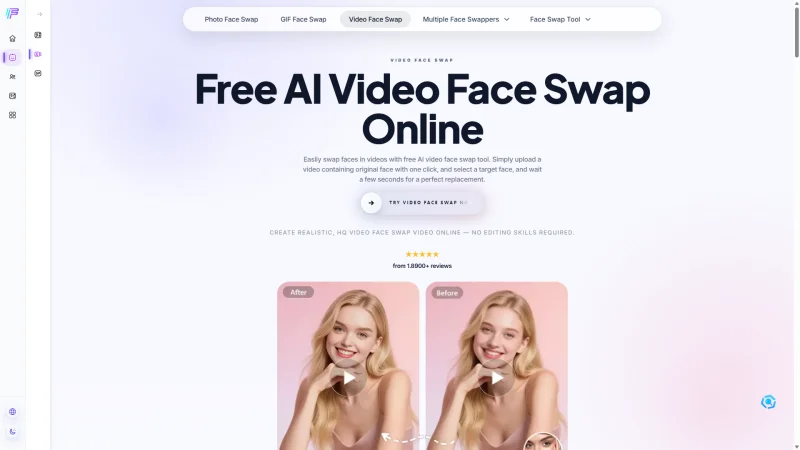
Overview:Face AI is a browser-based video face swap tool designed for users who want quick, realistic-looking results without installing software. Everything runs online, and the platform works smoothly across both desktop and mobile devices.
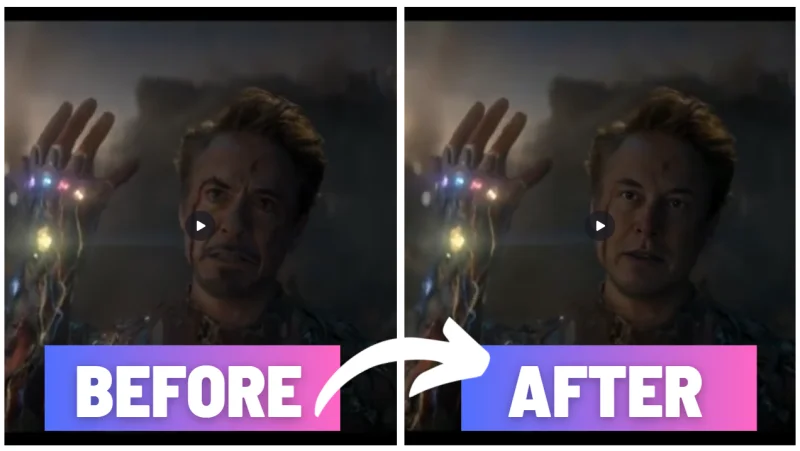
To evaluate its performance, I used a challenging test clip featuring low-light conditions, strong colored highlights, frequent head movement, and hands repeatedly passing in front of the face. Among all the tools I tested, Face AI delivered the most reliable tracking. Facial alignment remained accurate even during rapid motion, and I rarely noticed the flickering, ghosting, or edge artifacts that often appear in AI-generated face swaps.
Another standout strength was subject recognition. In multi-person footage, the system successfully replaced only the selected individual while leaving everyone else untouched. Facial textures also held up exceptionally well, occasionally appearing more refined than those in the original footage.
Free Plan Highlights:
The most appealing aspect of Face AI is that all its features can be used without creating an account.
- Start swapping immediately without registration
- Generate up to 10 videos per day
- Export clips at resolutions up to 4K
- Download videos without added watermarks
- Preserve the original soundtrack
- Swap multiple faces within a single video
- Results are saved for 24 hours (so you can download later)
How It Works
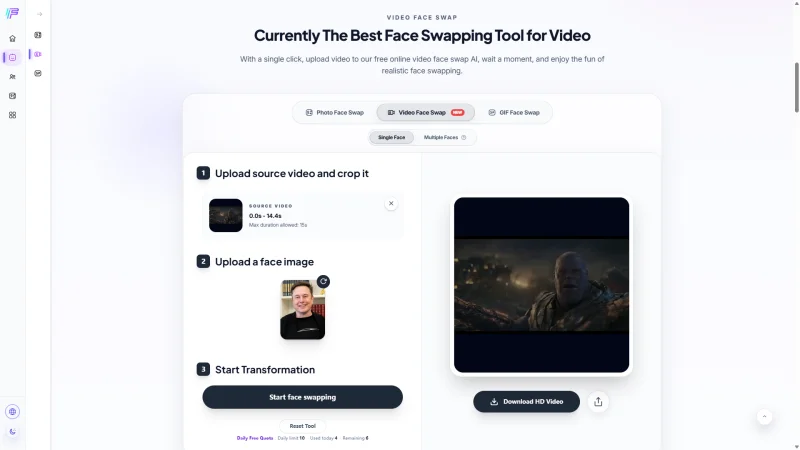
Begin by uploading a source video along with a reference image containing the face you want to insert. If your footage exceeds the free-tier limit, you can trim the segment directly within the interface before processing begins.
Once everything is ready, start generation and wait for the render to complete. During busy periods, the platform displays your position in the processing queue, which helps set expectations regarding wait times.
In my testing, most clips finished within about 1 minute.
Pros:
- Excellent facial tracking, even in difficult lighting conditions
- Handles motion and head rotation better than most competitors
- Multi-person support is included at no extra cost
- Preserves original audio automatically
- No registration required
- Clean exports without platform branding
- Up to 4K output quality available
Cons:
- limited to 15-second clips
- Not ideal for long-form projects
Best for: Anyone looking for a free online face swap video tool that prioritizes visual accuracy and ease of use. If you want high-quality results without creating an account or dealing with watermarks, it’s currently one of the most compelling choices available.
MagicHour
Overview:Rather than focusing exclusively on face replacement, MagicHour positions itself as a broader AI creation suite that combines video generation, image editing and audio tools.
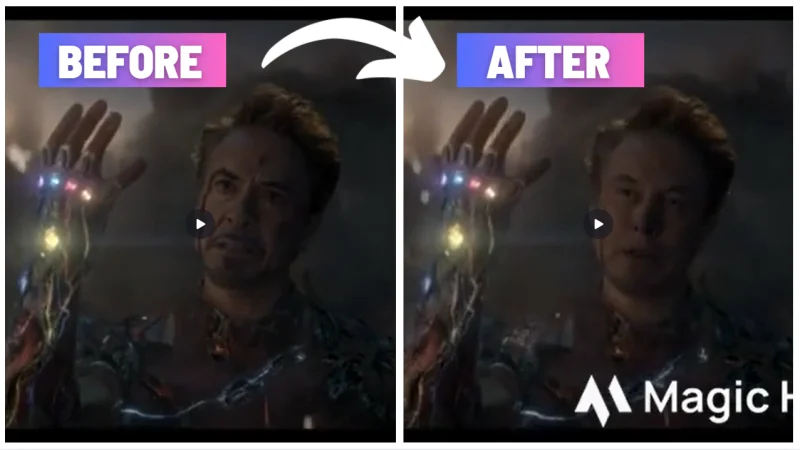
Using the same footage as Face AI, I found that MagicHour struggled more when scenes became visually complex. Side profiles, rapid movement, changing light sources, and noisy backgrounds occasionally caused the generated face to drift or fluctuate between frames. The transition between the inserted face and the original footage was also less convincing, particularly around the jawline and hairline.
While the output remained usable for casual content, it didn’t achieve the same level of consistency as the top-performing tools in this comparison.
What You Get for Free:
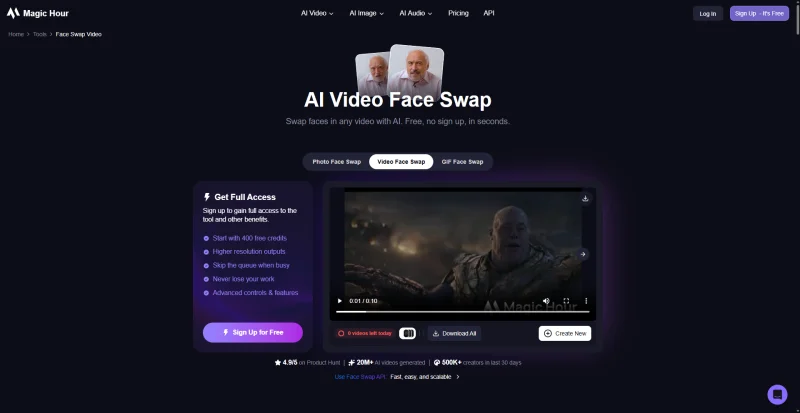
MagicHour allows users to take a free test before subscribing.
- No login required
- 3 face swap generations per day
- Access to additional AI creative tools beyond face swapping
However, several premium features sit behind the paid plans, including higher resolutions, faster processing, watermark-free exports, commercial rights, and expanded upload limits.
Workflow Experience
Creating a face swap only takes a few steps: upload a video, provide a face image, and launch the generation process.
The experience feels straightforward, but I noticed several usability limitations during testing.
For example, when I uploaded a 30-second sample clip, the platform automatically generated only the first 10 seconds rather than allowing precise trimming beforehand. Multi-person videos can also be difficult to control. In one test, MagicHour replaced every visible face in the scene even though I intended to swap only a single subject.
Rendering times generally ranged between 90 seconds and 2 minutes, although heavy traffic can extend the wait considerably.
Unlike some competitors, MagicHour doesn’t provide an obvious library where previous generations can be revisited later. If you leave the page before downloading, you may need to repeat the process.
Pros:
- Combines face swapping with a large collection of AI creation tools
- Accessible directly from the browser
- Can auto-detect and swap multiple faces (useful only if you want everyone swapped)
Cons:
- Only 3 free generations per day
- Watermark appears on free exports
- Limited control for longer videos (may default to exporting only the first seconds)
- Multi-person videos can be harder to manage
- Less reliable with side angles and difficult lighting
- Previous generations aren’t easily accessible
Best for: MagicHour makes the most sense for users who want an all-in-one AI toolkit rather than a dedicated face swap solution. If face swapping is only one part of your workflow, the platform’s broader feature set may justify the compromises in control and visual consistency.
Remaker
Overview:Remaker is another multi-purpose AI platform that includes video face swapping alongside a broader collection of image-generation and editing tools.
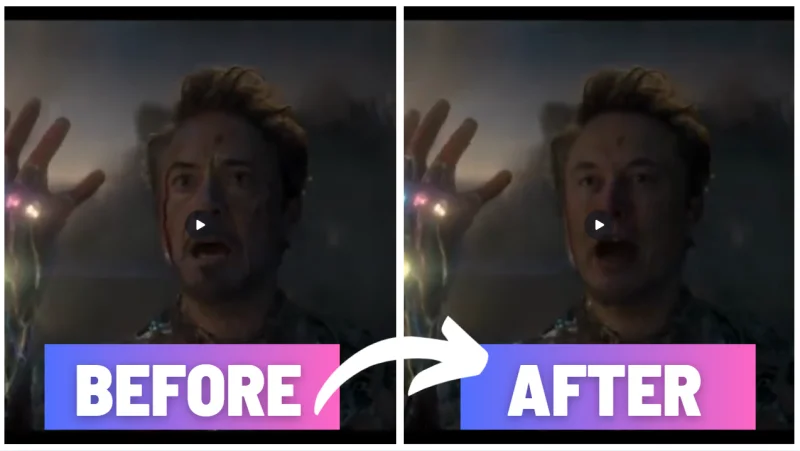
By and large, the video quality remained close to the source footage, and the face swap integrated naturally into the scene.
The most noticeable issue appeared around the edges of the face replacement. While not distracting at normal viewing distances, close inspection occasionally revealed a faint halo effect where the generated face met the original footage.
Compared with MagicHour, the output performed better, though it still fell short of Face AI in terms of sharpness and stability.
What You Get for Free:
- No login required
- 29 starter credits
- Ability to process significantly longer videos than most competitors
- Generated projects stored for up to 30 days
One important limitation involves export quality. Although the platform advertises an HD Face Swap mode, that feature is reserved for VIP subscribers and isn’t included in the free allowance.
How It Works
Getting started requires very little setup.
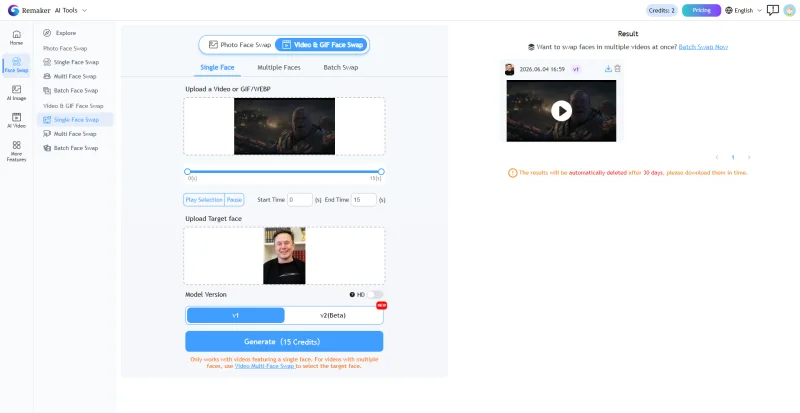
Simply upload a source video, provide the reference face image, and allow the platform to process the footage automatically. Unlike tools focused exclusively on short-form content, Remaker is capable of handling substantially longer clips, which immediately broadens its potential use cases.
Another convenience is project retention. Instead of forcing immediate downloads, the platform keeps completed generations available for a full month, making it easier to revisit previous work without rerunning the entire process.
In my testing, processing times averaged around 1.5 minutes.
Pros:
- Supports videos up to 30 minutes in length
- Keeps most of the original video quality outside the face area
- Generations remain accessible for 30 days
Cons:
- Very expensive on credits for video: 1 credit/second (free credits run out fast)
- “HD face swap” requires VIP, so free outputs may look less sharp on the face
- Minor blend artifacts: slightly blurred face details and occasional light edge
Best for: Remaker is particularly useful for users working with longer videos. If your priority is processing duration rather than achieving the absolute highest level of facial detail, it offers one of the more practical free starting points among current face swap platforms.
CharaLab
Overview:Unlike other tools on this list, CharaLab takes a noticeably different approach. Instead of emphasizing free access and quick experimentation, the platform feels more oriented toward creators who are willing to register, manage credits, and spend time generating content.
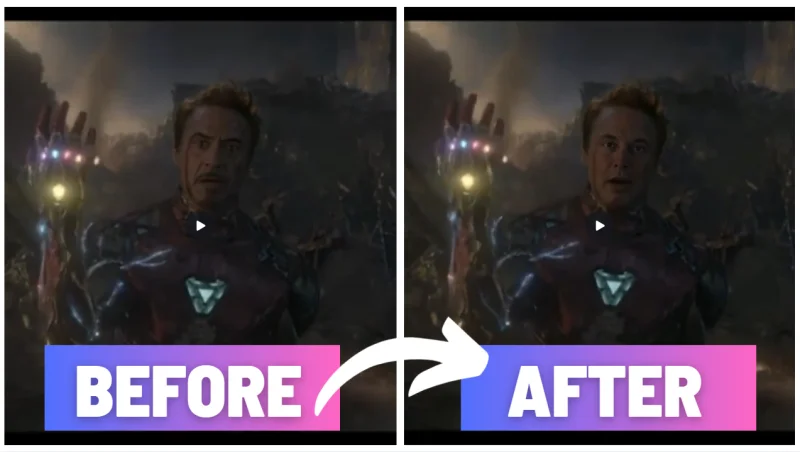
Using the same evaluation footage, CharaLab consistently produced detailed facial features with convincing expressions and strong frame-to-frame continuity. The generated face maintained its structure even when the subject changed angles or moved rapidly across the scene. In terms of realism, it came surprisingly close to Face AI and outperformed several other competitors in this comparison.
The largest drawback isn’t quality—it’s predictability. Credit consumption follows a tiered system that isn’t immediately obvious to new users, making it harder to estimate how many projects your free allowance will actually cover.
What You Get for Free:
- Login required
- 29 free credits for new users
- No watermark on free exports
- Audio preserved
- Generations accessible through a dedicated project dashboard
One area where information remains unclear is export specifications. The platform doesn’t prominently disclose maximum output resolution or long-term storage policies.
How It Works
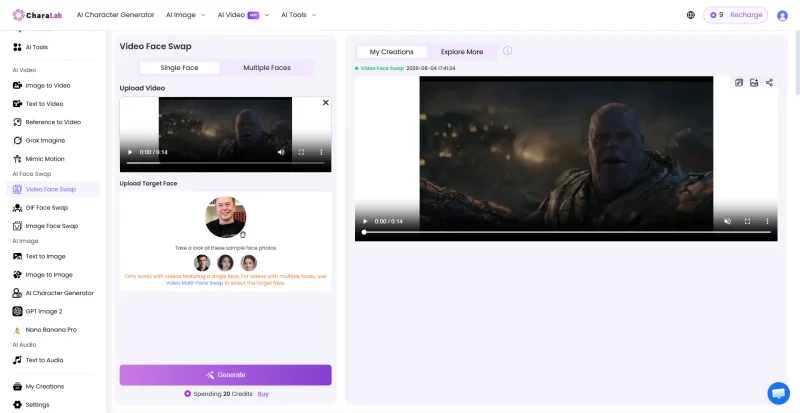
After creating an account, users can choose whether they want to replace a single individual or multiple people within the same clip.
Once assets are uploaded, generation typically completes in about 1 minute.
Finished projects appear inside the My Creations section, making it easy to review or download previous work.
Credit usage, however, deserves attention. During testing, both an 8 second clip and a 14 second clip consumed 20 credits, while a 29 second video required 39 credits. As a result, the free allowance often covers only one meaningful test before additional credits become necessary.
Pros:
- Very natural, high-detail face results (close to Face AI quality)
- Exports remain free of branding overlays
- Offers Single Face / Multiple Faces modes for better control
- Dedicated project management dashboard
Cons:
- Registration is mandatory
- Free credits disappear quickly
- Pricing structure lacks transparency
- Export specifications aren’t clearly documented
- Longer clips can become expensive surprisingly fast
Best for: Testers who want to evaluate high-quality face swap results and don’t mind logging in, best as a one-time trial with the free 29 credits, unless you plan to recharge for longer clips or repeated swaps.
Live3D
Overview:Live3D is best known for its VTuber and virtual avatar tools, but it also offers a free online video face swap feature. Live3D lets users jump straight into the swapping process and download finished videos without watermarks.
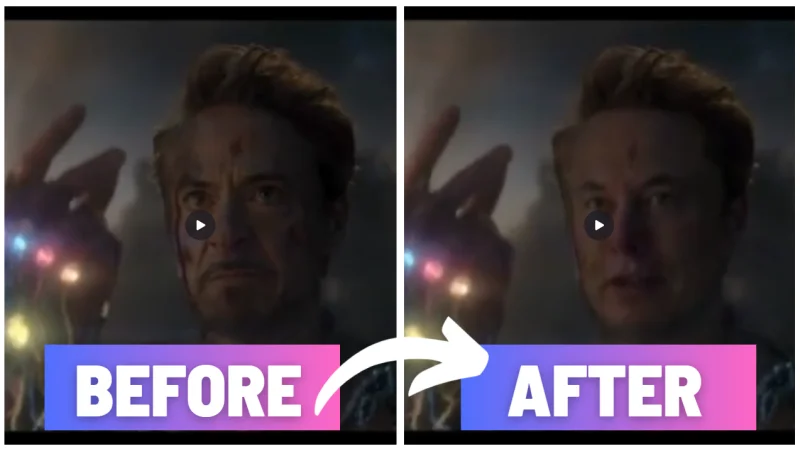
For the most part, the generated face blended reasonably well with the original footage, though facial details weren’t quite as defined as the source video. The biggest drawback wasn’t image quality, but speed. Processing took nearly three minutes, making Live3D the slowest tool in this comparison.
What You Get for Free:
- No account required
- No watermark on export
- Upload limits: video ≤ 100 MB, face image ≤ 20 MB
How It Works
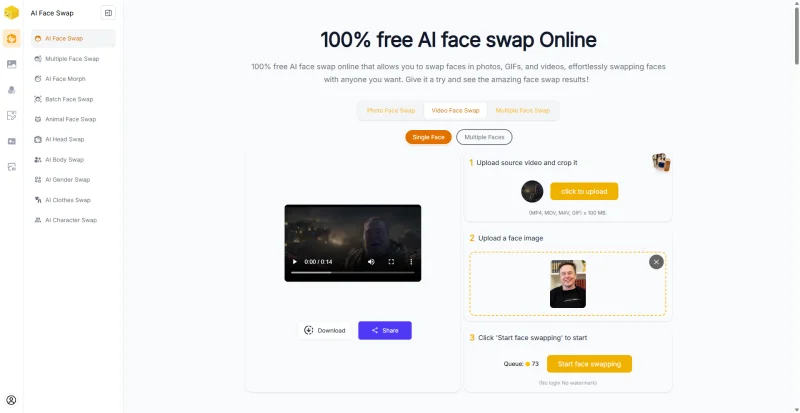
Getting started takes only a few steps:
- Upload a source video.
- Add a face image.
- Generate the swap.
- Download the completed video.
Pros:
- No sign-up needed
- Clean exports without branding
- Works well for standard footage
Cons:
- Slowest processing in my tests
- Face detail can look less defined than the source video
- No saved history
Best for: Users who want a watermark-free face swap without logging in and don’t mind waiting longer, especially creators already using Live3D for avatar/VTuber workflows.
Gifify
Overview:Gifify is a credit-based AI face swap tool that makes creating realistic face swap videos quick and easy. With a simple setup, no-watermark exports, original audio preservation, and high-quality results, it’s an excellent choice for anyone looking for an online face swap platform.
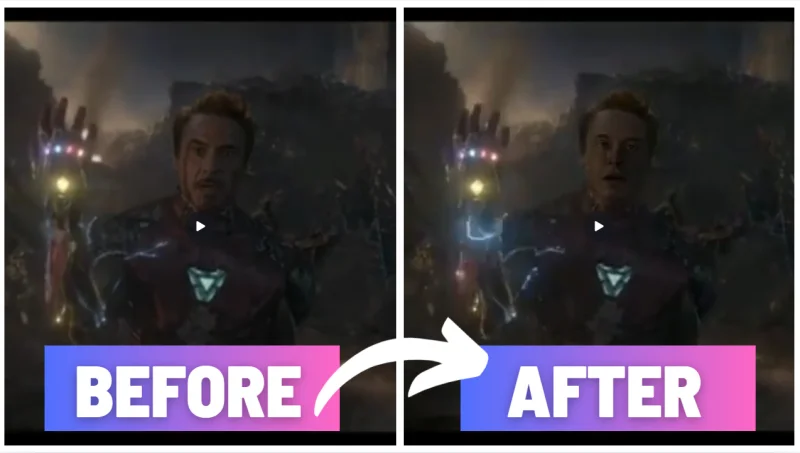
When testing motion-heavy footage, however, I noticed occasional visual glitches around the swapped face. Fast movement and sudden changes in position were more likely to introduce artifacts than with some of the higher-ranked tools on this list. The output also appeared slightly softer compared to the source footage.
What You Get for Free:
- Login required
- 29 free credits for new users
- No watermark on exports
- Uploads up to 300 MB
One video face swap currently costs 20 credits, so the free allowance is mainly useful for testing.
How It Works
- Create an account.
- Upload video and face image.
- Start the generation process.
- Download the finished export.
In my testing, most videos were completed in just over 1 minute.
Pros:
- Simple and beginner-friendly
- Keeps original audio
- Watermark-free downloads
Cons:
- Registration required
- Free credits are limited in practice
- Output can look slightly blurry
- Motion-heavy scenes may show artifacts
- Mild edge jitter around the swapped face
Best for: Good for quick experiments and one-off face swaps.
Vidwud
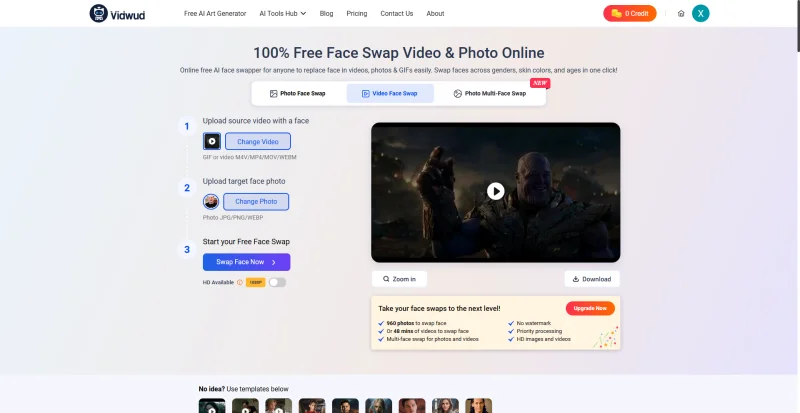
Overview:Vidwud combines an easy onboarding experience with surprisingly good visual quality. You can generate a face swap without creating an account.
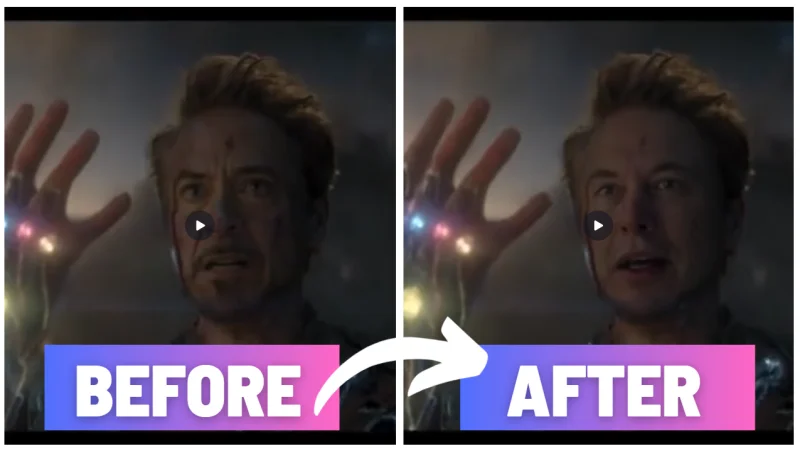
In my evaluation, the platform preserved most of the original video’s appearance, with minimal compression and natural-looking face integration. Processing was also relatively quick, typically taking around one minute. The main inconvenience is that while generation is available to guests, downloading requires logging in.
What You Get for Free:
- No login required to generate
- Login required to download
- 3 face swaps per day
- Max length isn’t clearly stated, I tested up to 30 seconds successfully
- Longer videos (10+ minutes) appear to require paid credits
How It Works
- Upload your video.
- Add a reference face image.
- Generate the swap.
- Sign in and download the result.
Pros:
- Good preservation of source footage
- Quick turnaround times
- Natural-looking face replacement
Cons:
- Download requires login (extra step vs truly no-login tools)
- No obvious “saved results” area
- Free usage is capped at 3/day, and long videos likely require credits
Best for: An excellent option for casual users who want a balance between convenience and output quality without committing to a full registration process upfront.
Comparison Table: Face Swap Video Online Free Tools
| Tool | Login | Free Model | Free Limit | Max Length (Free) | Speed | Trim Control | Watermark (Free) | Output Quality | Stability | Multi-Face Control | Save History |
| Face AI | None | Truly Free | 10 swaps/day | 15s | ≤1 min | Choose segment (slider) | No | Excellent detail retention, sometimes sharper than source | High | Supports multi-face swaps, accurate target selection | 24h |
| MagicHour | None | Daily Quota | 3 swaps/day | 10s | 1.5–2 min | Limited, often outputs only first seconds | Yes | Softer face details, blur edge, visible flicker in difficult scenes | Low | Often swaps everyone automatically | None |
| Remaker | None | Free Credits Trial | 29 credits | Depends on credits | 1.5 min | Not clearly specified | No | Good overall preservation, minor edge artifacts | Medium-High | Multi-face supported | 30 days |
| CharaLab | Required | Free Credits Trial | 29 credits | Depends on credits | 1 min | Not clearly specified | No | Very detailed and realistic results | High | Single Face / Multiple Faces mode toggle | Available via My Creations |
| Live3D | None | Truly Free | No clear quota disclosed | Unclear | 3 min | Unknown | No | Decent quality, slightly softer facial details | Medium | Multi-face supported | None |
| Gifify | Required | Free Credits Trial | 29 credits | Unclear | 1 min | Unknown | No | Slight blur and occasional motion artifacts | Medium | Multi-face supported | Available via My Creations |
| Vidwud | Download Only | Daily Quota | 3 swaps/day | 30s tested | 1 min | Unknown | No | Preserves source quality well with minimal compression | Medium-High | Multi-face supported | None |
Which Face Swap Video Tool Is Best?
There isn’t one “best” option for everyone, because the best face swap video online free tool depends on whether you care most about realism, time limits, or how much control you get.
Best overall free pick (quality + truly usable): Face AI
It offers clean exports (no watermark), strong stability in difficult lighting/angles, mobile browser support, and a clear 15-second workflow with segment selection.
Best for an all-in-one AI toolkit (but weaker face swap quality): MagicHour
Useful if you want multiple AI tools in one place, but the free tier is restrictive (3/day), results are less stable, and control is limited in multi-person scenes.
Best no-login option for short clips (download requires login): Vidwud
Good quality and natural swaps in my test, but you need an account to download and there’s no obvious saved history—so download immediately.
Best “trial” for high realism (not really for ongoing free use): CharaLab
Output quality can be close to Face AI, but it requires login and the free credits typically only cover one short export.
Best for longer videos if you’re willing to pay credits: Remaker
Supports up to 30 minutes, but the credit burn is high (1 credit/sec), and free outputs can look slightly soft on the face.
Best watermark-free no-login alternative (slow): Live3D
No watermark and no login, but it’s the slowest in my tests and the face detail can be less defined.
Best for quick one-off credit testing: Gifify
No watermark and audio preserved, but motion-heavy scenes can show artifacts and the free credits don’t last long.
How to Choose a Face Swap Video Online Free Tool
Video Quality
Check whether the export keeps the original clarity. Some tools preserve the background but soften the face (MagicHour/Remaker/Gifify), while others keep things crisp (Face AI, and CharaLab on short clips).
Face Accuracy
Look for stable tracking during turns, side profiles, and lighting changes. If you see flicker, jitter, or obvious blur seams, the swap will look fake fast (MagicHour was the most noticeable for this in my tests).
Multi-Face Support
“Multi-face” isn’t always good. Some tools let you choose single vs multiple faces (CharaLab), while others may swap everyone automatically (MagicHour), which is bad if you only want one person replaced.
Free Usage Limits
Free tools usually limit you by daily runs (Face AI 10/day, Vidwud 3/day, MagicHour 3/day) or starter credits (CharaLab/Gifify/Remaker). Credit trials can run out after one export, so they’re better for testing than ongoing use.
Watermarks
Always confirm whether free exports are clean. Face AI and CharaLab exports were watermark-free in my tests; MagicHour added a watermark on free output.
Upload Limits
Even “free” tools can block you with file caps (e.g., Live3D video ≤100MB, Gifify max upload 300MB). If you work with longer or higher-bitrate clips, these limits matter as much as time caps.
FAQ About Face Swap Video Online Free Tools
Is there a face swap video online free tool without login?
Yes. Face AI and Live3D let you generate and download without login. MagicHour and Remaker also allow generation without login, but policies can vary by feature.
Can I use a free AI video face swap service with no credit limits?
Yes, but usually with daily limits. For example, Face AI doesn’t use credits, but it limits free usage to 10 swaps per day.
Are there any unlimited face swap video online free tools?
Not reliably. Most “free” tools restrict usage via daily quotas, time caps, queues, or trial credits, even if they don’t advertise it as a hard paywall.
Can I create a 30-second face swap video online free?
Sometimes. Vidwud successfully generated a 30-second face swap on the free tier. Other tools may cap free exports at 10–15 seconds (eg, Face AI is 15 seconds).
Can I swap multiple faces in one video with AI face swap video online free tools?
Yes, but control differs. CharaLab has Single Face vs Multiple Faces modes. Face AI supports multi-face and can keep non-target faces unchanged. Some tools may swap everyone automatically, which is less flexible.
Do I need to download software to use a face swap video online free tool?
No. The tools in this post are primarily web-based, so you can use them in a browser without installing an app.
Can I use AI face swap video online free tools on mobile devices?
Yes, if the site is mobile-optimized. Face AI works smoothly on mobile browsers in my testing. Other tools may work but can feel cramped or slower depending on the UI and upload size.
Do free online face swap video tools add watermarks?
It depends. Face AI and CharaLab exported without watermarks in my tests, while MagicHour added a watermark on free output.
What is the best face swap video online free tool?
Face AI is my top pick overall for most users: no login, no watermark, strong stability, and consistent quality. If you need longer clips, Vidwud (30 seconds tested) may be a better free option.
Conclusion
Each tool on this list serves a slightly different audience. If your priority is a genuinely free browser-based workflow with strong visual consistency, Face AI was one of the strongest performers in my testing. Users focused on longer clips may prefer Remaker, while those looking for a broader AI toolkit may find MagicHour more appealing.
Ti potrebbe interessare:
Segui guruhitech su:
- Google News: bit.ly/gurugooglenews
- Telegram: t.me/guruhitech
- Facebook: facebook.com/guruhitechfb
- Instagram: instagram.com/guruhitech_official/
- X (Twitter): x.com/guruhitech1
- Bluesky: bsky.app/profile/guruhitech.bsky.social
- Rumble: rumble.com/user/guruhitech
- VKontakte: vk.com/guruhitech
- MeWe: mewe.com/i/guruhitech
- Skype: live:.cid.d4cf3836b772da8a
- WhatsApp: bit.ly/whatsappguruhitech
Esprimi il tuo parere!
Ti è stato utile questo articolo? Lascia un commento nell’apposita sezione che trovi più in basso e se ti va, iscriviti alla newsletter.
Per qualsiasi domanda, informazione o assistenza nel mondo della tecnologia, puoi inviare una email all’indirizzo [email protected].
Scopri di più da GuruHiTech
Abbonati per ricevere gli ultimi articoli inviati alla tua e-mail.