
TranscribeAudio: Turn Podcasts and Interviews into a Searchable Archive
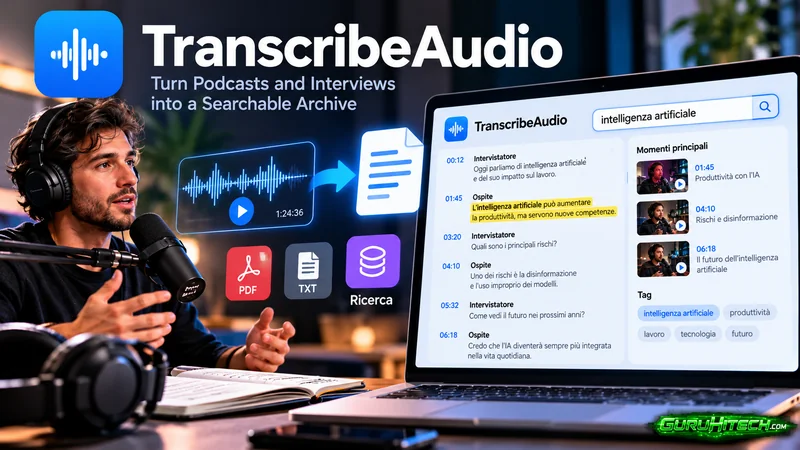
Most independent creators and small teams are sitting on an audio library they never reuse. Podcast episodes from last year, interview recordings with guests you meant to follow up with, voice memos with ideas you forgot you had. The audio is valuable, but audio is also the hardest format to retrieve. You cannot search a thirty-minute mp3 for the one sentence a guest said about pricing. You cannot quote it without relistening. And unless you wrote show notes by hand, the content is effectively locked inside the file.
An ai to transcribe audio tool is what unlocks it. Run the file through and you get editable text you can search, clip, and repurpose. If the source is video rather than audio, a video transcript from the same family of tools covers it, so your whole spoken archive ends up in one place regardless of format.
The Audio You Never Reuse
The pattern is predictable. You record an interview, publish the episode, maybe write two lines of show notes, and move on to the next one. The backlog grows. Three months later a listener asks a great question that a guest already answered on episode four, and you have no way to surface it without relistening to the whole thing. The knowledge is there, but it is trapped in a format built for linear playback, not retrieval.
This is the core problem a searchable archive solves. Not “transcribe everything for the sake of it,” but make the back catalog queryable so the good stuff resurfaces when you need it.
A Six-Step Pipeline from Dirty Audio to Retrievable Text
A reliable pipeline has six stages. Most of them are quick, and the slow one is the only one worth automating.
Step 1: Capture cleanly at the source
The cheapest accuracy win is at recording time. A USB mic in a quiet room beats any post-processing on a phone recording made in a café. If you interview guests remotely, ask them to wear headphones so their mic does not pick up your side of the call, which is the single biggest cause of cross-talk the transcription model cannot untangle.
Step 2: Transcribe without touching a keyboard
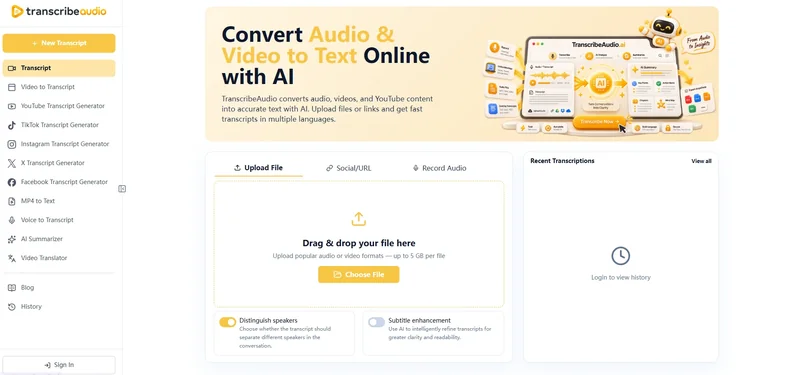
The core step is running the file through a tool that can ai to transcribe audio while you do something else. Upload the mp3, let it process, and come back to text instead of silence. This is also where video sources fold in: a conference recording or a screencast with voiceover can go through a video transcript and land in the same archive, so you are not maintaining two separate systems for two file types.
Step 3: Clean the first pass
This is the step people skip and then regret. Transcription models guess proper nouns by sound, so Italian brand names, guest surnames, and technical terms come back wrong often enough that you must read once. “Poste Italiane” might survive, but a niche SaaS name will not. Budget the read-through. It is faster than typing from scratch and it is what makes the output publishable.
Step 4: Structure it for reuse
Decide what each export is for and pick the format accordingly. Subtitle files (.srt) are for clips and captions. Plain text (.txt) is for notes and search. Word or rich text (.docx) is for deliverables you send to a client or guest. The format choice is not cosmetic: a clip subtitle and a client deliverable are different objects, and exporting the right one saves a second conversion later.
Step 5: Index it
A transcript you cannot find is no better than the audio. Tag each file by guest, topic, and date, and drop it into a folder or a notes app that searches full text. Now “every time we discussed pricing” is a query, not a recollection. The archive compounds: the more episodes you process, the more questions it can answer.
Step 6: Repurpose from the text
Once the archive is searchable, reuse gets cheap. Pull a sharp guest quote for a social post, lift a paragraph into a newsletter, or assemble the best moments from three episodes into a “greatest hits” piece. You are editing text you already have, not producing new recordings.
Why Italian Audio Needs a Second Pass
Italian adds its own wrinkles. Regional accents and fast informal speech between two natives are exactly where generic models wobble, and brand names that do not exist in an English training set come back mangled. A recorded interview that mentions a local startup or a dialect word will need a human eye on the first pass.
The practical fix is not exotic. It is to read the transcript once, correct the names, and save a glossary of the terms that came up so the next episode with the same guest is cleaner. After three or four episodes with a recurring guest, the correction load drops sharply because you already know how their name and their company are spelled.
Privacy: Where Your Audio Actually Goes
This is the question most “just use a free tool” advice ignores. Cloud transcription sends your audio to someone else’s servers. For a public podcast that is fine. For a confidential client interview, a recorded user research session, or anything with personal data, it is a real risk. The trade-off is simple: cloud tools need no setup and run on any device, while local models keep audio on your machine but expect you to supply the hardware and the patience.
Whisper, the open-source model Reddit’s technical communities recommend most, is accurate and free to run, but it is a model, not a product. On Windows you typically access it through a frontend like Buzz, and you want a decent GPU or transcription crawls. For occasional use that setup tax is often more than the task is worth. For high-volume private audio it is the right call. Pick based on what the audio contains, not on what is cheapest today.
Batch Versus Live, and Why It Matters for a Backlog
A distinction that clears up a lot of confusion: batch transcription processes a finished file after the fact and can optimize for final accuracy, while live transcription has to balance speed, partial updates, and turn detection in real time. If you are clearing a backlog of recorded episodes, you want batch. If you are captioning a live stream, you want live. The tool that is excellent at one is often awkward at the other, so match the job.
For an archive project the implication is freeing. You are not racing a clock, so you can process a week’s worth of audio overnight and review it at leisure, which is the workflow that actually fits a side project running on weekends.
What a Searchable Archive Unlocks
The payoff is not abstract. With the back catalog in text you can quote a guest accurately instead of paraphrasing from memory, reuse a strong clip without re-editing the video, and assemble a short course from episodes that already cover the topic in order. Coaches and teachers get the clearest win: transcribed sessions become mini-guides and handouts almost by accident, because the material is already organized by what was said, not by where it sits in a timeline.
A Real Example: Six Episodes in One Weekend
Take a creator with six podcast episodes, each about forty minutes, that have never been transcribed. That is four hours of audio total.
- Manual transcription at the oft-cited rate of five to six hours per hour of audio is twenty to twenty-four hours of work, or a few hundred euros outsourced.
- Running all six through an ai to transcribe audio tool is a few minutes of upload and processing plus one proofreading pass, closer to six or seven hours all in, and most of that is the read-through, not the wait.
The result is not six text files. It is a searchable library where a listener’s question gets answered from episode two in thirty seconds, and where next month’s newsletter can open with a quote you would never have remembered. Over a year, that archive is the difference between “we should do something with our old episodes” and actually having done it.
Common Mistakes
A few habits waste the effort. Trusting the first pass on names means every guest mention is one correction away from being wrong. Exporting only .txt when you also need .srt for a clip means a second conversion later. Skipping tags means the archive is searchable in theory but useless in practice, because everything lands in one undifferentiated pile. And treating transcription as the finish line instead of the start means the text gets produced and then ignored, which is the same outcome as never transcribing at all.
Conclusion
Audio is only as useful as your ability to find something in it later. An ai to transcribe audio step turns recordings into text, and a video transcript does the same for video sources, so the whole spoken archive ends up queryable in one place. The real work is the proofread and the tagging, not the transcription. Do those two and a folder of episodes you never reopen becomes a library you reach for every week.
Ti potrebbe interessare:
Segui guruhitech su:
- Google News: bit.ly/gurugooglenews
- Telegram: t.me/guruhitech
- Facebook: facebook.com/guruhitechfb
- Instagram: instagram.com/guruhitech_official/
- X (Twitter): x.com/guruhitech1
- Bluesky: bsky.app/profile/guruhitech.bsky.social
- Rumble: rumble.com/user/guruhitech
- VKontakte: vk.com/guruhitech
- MeWe: mewe.com/i/guruhitech
- Skype: live:.cid.d4cf3836b772da8a
- WhatsApp: bit.ly/whatsappguruhitech
Esprimi il tuo parere!
Che ne pensi di questa notizia? Lascia un commento nell’apposita sezione che trovi più in basso e se ti va, iscriviti alla newsletter.
Per qualsiasi domanda, informazione o assistenza nel mondo della tecnologia, puoi inviare una email all’indirizzo [email protected].
Scopri di più da GuruHiTech
Abbonati per ricevere gli ultimi articoli inviati alla tua e-mail.