
Character Swap AI: A Practical Guide to Recasting Videos Without Rebuilding Every Scene
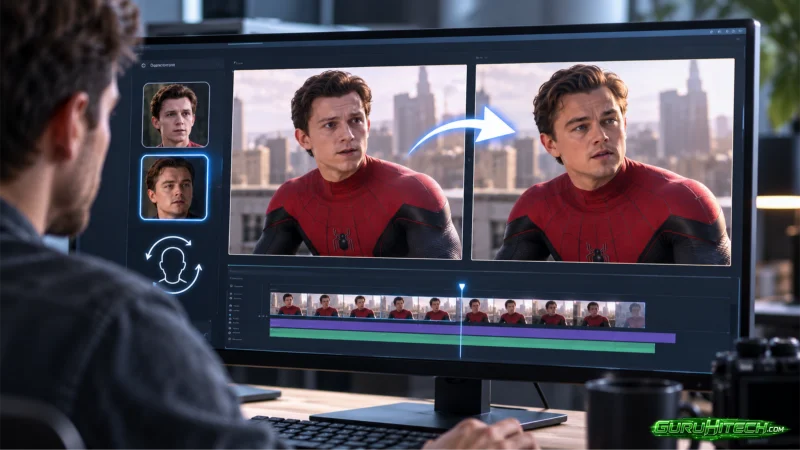
Have you ever captured the right performance but ended up with the wrong character? The movement may be perfect, the camera angle may work, and the timing may fit your story—yet the person, avatar, or mascot on screen does not match your creative direction.
Traditionally, fixing that problem required another shoot, manual rotoscoping, motion capture, or frame-by-frame compositing. Each option added more production time and demanded skills that many creators and small teams simply did not have.
AI is changing that workflow. Instead of recreating an entire scene, creators can now use an existing performance as the motion guide and replace the visible character with a new reference.
Why AI Character Replacement Is Changing Video Production
Character replacement sits between conventional video editing and full character animation. It gives creators a practical way to preserve what already works while changing the visual identity of the performer.
Several advantages make this workflow especially useful:
- Existing motion becomes reusable: A dance, gesture, walk cycle, or acting performance can guide a completely different character.
- Pre-production becomes more visual: Filmmakers can test casting and character ideas before organizing an expensive production.
- Creative variations become easier: One source clip can support different mascots, avatars, original characters, or campaign concepts.
- Technical barriers become lower: Creators can explore character-led videos without beginning with a complete animation or compositing pipeline.
The key idea is simple: keep the performance, change the performer.
Our Pick for a Video-First Character Replacement Workflow
Motion Control AI provides a focused workflow for creators who want to replace a character while retaining the motion, pose, timing, framing, and general scene direction of a source video.
Its dedicated character swap ai tool starts with two clear inputs: a source video containing the performance and a reference image showing the replacement character. The source clip guides the movement, while the image establishes the new character’s visual identity.
This video-first approach helps distinguish character replacement from a basic face swap. A face swap usually concentrates on facial identity, while character swapping is intended to recast the visible on-screen subject more broadly.
The tool also supports an image replacement mode. You can provide an original scene and a second image containing the replacement character, then describe what should change or remain untouched.
How to Create a Better Character Swap
The basic workflow is approachable, but input quality still matters. AI can interpret the material you provide; it cannot recover visual information that is never visible in the source.
1. Choose a Clear Source Video
Start with a clip in which the main performer is easy to identify. Stable framing, visible body movement, and consistent lighting give the system a clearer performance to follow.
Heavy occlusion can make replacement more difficult. If the subject repeatedly disappears behind furniture, other people, or fast foreground objects, the generated character may struggle to remain consistent.
Simple clips are often the best starting point. A clear walk, dance, gesture sequence, or direct-to-camera performance makes it easier to evaluate motion matching before attempting more complicated scenes.
2. Use a Strong Character Reference
Your replacement image should clearly communicate the character’s identity. Whenever possible, choose a reference that shows the face, clothing, body proportions, and overall visual style.
A tightly cropped portrait may work for a close-up video but provide too little information for a full-body dance. For wider shots, a character reference with more of the body visible gives the AI a better target.
Consistency also matters. Avoid references with confusing backgrounds, overlapping subjects, or accessories that hide important parts of the character.
3. Describe What Must Stay the Same
A useful prompt does more than say “replace the person.” It tells the editor which parts of the scene are important.
You might ask it to preserve the original walk cycle, gesture rhythm, camera angle, background, and lighting direction. If you are introducing a stylized character, you can also specify whether that style should remain illustrated or adapt to the realism of the source scene.
Think of the prompt as a compact creative brief. Define the replacement, identify the protected elements, and mention the qualities that make the shot recognizable.
4. Preview Before Treating the Result as Final
Review the entire output rather than judging a single frame. Look for character consistency, natural contact with the environment, stable clothing details, and believable changes in pose.
Pay special attention to hands, fast turns, crossed limbs, and moments when the subject moves close to the edge of the frame. These are common stress points for AI video workflows.
If the first result feels unstable, simplify one variable at a time. Try a cleaner reference image, a shorter source clip, less occlusion, or a more precise prompt before generating another version.
Practical Ways Creators Can Use Character Swap AI
Short-form creators can recast dance videos, meme formats, and social clips with an original character or avatar. The existing performance preserves the pace and energy that made the source video effective.
Filmmakers and previs artists can test how a concept character might appear inside a scene. This does not replace final visual effects, but it can communicate casting, blocking, and tone before a team commits to production.
Anime, game, and fandom creators can place an illustrated hero or original character into a motion-led video concept. A consistent reference image can also help them explore how the same character behaves across different performances.
Marketing teams can turn a proven motion clip into early mascot or spokesperson variations. This makes it easier to compare creative directions before planning a new shoot or commissioning a polished campaign asset.
Virtual influencer creators can use reference-led replacement to explore a recurring identity across multiple clips. For the best continuity, they should use a clean and consistent character reference instead of changing the design for every generation.
Character Swap Versus Face Swap and Body Swap
These terms are often treated as interchangeable, but they describe different creative goals.
Face swap focuses mainly on replacing facial identity. It is most relevant when the body, clothing, and original performance should remain largely unchanged.
Body swap is commonly associated with still-image editing or broader body replacement. It may be the better choice when the source is a photograph rather than a motion clip.
Character swap is the most suitable description when the goal is to recast a moving subject while using the original video as a guide for pose, timing, and scene flow. Understanding this distinction helps creators choose the right workflow and prepare better inputs.
Responsible Character Replacement
Creative flexibility should be paired with responsible use. Only upload videos, photographs, character designs, and brand assets that you own or have permission to use.
Real people should not be placed into misleading, harmful, or deceptive scenes. Commercial projects may also require permission from performers, character owners, clients, or licensors even when the technical transformation is generated by AI.
Before publishing, teams should review the current usage terms, privacy information, credit requirements, and export conditions shown by the editor. AI generation changes the production method, but it does not remove the need to respect consent and intellectual property.
The Future of Motion-Controlled Character Creation
Character replacement is becoming part of a broader shift toward reusable performances. A creator may begin with one recorded movement and adapt it into several visual concepts without rebuilding every shot from zero.
As motion control, character consistency, and scene awareness improve, the distance between an idea and a convincing video prototype will continue to shrink. Small teams will be able to evaluate more concepts before spending their production budget.
The most valuable result may not always be the final export. Sometimes it is the ability to see a character idea in motion early enough to make a better creative decision.
Conclusion
AI character replacement gives creators a new way to work with footage they already have. By combining a clear source performance, a strong character reference, and precise prompt guidance, they can explore new casting, storytelling, and campaign possibilities without reconstructing the entire scene.
The technology works best when it supports creative judgment. Start with a simple clip, protect the details that matter, review the result carefully, and refine the concept one decision at a time.
Ti potrebbe interessare:
Segui guruhitech su:
- Google News: bit.ly/gurugooglenews
- Telegram: t.me/guruhitech
- Facebook: facebook.com/guruhitechfb
- Instagram: instagram.com/guruhitech_official/
- X (Twitter): x.com/guruhitech1
- Bluesky: bsky.app/profile/guruhitech.bsky.social
- Rumble: rumble.com/user/guruhitech
- VKontakte: vk.com/guruhitech
- MeWe: mewe.com/i/guruhitech
- Skype: live:.cid.d4cf3836b772da8a
- WhatsApp: bit.ly/whatsappguruhitech
Esprimi il tuo parere!
Ti è stato utile questo articolo? Lascia un commento nell’apposita sezione che trovi più in basso e se ti va, iscriviti alla newsletter.
Per qualsiasi domanda, informazione o assistenza nel mondo della tecnologia, puoi inviare una email all’indirizzo [email protected].
Scopri di più da GuruHiTech
Abbonati per ricevere gli ultimi articoli inviati alla tua e-mail.