

From Static to Moving: A Practical Look at What Image-to-Video AI Actually Delivers
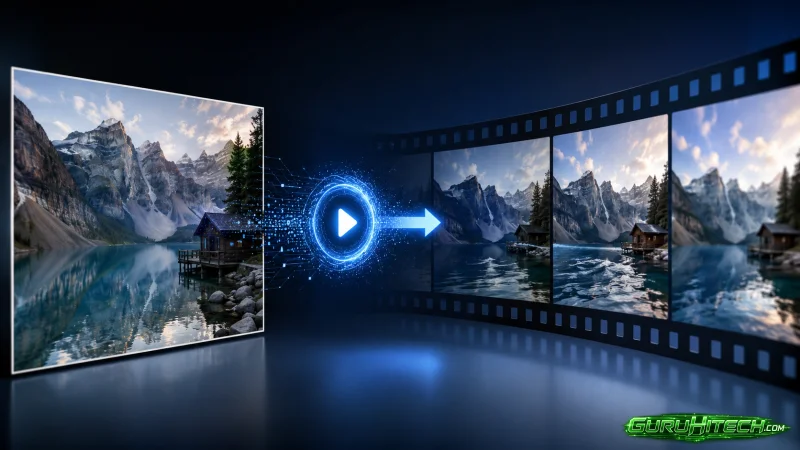
The gap between what generative AI promises and what it actually delivers is often wide enough to drive a truck through. Demo reels look impressive. Marketing copy talks about cinematic quality and seamless motion. Then you upload your own image, and the result is something else entirely. The image to video ai space has grown rapidly, but separating genuine utility from hype requires actually using the tools. I spent time with one of the more accessible platforms to see what happens when you move beyond the sales pitch and into real-world testing.
What emerged was a picture of a tool that does not pretend to be something it is not. It does not claim to replace professional video production. It does not promise Hollywood-level effects. What it does claim is straightforward: upload a photo, describe the motion, get a video. So the question is whether that straightforward workflow produces results that are actually useful.
The Workflow That Defines the Experience
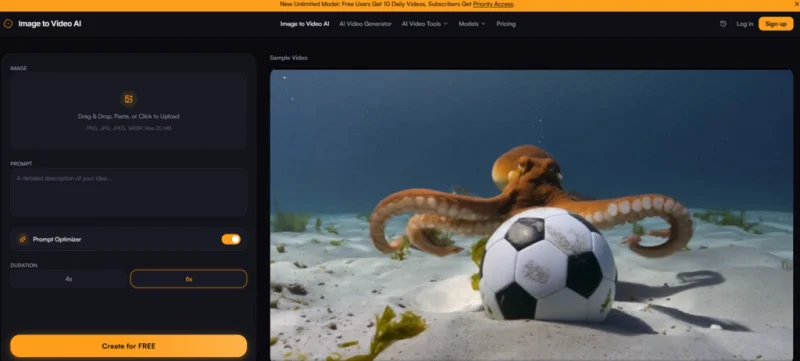
The platform lays out a three-step process, and in practice, that is exactly how it plays out. There are no hidden steps, no required account creation to test the basic functionality, and no confusing settings panels.
Uploading the Image: Simplicity as a Feature
The upload process is as minimal as it gets. Drag and drop works. The tool accepts JPG, PNG, and WEBP formats up to 20MB. There is a crop tool for adjusting aspect ratio before generation starts. This last point matters more than it might seem. Being able to frame the image before the AI processes it means you control the final composition rather than leaving it to chance.
What I noticed during testing was the absence of decision fatigue. There is no model selection dropdown. There are no advanced settings that require technical knowledge. You upload an image, and you move to the next step. For someone who has never touched video editing software, this is exactly the right level of complexity.
Writing the Prompt: Where Skill Actually Matters
The prompt box accepts natural language descriptions of motion,the site suggests examples like “slow zoom in,” “gentle sway,” or “flowing water.” The platform states that the AI uses both the image and the prompt together to generate context-aware animations. This is a critical distinction from tools that apply generic motion templates regardless of what the image contains.
In practice, prompt quality is the single biggest variable affecting output. A vague prompt like “make it move” produces generic motion that could apply to almost any image. A specific prompt like “slow zoom with drifting clouds and warm light” produces motion that feels more intentional and more closely tied to the image content.
This means the tool rewards descriptive precision. Users who take the time to craft thoughtful prompts get better results. Users who rush through the prompt field get results that reflect that haste. This is not a flaw—it is a characteristic of how prompt-guided generation works. The tool gives you control, but it also requires you to exercise it.
Generating and Iterating: The Speed Advantage
Clicking generate starts the process, and the result appears in seconds. The speed is not just a convenience—it fundamentally changes the creative workflow. When generation takes seconds, experimentation becomes viable. You can try three different prompts for the same image in the time it would take to export a single clip from traditional software.
The preview lets you assess the result before downloading. If it is not what you wanted, you adjust the prompt and try again. This low-cost iteration encourages exploration rather than settling for the first acceptable result.
What the Output Actually Looks Like
Describing the output requires more than saying “it works.” The quality varies by image type and prompt quality, but some patterns emerged during testing.
Motion Quality and Naturalness
The best results came from images with clear depth cues and distinct subjects. A landscape photo with visible foreground, midground, and background elements produced motion that felt more three-dimensional. A portrait with a clear subject and blurred background produced a gentle sway that felt natural rather than robotic.
The motion is not always perfect. Some outputs had movement that felt slightly off—a zoom that was too fast, a sway that seemed unnatural. The ability to regenerate with adjusted prompts mitigates this, but it does mean the tool is not a one-click guaranteed success machine.
The platform claims the motion feels natural, not robotic. In my testing, this was true for the better outputs. The motion had a smoothness that distinguished it from simple pan-and-zoom presets. It was not photorealistic, but it was evocative.
Resolution and Usability
The tool delivers HD video at up to 1080p resolution, the free tier includes a small watermark. The paid tier removes it and unlocks higher resolution options. For social media content, the output resolution is sufficient. For professional use where watermark-free output is required, the paid tier becomes relevant.
The platform states there are no watermarks on the output, but the FAQ clarifies that the free tier includes a small watermark while the paid plan removes it. This is a standard freemium model rather than a hidden catch.
Where the Tool Fits in a Creator’s Workflow
The platform is not designed to replace professional video production. It is designed for specific use cases where speed and accessibility matter more than absolute quality.
Social Media Content
For Instagram Reels, TikTok, and YouTube Shorts, the tool provides a way to turn static images into short, motion-enhanced clips. The speed means you can produce multiple clips in a single sitting, the output resolution is sufficient for mobile-first platforms.
The site has a testimonial from a marketing manager who uses the tool to turn product stills into social media clips in under a minute. This aligns with my experience—the workflow is fast enough to fit into a tight content production schedule.
E-Commerce and Product Visualization
The platform cites a case where adding video previews to product pages increased conversion by nearly 40%. Whether or not that specific number applies universally, the logic is sound: motion attracts attention, and attention drives engagement.
Being able to animate product photos without hiring a video editor makes this accessible to small businesses and solo operators. The tool does not require any technical knowledge, and the free tier provides enough runway to test whether video previews actually move the needle for your specific products.
Real Estate and Property Listings
A realtor testimonial on the site describes using the tool to turn property photos into cinematic walkthroughs. For listings where a full video shoot is not feasible, adding subtle motion to still images can make listings more engaging.
The tool does not create a full virtual tour. It adds motion within the existing frame. But for buyers scrolling through listings, that extra movement can make a property stand out.
Creative and Personal Projects
For travel photos, portraits, or artistic work, the tool adds a layer of motion that static images lack. A travel influencer testimonial describes using the tool to create cinematic reels from travel photos. The results are not photorealistic, but they are visually interesting and consistently outperform static posts.
Practical Limitations Worth Acknowledging
Any honest assessment of the tool needs to address its limitations.
Prompt quality is the primary variable affecting output. The tool interprets your text description alongside your image. Users who are not comfortable writing descriptive prompts may find the results inconsistent.
Complex scenes may require multiple attempts. Not every generation works on the first try. Some outputs have motion that feels slightly off. The ability to regenerate with adjusted prompts mitigates this, but it does mean the tool is not a guaranteed one-shot solution.
The tool does not create new visual information. It generates motion within the existing frame. It does not move the camera around a three-dimensional space or create new perspectives.
Results vary by image type. Images with clear depth cues and distinct subjects tend to produce more convincing motion than flat, low-contrast images. This is characteristic of how image-to-video models work.
The Bottom Line on What This Tool Actually Does
After testing the platform across multiple scenarios, the conclusion is straightforward. The tool does what it says it does: it turns static images into short, motion-enhanced videos quickly and without requiring technical skills. It does not do everything, but it does one thing well.
The ai image to video category is still evolving, and this platform represents one approach to the problem. It prioritizes accessibility over complexity, speed over absolute quality, and iteration over perfection. Those priorities will not suit every use case, but for the growing number of creators who need to produce video content at scale, they make a compelling case.
The most useful frame for evaluating the tool is not whether it is “good” or “bad” in absolute terms. It is whether it solves a specific problem for a specific type of user. For social media creators, e-commerce operators, and marketers who need to produce video content quickly, the tool offers a workflow that was not previously available. That alone makes it worth knowing about.
Ti potrebbe interessare:
Segui guruhitech su:
- Google News: bit.ly/gurugooglenews
- Telegram: t.me/guruhitech
- Facebook: facebook.com/guruhitechfb
- Instagram: instagram.com/guruhitech_official/
- X (Twitter): x.com/guruhitech1
- Bluesky: bsky.app/profile/guruhitech.bsky.social
- Rumble: rumble.com/user/guruhitech
- VKontakte: vk.com/guruhitech
- MeWe: mewe.com/i/guruhitech
- Skype: live:.cid.d4cf3836b772da8a
- WhatsApp: bit.ly/whatsappguruhitech
Esprimi il tuo parere!
Ti è stato utile questo articolo? Lascia un commento nell’apposita sezione che trovi più in basso e se ti va, iscriviti alla newsletter.
Per qualsiasi domanda, informazione o assistenza nel mondo della tecnologia, puoi inviare una email all’indirizzo [email protected].
Scopri di più da GuruHiTech
Abbonati per ricevere gli ultimi articoli inviati alla tua e-mail.