

HBADA X7: Unboxing and First Impressions of the Smart Ergonomic Chair
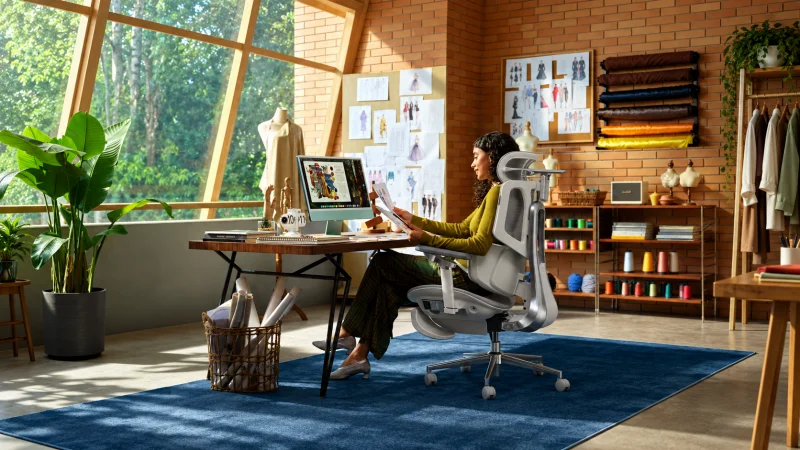
Opening the box of a premium ergonomic chair usually comes with high expectations. You are not just looking for a comfortable place to sit. You want something that can support your body properly, adapt to different working positions, and make long hours at a desk feel easier. The HBADA X7 smart ergonomic chair is designed with exactly that idea in mind, combining adjustable ergonomics with smart features that go beyond what you normally get from a standard office chair.
From adaptive lumbar support and seat ventilation to massage functions, an adjustable headrest, and multiple reclining positions, the X7 feels more like a complete workstation chair than a basic office seat. In this guide, we will look at the unboxing experience, the assembly process, the main features, and our first impressions after setting it up.
Unboxing the HBADA X7: A Premium First Impression
The X7 is not a minimalist office chair, and you notice that as soon as you open the box.
The chair uses a reinforced aluminum alloy rear frame, while the five-star base is designed to provide solid stability. According to the official specifications, the chair is suitable for users around 150 to 195 cm tall and supports a maximum weight of approximately 150 kg.
Before starting the assembly, it is a good idea to lay all the parts out on the floor and identify each component.
Inside the package, you can expect to find:
- Five-star chair base
- Casters
- Gas lift cylinder
- Seat section
- Backrest
- Headrest
- Connecting parts
- Screws and accessories
- Assembly manual
Taking a few minutes to organize everything first makes the setup much smoother.
The overall first impression is that this chair has been designed with more attention to detail than a typical entry-level office chair. The number of adjustment mechanisms, the lumbar system, and the smart functions immediately show that this product is aimed at people who spend serious time at a desk.
How to Assemble the HBADA X7 Smart Ergonomic Chair
Despite its high-tech appearance, the assembly process is not as difficult as it may look.
HBADA states that the X7 arrives mostly pre-assembled, which means you mainly need to connect the base, seat, and backrest. This makes the setup more manageable than building a fully disassembled ergonomic chair from scratch.
Step 1: Prepare the Base
Start by attaching the casters to the five-star base.
It is best to work on a carpet, cardboard sheet, or another protected surface, especially if you have wooden flooring. Once the wheels are installed, insert the gas lift cylinder into the center of the base.
You normally do not need excessive force. Most parts settle securely into place once the chair is fully assembled and your body weight is applied.
Step 2: Position the Seat
The seat is one of the most important parts of the X7 because it contains several comfort and adjustment features, the seat width is approximately 52 cm, while the depth can be adjusted from around 40.5 cm to 45.5 cm. The seat height can also be adjusted from roughly 44.5 cm to 53 cm.
This adjustable seat depth is particularly useful because it helps different users find a better sitting position based on leg length.
A fixed-depth chair may feel comfortable for one person but too long or too short for someone else. The X7 gives you more flexibility to fine-tune the sitting area.
Step 3: Attach the Backrest
The backrest requires a little more attention because much of the X7’s ergonomic technology is built into this section.
The easiest approach is to align all mounting points first before fully tightening the screws.
If you completely tighten one screw before inserting the others, the parts may become slightly misaligned. Keeping everything loose at first makes the process easier.
Once the backrest is attached properly, the chair begins to feel much more complete and solid.
At this stage, you can also start to appreciate the strength of the frame and the overall premium construction.
Adaptive Lumbar Support Is the Main Highlight
One of the biggest differences between the X7 and a traditional ergonomic chair is its adaptive lumbar support system.
On a normal office chair, you manually adjust the lumbar support and leave it in the same position for most of the day.
The X7 takes a different approach.
The system uses sensors, a dedicated chip, and a linear motor to detect changes in your sitting position and adjust the lumbar support automatically.
There are also different intensity levels that allow you to customize how strong the lumbar support feels.
This feature makes sense in real-world use because most people do not stay perfectly still while working.
You lean forward while typing, you sit back during meetings, you change position while reading, you may even shift from one side to another without noticing.
A lumbar system that follows these movements can feel more natural than a completely fixed support.
It does not mean the chair will magically correct every posture problem, but it reduces the need to keep adjusting the lumbar section manually every time you change position.
Seat Ventilation for Long Working Sessions
One feature that may seem unnecessary at first is active seat ventilation.
However, after sitting for several hours, it becomes easier to understand why it can be useful.
The X7 uses two 3,000 RPM fans and provides three airflow modes. The airflow is designed to move through the perforated seating surface and reduce heat buildup.
For people who work in warm environments or spend eight or more hours at their desks, this can be a genuinely useful feature.
Traditional padded seats often trap heat after long periods of use.
The ventilation system does not replace air conditioning, of course, but it can help keep the contact area cooler and more comfortable during extended work sessions.
It is one of those features that makes the chair feel more like a smart productivity product rather than just another piece of office furniture.
8D Massage and Relaxation Features
The X7 also includes an 8D bionic massage system.
Instead of relying only on basic vibration motors, HBADA describes the system as using a dual-core design intended to create a more focused mechanical massage experience.
This is especially useful during short breaks.
After working for several hours, you can recline the backrest, use the leg support, and activate the massage function.
That creates a very different experience compared with a normal upright working position.
The massage feature is not necessarily the main reason to buy this chair.
Ergonomics should still be the priority.
However, it is a useful extra for people who want to combine work and relaxation without leaving the desk area.
Adjustment Options: Where the X7 Really Stands Out
Smart features attract attention, but a good ergonomic chair still needs to provide proper adjustability.
This is one area where the X7 performs strongly.
The chair includes several adjustment options, including a 4D headrest, highly adjustable armrests, seat-depth adjustment, and multiple backrest angles.
HBADA lists four main reclining positions:
- 105°: More upright working position
- 116°: Relaxed office sitting
- 128°: Break or rest position
- 140°: Deeper relaxation mode
This range makes it easier to use the same chair for different tasks throughout the day.
For example, you may prefer a more upright angle while typing.
When reading a long document, a slightly reclined position may feel more comfortable.
During a break, you can recline the chair further and take pressure off your lower back.
That flexibility is one of the strongest reasons to consider a chair like this for long-term desk use.
Adjusting the Headrest Properly
The headrest should not simply touch the back of your head.
Its position needs to match your height, neck position, and backrest angle.
It is worth spending a few minutes adjusting it carefully.
Once the correct position is found, the headrest can provide useful neck support, especially when working in a slightly reclined position.
The same applies to the armrests.
Rather than adjusting them once and forgetting about them, it is better to match them with the height of your desk, keyboard, and mouse.
Proper armrest positioning can help reduce unnecessary tension in the shoulders and wrists.
First Impressions After Assembly
The strongest point of the HBADA X7 smart ergonomic chair is not one single feature.
It is the way all the features work together.
The overall experience feels very different from a traditional office chair that only offers seat-height adjustment and basic reclining.
The lumbar support reacts to changes in posture, the seat depth can be adapted to your legs, the headrest supports different sitting angles. the backrest can quickly move from a working position to a more relaxed one, the design also contributes to the premium feel, the standard X7 uses a high-strength aluminum alloy rear frame, while the X7 Air version uses reinforced nylon.
According to HBADA, the main ergonomic and smart functions are largely shared between both versions.
Of course, a chair with this many adjustments requires a short adaptation period.
It is difficult to judge an ergonomic chair properly after sitting in it for only five minutes.
During the first few days, it is better to gradually adjust the seat height, seat depth, headrest, armrests, and lumbar support until the chair feels natural for your body.
Who Is the HBADA X7 Best For?
The X7 appears to be most suitable for people who spend a large part of the day sitting.
It can be a good option for:
- Remote workers
- Programmers and developers
- Designers
- Content creators
- Gamers who also work at the same desk
- Managers with long office hours
- Users who want a highly adjustable ergonomic chair
If you only use a desk chair for one or two hours per day, you may not fully benefit from all the advanced features.
However, if your desk is your main working environment for eight hours or more, features such as dynamic lumbar support, ventilation, multiple recline angles, and extensive adjustability become much more valuable.
FAQs About the HBADA X7
How much weight can the HBADA X7 support?
According to the official specifications, the chair supports up to approximately 150 kg or 330 lb. The recommended user height is around 150 to 195 cm.
Is the HBADA X7 smart ergonomic chair difficult to assemble?
No. The chair arrives partially pre-assembled. The main assembly steps involve attaching the base, seat, and backrest, which makes the setup relatively straightforward.
Does the lumbar support require manual adjustment?
The main lumbar system is designed to adjust automatically using sensors, electronic processing, and a motorized mechanism. You can also customize the level of support based on your preference.
Is the HBADA X7 suitable for eight-hour workdays?
Yes, it is designed for extended sitting and includes adjustable seat depth, lumbar support, headrest positioning, reclining functions, and seat ventilation. However, regular movement and short breaks are still important during long working days.
What is the main difference between the X7 and X7 Air?
The main difference is the rear frame material. The X7 uses an aluminum alloy structure, while the X7 Air uses reinforced nylon. Their main ergonomic and smart functions are otherwise quite similar.
Conclusion
After looking at the unboxing experience, assembly process, and main features, the HBADA X7 smart ergonomic chair feels designed for users who want more than basic office seating. Its adaptive lumbar support is probably the standout feature, but the active ventilation, 8D massage, adjustable headrest, flexible seat depth, and wide reclining range all contribute to a more personalized working experience.
The assembly process is also relatively simple because the chair arrives partially pre-assembled. The most important step comes after setup: taking the time to adjust everything properly. A chair with this many settings works best when it is carefully matched to your height, desk, body shape, and daily working habits.
For people who spend long hours working, studying, designing, gaming, or managing projects from a desk, that level of customization can make the HBADA X7 a much more interesting option than a conventional office chair.
Ti potrebbe interessare:
Segui guruhitech su:
- Google News: bit.ly/gurugooglenews
- Telegram: t.me/guruhitech
- Facebook: facebook.com/guruhitechfb
- Instagram: instagram.com/guruhitech_official/
- X (Twitter): x.com/guruhitech1
- Bluesky: bsky.app/profile/guruhitech.bsky.social
- Rumble: rumble.com/user/guruhitech
- VKontakte: vk.com/guruhitech
- MeWe: mewe.com/i/guruhitech
- Skype: live:.cid.d4cf3836b772da8a
- WhatsApp: bit.ly/whatsappguruhitech
Esprimi il tuo parere!
Ti è stato utile questo articolo? Lascia un commento nell’apposita sezione che trovi più in basso e se ti va, iscriviti alla newsletter.
Per qualsiasi domanda, informazione o assistenza nel mondo della tecnologia, puoi inviare una email all’indirizzo [email protected].
Scopri di più da GuruHiTech
Abbonati per ricevere gli ultimi articoli inviati alla tua e-mail.