
PaperFig Cuts Rework Before Scientific Figure Review

A scientific figure can look polished and still explain the experiment badly. That is why PaperFig belongs inside a review process rather than outside it. The most useful workflow starts when a researcher turns the manuscript into one clear visual message, generates a draft, and checks every object before the file reaches coauthors or reviewers.
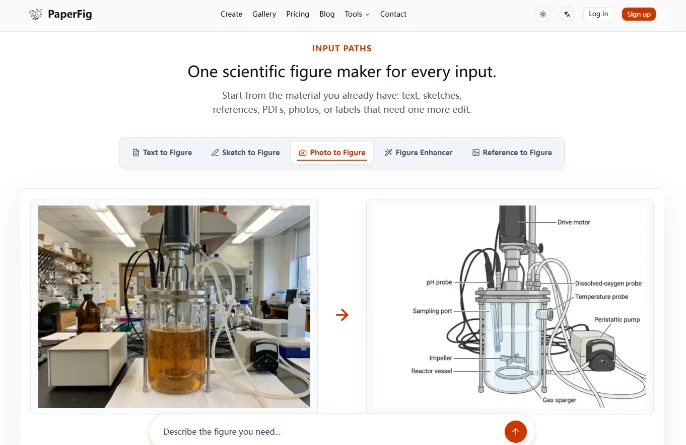
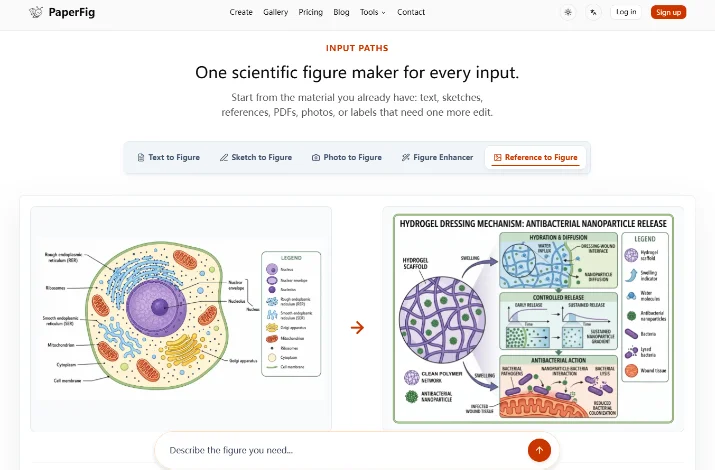
The platform can begin with text, a sketch, a photo, a PDF, or a reference image. Researchers can then correct labels with an OCR editor and export a PNG. Paid plans also add 4K options and editable SVG or PPTX label exports. This sequence removes some manual layout work, but it only saves time when each stage has a clear acceptance rule.
Prepare The Workflow Before Opening The Figure Generator
The first mistake often appears before an image exists. A request such as “make a graphical abstract for this study” leaves too many decisions open. Which finding should dominate? Which steps must appear? What does each arrow mean? When those answers stay implicit, a complete-looking draft can send coauthors into three different versions of the same story.
Prepare a short but binding brief. It should contain one supported conclusion, the essential objects, their order, and the relationships a reader must understand. Colour and decoration come later. In a materials study, for example, the path might be material structure, applied stimulus, measured change, and final signal. A detail that does not change that path probably belongs in the caption.
Step One Define One Supported Scientific Message
Write one sentence containing the research question, the intervention or method, and the supported result. Do not add a conclusion that the manuscript cannot defend. If two results compete for space, choose the one that supports the paper’s main claim and leave the secondary result in an experimental panel or the body text.
This step can feel slow, yet it prevents the most expensive kind of rework: rebuilding the composition after people have already approved colours and icons. The loss extends beyond design time. Every replacement draft reopens scientific discussion and creates comments tied to files that are already obsolete.
Step Two Order Entities Arrows And Results
List only the necessary entities and give every arrow a real job: transport, activation, inhibition, comparison, or time. If an arrow cannot be explained with one precise verb, it should not enter the draft. State the reading direction as well, because a left-to-right sequence and a cycle describe different logic.
Before moving on, show the brief to a colleague who knows the project but did not write that section. If the colleague can reconstruct the message without inventing a relationship, the structure is ready. If a new connection appears in the retelling, the brief still contains an ambiguity that generation will only hide.
Choose The Input That Exposes Scientific Uncertainty
The right input is not simply the easiest file to upload. It depends on what remains unresolved. Text works when the sequence is already defined. A sketch clarifies spatial arrangement, a photo anchors the figure to a real device or specimen, a PDF brings context, while a reference image communicates a visual direction.
A small intake rule keeps form separate from evidence:
- Use text for mechanisms that can be described with explicit verbs and relationships.
- Use a sketch for layers, compartments, or routes that depend on position.
- Use a photo for a real object that needs to remain recognisable.
- Use a PDF only after isolating the pages that matter.
- Use a reference image for hierarchy and composition, never as permission to copy protected work.
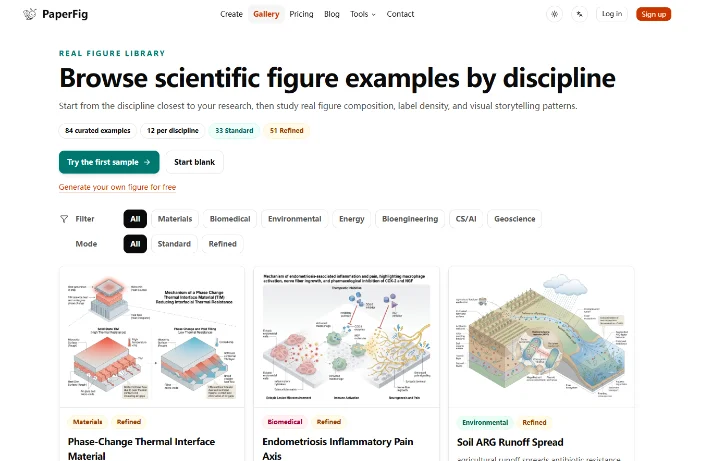
PaperFig also has a public gallery with 84 curated examples across seven disciplines. It can help a researcher study label density, panel balance, and reading direction. The gallery is not a bank of scientific results. Its examples can describe the desired form, but the evidence must still come from the new study.
Step Three Generate A Draft With Clear Constraints
Put the field, topic, visual order, required components, essential labels, and exclusions into the prompt. The Text to Figure field accepts up to 3,000 characters, but more text does not automatically create more precision. A short sequence with clear verbs often gives the draft a stronger structure than a long paragraph full of background.
Judge the first output by object coverage and relationship logic. Do not spend time debating colour if a compartment is missing or if an arrow implies causation where the paper only reports association. A discarded draft at this stage is useful evidence. It stops a structural mistake from becoming more expensive after layout and coauthor review.
Correct Labels Without Regenerating The Entire Figure
Text inside a generated image is a fragile point. An abbreviation can lose a character, a protein can move toward the wrong compartment, or a minus sign can disappear. Everything may look readable at full browser size. The same label can become unclear when the figure is reduced to a journal column.
The OCR editor lets a researcher correct one word without requesting a completely new image. This matters because regeneration may move objects that have already passed review. The check must go beyond spelling. After each edit, confirm that the label still belongs to the right object and does not cover an arrow or symbol.
Step Four Run Three Separate Figure Checks
Use a three-pass render test. The first pass compares entities, arrows, and the stated result with the manuscript, the second checks spelling, units, symbols, and label placement. The third places the image at the size where readers will actually see it. Only a 3/3 result should move into the shared review file.
Set one simple hard fail as well. If an arrow changes the meaning of the result, a label becomes unreadable, or an unsupported object appears, the figure stays out of group review. This threshold prevents five people from spending time on a draft that already contains a disqualifying scientific error.
Export The Format That Fits The Next Stage
A basic PNG is often enough for an early discussion. When the figure moves towards manuscript production or presentation slides, a 4K PNG and editable SVG or PPTX label exports become more useful. The format should follow the next task rather than the urge to download the largest file immediately.
With an AI scientific figure maker, a better export cannot rescue a bad structure. A perfectly editable SVG may still contain an unsupported relationship. Keep the sequence simple: message, relationship, label, final size, and then file format.
A clean handoff contains three things:
- The approved brief with its central sentence.
- The figure placed at the size where it will be read.
- A short list of corrections that remain open.
PaperFig reduces the time spent aligning objects and rebuilding the first layout. It does not decide whether a scientific arrow is correct. One named owner should remain responsible for the file through export.
Protect Research Materials Before Uploading Them Online
Prompts, images, PDFs, and generated outputs may be processed by external AI, storage, and moderation services. Do not upload identifiable health data, PHI, confidential unpublished research, proprietary datasets, grant-review material, or content that the group has no right to process.
The practical response is to prepare a reduced input. Remove names, identifiers, and details that do not affect the composition. If the mechanism cannot be described without exposing confidential material, this workflow does not fit that figure. Care at intake prevents a problem that no graphical correction can repair later.
A Useful Draft Makes Scientific Errors Visible
PaperFig suits researchers who already have a defined scientific story but want to cut first-pass composition work. It is especially useful when a revision needs another panel, a presentation needs a clearer version, or a group needs a concrete structure to discuss instead of a vague visual idea.
The strongest result is a draft that exposes wrong words, ambiguous relationships, and unnecessary detail early. Correcting those problems before group review costs less than explaining later why a convincing image no longer matches the manuscript.
Ti potrebbe interessare:
Segui guruhitech su:
- Google News: bit.ly/gurugooglenews
- Telegram: t.me/guruhitech
- Facebook: facebook.com/guruhitechfb
- Instagram: instagram.com/guruhitech_official/
- X (Twitter): x.com/guruhitech1
- Bluesky: bsky.app/profile/guruhitech.bsky.social
- Rumble: rumble.com/user/guruhitech
- VKontakte: vk.com/guruhitech
- MeWe: mewe.com/i/guruhitech
- Skype: live:.cid.d4cf3836b772da8a
- WhatsApp: bit.ly/whatsappguruhitech
Esprimi il tuo parere!
Ti è stato utile questo articolo? Lascia un commento nell’apposita sezione che trovi più in basso e se ti va, iscriviti alla newsletter.
Per qualsiasi domanda, informazione o assistenza nel mondo della tecnologia, puoi inviare una email all’indirizzo [email protected].
Scopri di più da GuruHiTech
Abbonati per ricevere gli ultimi articoli inviati alla tua e-mail.