
Use Voice to Instrument Like a Gesture Interface
A six-second cue does not need a polished singer. It needs three clean note entrances, one intentional pause, and an ending that lands where the picture or action ends. A voice to instrument workflow becomes useful when the person recording can perform those decisions clearly, even if the vocal itself was never meant to be heard.
In that sense, the voice works like a controller: the note edges, holds, and rests carry the instruction. VoiceToInstrument provides a browser route for selecting an instrument, recording or uploading the phrase, and opening the generated result in Studio. The useful test is whether the new timbre still carries the cue’s job.
A Vocal Phrase Can Carry More Than Pitch
A melody is more than its pitch sequence. Listeners notice where a note begins, how long it lasts, which note takes the weight, and where the phrase leaves air. Those details make a cue feel like a question, a reply, a warning, or a release.
Those details also change with the syllable. A soft “mm” rounds the entrance; a short “da” marks it more sharply. A deliberate breath separates two shapes that might otherwise blur. Before recording, the practical question is simple: which part of this phrase must another listener recognize immediately?
Separate the Phrase Shape From the Vocal Sound
Start by humming the phrase once without thinking about an instrument. Tap the beat and notice the contour: where it rises, where it falls, and where it rests. Then repeat it with a neutral syllable. If the idea still reads without lyrics or vocal character, its shape is doing the work.
The converter is being asked to move a performed musical shape into another instrumental role. Impersonating a guitar, violin, or keyboard can add noises and mannerisms that obscure the phrase. A plain source keeps attention on the notes and timing.
Give the Phrase One Job Before Recording
A four-second notification cue, an eight-bar hook, and a background counterline need different gestures. Name the job first. A notification benefits from a distinct beginning and ending, a hook needs a memorable contour, a counterline needs enough empty space to live beside another part.
One recording should serve one of those jobs. That choice determines which details matter during the timbre change and which can remain loose.
| Vocal gesture | What it communicates | Useful test |
| Sharp consonant at the start | A clear note entrance | Transition cue or rhythmic hook |
| Steady held vowel | Length and continuity | Pad-like line or closing tone |
| Intentional silent gap | Phrase boundary | Call-and-response idea |
| Stronger final syllable | Destination or emphasis | Logo sting or cadence |
Each row gives the listener one audible feature to compare between source and result. That is more useful than rating the whole output with a single word such as “good.”
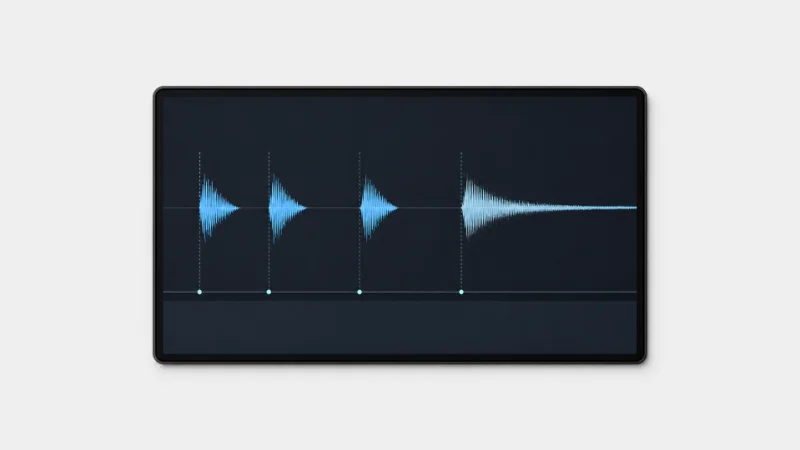
Take a hypothetical six-second confirmation cue. The first two notes arrive quickly, the third waits behind a short pause, and the fourth holds through the final second. If the converted version blurs the pause, the source needs a sharper break. If the hold ends too early for the animation, the last vocal note needs more length. The creator now has a specific revision instead of a general dislike.
Build a Small Gesture Vocabulary Before Conversion
Long melodies, lyrics, slides, vibrato, and changing volume can make a first test feel impressive. They also make a weak result hard to diagnose. Four to eight notes with one clear contrast expose far more about what should change next.
Record a Clear Contrast Instead of More Complexity
The phrase might alternate short and long notes, or place a pause between two matching shapes. Choose a comfortable tempo and record without accompaniment. The result has enough structure to judge while remaining easy to repeat.
For the first pass, the browser recorder is usually the cleanest option because the phrase is short and disposable. An upload makes more sense when the source already belongs to an edit or music session and needs a stable filename. The choice is about traceability, not prestige.
Match the Instrument to the Gesture Question
Choose an instrument that exposes the feature under review. A cue built around crisp beginnings needs a timbre with distinct note entrances. A phrase built around a long final hold needs a sustained role. The first selection is an inspection lens, not a permanent arrangement.
Hold that selection steady for the first two recordings. Changing the phrase and instrument together hides the reason one version works better. Once the gesture reads clearly, a second instrument can answer the separate arrangement question.
Run the Interface Test in Three Passes
Three passes are enough for a first decision. The sequence moves from basic conversion to one controlled change and finally to the real use context.
Pass one: establish the contour. Record a plain rising-and-falling phrase, choose an instrument, and generate it. Confirm that the main turns can be compared with the source and that the result opens in Studio. Leave the output unedited.
Pass two: change one gesture. Use the same notes and instrument, then shorten the first two notes, extend the final hold, or add a clear rest. Compare that one change. If it does not help, revise the source phrase before touching other variables.
Pass three: place it in context. Put the candidate beneath the video, game moment, presentation, or song section it is meant to serve. A phrase that feels expressive alone may cover speech or overstay a short transition. The real context turns taste into an editing decision.
At this point, VoiceToInstrument has exposed whether the original gesture was specific enough for a new role. If the idea only works while the vocal remains present, the voice may be the part worth keeping.
Choose Text When the Melody Does Not Exist Yet
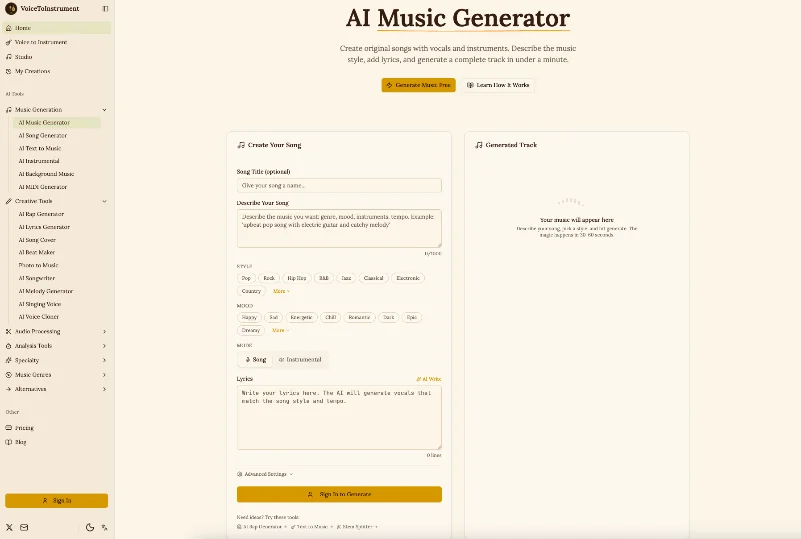
A performed phrase is not always the right starting point. Sometimes the creator knows the scene, mood, and intended energy but has no melody to preserve. An AI music generator addresses that different situation with a written description and controls such as Style, Mood, and Song or Instrumental mode.
Conversion tests an existing gesture in another timbre. Generation proposes musical material from a brief. The first route starts with a phrase; the second starts with an intention.
Both routes sit inside VoiceToInstrument, but their inputs answer different needs. Before generating, identify what already exists: a phrase, a rhythm, or only an intention. That answer points to the more informative starting place.
Verdict: Design the Gesture Before the Sound
Humming feels casual, yet a useful source still needs deliberate note edges, accents, holds, and rests. A short phrase that exposes those details gives the creator more to judge than a long, impressive take.
Start with a performed phrase when timing already matters; start with a written brief when the melody is still open. Either way, make the input carry one clear job. That is what turns a novelty demo into a useful musical decision.
Ti potrebbe interessare:
Segui guruhitech su:
- Google News: bit.ly/gurugooglenews
- Telegram: t.me/guruhitech
- Facebook: facebook.com/guruhitechfb
- Instagram: instagram.com/guruhitech_official/
- X (Twitter): x.com/guruhitech1
- Bluesky: bsky.app/profile/guruhitech.bsky.social
- Rumble: rumble.com/user/guruhitech
- VKontakte: vk.com/guruhitech
- MeWe: mewe.com/i/guruhitech
- Skype: live:.cid.d4cf3836b772da8a
- WhatsApp: bit.ly/whatsappguruhitech
Esprimi il tuo parere!
Ti è stato utile questo articolo? Lascia un commento nell’apposita sezione che trovi più in basso e se ti va, iscriviti alla newsletter.
Per qualsiasi domanda, informazione o assistenza nel mondo della tecnologia, puoi inviare una email all’indirizzo [email protected].
Scopri di più da GuruHiTech
Abbonati per ricevere gli ultimi articoli inviati alla tua e-mail.