
Strip EXIF Data Before You Publish: Privacy Steps for Bloggers and Creators
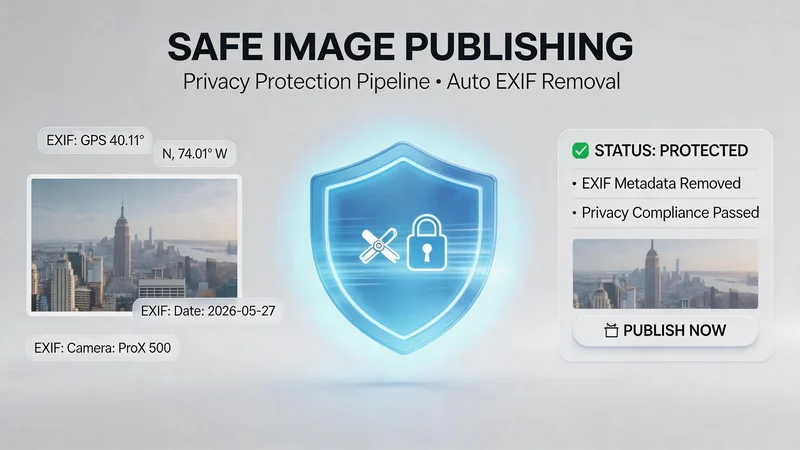
You framed the perfect shot, edited the colors, and scheduled the post—then remembered your phone embeds location, device model, and timestamps inside the file. For anyone building a public brand, learning to strip EXIF data before you publish is as routine as spell-checking headlines. Metadata rarely shows on the page, yet it travels with the image when someone downloads or re-uploads it. This guide covers a practical privacy path with AnyEXIF, plus when AnyWebP belongs in the same afternoon.
What EXIF Is—and What Leaks Without You Noticing
EXIF (Exchangeable Image File Format) stores camera settings and contextual tags: capture date, GPS coordinates, lens details, sometimes serial hints and software versions. Social platforms often strip some fields on upload, but blogs, email attachments, press kits, and client downloads frequently deliver the original file.
Creators care because:
- Location tags can reveal home neighborhoods or vacation timing
- Device fingerprints feel personal in sensitive niches (family, activism, journalism)
- Draft timestamps clash with embargoes or surprise announcements
- Client trust expects deliverables without accidental studio address leaks
Stripping EXIF is not paranoia; it is hygiene before assets leave your control.
Who Should Make This a Default Step
Removing EXIF metadata is a smart privacy habit for many types of creators and professionals. Hidden image data can reveal locations, devices, timestamps, and other sensitive details without you realizing it.
Travel Bloggers
Travel photos often contain GPS coordinates embedded in the image metadata. Sharing unedited originals may accidentally expose exact locations, hotels, or personal travel routes.
Food & Lifestyle Creators
Frequent uploads from the same cafés, studios, or neighborhoods can gradually reveal personal routines and commonly visited places through metadata patterns.
Freelancers & Creative Professionals
When delivering final work to clients, cleaned image files appear more professional than raw phone exports containing unnecessary camera information and hidden metadata.
Journalists, Activists & Independent Media Teams
For sensitive reporting or field work, removing metadata helps protect sources, locations, and operational privacy before publishing images online.
Etsy Sellers & Craft Businesses
Behind-the-scenes product photos may unintentionally expose workspace details, home addresses, or personal equipment information through embedded EXIF data.
When the Risk Is Lower
If you mainly share compressed screenshots or heavily processed social media images, the privacy risk is usually smaller. However, high-resolution photos, downloadable media, portfolio images, and website hero banners should still be checked before publishing.
Privacy Workflow: Clean Metadata First
Pass 1 — Review and remove with AnyEXIF
Open AnyEXIF with the image you plan to publish. Use it to inspect what is inside the file before you blindly export. Many creators skip straight to “remove all” without knowing whether orientation tags or color profiles matter for their CMS.
Typical sequence:
- Upload the photo you intend to ship.
- Read the displayed metadata fields (note anything surprising).
- Remove or clear EXIF according to the tool’s options.
- Download the cleaned file under a new filename (`hero-clean.jpg`).
Treat this as the privacy gate: nothing goes to WordPress, Substack, or a client zip until it passes here.
Pass 2 — Optional web optimization with AnyWebP
AnyEXIF solves identification risk; it does not always shrink file size. When the same image will live on a public post, run the cleaned JPG or PNG through AnyWebP to resize and export WebP for faster loads.
Skip Pass 2 when:
- – The file is only inside a password-protected client review link that strips metadata anyway
- – You need a maximum-quality TIFF master archived offline
- – Platform policy already re-encodes uploads and you have confirmed EXIF removal at source
Use both passes when you control the final hosted asset.
Fields Worth Checking Every Time
Even if you batch-process folders, glance at these categories once per project type:
- GPS latitude/longitude — highest priority for on-location creators
- Date/time original — embargo and “spoiler” timing
- Make/model — optional privacy preference, not always critical
- Software — reveals editing stack; remove if you prefer neutrality
- Orientation — confirm removal does not rotate the visible image; re-open cleaned file before publish
If orientation looks wrong after stripping, re-export from your editor with rotation baked in, then run AnyEXIF again.
Three Publishing Situations
Personal blog hero image
Strip EXIF on AnyEXIF, verify dimensions, convert JPG to WebP on AnyWebP, upload to theme. Keep an unlisted master without GPS if you archive RAW elsewhere.
Newsletter attachment
Privacy first on AnyEXIF; WebP optional unless your provider caps attachment size—then compress after metadata removal.
Stock or guest post submission
Many publishers reject files with location data. Deliver cleaned JPG unless their brief demands otherwise; document “EXIF removed” in your cover email to speed review.
Mistakes That Undo the Work
Publishing the pre-clean copy from your camera roll. Phone galleries often re-share the uncleansed original. Upload from the folder where cleaned exports live.
Assuming Instagram “fixed it.” Platform processing does not protect files you email or host yourself.
Stripping then editing in an app that re-embeds metadata. If your editor rewrites EXIF on save, run AnyEXIF after the final export, not only on the import.
Confusing compression with privacy. Smaller files are not automatically anonymous; run metadata removal explicitly.
Quick Answers
Does removing EXIF hurt image quality?
No. Visible pixels stay the same when tools only delete metadata blocks.
Will SEO suffer?
Search engines rank pages, not hidden camera tags. Alt text and filenames matter more than EXIF keywords.
Should I remove EXIF from every image on my site retroactively?
Prioritize downloadable, high-resolution, and location-sensitive shots first; batch during quiet weeks.
Is WebP required after AnyEXIF?
No. It is a performance step, not a privacy requirement.
Before You Hit Publish
Add two checkboxes to your preflight list: metadata cleared and file opened once on desktop to confirm orientation. Pair that habit with sensible alt text and intentional filenames—privacy and accessibility move together. Once viewing and editing EXIF data before you publish becomes muscle memory, you spend less energy worrying what rides along inside every hero image—and more energy on the story those images support.
Scopri di più da GuruHiTech
Abbonati per ricevere gli ultimi articoli inviati alla tua e-mail.