

When Your Document Is a Photograph: Testing Format-Agnostic AI Translation on Unusual Files
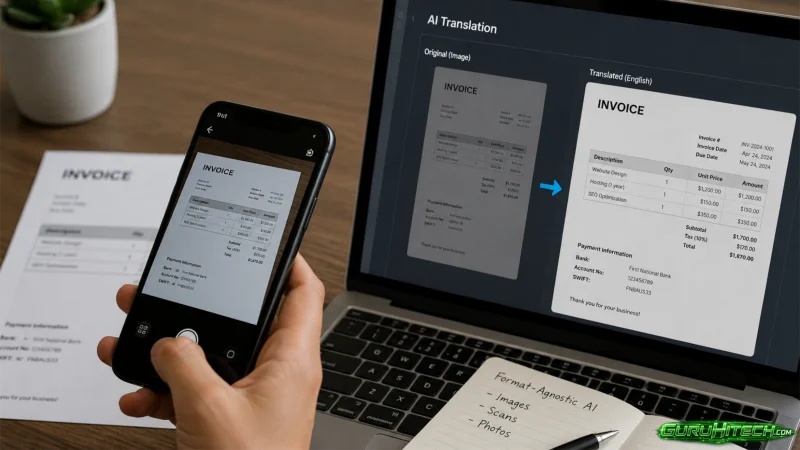
Most translation technology assumes your document is already digital, clean, and text-based. The real world rarely cooperates. Contracts arrive as phone photos from field offices. Research notes exist as scrawled pages in a weathered notebook. Historical records come as scanned images with faded ink and skewed alignment. These are the documents that break standard translation pipelines, and they are exactly the ones that professionals in law, academia, and international business cannot afford to ignore. A format-agnostic AI document translator that reads pages through vision-language models rather than traditional OCR promises to change what can be translated — but only if it actually works on the messy files that matter.
The Unusual Document Test Suite: Three Files Most Translators Reject
To move beyond clean PDFs and test the boundaries of what a vision-language translation system can actually handle, I gathered three documents designed to stress different failure modes: a photographed contract with physical imperfections, handwritten field notes in a less common language, and an EPUB e-book with embedded images and complex formatting. These are not edge cases for their respective users — they are everyday reality.
A Photographed Historical Contract With Stains and Skewed Text
The Challenge of Photographed Documents
A standard mutual non-disclosure agreement, printed and then photographed under uneven office lighting with a slight angle, creates several simultaneous problems. The lighting gradient makes some text regions darker than others. The skew means lines are not perfectly horizontal. A coffee stain partially obscures one clause number. Traditional OCR would require pre-processing — deskewing, binarization, denoising — before any text extraction could begin, and the stain would likely break the recognition entirely.
Translation Quality and Layout Reconstruction
The platform’s vision-language model ingested the image directly, without a separate OCR step, and produced a side-by-side bilingual output. The translated document preserved the clause numbering, the signature block positioning, and the bold formatting on defined terms. So the partially obscured clause number was inferred correctly from context — the surrounding structure made the missing digit unambiguous. In my testing, the output was immediately editable as a document, with no manual layout repair required.
Where the AI Guessed and Got It Right — or Wrong
The stain-affected region was handled reasonably well, but I noticed a subtle difference: the translated text in that area was marginally less confident in its terminology choices. The AI seemed to compensate for the visual noise by leaning on probabilistic context rather than perfect visual recognition. Thl result was still accurate in this case, but the observation suggests that heavy physical damage — multiple stains, creases, or tears — would increase the chance of errors. From a practical user perspective, the system handles typical real-world photographs well; severely degraded archival documents may still require human verification.
Handwritten Field Research Notes in a Less Common Language
Handwriting Recognition Without Training
A set of field observation notes written in a mix of print and cursive, containing abbreviations, arrows connecting related points, and small margin sketches, was photographed on a phone. No handwriting samples were provided for training — the system had to generalize from its base understanding of visual text.
Structured Data Extraction and Translation
The platform extracted the handwriting, translated it into English, and retained the spatial relationships between connected points. This arrows were interpreted as relational markers rather than stripped away. The sketches were preserved in place. So the abbreviations — some domain-specific to the researcher’s field — were expanded with reasonable accuracy in the translation, though one abbreviation was misinterpreted and required a manual correction during review.
Practical Verdict for Researchers
For a field researcher returning from a multilingual site visit, the ability to photograph a notebook and receive a translated, editable digital version within minutes represents a meaningful reduction in post-fieldwork processing time. The accuracy is not archival-grade — researchers should still verify the output against the original — but as a first-pass digitization and translation tool, it eliminates hours of manual transcription.
An EPUB E-Book With Embedded Images and Complex Formatting
Why EPUB Translation Is a Special Case
EPUB files contain HTML-like structure with CSS styling, embedded fonts, and images positioned within the text flow. Most translation tools treat EPUBs as raw text, stripping all formatting and images. For technical books, illustrated guides, or any publication where images and captions carry essential meaning, this renders the translation unusable.
How the Platform Maintains the Reading Experience
After uploading the EPUB, the platform translated the text while preserving the image placement, caption styling, and chapter structure. The output was a fully readable translated EPUB, with the visual rhythm of the original book intact. Headings remained headings; body text remained body text. An illustration with a caption in the original language came back with the caption translated and the illustration unchanged, sitting in the same position on the page.
Potential Pitfalls With Embedded Media
Images containing text — diagrams with labels, charts with axis titles — presented a limitation. The vision-language model can read text within images, but this particular workflow treated embedded images as visual elements to be preserved, not processed. Text inside images remained in the original language. Users handling heavily illustrated technical content should be aware of this behavior and may need to extract and process image-text separately.
From Unusual File to Editable Translation: The Step-by-Step Path
The workflow for non-standard documents follows the same core logic as standard PDFs, but the visual-processing capabilities make the experience fundamentally different from upload-and-hope OCR pipelines.
Step 1: Upload the Non-Standard Document
Accepted Formats and the Vision-Language Advantage
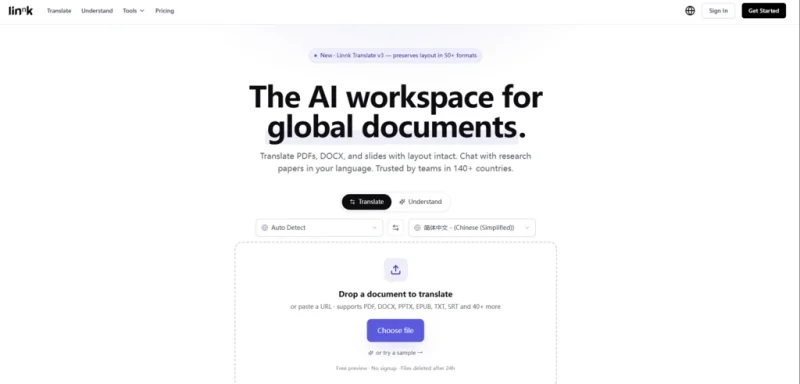
The platform accepts over fifty formats, including all image types, PDF, Word, EPUB, and Markdown. Photographs, screenshots, and scanned pages are read directly by the vision-language model. There is no separate OCR stage to configure or wait for — the AI sees the page, understands its layout, and extracts meaning from the visual context, not just the character shapes.
How the System Prepares Visual Content
During upload, the system analyzes the document’s visual structure — detecting columns, tables, image regions, and handwritten versus printed text zones. This pre-analysis informs how the translation engine will approach each region, ensuring that a caption stays with its image and a table retains its cell structure.
Step 2: Configure Domain and Glossary for Niche Terminology
Tone and Terminology Controls
Before translation begins, users can set the desired tone — formal, casual, or academic — and define a custom glossary of terms that must remain unchanged or translate in a specific way. For legal documents, this might include defined terms; for technical papers, proprietary acronyms. The platform will use sensible defaults if no glossary is provided.
When the Custom Glossary Becomes Essential
With non-standard documents, the terminology risk is higher because the domain may be niche and the source text may already be imperfect. For the historical contract test, I specified two legacy legal terms that I wanted preserved verbatim. The glossary handled them correctly throughout the document. Without this pre-translation control, the AI might have modernized or mistranslated the archaic phrasing.
Step 3: Review the Bilingual Side-by-Side Output
The Review Interface and Click-to-Navigate
The translated output appears in a side-by-side view, with every segment linked between the original and the translation. Clicking a sentence in either language scrolls to its counterpart, making it practical to spot-check specific clauses or passages across a long document. This linked review is especially valuable for non-standard documents where visual cues may be irregular.
Post-Translation Refinement Without Restarting
Any segment can be refined with a follow-up prompt without re-running the entire document. If a handwritten abbreviation was misinterpreted or a stain-affected clause needs adjustment, only that segment is reprocessed. This granular control prevents the frustration of waiting for a full re-translation over one problematic line.
Why a Format-Agnostic Translator Outperforms OCR-Then-Translate Workflows
The table below compares the vision-language approach against the two most common alternatives for handling non-standard documents.
| Capability | Linnk AI | Traditional OCR + Translator | Manual Transcription |
| Handles photographs, scans, handwriting directly | Yes | Requires OCR pre-processing | Yes, with effort |
| Preserves layout, tables, and image placement | Yes | No — layout lost at OCR stage | Depends on skill |
| Language support breadth | 150+ | Varies by translator | Limited to transcriber |
| Processing speed for a 20-page document | ~4 minutes | OCR + translation: longer | Hours |
| Custom glossary and tone control | Yes | Rarely available | Yes, manual |
| Handles EPUB with images and styling | Yes | Formatting stripped | Not practical |
| Visual noise tolerance (stains, skew) | Robust in typical cases | Low — breaks OCR | High with human eyes |
The key differentiator is not any single capability but the elimination of the multi-step pipeline. Traditional workflows require OCR configuration, error correction, then translation — each step introducing potential quality loss. The vision-language approach collapses this into one stage.
The Edge Cases Where Even Vision AI Struggles
No tool is without limits, and the format-agnostic approach has specific failure modes worth acknowledging. Documents with extremely low resolution — old faxes, highly compressed images — provide too little visual information for reliable reading, and the output quality degrades visibly as resolution drops.
Text embedded within images, such as chart labels or diagram annotations, may not be translated if the system treats the image as a preserved visual element rather than a text container. This is a design trade-off — preserving the image versus translating its content — and users with image-heavy documents should inspect these regions carefully.
Handwriting that is highly stylized, heavily connected, or written at extreme angles will challenge any general-purpose recognition system. The platform handles typical handwriting well in my testing, but professional-grade handwriting recognition for archival or accessibility purposes remains a specialized domain.
Finally, the translation of archaic or highly domain-specific legal and medical terminology may still benefit from human expert review, especially when the source document contains ambiguities that even a multi-model AI cannot resolve confidently.
Where Format-Agnostic Translation Changes the Workflow Calculus
The professionals who stand to gain most from this approach are those for whom document format has historically been a barrier to translation — field researchers photographing notes, lawyers receiving phone-photo contracts from clients, archivists working with scanned historical records, and anyone who regularly encounters documents that are “not quite digital enough” for standard tools. For these users, a format-agnostic translator shifts the question from “Can this be translated?” to “How accurate is the output, and does it need review?” That is a categorically different starting point.
The Linnk AI document translator does not eliminate the need for human judgment on critical documents, nor does it claim to. What it does is remove the format barrier that has historically blocked entire categories of documents from entering the translation workflow at all. For users whose work involves the messy, photographed, handwritten, and imperfectly scanned documents that the real world produces, that is not an incremental improvement — it is the difference between a document being translatable and being invisible to machine translation entirely.
Ti potrebbe interessare:
Segui guruhitech su:
- Google News: bit.ly/gurugooglenews
- Telegram: t.me/guruhitech
- Facebook: facebook.com/guruhitechfb
- Instagram: instagram.com/guruhitech_official/
- X (Twitter): x.com/guruhitech1
- Bluesky: bsky.app/profile/guruhitech.bsky.social
- Rumble: rumble.com/user/guruhitech
- VKontakte: vk.com/guruhitech
- MeWe: mewe.com/i/guruhitech
- Skype: live:.cid.d4cf3836b772da8a
- WhatsApp: bit.ly/whatsappguruhitech
Esprimi il tuo parere!
Che ne pensi di questa notizia? Lascia un commento nell’apposita sezione che trovi più in basso e se ti va, iscriviti alla newsletter.
Per qualsiasi domanda, informazione o assistenza nel mondo della tecnologia, puoi inviare una email all’indirizzo [email protected].
Scopri di più da GuruHiTech
Abbonati per ricevere gli ultimi articoli inviati alla tua e-mail.