
AI Headshot Tools Uncovered: Common Misconceptions and Key Decision Factors
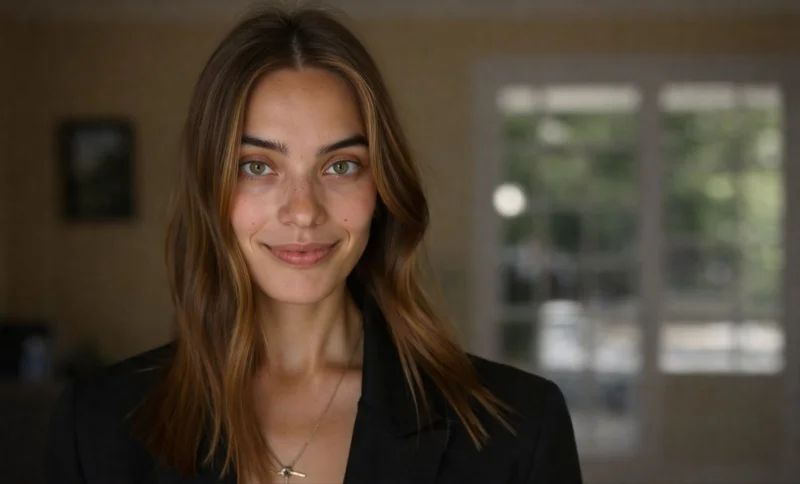
The rise of AI-generated headshots has been fast—and, at times, a bit confusing. Not long ago, many people assumed these tools were little more than gimmicks, producing results that felt artificial or overly edited. That assumption doesn’t really hold up anymore.
Still, a few myths persist. Some believe you need dozens of photos. Others think payment or account creation is required before you can even try a tool. And many assume studio-level quality is still out of reach.
The reality is more balanced. The technology has improved, but the growing number of options makes it harder to figure out which tool actually fits your needs. This guide breaks things down clearly, so you can evaluate what matters and decide which option works best for you.
TL;DR
- Notegpt: best for pay-per-image usage with a small free monthly allowance
- Dreamwave: best for users who want email-delivered previews before paying
- Pixelbin: best for batch-style generation with consistent filtering
- HeadshotMaster: best for instant, no-login access with flexible input
Comparison Overview
| HeadshotMaster | Notegpt | Dreamwave | Pixelbin | |
| Generation speed | generates in 6–15 sec/image | generates in ~6 sec/image | generates in 24 sec–1.6 min/image | generates in ~6 sec/image |
| Pricing / free tier | provides free unlimited basic; advanced allows 4×/day | provides 3 free/month + paid credits | requires payment per image; provides free watermarked preview | provides 3 free/month + paid credits |
| Input requirements | works with 1–4 photos | requires min 4 photos | requires min 4 photos, 500×500 | requires min 4 photos |
| Output quality | produces variable likeness; smoothing may appear processed | produces consistent, filtered outputs | produces consistent style; preview includes watermark | produces filtered, professional outputs |
| Key limitation | shows likeness variability in basic model | limits free usage volume | requires login + payment for final images | limits free control |
How AI Headshot Technology Has Improved
Earlier tools often needed large datasets and still struggled with consistency. That’s where many of the lingering doubts come from.
Now, models can generate realistic outputs using far fewer inputs. In some cases, even a single image is enough to get started. Processing speed has also improved significantly, with results appearing in seconds rather than minutes.
Accessibility has shifted too. What once required subscriptions and lengthy onboarding can now happen in a much lighter workflow. Many users are still surprised by how quickly a usable headshot can be generated today.
What Makes the Best Tool in This Space
Choosing the right tool comes down to a few practical factors.
Speed plays a major role. Faster generation means you can iterate more and refine results without waiting.
Pricing and access determine how easily you can get started. Some platforms require upfront commitment, while others allow immediate use.
Input flexibility affects how much preparation is needed. Tools that accept fewer photos remove a common barrier.
Output quality is about consistency and realism. Some tools prioritize clean, uniform results, while others vary depending on the input.
Finally, limitations matter. Every platform has trade-offs, whether in usage limits, required inputs, or output control.
Competitor Breakdown
Notegpt
Notegpt generates headshots in about 6 seconds per image, enabling rapid iteration. It provides 3 free images per month, followed by a pay-per-image structure ranging from $0.24 to $1.14. The platform requires at least four input photos. Its filtering system removes low-quality inputs and produces consistent professional-style outputs. Anonymous use includes a single trial within 24 hours, while continued usage requires login and credits. This setup suits users who prefer a structured, pay-per-use workflow.
Dreamwave
Dreamwave generates images within 24 seconds to 1.6 minutes per output, reflecting a more processed generation cycle. Pricing ranges from $0.33 to $0.47 per image. It provides watermarked previews via email, while final outputs require payment. The platform requires at least four photos at a minimum resolution of 500×500. Users must create an account before generating images. This structure works for users who want to preview results before paying.
Pixelbin
Pixelbin generates images in approximately 6 seconds and supports batch workflows. It provides 3 free images per month, with additional usage based on paid credits. The system requires at least four input photos. Automated filtering removes unsuitable inputs and produces consistent outputs optimized for professional use. Anonymous access includes a limited trial, while continued use requires login and credits. This approach fits users focused on generating multiple consistent images efficiently.
HeadshotMaster: Rethinking Access to AI Headshots
A common assumption about these tools is that you need to commit—time, money, or both—before seeing any results. That assumption doesn’t apply here.
HeadshotMaster focuses on access first. With the AI Headshot Generator, you can begin generating images immediately without logging in. The basic model allows unlimited usage, so you can test different inputs freely. For those who want more control, the advanced model provides up to four generations per day after registration.
Input requirements are more flexible than many alternatives. The system works with as little as one photo, while still supporting up to four for improved accuracy. This reduces preparation time and lowers the barrier to entry.
Generation speed ranges from 6 to 15 seconds per image, allowing quick iteration. Users can explore multiple variations in a short session without waiting through long processing times.
The platform also includes more than 20 scene options, giving users a range of styles without needing separate tools.
There are some limitations. The basic model can produce variable likeness accuracy depending on the input image. In certain cases, skin smoothing may appear more processed than expected. These outcomes are typical for fast, lightweight generation systems.
Overall, this approach changes how people interact with an AI Headshot Generator. Instead of planning everything in advance, users can start experimenting right away and refine from there.
Who Benefits Most
For many people, the biggest frustration isn’t the output—it’s the setup. Gathering multiple photos, creating accounts, and navigating pricing structures can feel like unnecessary friction, especially for something as simple as a profile image.
That’s where a more flexible workflow becomes useful. Someone updating a LinkedIn profile, refreshing a personal site, or preparing for a job application often just needs a quick, usable result. Being able to start with a single image and generate options within seconds makes that process much easier.
At the same time, users who prioritize precision and highly controlled outputs may still prefer tools that require more input and structured workflows. The choice ultimately depends on whether speed and simplicity matter more than fine-tuned consistency.
Conclusion: Which Tool Is Best for You?
Each platform aligns with a slightly different use case.
Notegpt supports users who prefer credit-based pricing and structured input requirements. Dreamwave fits those who want preview-based workflows before committing to payment. Pixelbin works well for batch generation with consistent filtering.
HeadshotMaster stands out for users who want immediate access with minimal setup and flexible input requirements.
If your priority is to quickly test ideas and generate results without committing upfront, an AI Professional Headshot Generator like HeadshotMaster offers a distinct starting point.
Its core difference remains straightforward: it allows unlimited basic use without requiring login.
Ti potrebbe interessare:
Segui guruhitech su:
- Google News: bit.ly/gurugooglenews
- Telegram: t.me/guruhitech
- Facebook: facebook.com/guruhitechfb
- Instagram: instagram.com/guruhitech_official/
- X (Twitter): x.com/guruhitech1
- Bluesky: bsky.app/profile/guruhitech.bsky.social
- Rumble: rumble.com/user/guruhitech
- VKontakte: vk.com/guruhitech
- MeWe: mewe.com/i/guruhitech
- Skype: live:.cid.d4cf3836b772da8a
- WhatsApp: bit.ly/whatsappguruhitech
Esprimi il tuo parere!
Che ne pensi di questa notizia? Lascia un commento nell’apposita sezione che trovi più in basso e se ti va, iscriviti alla newsletter.
Per qualsiasi domanda, informazione o assistenza nel mondo della tecnologia, puoi inviare una email all’indirizzo [email protected].
Scopri di più da GuruHiTech
Abbonati per ricevere gli ultimi articoli inviati alla tua e-mail.