
Filmora vs. Canva: Which Wedding Invitation Video Maker is Right for You?
Introduction
Digital wedding invitations are getting rapidly replaced by traditional paper cards and offer couples a more creative and instantly shareable way of announcing their wedding day.
Two main choices are Filmora and Canva. Filmora is video editing software that is powerful and offers a wide range of tools to create very detailed and professional videos. On the other hand, Canva is a design tool that is easy to use and comes with a variety of beautiful templates ready for use. In this article, we compare both platforms, i.e., Filmora vs Canva, so that you can choose your marriage invitation video maker based on your style and comfort level with the tools.
Contender #1 – Filmora (The Dedicated Video Editor)
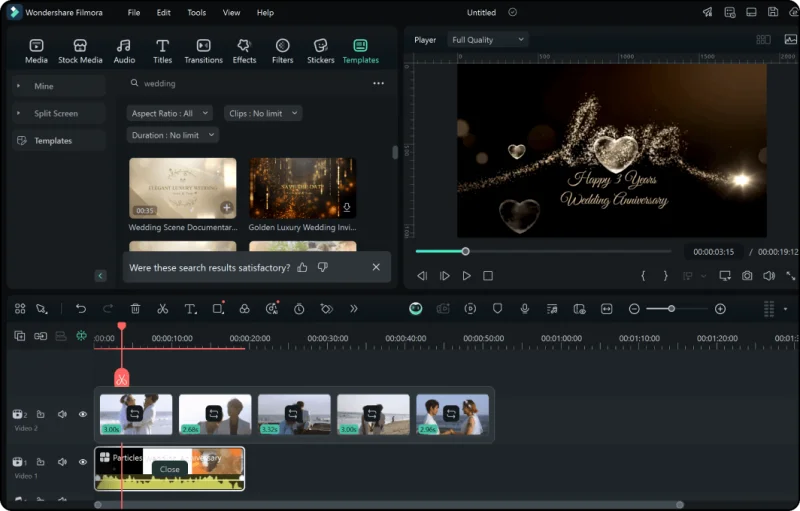
Filmora is a timeline-type video editing software that is famous for handling both power and simplicity efficiently. The software is intended for novices and non-professional creators who wish to have advanced editing tools at their disposal, but at the same time, they do not want to get confused by too much complexity. Since it is a tool made only for video, Filmora gives much more control and accuracy than usual drag-and-drop design platforms.
Strengths for Wedding Invitations:
Advanced editing tools:
Filmora offer highly accurate trimming, cutting, and keyframing for fully customized animations. Besides, you can finely adjust the transitions, control the motion paths, add green-screen effects, and model your scenes with pinpoint accuracy, which is just the right thing for couples wanting a spectacular wedding invite video.
Template library:
Filmora provides over 10,000 ready-to-use animated templates so that you can make fabulous wedding invitation videos within a few minutes. The wedding templates that you can find include elegant, rustic, modern, dreamy, minimalistic, gold-themed, and scribble-style, among others to fulfill your desire. All you have to do is drag a template to the timeline, replace the media, and voila and create wedding invitation video in minutes.
Royalty-free music & AI features:
Filmora offers a broad collection of music tracks for weddings which are royalty-free including Universal Music for Creators. AI Smart BGM adjusts the background music automatically to the mood, whereas AI Music Generator enables you to make a custom soundtrack from scratch. Besides, they not only help you save time but at the same time make your invitation feel touching and complete.
Stock media & effects:
You can also gain access to stock videos having love themes, romantic backgrounds, floral stickers, heart transitions, and stylish text animations. While creating your very own video card, Filmora’s text-to-video and AI image generation tools offer yet more avenues for your creativity.
No watermark with paid plan:
Filmora’s paid version allows you to export your work in high definition without any watermark. Despite the presence of a watermark in exports done with the free version, the overall export quality is still very good.
Weaknesses / ideal user
Filmora nevertheless has a learning curve that is a bit tougher, particularly for users who have no experience in video editing at all, compared with Canva. Ideally, it would be a person who wants to have more control, add more motion effects, and get high-quality cinematic results, and at the same time willing to spend some time getting to know the interface. Also, since Filmora is made only for video, it is not suitable for wide static design tasks.
Contender #2 – Canva (The Design Powerhouse)
Canva is a browser-based graphic design tool that has recently developed video editing features with a very user-friendly interface. Its major advantage lies in the fact that it is so simple for users unfamiliar with technical skills to make high-quality visuals. By use of several millions of design elements, AI-powered tools, and excellently designed templates, Canva is adept at making wedding invitation videos look very discreet.
Strengths for Wedding Invitations:
Easy to use:
The drag-and-drop editor of Canva is almost human in terms of understanding. You can quickly create a wedding invitation video by using pictures, videos, text, and music through simple drag-and-drop operations in many cases at zero cost.
Extensive Template Library:
Canva houses a vast array of wedding video templates that cover every theme imaginable, so that minimalist, floral, boho, luxury gold, classic black-and-white, cartoon-inspired, and more, are all represented here. The intent of these templates is primarily stylish design and hence they would be exceptional for photo-centered slideshows.
One-stop shop:
Besides the video invitation, you can also create save-the-date cards, wedding websites, menus, and signage you name it, all from the same platform. Canva helps to keep your entire wedding brand consistent.
Working together:
Canva is great when used as a duo. You get to share your design instantly with your other half or planner, comment, and edit in real-time from any device.
Weaknesses / ideal user
Filmora offers more fully featured video editing tools than Canva. Besides that, it has more timeline controls, more effects, and detailed keyframing tools that are not available in Canva. So, for simple slideshows accompanied by music, Canva is a great tool, but making complex or cinematic video invitations will be very difficult. If you like to keep things simple and like having a wide range of designs to choose from and almost instant playback, then you are exactly the couple for whom Canva is the best choice.
Head-to-Head Feature Comparison
| Feature | Filmora | Canva |
| Ease of Use | Beginner-friendly but more advanced; uses timeline-based editing. | Extremely easy; features a drag-and-drop design workflow. |
| Best For | Cinematic, polished, and fully customized wedding invitation videos. | Quick, stylish, slideshow-style invitations. |
| Video Control | High: Includes keyframing, motion control, effects, and transitions. | Basic: Offers limited timeline control and simple animations. |
| Templates | 10,000+ animated video templates, including many wedding themes. | Thousands of wedding video templates with a strong design focus. |
| Music & Audio | Royalty-free music, AI Music Generator, and Smart BGM. | Basic audio tools and a built-in music library. |
| AI Features | Text-to-video, AI image generation, AI music, and AI editing. | Magic Studio AI: auto-editing, text-to-image, and style tools. |
| Stock Resources | Large collection of romantic stickers, effects, and stock videos. | Massive design library with photos, graphics, and icons. |
| Collaboration | Limited. | Excellent: Supports real-time co-editing and sharing. |
| Learning Curve | Moderate. | Very low. |
| Output Quality | High-quality exports; best for cinematic videos. | Great for simple, elegant designs; less advanced editing. |
| Watermark | No watermark on paid plans (Free plan includes watermark). | No watermark for free use (unless using Pro assets). |
| Pricing | $9.99/month or $24.99/year (Paid video editor). | Free plan (or $12.99/month / $119.99/year for Pro). |
Filmora, for cinematic and highly customized invitations
- If you want a very polished, cinematic invitation with smooth, seamless transitions, custom animations, and a soundtrack selected to match your mood, Filmora is the best choice.
- Excellent choice if you want to be able to use advanced features such as AI-generated music or text-to-video to create something original.
- Great for people who are ready to spend time mastering the software to be able to make professional-quality invitations.
- Working with template-based editing, you will keep creative control while simplifying the process and making it more efficient.
Canva, for quick and design-focused invitations:
- Great timesaver if your main concern is to finish the invitation in no time using easy and intuitive steps.
- Great tool if you want to make beautiful photo slideshows with text and background music.
- Have a perfectly matching set of wedding printed materials like menu cards, place cards, or save-the-date cards.
- Since it is based on the browser, it requires no downloading of the software, making it very fast and convenient for use.
Conclusion
Both Filmora and Canva have great tools to create a perfect wedding invitation video. You can be sure that Canva will offer you features to work quickly and easily, and to promote your design projects. So Canva is perfect if you want to make slideshow invitations. But, if you want a movie-style highly styled invitation with advanced effects, smooth transitions, and full creative control, Filmora should be your first choice.
Scopri di più da GuruHiTech
Abbonati per ricevere gli ultimi articoli inviati alla tua e-mail.