

How Knowledge Workers Finally Turn Audio Into an Asset Instead of a Liability
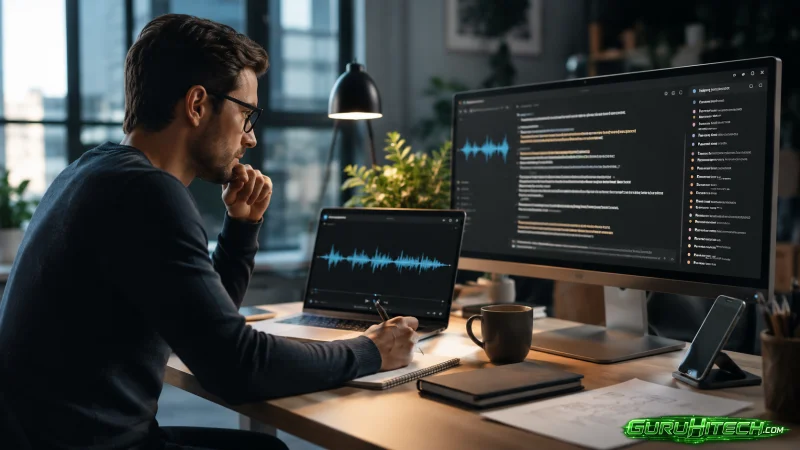
Every knowledge worker knows the feeling: you leave a meeting with a notebook full of fragments, a recording that you will probably never listen to again, and a vague sense that something important was decided. The recording is a liability—a file that takes up space and demands attention you do not have. The promise of AI transcription has always been to turn that liability into an asset, but most tools stop at raw text, leaving you with a different kind of mess. Whisper AI approaches the problem differently. It treats the transcript not as the final product, but as the raw material for something useful—a searchable, attributable, and actionable record of what was actually said.
The Shift From Listening to Reading
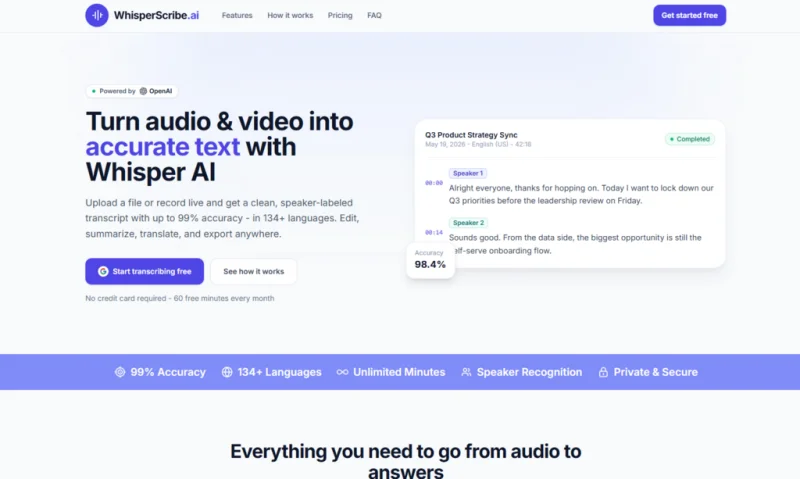
The most underrated feature of good transcription is not accuracy—it is structure. A transcript without speaker labels is just a monologue pretending to be a dialogue. WhisperScribe applies automatic speaker diarization to every upload, labeling each participant and making it possible to scan for specific voices. This is not a nice-to-have; it is what turns a transcript into a document you can navigate the way you navigate a book—by looking for the parts that matter.
Finding the Signal in the Noise
Meetings are noisy. People ramble, repeat themselves, and go down tangents. The AI summary feature addresses this by generating a condensed version of the content, pulling out key points, decisions, and action items. In practice, this means you can read a three-paragraph summary of a 60-minute call and know exactly what was agreed upon, without wading through the filler. The summary is generated with one click, and it sits alongside the full transcript, so you can always dive deeper if something needs verification.
Timestamps That Turn Audio Into a Database
Word-level timestamps are the feature that transforms the transcript from a static document into an interactive reference. Click any word and the audio jumps to that exact moment. This is invaluable for fact-checking, pulling quotes, or understanding the context of a decision. For researchers, journalists, and anyone who depends on accurate attribution, this feature alone justifies the workflow.
Testing the Workflow With Real Recordings
Instead of relying on promotional claims, I put the platform through three realistic scenarios. The results reveal both the strengths and the boundaries of what the tool can do.
Scenario One: The Internal Project Kickoff
A 50-minute kickoff meeting with six team members, including one remote participant with a slightly delayed audio feed. The transcript arrived with all speakers correctly separated, and the remote participant’s voice stayed consistently labeled throughout—no fragmentation despite the lag. The AI summary extracted the project timeline, the assigned owners, and the key risks. So the only manual intervention needed was renaming Speaker 2 to “Maria” and Speaker 5 to “James,” which took about thirty seconds.
Scenario Two: The Client Interview With Background Noise
A 28-minute interview recorded in a coffee shop, with intermittent clattering and music bleeding through. The automatic language detection correctly identified it as English, but the accuracy dropped to about 85% due to the background noise. The transcript contained a few garbled phrases where the system tried to interpret the music as speech, and a couple of sentences were misattributed because the diarization confused the interviewer’s voice with a nearby conversation. Cleaning up the errors took about fifteen minutes—still far less than the 50 minutes it would have taken to transcribe from scratch.
Scenario Three: The Panel Discussion With Overlap
A 45-minute panel with five speakers, frequent interruptions, and occasional simultaneous speech. The tool handled the clear segments well, but the overlapping sections produced a jumble of text that required manual splitting. The speaker labels were correct for about 80% of the dialogue, but the cross-talk segments needed to be reassigned. So the summary, however, was remarkably coherent, capturing the main arguments and conclusions without being thrown off by the chaos.
From Upload to Output in Four Manageable Steps
The platform keeps the process minimal, which is exactly what busy professionals need.
Step One: Get Your Audio Into the Browser
Drag and drop or click to upload. The interface accepts common audio and video formats, with a 2 GB per-file limit. Batch upload means you can process multiple recordings at once. There is also a live recording button for capturing audio directly through the browser microphone—handy for quick captures where using a separate recorder would interrupt the flow.
The upload progress is transparent. You can see the file moving into the system, and once it is uploaded, processing begins automatically.
Step Two: Automatic Transcription With No Configuration
Language detection and speaker separation happen in the background. You never have to select a language from a dropdown menu or choose a model. The system handles all of that automatically, returning a transcript with speaker labels and word-level timestamps.
Processing time depends on file length. Short files return in seconds; longer ones may take a few minutes. The platform does not promise instant results, but the wait is proportional to the content.
Step Three: Refine the Transcript
Edit speaker names, merge lines, and correct errors directly in the browser. The interface is simple and responsive—renaming a speaker updates every instance of that label throughout the document. You can split lines that were incorrectly merged or merge lines that were incorrectly split.
Generate an AI summary with one click. The summary condenses the content into key points, decisions, and action items. You can also translate the transcript into another language using the built-in translation function.
Step Four: Export or Copy
Choose from multiple export formats. TXT, Word (.docx), PDF, subtitles (SRT/VTT), and HTML are all available. The Free plan includes basic exports, while paid plans unlock the full set. There is also a copy-to-clipboard button for quick pasting.
How the Experience Stacks Up Against the Alternatives
| Dimension | WhisperScribe | Typical Transcription Services |
| Time Investment | Upload, wait, edit—no software setup | Often requires account creation and installation |
| Speaker Clarity | Automatic diarization with renaming | Usually missing or requires manual annotation |
| Navigation | Word-level timestamps for instant playback | Often only sentence-level or none |
| Post-Processing | Summarize, translate, export all in one place | Often requires separate tools |
| Language Handling | Automatic detection across 134+ languages | Manual selection or limited support |
| Data Control | Encrypted storage and one-click deletion | Varies widely; not always transparent |
The Real Limitations You Need to Know
Whisper AI is powerful, but it is not magic. The up to 99% accuracy figure applies to clear audio with minimal background noise and standard accents. In practice, recordings with poor microphone quality, heavy echo, or multiple speakers talking over each other will produce results that require cleanup. The speaker diarization can struggle when voices are similar, and the automatic language detection may misidentify short segments of code-switching.
So the live recording feature does not include noise reduction, so the quality of your microphone directly affects the transcript. The translation feature is useful but, like any machine translation, benefits from human review before publication. The batch processing queue does not allow you to prioritize specific files—they process in the order they were uploaded.
From a practical standpoint, the tool is best suited for recordings where the audio is reasonably clear and the number of speakers is manageable. It excels at meeting recordings, lecture captures, and structured interviews. It is less reliable for highly degraded audio, crowded environments with simultaneous speech, or recordings where the primary content is non-speech.
Who This Workflow Fits Best
The tool is designed for professionals who need to extract value from recordings without spending more time on post-processing than on the original conversation. Project managers, researchers, content creators, and anyone who regularly attends meetings will find the combination of speaker labels, timestamps, and AI summaries indispensable. The free tier gives you 60 minutes per month with no credit card required—enough to test the workflow with your own recordings before committing.
Paid plans start at $5.75 per month (annual) for 300 minutes, $8.25 per month for 600 minutes, and $16.58 per month for unlimited minutes. This ability to cancel anytime and the encryption of data in transit and at rest make it a practical choice for sensitive business conversations.
The real value is not in any single feature—it is in the way the platform reduces the friction between recording and using. The transcript becomes a living document that you can search, share, and reference. So the summary gives you the highlights without the hours. The timestamps let you verify everything. And the whole process happens in your browser, with no software to install and no hidden steps. For anyone who has ever looked at a recording and felt defeated before even pressing play, that shift in experience is the real product.
Ti potrebbe interessare:
Segui guruhitech su:
- Google News: bit.ly/gurugooglenews
- Telegram: t.me/guruhitech
- Facebook: facebook.com/guruhitechfb
- Instagram: instagram.com/guruhitech_official/
- X (Twitter): x.com/guruhitech1
- Bluesky: bsky.app/profile/guruhitech.bsky.social
- Rumble: rumble.com/user/guruhitech
- VKontakte: vk.com/guruhitech
- MeWe: mewe.com/i/guruhitech
- Skype: live:.cid.d4cf3836b772da8a
- WhatsApp: bit.ly/whatsappguruhitech
Esprimi il tuo parere!
Ti è stato utile questo articolo? Lascia un commento nell’apposita sezione che trovi più in basso e se ti va, iscriviti alla newsletter.
Per qualsiasi domanda, informazione o assistenza nel mondo della tecnologia, puoi inviare una email all’indirizzo [email protected].
Scopri di più da GuruHiTech
Abbonati per ricevere gli ultimi articoli inviati alla tua e-mail.