
Is It Safe to Use a WhatsApp Sender?

Yes, a WhatsApp sender can be safe to use, but safety depends on much more than the software itself.
The tool matters, including where it comes from, what permissions it requests and how it handles data. The way it is used matters just as much. Contacting existing customers about relevant updates is very different from importing an unknown list of phone numbers and sending the same promotion to everyone.
That distinction is important because sender tools are designed to reduce repetitive work. They can help businesses organize contacts, prepare recurring messages and manage outreach more efficiently, but they do not remove the need to think about privacy, audience quality or sending behavior.
Before using any WhatsApp sender, it is worth looking at four areas: software permissions, contact data, recipient relevance and messaging patterns.
Check the Tool Before Importing Any Contacts
The first safety check should happen before a contact list is uploaded.
Browser extensions and third-party messaging tools need access to certain functions in order to work, particularly when they operate alongside WhatsApp Web. That does not mean every permission request should automatically be accepted.
Look at whether the requested access is reasonably connected to what the product claims to do.
When reviewing WhatsApp Sender, for example, users can check the extension listing, publisher information and browser permissions before deciding whether to install it.
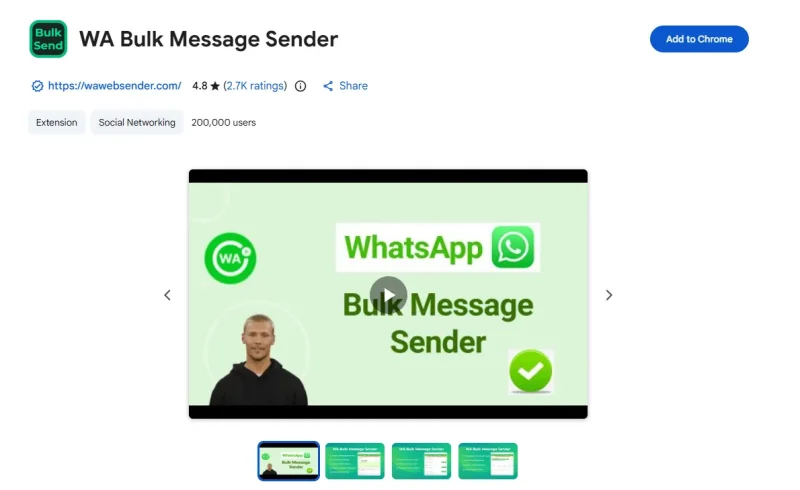
The same basic review should be applied to any sender tool.
An identifiable developer, accessible product information, a privacy policy and permissions that match the advertised functionality are all useful signals. Requests for unrelated access deserve more scrutiny.
The goal is not to find software that requires no permissions at all. Tools that interact with browser-based services naturally need some access. The important question is whether you understand what is being requested and why.
Security reviews should also extend beyond the installation page. Avoid sharing credentials through unusual forms, downloading unofficial copies from unknown websites or installing modified versions distributed through third-party download pages.
Using the official product source is the safer starting point.
Contact Quality Often Matters More Than Sending Volume
People often worry about how many WhatsApp messages can be sent safely.
That question skips an important issue: who is receiving them?
Imagine two businesses each sending 200 messages.
The first is reminding customers about appointments they already booked, the second is promoting an unrelated service to numbers obtained from a third-party database.
The volume is identical, but the recipient experience is completely different.
People who recognize the business and understand why they are being contacted are more likely to see the message as useful. People who have no relationship with the sender are far more likely to treat the same communication as unwanted.
Safer contact lists normally come from genuine business interactions: customers, people who submitted enquiries, event registrants, leads who requested follow-up or users who deliberately chose to receive relevant updates.
Possessing a phone number is not the same as having a good reason to message it.
This becomes especially important with old spreadsheets. A contact may have interacted with the company years ago, changed interests or requested not to receive further promotions. Reusing the list without reviewing it can create problems even when the original source was legitimate.
Before every campaign, remove outdated, irrelevant and opted-out contacts rather than treating the database as permanent.
Do Not Look for a “Safe Number” of Messages
There is no single daily or hourly message count that makes every WhatsApp outreach campaign safe.
That is because message volume is only one part of the overall pattern.
Recipient responses, account history, campaign relevance and sudden changes in activity can all matter. An account normally used for a small number of individual customer conversations behaves very differently if it abruptly begins sending large quantities of identical promotional messages.
This is why numerical rules such as “send fewer than X messages per hour” should not become the basis of a messaging strategy.
Even relatively small campaigns can create negative reactions when the audience is poorly selected.
Instead, sending volume should follow actual business needs.
Teams using Rocket Sender should still treat contact quality and message relevance as part of the sending workflow rather than relying on automation alone.
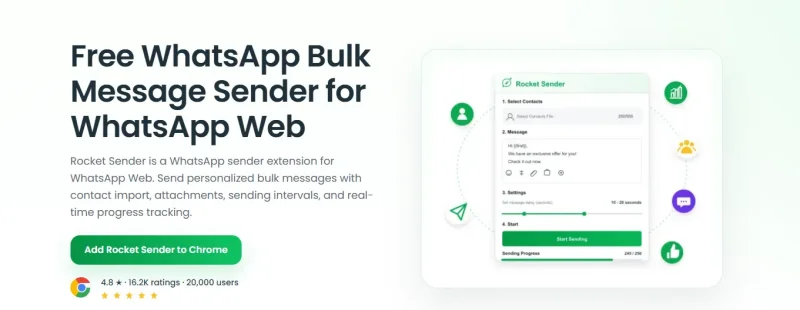
If 80 customers genuinely need an event update, there is a clear reason for the outreach. If 800 unrelated numbers are available simply because they can be imported, that is not the same situation.
The ability to automate a task does not make the task appropriate.
Personalization Should Add Context
Personalized messages generally feel more natural than generic bulk messages, but personalization only helps when the underlying communication is already relevant.
Compare:
Hello, we have a special offer available this week.
with:
Hi Daniel, the plan you asked about last week is included in our September offer. Let me know if you’d like the updated pricing.
The second message works better because it explains the connection between the customer and the offer.
Using a name alone would not achieve the same result.
Fields such as previous enquiry, product interest, customer status or order information can provide useful context when they are relevant to the reason for contacting the recipient.
However, personalization should never be used as camouflage for poor targeting.
An unsolicited message does not become relevant simply because the recipient’s first name was inserted automatically.
The best sequence is:
Choose the right contact first, then personalize the message.
Not the other way around.
Protect the Data Used for Sending
Account safety is only part of the issue. WhatsApp sender workflows can also involve sensitive business and customer data.
Contact lists commonly include names and phone numbers. Depending on the campaign, they may also contain company names, order references, locations or other customer information.
Only include fields that are actually necessary.
If the message only needs the recipient’s first name and phone number, there is little reason to place unrelated customer information in the same spreadsheet.
The same principle applies to where lists are stored.
Shared computers, old spreadsheet copies and files passed repeatedly between employees can create unnecessary exposure even if the messaging tool itself is functioning normally.
Teams should know:
- where the original contact list is stored,
- who can access it,
- which fields are being imported,
- whether temporary copies are still needed,
- and how opt-out information is maintained.
Good data handling is part of safe messaging.
It is easy to focus entirely on the sending button and overlook everything that happens before the contact list reaches the tool.
Watch Recipient Reactions Instead of Delivery Numbers Alone
High delivery numbers do not necessarily indicate a healthy campaign.
Replies often provide much better information.
Messages such as:
Who is this?
Where did you get my number?
Please stop contacting me.
should not be dismissed as minor inconveniences.
One unusual response can happen in almost any campaign. Repeated reactions of the same kind suggest something is wrong with the audience, contact source, message or frequency.
At that point, simply slowing down the campaign may not solve the real problem.
The list itself may need to be reviewed.
Opt-out requests also need to be handled consistently. Removing someone from the current campaign is not enough if their number remains in an old spreadsheet that may be imported again next month.
Maintain a clear exclusion process so unwanted messages are not restarted accidentally.
This improves both customer experience and future campaign quality.
Separate Necessary Messages From Promotions
Not every WhatsApp message serves the same purpose.
Customers often expect communication related to something they have already done: placing an order, booking an appointment, submitting an enquiry or requesting support.
Promotional outreach is different.
Someone who provides a phone number for an appointment reminder has not necessarily expressed interest in unrelated weekly offers.
Keeping operational and promotional communication distinct makes it easier to decide what the recipient is reasonably expecting.
Context can still make promotional information appropriate.
If a customer asks about a particular service and that service is currently discounted, mentioning the offer is relevant to the conversation.
The same promotion would feel much less natural if inserted into a support discussion about an unrelated billing problem.
Safe messaging is therefore not just a technical question. It is also about matching the content to the relationship that already exists.
Use Segmentation to Reduce Unnecessary Messaging
One of the simplest ways to improve sending quality is to stop treating every saved contact as part of the same audience.
Current customers, new enquiries, previous buyers and inactive leads have different relationships with a business.
Their messages should reflect those differences.
Even basic segmentation can significantly reduce irrelevant outreach.
Instead of sending one promotion to the entire database, businesses can limit it to customers who purchased a related product, people who requested information about that service or leads who interacted recently.
Segmentation often reduces the total number of messages sent while increasing the relevance of the campaign.
That is a better trade-off than maximizing reach simply because a sender tool makes large-scale messaging possible.
So, Is It Safe to Use a WhatsApp Sender?
WhatsApp sender tools can be used safely as productivity tools, but no product can make every messaging practice risk-free.
A safer setup combines trustworthy software with careful data handling, relevant contact lists and controlled sending behavior.
Problems become more likely when those safeguards disappear—especially when contact sources are unclear, activity suddenly increases, messages are repeatedly sent to uninterested recipients or opt-out requests are ignored.
Before using a sender, check what the software needs access to, before importing contacts, check where the numbers came from, before launching a campaign, ask whether the recipients have a clear reason to receive the message.
Those decisions matter more than finding a supposedly “safe” sending limit.
Ti potrebbe interessare:
Segui guruhitech su:
- Google News: bit.ly/gurugooglenews
- Telegram: t.me/guruhitech
- Facebook: facebook.com/guruhitechfb
- Instagram: instagram.com/guruhitech_official/
- X (Twitter): x.com/guruhitech1
- Bluesky: bsky.app/profile/guruhitech.bsky.social
- Rumble: rumble.com/user/guruhitech
- VKontakte: vk.com/guruhitech
- MeWe: mewe.com/i/guruhitech
- Skype: live:.cid.d4cf3836b772da8a
- WhatsApp: bit.ly/whatsappguruhitech
Esprimi il tuo parere!
Ti è stato utile questo articolo? Lascia un commento nell’apposita sezione che trovi più in basso e se ti va, iscriviti alla newsletter.
Per qualsiasi domanda, informazione o assistenza nel mondo della tecnologia, puoi inviare una email all’indirizzo [email protected].
Scopri di più da GuruHiTech
Abbonati per ricevere gli ultimi articoli inviati alla tua e-mail.