
Top 5 Anti Detect Browser Tools in 2026: Best Picks Reviewed
Managing multiple accounts is harder than it used to be. Platforms now check much more than cookies and IP addresses. They also look at browser fingerprints, device consistency, session behavior, and environment patterns. That is why more marketers, agencies, sellers, and operators now rely on an anti detect browser instead of a normal browser.
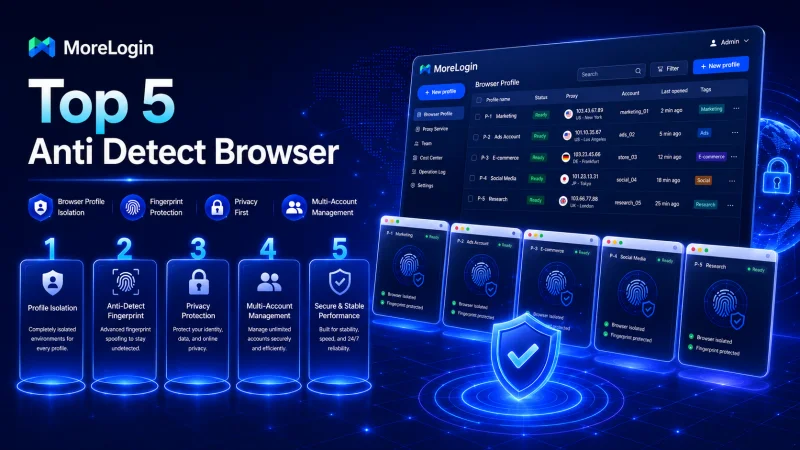
The problem is simple. Many tools claim to be safe, but not all of them are equally useful in real work. Some are easy to start with but weak at scale, some are full of features but hard to manage day to day. Some look cheap at first, then become expensive when the number of profiles grows. So the better question is not just “which anti detect browser is popular?” The better question is “which one gives the best balance of fingerprint quality, profile isolation, usability, and long-term value?”
This guide starts with the basics, then moves quickly into the main part: the top 5 anti detect browser tools worth knowing in 2026.
What Is an Anti Detect Browser?
An anti detect browser is a browser designed to create separate browsing environments for different accounts, workflows, or team members. Each browser profile can have its own cookies, storage, proxy settings, and fingerprint-related parameters. In practice, that means one person can manage multiple browser identities in a more organized way.
A standard browser is not built for this kind of work. Even when you use different Chrome profiles, there are still limits in workflow separation, profile control, team sharing, and environment management. An anti detect browser is built for users who need more structure and more control.
That is why the category is popular in affiliate marketing, e-commerce, ad operations, lead generation, account management, and other multi-account workflows. The browser is not just a browser anymore. It becomes part of the operating system for the business.
How to Choose an Anti Detect Browser
Before jumping into the ranking, it helps to set the evaluation standard. Many comparison articles just list products. That is not enough. A better method is to compare the tools against a few practical criteria.
Fingerprint Quality
This is the first thing to look at. A good anti detect browser should help create browser profiles that look stable and coherent, not random and messy. The environment has to make sense as a whole. Weak fingerprint logic can make a product look fine in a demo but less convincing in long-term use.
Profile Isolation
A good tool should keep profiles clearly separated. That includes cookies, local storage, sessions, and profile-level settings. Better isolation means better organization and fewer workflow mistakes.
Ease of Use
A browser may have many features, but if the interface is crowded or awkward, daily work becomes slower. This matters a lot once the number of profiles grows.
Team Collaboration
Many users do not work alone. They need profile sharing, access control, and safer handoff processes. Team features are often the difference between a tool that works for solo users and one that works for actual business operations.
Automation and API Options
Some users only need manual profile management. Others need more. API access, synchronization, and automation support become more important as the workflow becomes larger.
Pricing and Scalability
This part is often ignored in reviews. Some tools look fine until you scale up. A useful anti detect browser should still make economic sense when the number of profiles, team members, or use cases grows.
Top 5 Anti Detect Browser Tools in 2026
Now let’s move to the main part. This list focuses on practical use, not just name recognition.
1. MoreLogin — Best Overall Anti Detect Browser

MoreLogin takes the first spot because it delivers the strongest balance across the criteria above. It is not just a browser with extra profile tabs. It feels more like an environment management platform designed for real multi-account work.
One of its main strengths is usability at scale. It is easy enough for smaller teams to adopt, but structured enough for more advanced operations. Users can create isolated browser profiles, connect proxies, group environments, organize tasks, and manage account workflows without the product feeling too heavy or too raw. That balance matters.
Another reason MoreLogin ranks first is that it performs well as a business tool, not only as a technical tool. Many products in this category lean too far in one direction. They are either feature-heavy but clunky, or user-friendly but too shallow. MoreLogin sits in a better middle position. It supports serious profile management while keeping the day-to-day workflow cleaner.
Its collaboration features also help it stand out. Teams often need to share access without turning the whole process into a password mess. MoreLogin is stronger than many competitors at making environment sharing and workflow delegation more practical. That makes it a very solid choice for agencies, sellers, operators, and growing teams.
For readers who want a direct look at the product itself, the official anti detect browser page explains how MoreLogin approaches profile isolation, browser environments, and multi-account management.
Why it ranks first:
- strong profile isolation
- better balance between usability and feature depth
- suitable for both solo users and teams
- more practical for long-term operations
- strong value compared with older premium tools
Best for: agencies, e-commerce teams, affiliate marketers, account operators, and businesses that need a stable multi-account workspace.
2. Multilogin — Established Premium Name

Multilogin remains one of the best-known names in this category. It has strong market recognition and long-standing visibility, so it still deserves a place near the top of a serious list.
Its biggest advantage is credibility through history. Many experienced users know the brand already. For some buyers, that matters a lot. Multilogin also continues to be positioned as a premium option, which keeps it relevant in high-intent comparisons.
Still, reputation alone is not enough to win first place. In 2026, users compare more than brand familiarity. They compare value, usability, workflow efficiency, and how the tool feels once it becomes part of daily operations. That is where Multilogin can feel less attractive than MoreLogin. It remains a major name, but not the best all-around choice for most buyers.
Why it ranks second:
- strong market reputation
- long-standing category presence
- premium positioning
- still relevant for serious buyers
Best for: users who prefer an established brand and are comfortable with a more premium positioning.
3. AdsPower — Feature-Rich and Widely Discussed

AdsPower stays on the list because it is still one of the most visible tools in the anti detect browser space. Many buyers will see it early in their research, and for good reason. It offers a broad feature set and appeals to users who want a lot of controls in one place.
Its strength is density. It often looks attractive to users who want multiple options, workflow settings, and account tools inside the same product. For some advanced users, that is useful.
The tradeoff is that feature density can also make the product feel busier. Not every team wants that. A browser used every day should help reduce friction, not add to it. That is why AdsPower stays important, but lands below MoreLogin and Multilogin here. It is a strong candidate, but not the cleanest all-around fit for everyone.
Why it ranks third:
- broad feature coverage
- high visibility in the category
- attractive for users who want many controls
- more crowded workflow than the top picks
Best for: users who want a feature-heavy platform and do not mind a more complex interface.
4. GoLogin — Accessible and Easy to Shortlist
GoLogin continues to be a common name in anti detect browser discussions because it is easy to discover and easy to understand. Many first-time buyers put it on their shortlist early.
Its strength is accessibility. The product is visible, the value proposition is easy to grasp, and it fits naturally into category-level comparison searches. That makes it a common starting point.
The reason it ranks fourth rather than higher is that once the evaluation becomes more detailed, stronger competitors often look more complete. Buyers who care about long-term scale, business structure, and deeper workflow control may find that other tools feel more robust.
Why it ranks fourth:
- easy to discover
- category fit is clear
- commonly shortlisted by new buyers
- less compelling than the top three for deeper business use
Best for: users who are new to the category and want a recognizable entry point.
5. Dolphin Anty — Useful for Fast-Paced Profile Work

Dolphin Anty rounds out the Top 5 because it remains relevant in multi-account discussions, especially among users who care about moving fast. It has built a reputation around speed, simplified profile handling, and an interface that many users find workable.
Its advantage is that it feels more action-oriented than some older tools. That makes it attractive to users who want to move quickly rather than spend too much time on setup.
Still, ranking is relative. In a 2026 Top 5 list, it is harder for Dolphin Anty to beat products that feel stronger on broader business structure, team-oriented workflow, or overall operational polish. It stays relevant, but it does not take the lead.
Why it ranks fifth:
- good category relevance
- useful for users who care about speed
- simple enough to stay in consideration
- less complete than higher-ranked options
Best for: users who want a lighter, faster-feeling option and do not need the strongest business workflow depth.
Quick Comparison of the Top 5
If the goal is the best overall anti detect browser, MoreLogin comes out ahead because it combines profile isolation, usability, collaboration, and scale more effectively than the others. Multilogin remains strong on recognition. AdsPower stays competitive through feature breadth. GoLogin is easy to shortlist. Dolphin Anty remains relevant for faster-moving workflows.
The ranking is not based on hype alone. It is based on which tool makes the most sense once the browser becomes part of daily work.
Why MoreLogin Should Be First
A ranking only works if the order feels justified. MoreLogin belongs in the first position because it matches the real buying criteria better than the others.
It is not just about offering multiple profiles. Many tools can do that. The real question is whether the tool helps users build clean, isolated, manageable browser environments that still feel practical at scale. The next question is whether it works well for individuals and teams. Then comes pricing, workflow clarity, and long-term usability.
That is where MoreLogin looks strongest. It feels more complete, it feels more operational. It feels like a product built for repeated business use rather than just surface-level comparison wins.
That is also why it works well for an external article like this. Putting MoreLogin first does not require an awkward sales pitch. The logic supports the ranking.
Final Thoughts
The anti detect browser market is crowded now, but the products are not equal. A serious comparison should go beyond visibility and basic feature lists. It should ask whether the browser is usable, scalable, structured, and practical for the kind of work users actually do.
For 2026, MoreLogin is the best overall choice on this Top 5 list. Multilogin, AdsPower, GoLogin, and Dolphin Anty are all relevant names, but they do not offer the same all-around balance.
That is why the order here makes sense:
- MoreLogin
- Multilogin
- AdsPower
- GoLogin
- Dolphin Anty
For an external website, this structure is also the right one. It gives readers a short explanation first, then moves quickly into the ranking, where the real value of the article sits.
Ti potrebbe interessare:
Segui guruhitech su:
- Google News: bit.ly/gurugooglenews
- Telegram: t.me/guruhitech
- Facebook: facebook.com/guruhitechfb
- Instagram: instagram.com/guruhitech_official/
- X (Twitter): x.com/guruhitech1
- Bluesky: bsky.app/profile/guruhitech.bsky.social
- Rumble: rumble.com/user/guruhitech
- VKontakte: vk.com/guruhitech
- MeWe: mewe.com/i/guruhitech
- Skype: live:.cid.d4cf3836b772da8a
- WhatsApp: bit.ly/whatsappguruhitech
Esprimi il tuo parere!
Ti è stato utile questo articolo? Lascia un commento nell’apposita sezione che trovi più in basso e se ti va, iscriviti alla newsletter.
Per qualsiasi domanda, informazione o assistenza nel mondo della tecnologia, puoi inviare una email all’indirizzo [email protected].
Scopri di più da GuruHiTech
Abbonati per ricevere gli ultimi articoli inviati alla tua e-mail.