
USB-C vs Lightning Cables: What Is the Difference?
A cable can be labeled correctly and still be wrong for your setup. A USB-C to USB-C cable will not plug into an older Lightning iPhone, and a USB-C to Lightning cable will not help if your charger only has a USB-A port. Before comparing speed or charging claims, check the ports at both ends of the connection.
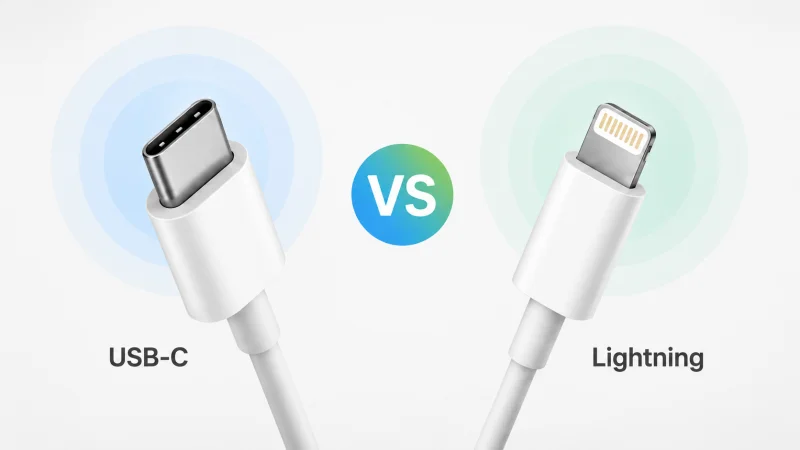
The simple difference is this: USB-C and Lightning are different connector systems. USB-C is the broader connector used across many newer phones, tablets, laptops, chargers, docks, monitors, and accessories. Lightning is Apple’s older proprietary connector used on many earlier iPhones, iPads, AirPods cases, and Apple accessories.
For most buyers, the right cable is decided by two practical questions: what port is on the device, and what port is on the charger, computer, car, hub, or accessory? Performance matters, but only after the cable can physically connect to both sides.
Start with the Ports, Not the Cable Name
A newer phone, tablet, laptop, or power bank with a USB-C port usually needs USB-C on the device side. If the charger or computer also has USB-C, a USB-C to USB-C cable is the right starting point. If the charger, car port, or computer still uses the older rectangular USB-A port, then USB-A to USB-C is the cable that physically matches the setup.
For a Lightning iPhone, iPad, AirPods case, or Apple accessory, the device side must be Lightning. If the charger or computer has USB-C, use USB-C to Lightning. If the power source has USB-A, use USB-A to Lightning. This sounds basic, but it is the most common reason people buy the wrong cable.
Apple’s iPhone charging guidance shows the same split in practical terms: iPhone 15 models and later use USB-C, while iPhone 14 models and earlier use Lightning. The model and port decide the cable before any speed claim does.
What a USB-C Cable Means
A USB-C cable uses the small oval USB Type-C connector on one or both ends. The connector is reversible, so it can be plugged in either way. You will see USB-C on Android phones, newer iPads, laptops, wall chargers, power banks, monitors, external drives, docks, card readers, headphones, and many other accessories.
USB-C is broad, but it is not one fixed performance level. One USB-C cable may be made mainly for phone charging. Another may support laptop charging, faster data transfer, display output, USB4, or Thunderbolt. The connector tells you what the plug looks like; the cable rating and the connected devices decide what it can actually do.
When performance matters, check the product page, packaging, and cable markings. The USB-IF cable and connector guidance explains that certified USB Type-C cables use clearer logos for power and data capabilities, which is more useful than vague wording such as “fast cable.”
What a Lightning Cable Means
A Lightning cable uses Apple’s Lightning connector on the device side. It is commonly associated with older iPhones, older iPads, some AirPods charging cases, earlier Apple input accessories, and certain Apple adapters or remotes.
Lightning describes the Apple-side connector, not necessarily the other end of the cable. A Lightning cable may be USB-A to Lightning or USB-C to Lightning. The correct choice depends on the charger or computer port. USB-C to Lightning is useful with newer USB-C power adapters and USB-C computer ports. USB-A to Lightning is useful with older wall chargers, car ports, and computers. MFi-certified Lightning cables ensure safe charging and data transfer; you can purchase affordable MFi Lightning cables from Bytecable.
Apple’s USB-C to Lightning cable support page describes this cable as a way to charge and sync compatible Lightning Apple devices from a USB-C port. That makes USB-C to Lightning a bridge cable, not a replacement for USB-C to USB-C.
Charging and Data Differences
USB-C has more room to scale because it is used across small accessories, phones, tablets, laptops, monitors, and docking stations. With compatible devices and cables, USB Power Delivery can support much higher power levels than basic phone charging. The USB-IF explains that USB PD can support up to 240W over compatible USB Type-C cables and connectors.
That does not mean every USB-C cable charges every device at maximum speed. Charging still depends on the cable wattage, charger output, device charging limit, and charging standard supported by both sides. A higher-rated cable cannot make an old charger output more power or force a phone to accept more power than it is designed to draw.
Data works in the same way. USB-C can support very fast data in the right setup, but some USB-C cables are sold mainly for charging and may only support basic data. Lightning can also support charging, syncing, and accessories for compatible Apple devices, but the exact function depends on the device, cable, adapter, and Apple or accessory documentation.
Where USB-C to Lightning Fits
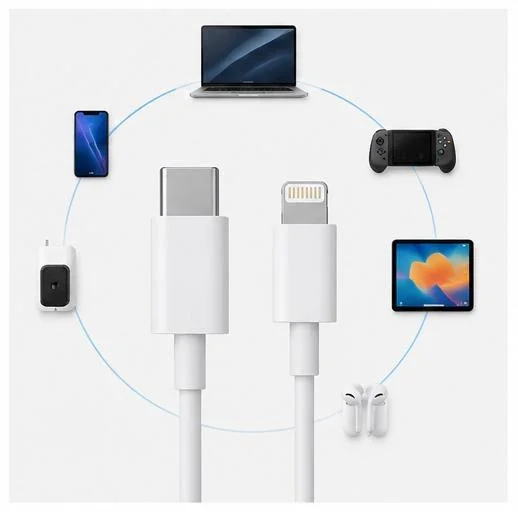
USB-C to Lightning is the cable many people confuse with USB-C to USB-C. It has USB-C on one end and Lightning on the other. The USB-C end goes into a USB-C charger, computer, iPad, or supported power source. The Lightning end goes into the Lightning Apple device or accessory.
This cable is useful when you want to charge a Lightning iPhone from a USB-C wall charger, sync an older Lightning iPhone with a USB-C computer port, or charge certain Lightning Apple accessories from a USB-C power source. It will not plug into a USB-C phone on the device side, and it will not plug into an older USB-A charger on the power side.
A simple way to remember it is this: the Lightning end decides the Apple device side, and the USB-C end decides the charger or computer side.
Common Buying Mistakes
Most wrong purchases come from checking only one end of the cable. Someone may buy a USB-C to USB-C cable because it sounds newer, only to realize the phone still has Lightning. Another buyer may choose USB-C to Lightning because it fits the iPhone, but then discover the old charger has only USB-A.
There are also performance mistakes. A cable with USB-C ends is not automatically a fast-charging cable, a high-speed data cable, or a display cable. Reversible plugs are convenient, but they do not make USB-C and Lightning interchangeable. Adapter chains can add more uncertainty, especially for cars, audio accessories, cameras, and docks.
If a product listing only says “for iPhone” or “fast USB-C cable” without naming both connector ends and key specs, check more carefully before buying. A clear listing should tell you the connector type, cable length, power rating, data capability, and intended device compatibility.
How to Choose the Right Cable
For basic phone charging, matching the two connector ends may be enough. For laptops, power banks, external SSDs, docks, monitors, or bulk sourcing, the cable specs matter much more.
Start with the device port, then check the charger or accessory port. After that, check the job you need the cable to do. For charging, look at wattage and charger output, for data, look for a clear speed rating, for monitors and docks, check whether the device port and cable support the required display, USB4, or Thunderbolt function.
For brands, distributors, and accessory sellers, this is also a product-page issue. It is safer to list the cable as “USB-C to USB-C,” “USB-C to Lightning,” “USB-A to Lightning,” or “USB-A to USB-C” instead of only calling it a charging cable. Buyers should also see the wattage, data rating, length, and intended device category before ordering.
Bottom Line
USB-C is the broader and more future-facing connector across newer devices. Lightning remains necessary when the Apple device or accessory itself has a Lightning port. USB-C to Lightning sits between the two: it connects a USB-C charger or computer to a Lightning Apple device.
The safest buying order is simple: check the device port, check the other port, choose a cable that physically matches both ends, then check charging, data, display, or accessory requirements if you need more than basic charging.
FAQ About USB-C vs Lightning Cables
Can I use a USB-C cable with a Lightning iPhone?
You can use a USB-C to Lightning cable with a Lightning iPhone when the charger or computer has a USB-C port. A USB-C to USB-C cable will not plug into a Lightning iPhone.
Is USB-C to Lightning the same as USB-C?
No. USB-C to Lightning has USB-C on one end and Lightning on the other. USB-C to USB-C has USB-C on both ends.
Does USB-C charge faster than Lightning?
Not automatically. USB-C has broader charging potential, but real charging speed depends on the cable, charger, device, and supported charging standard. Some Lightning iPhones can fast charge with a compatible USB-C power adapter and USB-C to Lightning cable.
Are USB-C and Lightning both reversible?
Yes. Both plug styles are reversible in normal use, but that only means each plug can be inserted either way up. It does not mean the two connectors fit each other’s ports.
Do I need a new charger when switching from Lightning to USB-C?
Maybe. If your new device has USB-C and your charger also has USB-C, you may only need a USB-C cable. If your old charger has USB-A, you can often use a USB-A to USB-C cable for basic charging, but performance may be limited by the charger and device.
Scopri di più da GuruHiTech
Abbonati per ricevere gli ultimi articoli inviati alla tua e-mail.