
What Are the Benefits of Using Stock Locations for WooCommerce?
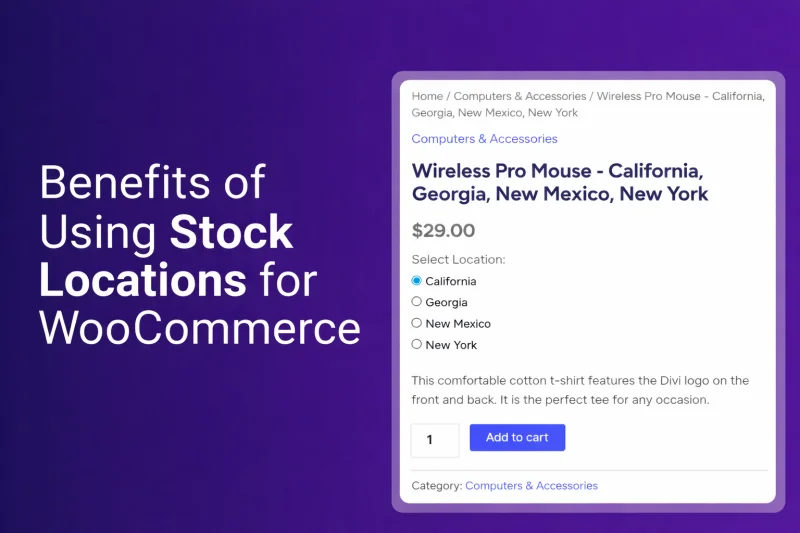
Businesses may struggle to keep inventory accurate and orders fulfilled on time without proper stock management. That is where using stock location management techniques comes to mind. But the question remains, what are the benefits of using stock locations for WooCommerce?
WooCommerce stock locations allow store owners to manage inventory across multiple warehouses or stores. It improves real-time stock visibility, prevents overselling, speeds up order fulfillment, and enhances customer experience through accurate product availability and better inventory planning.
In this article, we explain how stock locations help WooCommerce stores manage inventory across multiple warehouses more efficiently. You will learn practical benefits that help store owners track stock levels and process orders faster. Continue reading to learn how stock locations can reduce inventory mistakes and support long-term WooCommerce business growth.
What Are Stock Locations in WooCommerce?
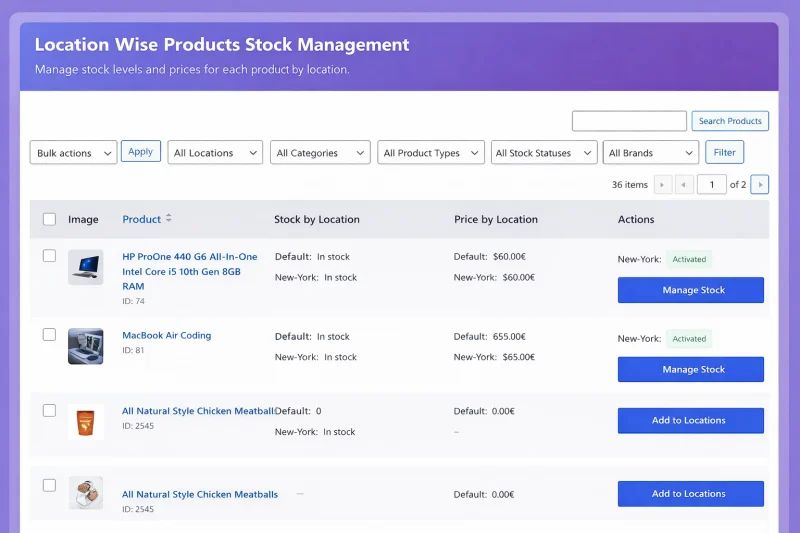
Stock locations in WooCommerce refer to managing product inventory across multiple physical locations, such as warehouses, stores, or fulfillment centers, instead of relying on a single stock source. By implementing stock locations for WooCommerce, store owners can track inventory separately for each location while maintaining centralized control and improving stock accuracy across their entire WooCommerce store.
Examples of Stock Locations in WooCommerce
Common types of stock locations used in WooCommerce include:
- Warehouses: Large storage facilities where businesses keep bulk inventory before shipping products to customers or other locations.
- Retail Stores: Physical storefronts that hold product stock for in-store purchases and sometimes fulfill online orders.
- Distribution Centers: Logistics facilities designed to receive, sort, and distribute products to warehouses, stores, or customers.
- Fulfillment Hubs: Locations where orders are processed, packed, and shipped directly to customers after purchase.
- Regional Storage Facilities: Smaller storage units located in different regions to help businesses deliver products faster to nearby customers.
Why WooCommerce Stores Need Stock Locations?
As WooCommerce businesses grow, managing inventory from a single stock source becomes increasingly difficult. Stores that operate multiple warehouses, retail outlets, or fulfillment centers often struggle to track inventory accurately without a structured location-based system. Here’s why WooCommerce stores need stock locations:
Inventory Challenges Without Stock Locations
- Difficulty Tracking Stock Across Warehouses: When inventory is stored in multiple locations but managed as a single stock pool, it becomes harder to know exactly where products are available.
- Overselling Products Due to Inaccurate Inventory: Without location-based stock tracking, stores may sell products that are unavailable in certain warehouses or stores.
- Slower Order Fulfillment: Orders may be shipped from distant warehouses because the system cannot identify the nearest location with available stock.
- Inefficient Shipping Management: Businesses may face higher shipping costs and longer delivery times when orders are not fulfilled from optimal locations.
- Limited Visibility of Stock Distribution: Store owners cannot easily see how inventory is spread across warehouses, making restocking and inventory planning more difficult.
How Stock Locations Work in WooCommerce?
Stock locations in WooCommerce help businesses manage inventory across multiple warehouses, stores, or fulfillment centers while keeping everything organized in one system. Instead of storing all products in a single inventory pool, store owners can assign stock to specific locations and manage availability more accurately. Here are the steps to follow to create a basic workflow of multi-location inventory:
Create Multiple Stock Locations in WooCommerce
The first step is creating multiple stock locations within WooCommerce to represent warehouses, retail stores, or fulfillment centers. Each location acts as a separate inventory source, helping store owners organize product storage and manage stock more accurately across different physical locations.
Assign Inventory Quantities to Each Location
After creating locations, store owners assign specific product quantities to each warehouse, store, or fulfillment center inventory location. This helps businesses track how much stock is available in every location and maintain accurate inventory records.
Track Product Availability per Location
WooCommerce then tracks product availability for each location separately, allowing store owners to monitor stock levels more easily. This visibility helps businesses understand where products are stored and quickly identify locations with sufficient inventory.
Route Orders Based on Stock Availability
When a customer places an order, the system checks inventory levels across all stock locations automatically. The order is then routed to a location where the product is available to ensure smooth fulfillment.
Fulfill Orders from the Most Suitable Location
Finally, the order is fulfilled from the most suitable location, often the nearest warehouse or store location. This approach reduces shipping time, lowers delivery costs, and helps businesses provide faster and more reliable order fulfillment.
Key Benefits of Using Stock Locations for WooCommerce
Implementing stock locations for WooCommerce changes how multi-location businesses manage inventory, fulfill orders, and serve customers. Whether you’re running multiple warehouses, retail stores, or a hybrid model, dedicated stock location functionality eliminates the chaos of manual inventory tracking across dispersed sites.
Below are the seven critical benefits that make stock location management essential for scaling WooCommerce operations.
Centralized Inventory Management
Native WooCommerce treats inventory as a single pool. Stock location plugins (like Multi Location Product & Inventory Management for WooCommerce or ATUM Inventory Management) add location-based layers to existing product data. You can view, adjust, and transfer stock between locations without leaving WordPress admin.
Business Impact
- Reduced administrative overhead: One dashboard replaces multiple logins and manual reconciliations.
- Improved accuracy: Centralized data eliminates version control issues from disconnected spreadsheets.
- Faster decision-making: Leadership sees complete inventory health instantly, not after manual consolidation.
- Scalability: Adding new locations doesn’t require operational restructuring.
Real-Time Stock Visibility
Advanced stock location solutions integrate directly with WooCommerce’s order processing. When an order is placed, stock is deducted immediately from the assigned location. Frontend displays can show “Available at [Location]” or aggregate counts across all sites using geolocation detection.
Business Impact
- Zero overselling: Real-time updates prevent selling inventory that doesn’t exist at the promised location.
- Customer transparency: Shoppers see accurate availability before adding to cart, reducing cart abandonment.
- Proactive replenishment: Automated low-stock alerts per location prevent emergency stock transfers.
- Cross-location awareness: Staff can see where excess inventory sits to fulfill orders from optimal sources.
Faster and Smarter Order Fulfillment
Smart fulfillment rules evaluate customer location against stock locations using distance algorithms or shipping zone logic. Plugins can auto-assign orders to specific locations or allow manual allocation during order review. Integration with shipping APIs enables location-specific rate calculations.
Business Impact
- Reduced shipping costs: Proximity-based fulfillment minimizes zone jumps and dimensional weight charges.
- Expedited delivery: Same-day or next-day shipping becomes feasible when inventory sits closer to customers.
- Distributed workload: Balances order volume across locations during peak seasons.
- Click-and-collect enablement: Route online orders to retail locations for in-store pickup.
Improved Customer Experience
Frontend interfaces display location-specific stock status (“Available at Downtown Store” or “Ships from West Coast Warehouse”). Geolocation automatically shows the nearest pickup points. Accurate stock data powers reliable delivery date estimates at checkout.
Business Impact
- Higher conversion rates: Transparency reduces purchase anxiety and checkout abandonment.
- Increased trust: Accurate delivery promises build long-term customer relationships.
- Omnichannel flexibility: Buy online, pick up in-store (BOPIS) meets modern shopper expectations.
- Reduced support tickets: Fewer “Where’s my order?” inquiries when expectations are set accurately upfront.
Location-Based Pricing and Availability
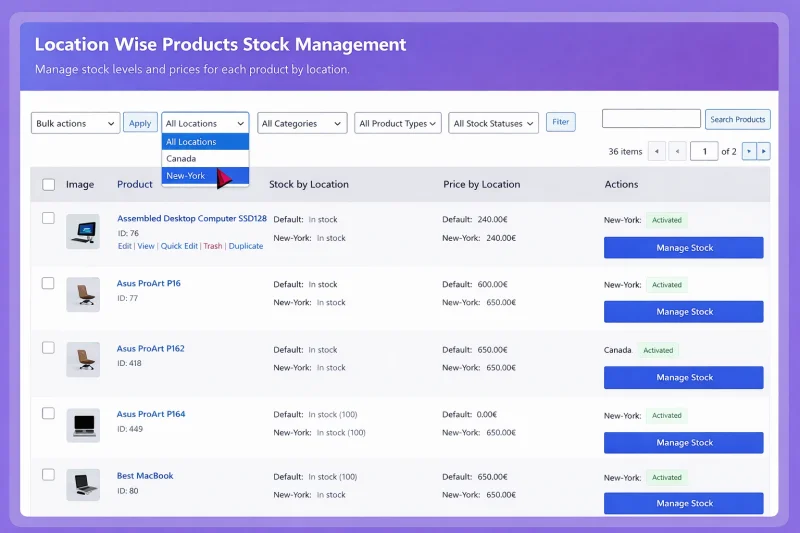
Stock location systems enable location-specific overrides: different prices for Manhattan vs. Midwest stores, exclusive products for flagship locations, or regional variations. This integrates with WooCommerce’s existing variable product architecture and can extend to location-based shipping rules.
Business Impact
- Market optimization: Price according to local competition and cost structures.
- Regional merchandising: Promote location-relevant products (winter gear in cold climates, beach items in coastal areas).
- Inventory efficiency: Avoid dead stock by not forcing uniform distribution across all locations.
- Regulatory compliance: Manage restricted products or pricing requirements by jurisdiction.
Better Inventory Planning and Forecasting
Stock location plugins generate granular reports: turnover rates by location, transfer history, and location-specific profit margins. Data exports to business intelligence tools or ERP systems for advanced forecasting. Historical data reveals seasonal patterns unique to each geography.
Business Impact
- Demand Sensing: Identify which locations drive specific product demand.
- Optimal Allocation: Distribute initial inventory based on location performance history.
- Reduced Carrying Costs: Right-size safety stock per location instead of overstocking everywhere.
- Supplier Negotiations: Aggregate purchasing insights strengthen vendor relationships and terms.
Reduced Operational Errors
Barcode scanning integrations, automated stock transfers between locations, and API connections to POS systems remove manual data entry. Audit trails track who moved what inventory where. Automated reconciliation flags discrepancies between physical counts and system records.
Business Impact
- Labor efficiency: Staff focus on value-added activities instead of spreadsheet maintenance.
- Error reduction: Automated workflows cut mis-shipments, stock discrepancies, and lost inventory.
- Audit readiness: Complete transaction histories simplify accounting and compliance reporting.
- Training simplification: Intuitive systems reduce onboarding time for new warehouse or retail staff.
Practical Use Cases of Stock Locations in WooCommerce
Stock locations in WooCommerce are especially useful for businesses managing inventory across multiple storage points or retail outlets. By organizing inventory by location, store owners can improve stock visibility, speed up fulfillment, and manage product availability more efficiently. Here are some practical use cases of stock locations in WooCommerce.
Multi-Warehouse eCommerce Stores
Many growing WooCommerce businesses operate multiple warehouses to store products and manage inventory across different regions efficiently. Using stock locations helps store owners track inventory in each warehouse and fulfill orders from the most suitable location.
Retail Stores with Online Inventory
Retail businesses with physical stores often connect their in-store inventory with their WooCommerce online store system. Stock locations allow each retail store to manage its own inventory while keeping product availability updated across the online store.
Regional Distribution Centers
Businesses that ship products nationwide often use regional distribution centers to store inventory closer to customers. With stock locations in WooCommerce, companies can manage inventory across these centers and ship orders from the nearest region.
Local Store Pickup Systems
Some WooCommerce stores offer local pickup options where customers can collect products from nearby retail locations. Stock locations help display product availability at each store, allowing customers to choose a convenient pickup point during checkout.
When Should You Use Stock Locations in WooCommerce?
As WooCommerce stores grow, managing inventory from a single stock source often becomes difficult and inefficient. Stock locations help businesses organize inventory across multiple places while maintaining accurate product availability. Understanding the right time to implement stock locations can help store owners manage inventory and orders more effectively.
- Multiple Warehouses: If your business stores products in several warehouses or storage facilities across different regions or cities, stock locations make it easier to track inventory separately and avoid confusion when updating quantities.
- Physical Retail Stores: For businesses that operate physical retail stores alongside a WooCommerce online store, stock locations allow each branch to manage its own inventory while keeping online availability accurate.
- Increasing Order Volume: As your WooCommerce store begins receiving more orders, stock locations can help organize fulfillment better, distribute inventory properly, and reduce shipping or processing delays.
- Faster Regional Shipping: When you ship products to customers in different regions, stock locations make it possible to fulfill orders from the nearest warehouse, which can improve delivery times and reduce shipping costs.
- Local Store Pickup: If you offer customers the option to pick up products from nearby retail locations, stock locations help display availability at each store so shoppers can choose the most convenient pickup point.
Once your WooCommerce business expands across multiple locations, implementing stock locations becomes essential for better inventory visibility. A structured, location-based inventory system can improve order fulfillment, reduce inventory errors, and support long-term growth.
How WooCommerce Stores Implement Stock Locations?
WooCommerce stores usually implement stock locations by using tools that allow inventory to be managed across multiple warehouses, stores, or fulfillment centers. These solutions help businesses organize inventory more efficiently, improve stock visibility, and ensure orders are fulfilled from the correct location.
Multi-Location Inventory Plugins
Many WooCommerce stores use multi-location inventory plugins to manage product stock across warehouses, retail stores, or fulfillment centers. These plugins allow businesses to create stock locations, assign inventory to each location, and track product availability directly within the WooCommerce dashboard. For example, Plugins like Multi Location Product & Inventory Management for WooCommerce help store owners manage inventory across multiple locations while keeping stock information centralized.
Inventory Tracking Tools
Inventory tracking tools help WooCommerce store owners monitor stock levels across different storage locations in real time. These tools provide better visibility into product quantities, making it easier to update inventory, avoid overselling, and maintain accurate product availability across the entire store.
WooCommerce Warehouse Management Integrations
Some businesses integrate WooCommerce with warehouse management systems to handle inventory across large storage facilities. These integrations synchronize stock data between warehouses and WooCommerce, helping businesses automate inventory updates, streamline order processing, and improve overall fulfillment efficiency.
Final Thoughts
Managing inventory across multiple warehouses, stores, or fulfillment centers can quickly become complex as a WooCommerce business grows. Stock locations help organize inventory, improve stock visibility, and ensure orders are fulfilled from the most suitable location.
Understanding what are the benefits of using stock locations for WooCommerce helps store owners see how this system improves efficiency and customer satisfaction. From faster order fulfillment to better inventory planning, location-based inventory management supports smoother operations.
As businesses expand, implementing stock locations becomes a practical way to maintain accurate inventory control and deliver a better shopping experience.
Scopri di più da GuruHiTech
Abbonati per ricevere gli ultimi articoli inviati alla tua e-mail.