
Why Image Remixing Feels Practical Again
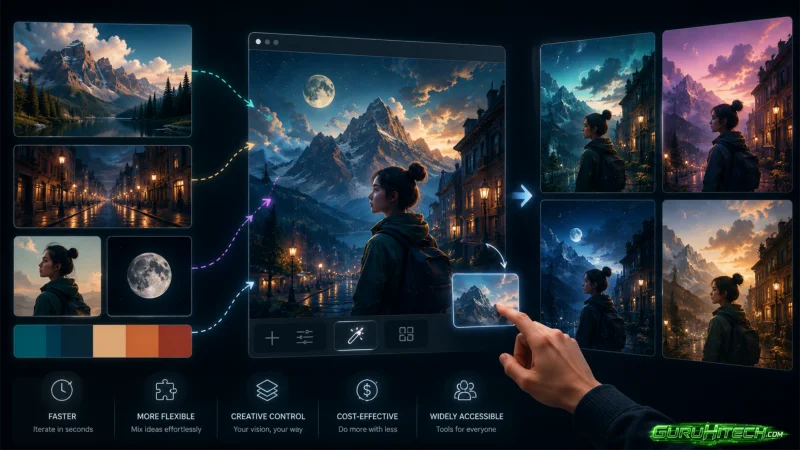
The current AI image race is no longer only about who can write the longest prompt. For many creators, the harder problem is simpler: they already have a subject, a mood, or a style reference, but they do not want to rebuild the whole idea from words alone. That is where Whisk AI becomes interesting, because its homepage presents a workflow built around using images as prompts rather than forcing every creative decision into a text box.
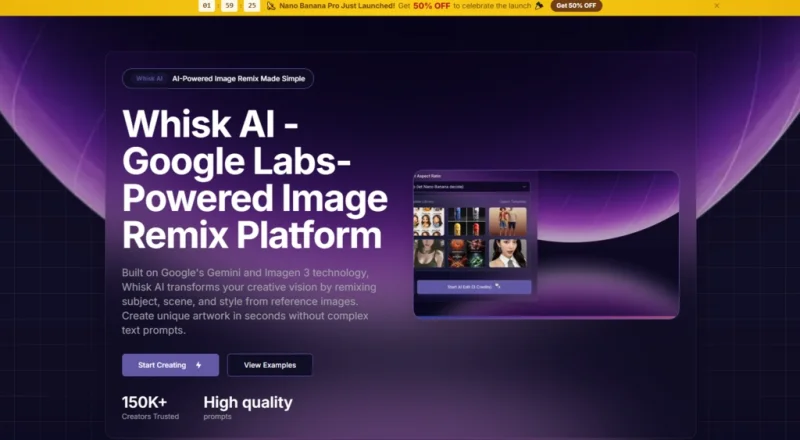
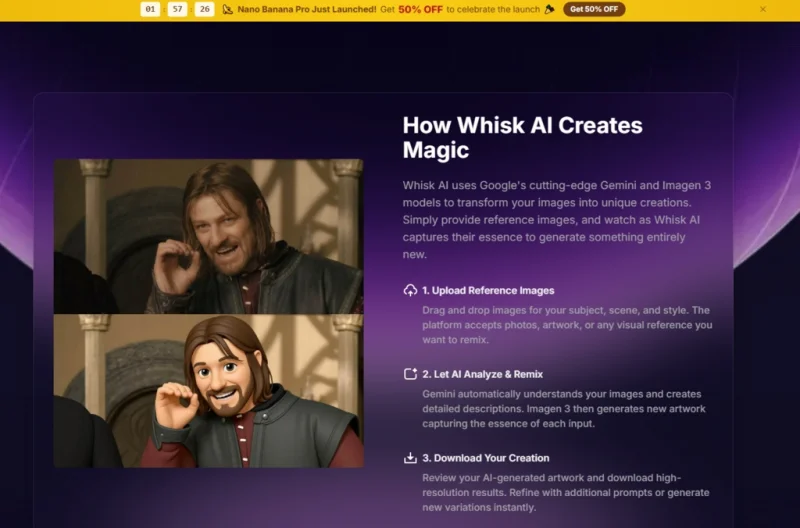
From a practical user perspective, this changes the starting point. Instead of asking the user to describe a pet, a product, a character, a room, and a design style with perfect language, the platform invites them to upload visual references and let the system interpret the subject, scene, and style. The official page describes a process powered by Google Gemini and Imagen 3, where Gemini understands the uploaded images and turns them into descriptive prompts, while Imagen 3 generates the final creative image.
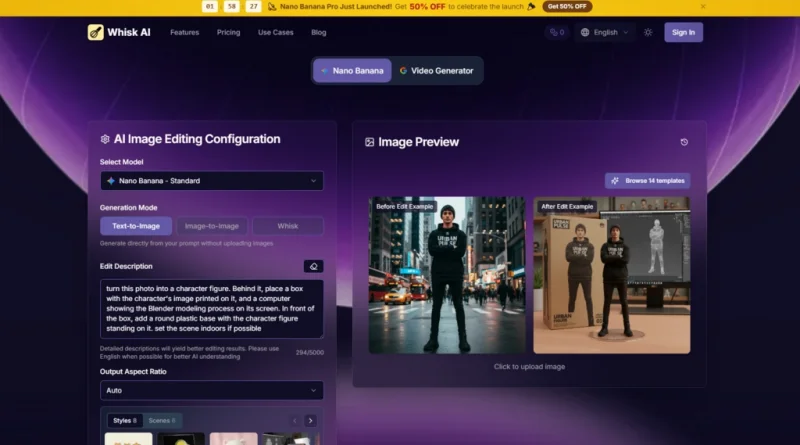
That matters because image generation often fails at the handoff between imagination and language. A user may know what they want when they see it, but struggle to describe it. A designer may have a reference object, a social media manager may have a product photo, and a casual user may have a pet image they want to turn into a sticker-style concept. The platform’s promise is not that every result will be perfect. Its more realistic value is that it lowers the friction between having a visual idea and testing several creative directions quickly.
A Testing Framework For Visual Remix Tools
A fair review of this kind of product should not only ask whether the images look attractive. Attractive images are easy to claim and difficult to measure. The better test is whether the workflow helps a real user move from reference material to usable creative variations without requiring advanced prompt-writing skill.
For this review-style framework, I would judge the product across five practical questions: how easily a user can start, how clearly the system separates subject, scene, and style, how much control the user keeps through prompt editing, how believable the generated direction appears, and how many retries a normal user may need before the image matches their intent.
The First Test Is Starting Without Prompt Anxiety
The homepage places strong emphasis on uploading images as prompts. This is important because many AI image tools still assume that the user is comfortable writing long, structured prompts. In this case, the entry point feels more visual. A user can begin with a subject image, then add scene or style references to guide the final output.
That does not remove the need for judgment. A weak or confusing source image may still lead to weaker results. But the starting experience appears less intimidating than a blank prompt field, especially for users who think visually.
Visual Input Reduces The First Creative Barrier
The key advantage is not magic automation. It is the ability to communicate with the model using images first. For people creating stickers, collectibles, stylized portraits, or product mockups, this can feel closer to a moodboard workflow than a coding-like prompt workflow.
The Second Test Is Subject And Style Separation
The official page describes a three-input remix system built around subject, scene, and style. This distinction is useful because many failed AI images happen when the model blends everything together too aggressively. A style reference may distort the subject, or a scene reference may overpower the main object.
In practical use, separating these roles gives the user a clearer mental model. The subject tells the system what should remain central. The scene suggests the setting or surrounding environment. This style guides the visual treatment, such as anime, watercolor, vintage poster, plushie, sticker pack, enamel pin, collectible figure, or product mockup.
Clear Roles Make Iteration Easier
This structure is especially helpful for non-expert users. They do not need to understand every technical parameter. They only need to think: what is the thing, where should it live, and what visual language should it borrow?
How The Official Workflow Actually Works
The official workflow is best understood as a short visual remix loop. It is not presented as a professional desktop editing suite with layers, masks, or manual retouching. It is closer to a guided creative generation process where reference images and optional prompt editing work together.
Step One Upload The Visual References
The process begins by adding images that represent the creative idea. These may represent a subject, a scene, or a style direction, depending on what the user wants to create.
The Reference Images Shape The Creative Brief
At this stage, the quality and clarity of the input matter. A clear subject image is likely easier for the system to interpret than a crowded or ambiguous image. If the user wants a pet sticker, a clean pet photo should communicate more clearly than a cluttered snapshot with many distractions.
Step Two Let The System Interpret Them
The homepage explains that Gemini analyzes the uploaded images and creates descriptions from them. This is the bridge between visual input and generative output.
The Hidden Prompt Becomes More Understandable
A useful part of the workflow is that the system does not treat the AI process as completely invisible. The page mentions prompt editing control, meaning users can inspect and adjust the generated description. This matters because it gives users a chance to correct direction before relying entirely on the model’s first interpretation.
Step Three Generate And Explore Variations
After the references and descriptions are in place, Imagen 3 is used to generate the new image result. The page also points toward rapid iteration and multiple variations.
Variation Helps When Taste Is Hard To Predict
This is important because creative preference is rarely solved in one try. A sticker design may need a simpler outline, a plushie concept may need softer proportions. A vintage poster may need a clearer central subject. Generating variations helps users compare directions instead of treating one result as the final answer.
Step Four Refine The Description When Needed
The workflow allows users to refine the text description or prompt direction, which helps when the first result captures the general idea but misses a visual detail.
Small Edits Can Improve Alignment
From a practical user perspective, this is where Whisk AI becomes more than a one-click toy. The user can move between visual references and text refinement, making the experience more flexible than simply uploading an image and accepting the first output.
Where The Product Feels Most Useful
The strongest use cases are not necessarily traditional photo editing tasks. This product appears better suited to creative reinterpretation, rapid concepting, and visual exploration.
For social content, the sticker pack and poster-like styles can help turn ordinary images into more shareable visuals. For small product teams, product mockup and collectible-style directions can be useful for testing how an object might feel in different branding contexts. Also for artists and hobbyists, watercolor, anime, plushie, and figure concepts provide a fast way to explore mood before committing to manual illustration.
Creative Merchandise Concepts Are A Natural Fit
One obvious scenario is merchandise ideation. A creator could start with a pet, character, mascot, or object and test how it might look as a sticker, enamel pin, or plushie-style concept.
The advantage here is speed of exploration. A traditional design process may require sketching several drafts before the direction feels clear. This tool appears useful for early-stage visual thinking, where the goal is not a production-ready file but a clearer sense of what style works.
The Output Is Better Treated As Directional
The result should be treated as a concept or creative draft, not automatically as a finished manufacturing asset. Details such as exact outlines, material constraints, or production specifications would still need human review.
Social Media Visuals Benefit From Fast Variation
Another realistic scenario is social media content. A content creator may not need a perfect campaign image every time. They may need several visual options quickly, then choose the one that feels most clickable or brand-appropriate.
In that case, rapid iteration is valuable. The user can test a vintage poster look, a collectible figure look, or a soft watercolor treatment without rebuilding the entire idea from scratch.
The Best Results Depend On Clear Intent
This platform may help users move quickly, but it cannot replace taste. If the visual direction is vague, the result may also feel vague. Users still need to decide what the image is for, who will see it, and what emotional tone it should communicate.
Comparison With Common Image Creation Workflows
The product’s main difference is its image-led remix structure. It does not appear to be trying to replace every AI image generator or every professional editing tool. Its clearest value is helping users combine references into new visual directions with a lower learning curve.
| Comparison Area | Whisk-Style Image Remix | Traditional Text Prompt Generator | Manual Design Software |
| Starting Point | Image references and optional text refinement | Written prompt first | Blank canvas or imported assets |
| Learning Cost | Lower for visual thinkers | Higher for prompt-heavy users | Higher for non-designers |
| Creative Control | Good for subject, scene, and style direction | Strong if user writes precise prompts | Strongest manual control |
| Best Use Case | Fast concepting and style exploration | Broad image generation from text ideas | Final design and detailed production |
| Iteration Speed | Designed for quick variation testing | Depends on prompt skill | Depends on design skill |
| Main Limitation | Results may vary with input clarity | Prompts can be hard to write well | Requires time and software knowledge |
Real Limitations Worth Knowing Before Use
A credible view of this platform should include its boundaries. The homepage presents a strong creative remix workflow, but it does not mean the system will preserve every detail exactly or produce a perfect result on the first attempt.
AI image remixing is still sensitive to input quality. If the uploaded subject is unclear, partially hidden, or visually crowded, the generated result may reinterpret it in unexpected ways. Style presets can also push the image strongly in one direction, which may be useful for creativity but less ideal when exact consistency is required.
Identity And Detail Consistency May Vary
The platform is better described as capturing the essence of references and turning them into creative outputs. It should not be framed as a guaranteed identity-preservation system or a precision retouching tool.
Users Should Expect Several Iterations
For complex scenes, users may need to generate multiple versions and adjust the description. This is not necessarily a weakness. It is part of the creative workflow. But users expecting one-click perfection may need to reset expectations.
Who Should Pay Attention To This Tool
The product feels most relevant for creators who already think in references. Designers, social media managers, small brand owners, artists, educators, and hobbyists may all find value if their goal is to explore visual directions quickly.
It is less ideal for users who need exact manual control, strict production specifications, or guaranteed consistency across many images. In those cases, professional editing tools and human design review remain important.
The more balanced way to understand the platform is this: it gives users a faster bridge between reference images and creative variations. It is not trying to remove human taste from the process. It is trying to make the first round of visual experimentation easier, more playful, and more accessible.
For that reason, its strongest role is early creative development. When a user needs to test whether a pet works better as a plushie, a product works better as a mockup, or a character works better in watercolor or anime style, the image-led workflow can save time and reduce prompt frustration. The final value depends on the quality of the source images, the clarity of the creative goal, and the user’s willingness to refine results instead of expecting the first version to solve everything.
Ti potrebbe interessare:
Segui guruhitech su:
- Google News: bit.ly/gurugooglenews
- Telegram: t.me/guruhitech
- Facebook: facebook.com/guruhitechfb
- Instagram: instagram.com/guruhitech_official/
- X (Twitter): x.com/guruhitech1
- Bluesky: bsky.app/profile/guruhitech.bsky.social
- Rumble: rumble.com/user/guruhitech
- VKontakte: vk.com/guruhitech
- MeWe: mewe.com/i/guruhitech
- Skype: live:.cid.d4cf3836b772da8a
- WhatsApp: bit.ly/whatsappguruhitech
Esprimi il tuo parere!
Ti è stato utile questo articolo? Lascia un commento nell’apposita sezione che trovi più in basso e se ti va, iscriviti alla newsletter.
Per qualsiasi domanda, informazione o assistenza nel mondo della tecnologia, puoi inviare una email all’indirizzo [email protected].
Scopri di più da GuruHiTech
Abbonati per ricevere gli ultimi articoli inviati alla tua e-mail.