
How to Recreate a Cinematic Kiss Scene From a Single Photo
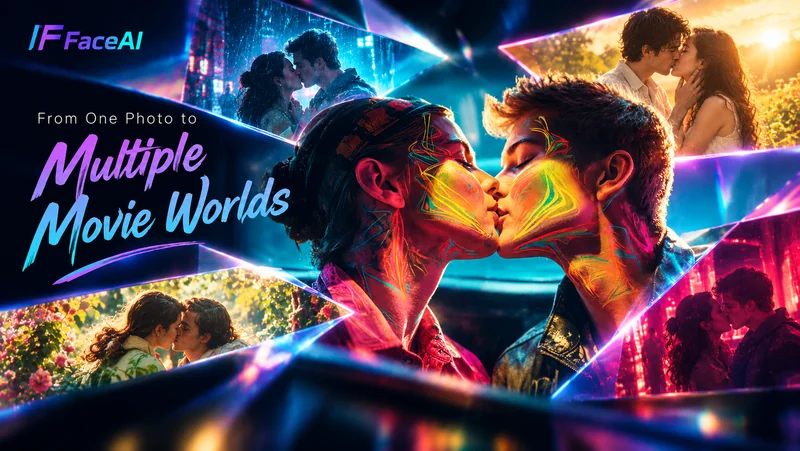
Some romantic movie scenes stay with us long after the credits roll. It might be a kiss in the rain, two people finally meeting again after years apart, or a quiet moment where neither person says a word. What makes these scenes memorable isn’t just the kiss itself. It’s the setting, lighting, camera angle, and emotion surrounding it.
You don’t need a film set to experiment with that kind of scene anymore. With Face AI, a single couple photo or two individual photos can become the starting point for a short romantic sequence, allowing you to explore different settings, moods, and moments without recreating the entire scene yourself.
Start With the Romantic Moment
Before you upload anything, ask a single question: what is the moment you want to feel? Not what you want to look at. What you want to feel. That distinction matters, because the same two people on screen can be a first kiss, a last kiss, or something in between — and the camera tells you which one it is.
Three moments I’d start from, in order of how cinematic they feel:
A kiss in the rain
Rain is the oldest cheat code in romance. The water does half the work — it adds movement, it adds reflections, and it gives the actors an excuse to hold each other closer. If you’ve ever wanted to feel what a meet-cute looks like when it’s actually raining, this is the one to try first.
A quiet forehead kiss
This is the anti-cinematic cinematic moment. No rain, no music, no swelling strings. Just two people in a room, and one of them leans in. It reads as “long relationship” instead of “first meeting,” and it’s the easiest to underestimate before you see it.
A reunion kiss
Distance, time, relief. The frame is almost always the same: a hug that starts as a stop, then turns. It leans on editing more than the others, which is why a short clip can land the entire emotional arc if the model picks the right beat to start the motion.
You could pick more — a first kiss, a blown kiss, a playful peck, but these three cover the emotional range that most people actually want to feel when they imagine a “movie scene.”
Build the Scene Around the Moment
The kiss is the action. The setting, lighting, and composition create the cinematic feeling. Most people focus on the kiss because that’s the verb. The grammar of the scene is everywhere else.
A few things to think about:
Setting
Rainy street, garden, train station, a kitchen with the lights low. The setting tells the audience when this happens in the story.
Lighting
Warm evening light feels like a memory. Cold night light feels like a thriller. Soft daylight feels like a beginning. Pick the one that matches the moment you picked.
Camera&Composition
A close-up is for feeling, a medium shot is for story, a wide shot is for scale. Most kiss scenes you remember are close-ups; most kiss scenes that don’t work are wide shots.
Start With Your Own Photo
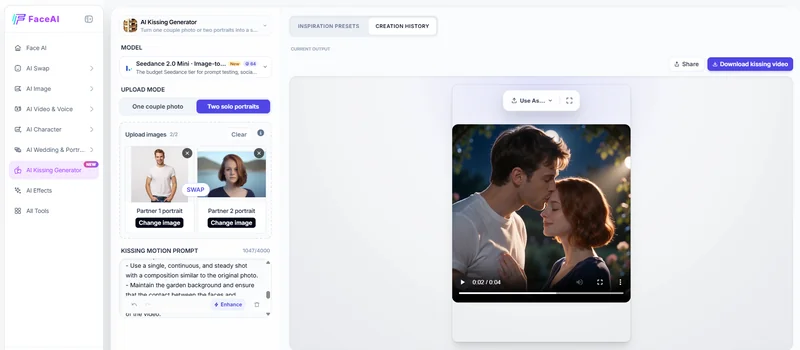
You don’t have to generate two strangers. You can use one couple photo — a real photo of you and your partner, your wedding, your anniversary, that one vacation you keep going back to. Or, if you don’t have a couple photo, you can use two solo portraits and let the tool place you both into the same scene. That’s what FaceAI’s AI Kissing Generator does, and it’s why the experience reads differently from a generic face-swap demo.
The real magic isn’t generating a kiss. It’s placing yourself and your partner inside a movie scene. That’s also when you stop thinking about presets and start thinking about which one fits your actual relationship. A first-kiss preset for a ten-year relationship feels wrong. A reunion preset for someone you saw yesterday feels theatrical. The presets are starting points, not destinations.
Explore Different Versions of the Same Scene
You can try the same photo against three different scenes before you commit to anything.
I took one couple photo and ran it through a Rain Kiss, a Garden Kiss, and a Reunion Kiss preset. Then I flipped the visual register on each: cinematic, romantic, evening. That’s nine short clips from a single upload.
The version I picked wasn’t the one I had in my head when I started. It was Garden Kiss in evening light — the softest option, which I would have skipped because I assumed “soft” meant “boring.”, it didn’t, it just felt like us.
From One Romantic Scene to a Visual Story
The same characters, the same setting, the same light — you can keep going. A meeting, a walk, a pause, a kiss. An ending. Each new clip borrows the visual grammar of the first one, so the whole sequence reads as one piece instead of a collection of moments.
The first clip is the one that’s hardest. After that, you’re just extending a feeling you already found.
What to Do With the Clip Once You Have It
If you’re a couple, the obvious play is the anniversary card. Replace the static photo with the short kiss clip. It’s the smallest possible upgrade, and the reaction is almost always outsized. The same clip also works as a Valentine’s post, a wedding save-the-date add-on, or a quiet “still thinking about you” text at 11 p.m.
If you’re a creator, drop it into a mood board or a pitch deck. The clip is faster to read than a still, and clients can hear the music you haven’t added yet. It’s also a useful test for whether a scene concept survives motion — some scenes look great in a still and die the moment they move.
If you’re a marketer, the clip is a hook. A 9:16 vertical video with the right first frame outperforms a photo carousel on most platforms right now. The same four seconds that worked as a mood reference also works as a thumb-stopper — and you can re-edit the same clip for both jobs without re-rendering.
Frequently Asked Questions
Do I need a couple photo, or can two solo portraits work?
Both work. A couple photo keeps the chemistry and posture you already have; two solo portraits let the tool compose you into a new scene. Couple photo is faster and usually lands closer to “us.” Two-portrait is more flexible and gives you more control.
What kind of photo gives the best result?
Front-lit faces, both people visible, no sunglasses or heavy occlusion. 720p or above is a safe baseline. Avoid group shots. The cleaner the faces, the less the model has to guess.
How long is the output, and can I make it longer?
Generation settings let you render up to 15 seconds at 480p or 720p, in aspect ratios like 1:1, 9:16, 16:9, 3:4, 4:3, and 21:9. The free plan locks longer durations, higher quality, and higher resolution, so start short to test. String multiple clips in any editor if you want a longer sequence.
Will the result look obviously AI-generated?
Depends on the photo. Sharp faces, clean lighting, and a simple preset usually land natural. Heavy occlusion, extreme angles, or a mood preset pushed past the photo’s natural feel will look uncanny. If something looks off, change the preset before you change the photo.
Can I use the clip commercially for ads or client work?
For paid campaigns, treat the output as a starting asset. Most platforms allow generated clips in marketing; some require disclosure depending on the region. Check the tool’s commercial-use terms and the host platform’s AI policy before you ship.
Can I edit the prompt to fine-tune the mood?
Yes. The “Kissing motion prompt” field lets you add specifics — “slow motion,” “smile first,” “look up after,” “cinematic warm tone.” Presets are starting points; the prompt is where you push past them.
Conclusion
Cinema used to be a permission-based medium. You needed money, time, people, weather, and luck. The romantic scenes you remember were the ones that survived all of that.
That filter doesn’t apply anymore. A photo, a sentence about the moment you want, and a model that knows the difference between a forehead kiss and a reunion — that’s enough to start.
Face AI gives you a way to see it before you decide what to do with it. Try one scene. Pick a moment. Upload the photo. The frame you imagined is closer than you think.
Ti potrebbe interessare:
Segui guruhitech su:
- Google News: bit.ly/gurugooglenews
- Telegram: t.me/guruhitech
- Facebook: facebook.com/guruhitechfb
- Instagram: instagram.com/guruhitech_official/
- X (Twitter): x.com/guruhitech1
- Bluesky: bsky.app/profile/guruhitech.bsky.social
- Rumble: rumble.com/user/guruhitech
- VKontakte: vk.com/guruhitech
- MeWe: mewe.com/i/guruhitech
- Skype: live:.cid.d4cf3836b772da8a
- WhatsApp: bit.ly/whatsappguruhitech
Esprimi il tuo parere!
Ti è stato utile questo articolo? Lascia un commento nell’apposita sezione che trovi più in basso e se ti va, iscriviti alla newsletter.
Per qualsiasi domanda, informazione o assistenza nel mondo della tecnologia, puoi inviare una email all’indirizzo [email protected].
Scopri di più da GuruHiTech
Abbonati per ricevere gli ultimi articoli inviati alla tua e-mail.