
Zens AI Opens Identity Aware Support For SaaS
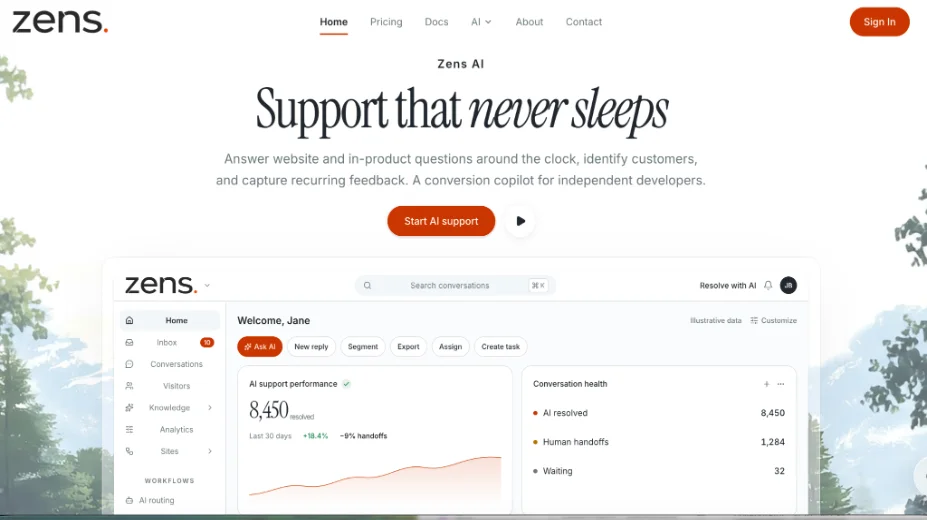
SaaS teams can now keep website and in-product questions on one identified thread instead of a nameless chat bubble. Zens is publicly available this month as an AI customer support workspace that answers around the clock, identifies the visitor, and attaches the conversation to account state.
Independent developers get a conversion copilot rather than another floating inbox. Zens AI ships with a site ID, a signed identity path, and a review-first inbox that can draft a reply without sending it until a human approves. The first public surfaces also include a browser SDK and an official WordPress plugin.
Support Breaks When Identity Stays Missing
The launch is aimed at a familiar support failure. A late reply is visible, a reply written without plan, role, or page context is more expensive. A visitor on /pricing who asks about seat limits is not the same case as an anonymous reader on the homepage. When those two threads look identical, a support lead either invents a second clarifying question or guesses. Both burn minutes that should have gone to the account that can convert.
Older live-chat tools store the message. They rarely store a verified user.id next to account.plan and current.page. That gap produces rework: the agent asks “which workspace?” the customer pastes a screenshot, and the first version of the answer is already stale. Designers usually notice this when a trial user is treated like a stranger after login.
The announced product starts from four of those breaks: repeated answers that drain support time, no one available at every moment, feedback that never becomes a requirement, and a loop that never closes because engineering still starts from opinion. The first public workspace is useful if it closes the identity gap. An extra empty chat tab is not the news.
What The Launch Puts In One Inbox
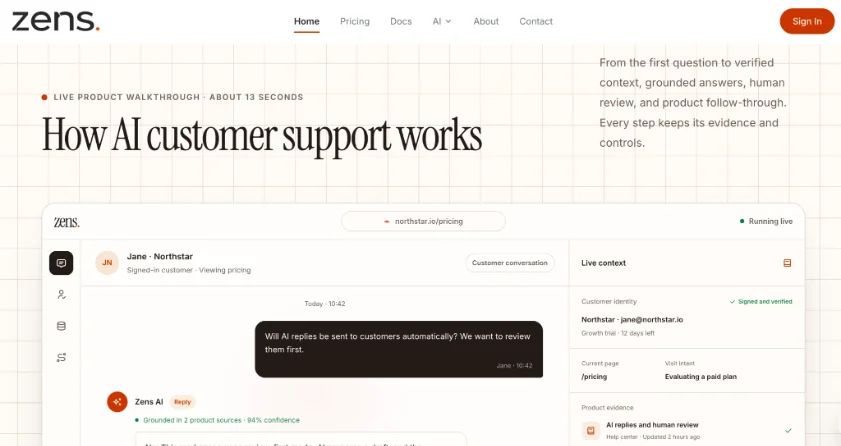
The released inbox is built as a context layer. A question arrives, the workspace assembles customer context and product evidence, then it can draft a reply that names the sources. In the public walkthrough released with the product, a team asking whether AI replies go out automatically gets a grounded answer: review-first mode keeps the draft inside the workspace until someone sends it. That control is part of the first release, not a later add-on.
Identity sits in front of the draft. Signed users and anonymous visitors can share the same widget, but the graph is built to keep visitor.anonymous_id, user.id, account.plan, and current.page in one view. If those four fields stay empty, the draft cannot defend a plan-specific answer. The thread then looks fine until a human opens the account and sees a Growth trial asking about a Business-only rule.
Signed Users Stay Separate From Anonymous Visitors
Signed identity is optional and server-side. A site owner receives a site ID and a signing secret, then decides which user fields are allowed in support context. After login, the product syncs user, account, plan, and the current page. Anonymous visitors can still ask, and they can leave an email for follow-up if the site turns that prompt on. The release is not forcing a profile on every stranger. It is stopping a signed-in buyer from being treated like one.
If a team cannot defend the identity graph, the inbox is just a faster way to guess. That single miss would never clear a security review that asks how account traits enter the widget. The company keeps the signing secret off the public page. The site ID is public; the secret is not.
Three Install Steps Teams Use On Launch Day
The published path is short on purpose. Teams do not rebuild Slack, Linear, or GitHub to try Zens AI. They register a site, install one snippet, then connect the tools they already use. The same setup each time is how a second product later gets support: a new site record, not a new widget stack.
That sequence is the availability story. A founder can stand up a workspace without a six-week procurement calendar. The remaining cost is configuration. Lost hours usually come from skipping identify after login, not from the script tag itself.
Register A Site Then Identify After Login
Create a workspace, receive a site ID and signing secret, and choose which fields may enter support context. The public example uses identity: signed and mode: review-first. Add the SDK to the product, then call identify with user and account after login. Until that call exists, the inbox can still collect a question, but it cannot attach plan or role. A draft that ignores that gap should be discarded before a customer sees it.
The third announced step is team routing. Repeated questions, human handoffs, and product briefs can move into Slack, Linear, or GitHub. For the first public day, the acceptance rule is smaller: a signed-in user on a known page gets a reviewable draft, and an unsigned visitor does not inherit a forged account. If that rule fails, the install is not complete.
WordPress Sites Can Skip Theme Snippets
The same release also shipped an official WordPress plugin. It adds the widget without pasting code into a theme, and it keeps optional identity signing on the server. The plugin is inactive by default. It contacts the hosted service only after an administrator pastes a Site ID, reviews the data notice, and selects Enable. Installing the plugin is not the same as turning on a live chat pipe.
Session recording stays off unless WordPress and the Zens site both enable it. Suggested privacy wording lands in the WordPress Privacy Policy Guide. Those defaults are part of the first-release note: a site can ship chat without turning on a recorder, and it can keep the HMAC signing secret in wp-config.php as ZENS_AI_SIGNING_SECRET instead of the database.
Keep The Signing Secret Off The Database
The Site ID is a public identifier in the browser SDK. The signing secret is used only on the WordPress server to create an HMAC-SHA256 signature. It is not stored in plugin settings and it is not printed on the public page. After the constant is in place, Signed identity is a separate switch under Settings. Anonymous chat still works if that switch stays off.
The company asks administrators to open a public page in a private window, send a test message, then log in and confirm the thread picks up display name and email only when signed identity is on. If the logged-out test already shows a WordPress profile, the secret path is wrong and the widget should stay disabled. Zens AI is a hosted service in that flow; the plugin is the local switch.
Who This Launch Helps On Day One
The first release is for a founder or support lead who can install one site this week and who already knows which user fields may leave the product. It is not aimed at a team that wants every AI draft to send itself on day one, or at a site that cannot name an allowed-origin list. The workspace is public. The send button still belongs to a person.
A reply that could not defend the plan on the page the visitor was reading is the failure the announcement is built to reduce. If that miss still happens after identify is live, the knowledge pages are thin. If it stops, the identity layer is doing the job the release described.
The public story is a signed context layer that can draft, wait, and keep the next human from asking the customer to start over. That product is available now.
Ti potrebbe interessare:
Segui guruhitech su:
- Google News: bit.ly/gurugooglenews
- Telegram: t.me/guruhitech
- Facebook: facebook.com/guruhitechfb
- Instagram: instagram.com/guruhitech_official/
- X (Twitter): x.com/guruhitech1
- Bluesky: bsky.app/profile/guruhitech.bsky.social
- Rumble: rumble.com/user/guruhitech
- VKontakte: vk.com/guruhitech
- MeWe: mewe.com/i/guruhitech
- Skype: live:.cid.d4cf3836b772da8a
- WhatsApp: bit.ly/whatsappguruhitech
Esprimi il tuo parere!
Ti è stato utile questo articolo? Lascia un commento nell’apposita sezione che trovi più in basso e se ti va, iscriviti alla newsletter.
Per qualsiasi domanda, informazione o assistenza nel mondo della tecnologia, puoi inviare una email all’indirizzo [email protected].
Scopri di più da GuruHiTech
Abbonati per ricevere gli ultimi articoli inviati alla tua e-mail.