
I Tried Seedance 2.5: What Actually Changed From the Single-Clip Era
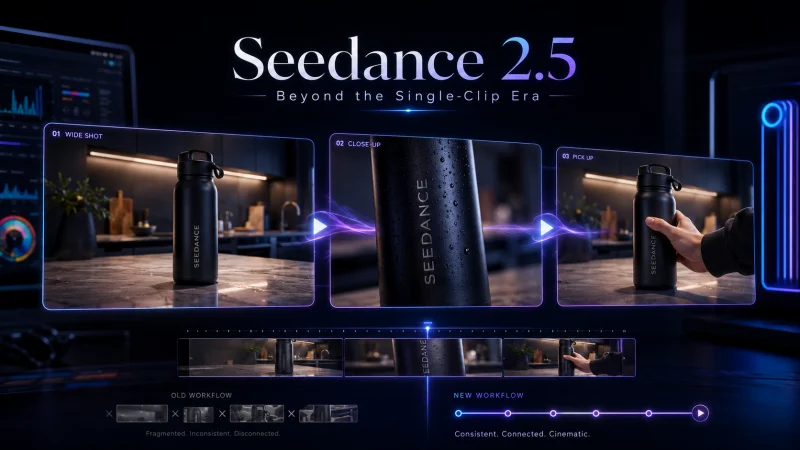
I stopped judging AI video tools by how good a single clip looks. That test stopped being useful sometime last year, when almost every model learned to make one pretty five-second shot. The clips looked great in a demo reel and fell apart the moment I needed two of them to belong to the same scene. Same character, new angle, and suddenly the jacket changed color and the room rearranged itself.
So when I sat down with Seedance 2.5, I ran a different test. Not “how sharp is one frame,” but “can it hold a scene across several shots without me stitching it together in an editor afterward.” That is the question that actually decides whether a tool saves a creator time, and it is the question the demo reels quietly avoid.
Here is what I found, what genuinely changed from the earlier version, and where I would and wouldn’t reach for it.
What Seedance 2.5 actually is (the short answer)
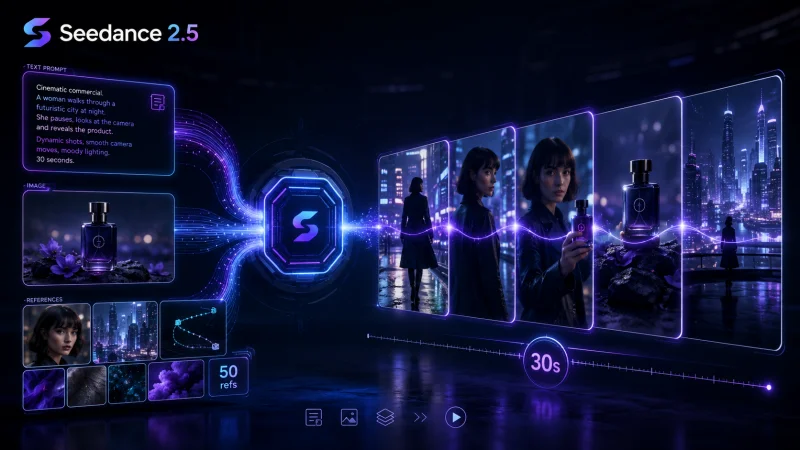
Seedance 2.5 is ByteDance’s latest multimodal video model, built by its Seed research group. In plain terms: you give it text, an image, or a mix of references, and it generates a video with multiple shots that are meant to stay consistent with each other. The hosted version I tested lists clips of up to about 30 seconds and outputs up to 4K, and it accepts up to roughly 50 multimodal reference inputs to steer subject, camera, and style.
The number that matters is not the resolution. It is the 30 seconds generated in a single pass. Seedance 2.0 topped out closer to ten seconds per clip, so you built anything longer by generating pieces and hoping they matched. The independent write-up at MindStudio describes 2.5’s output as one continuous, consistent stretch “rather than resetting at each clip boundary.” From what I tested, that framing is fair. The model treats a sequence as one intention instead of a series of unrelated guesses.
That is the real shift from the single-clip era: it feels closer to describing a scene than to prompting a screensaver.
The test I actually ran
I gave it a small, boring job on purpose, because boring jobs are where consistency breaks. I fed it three photos of the same product, a matte-black water bottle, and asked for a short sequence: a wide shot on a kitchen counter, a cut to a close-up on the label, then a pull-back as a hand picks it up.
The old workflow would have meant three separate generations and a prayer that the label survived. Here the label held its text and finish across the over-the-shoulder cut, and the bottle stayed the same object rather than morphing into a near-cousin at each new angle. It was not flawless. The hand that entered on the pull-back had the faintly waxy look AI still gives fingers, and I regenerated once to fix the lighting jumping between the wide and the close-up. But the thing that used to be impossible, keeping one object identical across a cut, was now the default.
That single detail is the whole story of 2.5 for me. The wins are not in any one frame. They are at the seams.
What changed from 2.0, concretely
If you already read the earlier coverage of Seedance 2.0, you don’t need the origin story again. What is new in 2.5 comes down to three things I could feel in practice:
- Length. Roughly 30-second clips instead of ~10, in one generation. Fewer seams to hide.
- Cross-shot consistency. Characters, wardrobe, and lighting held across shot changes far better than the 2.0-era stitch-and-pray workflow.
- More reference control. Up to ~50 references means you can pin down a look with several images instead of fighting one vague text prompt.
One honest caveat before anyone gets carried away. The product page advertises native audio generated alongside the video. I could not independently confirm that Seedance is the audio leader here, and neither could the comparisons I trust. So I would not choose 2.5 for its sound yet. More on that in the table below.
Seedance 2.5 vs Veo 3.1 vs Kling 3.0
No single model wins everything, and anyone who tells you otherwise is selling something. Here is how I’d frame the three I keep coming back to. Treat the figures as approximate and current to 2026, because this space moves monthly.
| Seedance 2.5 | Veo 3.1 | Kling 3.0 | |
| Best at | Multi-shot scenes that stay consistent | Photoreal clips with real synced audio | Long single takes |
| Clip length | Up to ~30s, multi-shot in one pass | Short (~8s, extendable) | Up to ~3 min at 1080p |
| Audio | Advertised on product page; not the recognized leader | Native 48kHz synced dialogue, the leader | Native audio sync |
| Honest limit | Audio claims unconfirmed independently | Short clips; you extend to go longer | Resolution claims vary by source |
The cleanest way to read that table: if your job is a sequence, say a product shown from three angles, or a character who has to survive a scene change, Seedance 2.5 is the one built for it. If your job is one short, photoreal shot where the voice has to land, buildfastwithai’s comparison makes the case that Veo 3.1 is still the audio pick, and I agree with it. If you need one long unbroken take, Kling stretches furthest.
That is the frame worth keeping: match the model to the shape of the job, not to whichever demo looked shiniest this week.
How to actually try it
You don’t need a plan or a card to see whether it fits your work. Here’s the path I’d take on a first sitting.
- Pick your input mode. Text-to-video for a scene from scratch, image-to-video to animate a product photo, or reference-to-video when you already have a look to match.
- Load your references. This is where 2.5 earns its keep. Feed it several images of the same subject rather than one, so it has enough to hold consistency.
- Describe the sequence, not just the shot. Say what happens across the shots (“wide establishing, then a close-up on the label, then a pull-back”), because the whole point is the sequence.
- Generate, then check the seams. Watch the shot transitions specifically. Does the subject survive the cut? That’s the test that matters.
If you want to run that test yourself, you can try Seedance 2.5 through the hosted SeedAI Video build. It gives free credits on signup and a few free generations a day, no card required, which is enough to judge the cross-shot consistency before you commit to anything.
Where I wouldn’t reach for it
Being honest about limits is what keeps the recommendation useful. I would not pick 2.5 when a single eight-second photoreal shot with perfect synced speech is the whole deliverable. That is Veo’s game right now. I would not pick it for a three-minute unbroken take either. That is Kling’s. And the free tier is genuinely a trial, not a production plan; the daily free generations run out fast once you start iterating, so budget for credits if it becomes part of your workflow.
None of that undercuts the core point. For the sequence-shaped jobs most creators and small teams actually ship, like a short ad with a few angles, a scene with a recurring character, or an explainer that has to cut between shots, the consistency is the feature, and 2.5 is the first version where it held up in my testing.
The takeaway
Here is a test you can carry to any AI video tool, not just this one. Give it a plain object and ask for three shots that have to agree with each other: a wide, a close-up, a pull-back. Then watch the cuts, not the frames. Whichever tool keeps the object the same object across those cuts is the one that will actually save you time, because the editing you were dreading was always at the seams, never inside a single clip.
By that test, Seedance 2.5 is the first version I’d trust with a real sequence. Run it on whatever you’re using now. If it survives the cut, you’ve found something worth paying for.
FAQ
Is Seedance 2.5 free? There’s a free tier: credits on signup and a few generations a day, no card needed. It’s built for trying the model, not for production volume.
Does Seedance 2.5 make audio? The product page says it generates audio with the video, but independent comparisons still credit Veo 3.1 as the native-audio leader. If sound is your priority, test it directly before you rely on it.
Who is it best for? Creators and small teams who need multi-shot sequences that stay consistent (short ads, product angles, recurring characters) more than a single perfect clip.
Ti potrebbe interessare:
Segui guruhitech su:
- Google News: bit.ly/gurugooglenews
- Telegram: t.me/guruhitech
- Facebook: facebook.com/guruhitechfb
- Instagram: instagram.com/guruhitech_official/
- X (Twitter): x.com/guruhitech1
- Bluesky: bsky.app/profile/guruhitech.bsky.social
- Rumble: rumble.com/user/guruhitech
- VKontakte: vk.com/guruhitech
- MeWe: mewe.com/i/guruhitech
- Skype: live:.cid.d4cf3836b772da8a
- WhatsApp: bit.ly/whatsappguruhitech
Esprimi il tuo parere!
Che ne pensi di questa notizia? Lascia un commento nell’apposita sezione che trovi più in basso e se ti va, iscriviti alla newsletter.
Per qualsiasi domanda, informazione o assistenza nel mondo della tecnologia, puoi inviare una email all’indirizzo [email protected].
Scopri di più da GuruHiTech
Abbonati per ricevere gli ultimi articoli inviati alla tua e-mail.